
Manual processes are silently draining your revenue. Every hour your team spends on repetitive tasks, every error that requires correction, and every opportunity missed due to slow response times—these all translate directly to lost money.
In 2026, the gap between businesses that automate strategically and those that don't is widening faster than ever.
This comprehensive guide will show you exactly how to automate business processes to increase revenue, starting with the highest-impact areas that deliver the fastest ROI. Whether you're a small business owner or managing a growing enterprise, you'll learn a practical roadmap to transform manual bottlenecks into automated revenue drivers.
Revenue Impact of Process Automation
Manual processes are expensive in ways that aren't always obvious. The average knowledge worker spends 62% of their time on "repetitive, mundane tasks". Stuff like coordinating, searching for information, switching between apps, and managing tasks. That's time that could be spent on revenue-generating activities like closing deals, serving customers, or innovating new products.
But that's not the only cost, consider:
- Time costs: Staff hours spent on repetitive tasks instead of strategic work
- Error rates: Manual data entry has a 1-4% error rate, leading to costly corrections and customer dissatisfaction
- Missed opportunities: Slow response times mean lost leads and customers who go to faster competitors
- Scaling constraints: As you grow, manual processes create bottlenecks that cap your revenue potential
Why 2026 is the Tipping Point for SMB Automation Adoption
Several factors are converging to make 2026 the year when automation becomes non-negotiable for business survival:
- AI accessibility: Tools like conversational AI app builders have made custom automation affordable for businesses of all sizes
- Customer expectations: Instant responses, real-time tracking, and seamless experiences are now baseline requirements
- Labor market pressure: Rising wages and talent shortages make automation economically essential
- Competitive pressure: Early adopters are pulling ahead, forcing others to automate or lose market share
According to McKinsey & Company, businesses can expect up to 3.4% productivity gains that is going to compound over time.
7 High-Impact Business Processes to Automate First
Not all automation delivers equal returns. Focus your initial efforts on these seven processes that consistently provide the highest revenue impact.
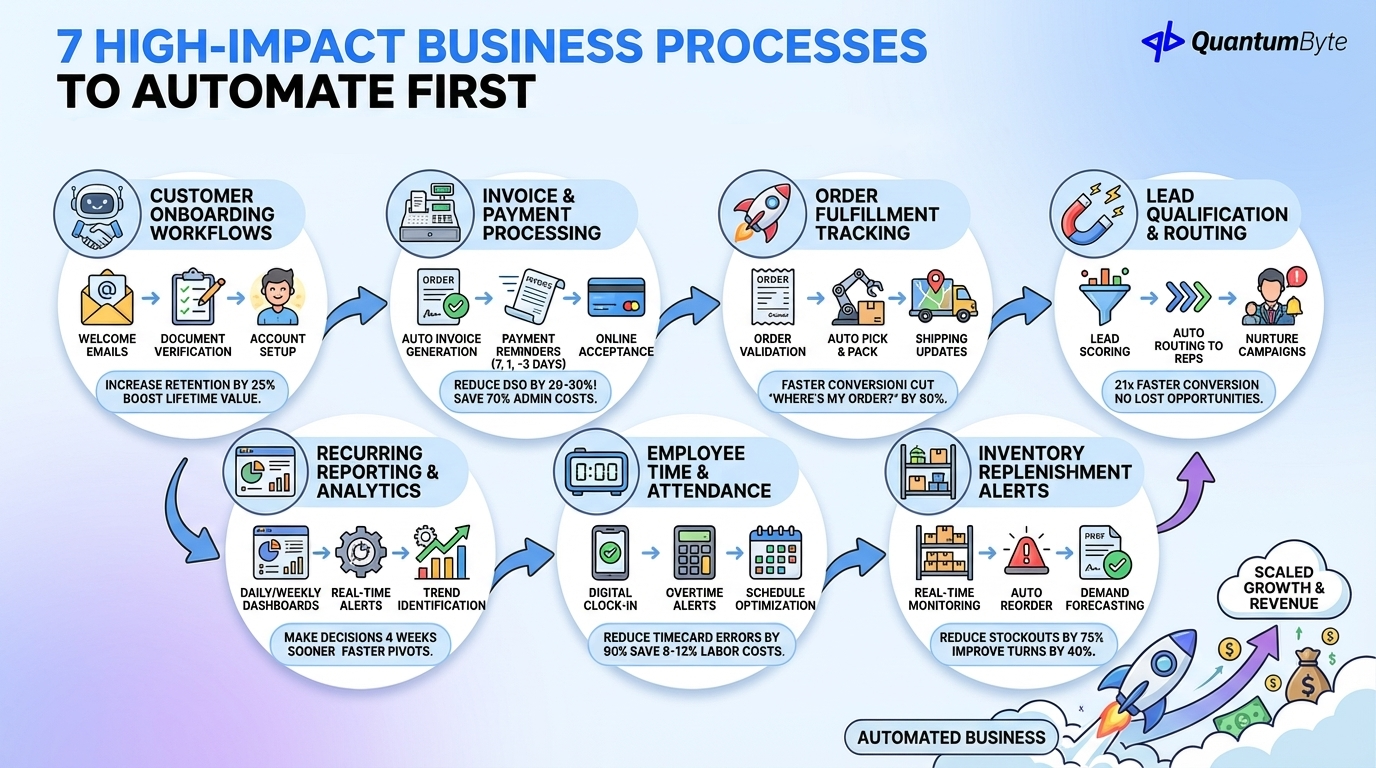
1. Customer Onboarding Workflows
First impressions matter. A clunky onboarding experience creates friction that leads to early churn and missed upsell opportunities.
What to automate:
- Welcome email sequences triggered by sign-up
- Document collection and verification
- Account setup and provisioning
- Training content delivery based on user behavior
- Check-in surveys and milestone celebrations
Revenue impact: Companies with strong onboarding increase customer retention by 25% and thus higher customer lifetime value.
2. Invoice and Payment Processing
Manual invoicing is a major cash flow killer. Late invoices mean late payments, which constrain working capital and growth.
What to automate:
- Invoice generation from completed work/deliveries
- Automatic sending at optimal times
- Payment reminder sequences (7 days before, day of, 3 days after)
- Online payment acceptance
- Reconciliation with accounting systems
Revenue impact: Automated invoicing reduces Days Sales Outstanding (DSO) by 20-30%, improving cash flow and reducing administrative costs by 70%.
3. Order Fulfillment Tracking
Every delay in order fulfillment costs you customer satisfaction and repeat business.
What to automate:
- Order receipt and validation
- Inventory allocation and backorder management
- Picking, packing, and shipping workflows
- Tracking updates and customer notifications
- Exception handling and escalation
Revenue impact: Faster fulfillment increases conversion rates by 5-8% per day reduced, and automated tracking cuts "where's my order?" inquiries by 80%.
4. Lead Qualification and Routing
Your sales team's time is too valuable to waste on unqualified leads or inefficient assignment.
What to automate:
- Lead scoring based on engagement and demographics
- Automatic routing to appropriate sales reps
- Instant notification and follow-up triggers
- Nurture sequences for not-yet-ready prospects
- Re-engagement campaigns for stalled leads
Revenue impact: Leads contacted within 5 minutes are 21x more likely to convert. Automated lead routing ensures no opportunity falls through the cracks.
5. Recurring Reporting and Analytics
Manual report generation steals time from analysis and action.
What to automate:
- Daily/weekly/monthly metric dashboards
- Real-time performance alerts
- Automated distribution to stakeholders
- Trend identification and anomaly detection
- Forecasting and scenario modeling
Revenue impact: Companies with real-time reporting make decisions 4 weeks sooner on average, enabling faster pivots and opportunity capture.
6. Employee Time and Attendance
Manual time tracking is error-prone and creates payroll complications.
What to automate:
- Digital clock-in/out with geofencing
- Overtime calculations and alerts
- Leave request and approval workflows
- Schedule optimization based on demand
- Payroll integration
Revenue impact: Automated time tracking reduces timecard errors by 90% and cuts payroll processing time by 80%, while enabling labor cost optimization that saves 8-12% on staffing.
7. Inventory Replenishment Alerts
Stockouts cost revenue; overstocking ties up capital. Both problems are solvable with automation.
What to automate:
- Real-time inventory level monitoring
- Automated reorder point triggers
- Demand forecasting based on historical patterns
- Purchase order generation and approval
- Supplier communication and order tracking
Revenue impact: Inventory automation reduces stockouts by 75% and improves inventory turns by 40%, freeing working capital while ensuring you never miss a sale.
Calculating Your Automation ROI
Before investing in automation, you need to quantify the expected return. Here's a framework to calculate your automation ROI:
The Automation ROI Formula
Annual ROI = (Direct Labor Savings + Error Cost Reduction + Revenue Growth Acceleration + Opportunity Value) - (Implementation Cost + Annual Maintenance)
Breaking Down Each Component
Direct Labor Savings
Hours saved per week × Fully-loaded hourly cost × 52 weeks
For example, if automating invoice processing saves your accounts receivable team 10 hours per week at a fully-loaded cost of $35/hour: Annual savings = 10 × $35 × 52 = $18,200
Error Cost Reduction
Current error rate × Tasks per year × Cost per error × Reduction rate from automation
If you process 5,000 invoices annually with a 3% error rate, each error costs $53 to correct, and automation reduces errors by 95%: Annual savings = 5,000 × 0.03 × $53 × 0.95 = $7,553
Revenue Growth Acceleration
This includes:
- Faster lead response → Higher conversion rates
- Shorter fulfillment times → Better customer retention
- Freed capacity for revenue-generating activities
Opportunity Value
What could your team accomplish with reclaimed time?
- Additional sales calls
- Customer relationship building
- Product development
- Market expansion activities
Real Example Calculations
| Process | Hours Saved/Week | Hourly Cost | Error Reduction | Annual ROI |
|---|---|---|---|---|
| Invoice Processing | 10 hrs | $35 | $7,500 | $25,700 |
| Lead Routing | 8 hrs | $50 | $3,000 | $23,800 |
| Order Fulfillment | 15 hrs | $25 | $12,000 | $31,500 |
| Reporting | 6 hrs | $45 | $2,000 | $16,040 |
| Total | $97,040 |
For most SMBs, automation investments pay back within 3-6 months, with ongoing returns for years afterward.
Choosing Between No-Code, Low-Code, and Custom Development
Not all automation approaches are equal. Understanding when to use each ensures you invest appropriately:
| Approach | Best For | Pros | Cons | Examples | Timeline | Cost Range | Flexibility |
|---|---|---|---|---|---|---|---|
| No-Code Platforms | Simple workflows, integrations between existing apps, small teams | Fast implementation, low cost, easy to modify | Limited complexity, dependency on platform, may not handle unique requirements | Zapier, Make.com, basic form builders | Days to weeks | $0-5K | Low-Medium |
| Low-Code Platforms | Moderate complexity, some customization needed, teams with basic technical skills | Balance of speed and flexibility, more sophisticated logic | Steeper learning curve, may still hit limitations | Retool, Bubble, Airtable with scripting | Weeks to months | $5-25K | Medium |
| Custom Development | Unique business processes, complex integrations, competitive differentiation | Complete flexibility, full ownership, unlimited scalability | Higher cost and time investment, ongoing maintenance | Traditional development agencies, in-house teams | Months to years | $25-200K+ | High |
| AI-Powered Custom Development | Complex workflows requiring customization, businesses needing rapid deployment, non-technical teams wanting sophisticated solutions | Combines speed of no-code with flexibility of custom development, 60-70% cost savings vs traditional custom dev | Newer technology, may require platform learning | AI app builders like QuantumByte | Days to weeks for complex applications | $5-50K | High |
The newest option, AI-Powered Custom Development, combines the speed of no-code with the flexibility of custom development. AI app builders like QuantumByte develop custom apps that streamline your workflows for internal use—describe your needs in plain language, and we generate production-ready applications in minutes rather than months.
Implementation Roadmap
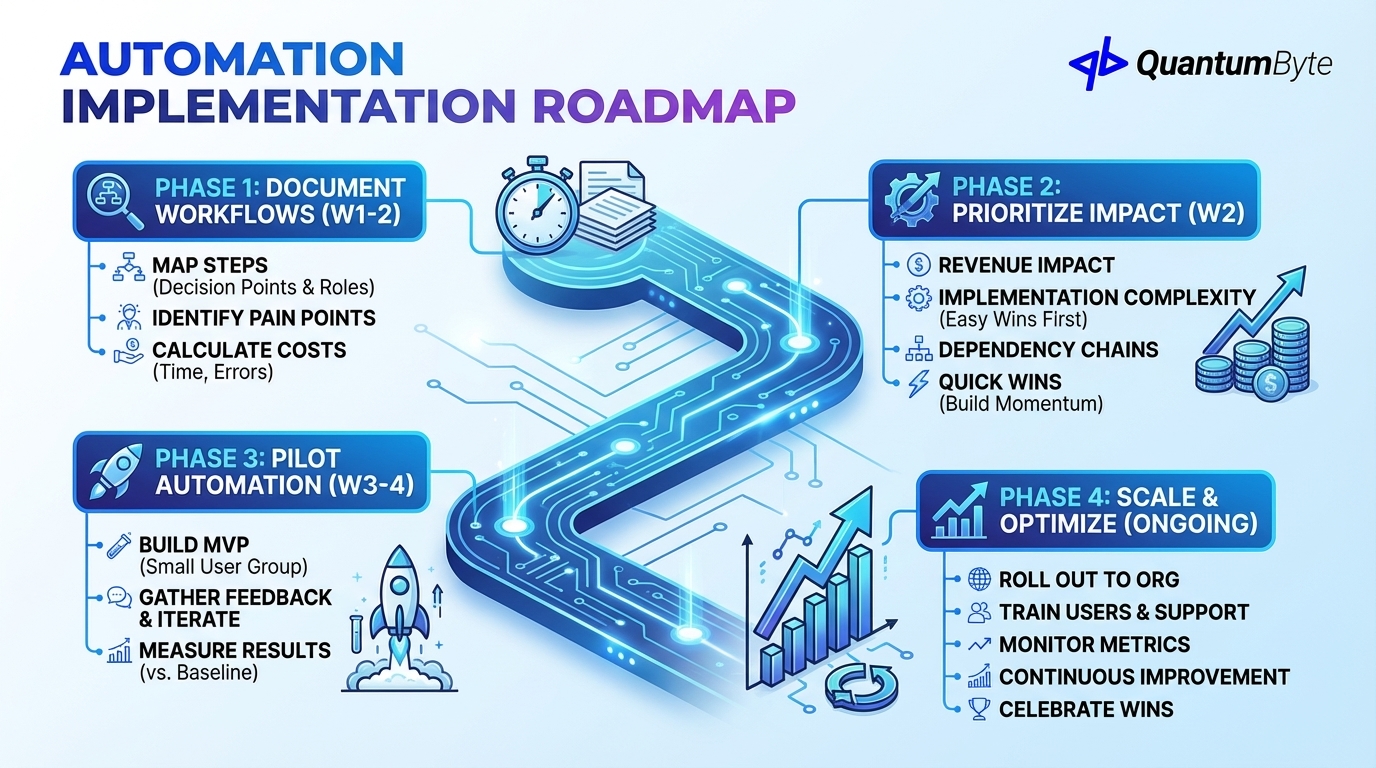
Successful automation follows a phased approach. Rushing implementation leads to abandoned projects and wasted investment.
Phase 1: Document Current Workflows (Week 1-2)
Before automating, you must understand exactly what you're automating.
Key activities:
- Map each process step-by-step, including decision points
- Identify who performs each task and how long it takes
- Document exceptions and edge cases
- Note pain points and bottlenecks
- Calculate current costs (time, errors, missed opportunities)
Deliverable: Process documentation with baseline metrics
Phase 2: Prioritize by Revenue Impact (Week 2)
Not every process should be automated first. Prioritize based on:
- Revenue impact: Which automations will generate or save the most money?
- Implementation complexity: Start with easier wins to build momentum
- Dependency chains: Some automations enable others
- Quick wins: Early successes build organizational buy-in
Deliverable: Prioritized automation roadmap
Phase 3: Pilot Automation (Week 3-4)
Start small, learn fast.
Key activities:
- Select one high-impact, moderate-complexity process
- Build MVP (Minimum Viable Process) automation
- Test with small user group
- Gather feedback and iterate
- Measure results against baseline
Success criteria: Automation works reliably and achieves measurable improvement
Phase 4: Scale and Optimize (Ongoing)
Successful pilots become organizational standards.
Key activities:
- Roll out to full team/organization
- Train all users and provide support resources
- Monitor performance metrics continuously
- Identify optimization opportunities
- Plan next automation initiatives
Best practices:
- Document everything for future reference
- Build feedback loops for continuous improvement
- Celebrate wins to maintain momentum
- Allocate budget for ongoing maintenance and enhancement
Case Study Spotlight: Avian Transport Management System
To illustrate the real-world impact of strategic automation, let's examine how Avian, one of Indonesia's leading paint and coatings manufacturers, transformed their operations.
The Challenge
Avian operates a massive distribution network spanning 142 branches, 1,500 vehicles, and more than 15,000 daily orders across Indonesia. Despite their scale, each region managed deliveries independently with manual processes for route planning, dispatch, and reporting.
The results were predictable:
- Data silos between regions
- Inconsistent service quality
- Increasing empty miles (vehicles traveling without cargo)
- Declining on-time delivery rates
- Teams spending more time reacting to problems than preventing them
The Solution
Avian implemented QuantumByte's Transport Management System (TMS) to bring every delivery operation into one connected platform. The system includes:
- Dynamic route optimization considering capacity, load rules, and live traffic data
- Auto-dispatching to assign deliveries without manual intervention
- Electronic proof of delivery with real-time ETA tracking
- SLA breach alerts to catch problems before they escalate
- Branch scorecards for accountability and performance management
- Standardized exception workflows for consistent problem resolution
The Impact
The transformation delivered measurable results:
| Metric | Before | After | Impact |
|---|---|---|---|
| Daily Orders Managed | Fragmented | 15,000+ unified | Complete visibility |
| Empty Miles | High | Significantly reduced | Cost savings |
| On-Time Performance | Declining | Improved | Customer satisfaction |
| Operations Mode | Firefighting | Forecasting | Proactive management |
| Cost Visibility | Delayed | Real-time per-route | Better decisions |
What used to require siloed teams and manual coordination now runs as one synchronized network, with dispatchers moving from reactive firefighting to proactive forecasting.
For more examples of automation impact, see how Nexius transformed financial reporting for SMEs and how SiKuWat empowered women farmers with digital harvest tracking.
How QuantumByte Develops Apps That Streamline Your Workflows
Traditional app development takes months and requires technical expertise. QuantumByte changes this equation by developing custom apps that streamline your workflows for internal use, delivered through three key capabilities:
AI-Powered App Generation from Natural Language
Describe your workflow needs in plain English, and QuantumByte's AI generates a functional app tailored to your processes. No coding required, no lengthy specification documents—just a conversation about what you need.
This approach is particularly powerful for:
- Productizing service businesses into scalable digital offerings
- Building custom operational apps for unique workflows
- Creating digital products from domain expertise
Canvas Studio for Visual App Refinement
Once the AI generates your initial application, Canvas Studio lets you visually refine workflows, adjust logic, and customize interfaces without touching a line of code. This hybrid approach combines the speed of AI generation with the precision of manual refinement.
Full Development Team Support for MVP-to-Production
For complex workflow apps, QuantumByte provides access to experienced developers who can take your MVP to production-ready quality. This eliminates the traditional choice between expensive custom development and limited off-the-shelf solutions.
Built-In Monetization and User Management
Beyond internal workflow apps, QuantumByte enables you to turn your streamlined processes into revenue streams. Built-in features for user management, payments, and access control let you productize your apps and sell them to others in your industry.
Start Your Automation Journey Today
The revenue impact of strategic automation is clear: reduced costs, faster operations, fewer errors, and freed capacity for growth. In 2026, the question isn't whether to automate. It's how quickly you can implement automation before competitors do.
Start with the seven high-impact processes outlined in this guide:
- Customer onboarding workflows
- Invoice and payment processing
- Order fulfillment tracking
- Lead qualification and routing
- Recurring reporting and analytics
- Employee time and attendance
- Inventory replenishment alerts
Follow the four-phase implementation roadmap, and remember: automation is a journey, not a destination. Each process you automate frees resources to automate the next, creating a compounding advantage that accelerates over time.
Ready to transform your business processes into revenue drivers? Schedule a consultation with QuantumByte to explore how custom apps that streamline your workflows can accelerate your growth.
Other Guides to Explore
- Workflow Automation Software: How to Reduce Costs and Boost Revenue
- Custom Business Software Development: When to Build vs. Buy
- How to Calculate and Maximize Your Automation ROI
- Supply Chain Automation: How to Reduce Costs and Increase Revenue
Frequently Asked Questions (FAQ)
How much does business process automation typically cost?
Costs vary widely based on complexity and approach. Simple no-code integrations may cost nothing beyond subscription fees ($20-100/month). Low-code solutions range from $5K-25K. Custom development typically runs $25K-200K+. AI-powered platforms like QuantumByte offer a middle ground: custom apps that streamline your workflows at 60-70% lower cost than traditional development, typically $5K-50K for comprehensive solutions.
How long does it take to see ROI from automation?
Most businesses see measurable ROI within 3-6 months, with simple automations paying back in weeks. The key factors are: how much time the manual process currently consumes, the error rate of manual processing, and the revenue impact of speed improvements. Our framework above helps you calculate expected ROI before investing.
What processes should I NOT automate?
Avoid automating processes that require significant human judgment, empathy, or creativity. Also avoid automating broken processes. Fix the process first, then automate. Finally, don't automate low-volume, low-impact tasks; the implementation cost may exceed the benefit.
Do I need technical skills to implement automation?
Not anymore. Modern platforms like QuantumByte develop custom apps that streamline your workflows—describe your needs in plain English. That said, having someone who understands your processes deeply is essential—technical skills are less important than business process knowledge.
How do I get my team to adopt automated processes?
Start with automations that make their jobs easier, not those that feel threatening. Involve team members in the design process. Celebrate time saved and redirect that time to more meaningful work. Train thoroughly and provide ongoing support. Address concerns about job security directly—frame automation as a tool that elevates their role, not replaces it.
What's the difference between automation and AI?
Automation follows predefined rules to complete tasks consistently. AI adds intelligence. It can learn, make decisions, and handle exceptions that rule-based automation cannot. Modern automation platforms increasingly combine both: rule-based workflows for predictable tasks, AI for intelligent decision-making and handling edge cases.