What if you could reclaim 30% of your company's revenue without making a single new sale? That's the opportunity hidden in your inefficient workflows. Every manual approval, every data re-entry, every task that falls through the cracks—they're all silently draining money from your business.
Workflow automation software transforms these revenue leaks into efficiency gains. This guide shows you exactly which workflows to automate, how to calculate your potential savings, and the implementation approach that delivers results without disrupting your operations.
The Cost of Manual Workflows
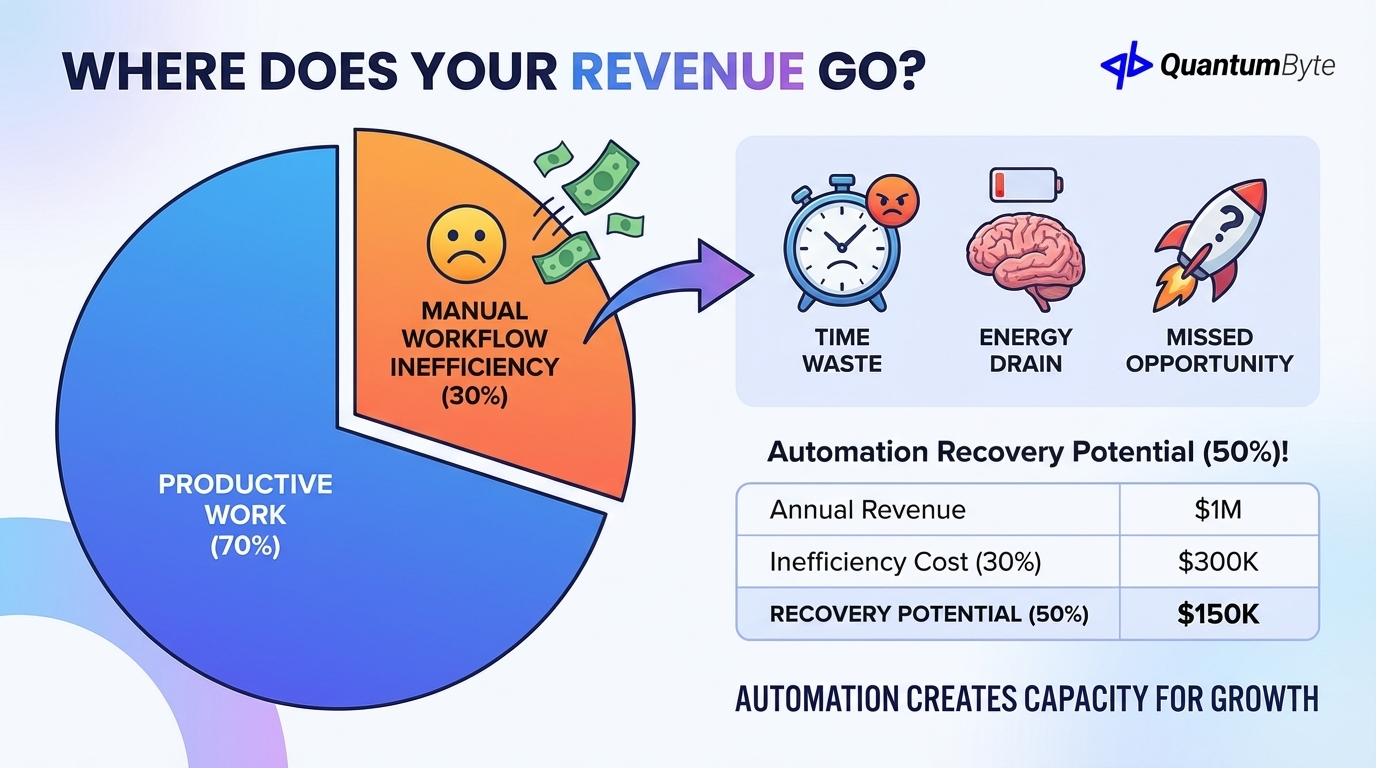
The average SMB wastes 30% of potential revenue on inefficient workflows. This isn't a typo. Nearly a third of what your business could earn disappears into manual processes, redundant tasks, and coordination overhead.
Consider what this means in real numbers:
| Annual Revenue | Workflow Inefficiency Cost (30%) | Automation Recovery Potential (50%) |
|---|---|---|
| $500,000 | $150,000 | $75,000 |
| $1,000,000 | $300,000 | $150,000 |
| $5,000,000 | $1,500,000 | $750,000 |
| $10,000,000 | $3,000,000 | $1,500,000 |
Even recovering half of this waste through automation represents transformative value for most businesses.
Manual workflows also consume:
- Time: Your team's hours spent on tasks that software could handle instantly
- Energy: Mental bandwidth drained by repetitive work instead of strategic thinking
- Opportunity: What could your team accomplish with 20, 30, or 40 hours per week reclaimed?
The opportunity cost question is crucial. Every hour spent on manual invoice approval is an hour not spent on customer relationships. Every day waiting for manual report compilation is a day of delayed decision-making. Workflow automation software creates capacity for growth.
15 Revenue-Draining Workflows to Automate
Not all workflows have equal impact on your bottom line. These 15 processes consistently deliver the highest returns when automated, organized by business function:
Sales Workflows
1. Lead Assignment and Distribution
Manual lead routing means delays, uneven distribution, and missed opportunities. Automated assignment ensures instant response based on territory, expertise, availability, or round-robin rules.
Revenue impact: Leads contacted within 5 minutes convert at 21x the rate of those contacted after 30 minutes. Automation eliminates response delays entirely.
2. Follow-Up Reminders and Sequences
Sales reps juggling dozens of prospects inevitably let some fall through the cracks. Automated follow-up sequences ensure no opportunity goes cold.
Revenue impact: 80% of sales require 5+ follow-ups, but 44% of salespeople give up after one. Automation maintains consistent outreach without manual tracking.
3. Contract and Proposal Generation
Creating proposals from scratch for each opportunity wastes hours and introduces errors. Template-based automation generates professional documents instantly.
Revenue impact: Faster proposals mean faster decisions. Companies that respond to RFPs within 24 hours win 7x more often than those responding in a week.
Finance Workflows
4. Expense Approvals and Reimbursement
Paper expense reports waste everyone's time—the employee submitting, the manager reviewing, and finance processing. Digital workflows compress weeks into days.
Revenue impact: Manual expense processing costs $58 per report (Global Business Travel Association). Automation reduces this to $8 per report while cutting reimbursement time from 30 days to 3.
5. Invoice Processing and Approval
Every invoice touching multiple hands adds delay and error risk. Automated routing with approval thresholds keeps payments on track.
Revenue impact: Late payment penalties, missed early-payment discounts, and strained vendor relationships all hit the bottom line. Automation captures 2-3% early payment discounts consistently.
6. Payment Reminders and Collections
Chasing overdue invoices is unpleasant and inefficient. Automated reminder sequences maintain professionalism while improving collection rates.
Revenue impact: Automated payment reminders reduce DSO by 20-30%, accelerating cash flow and reducing bad debt write-offs by up to 50%.
HR Workflows
7. Leave Requests and Approval
Email-based leave requests create confusion about coverage, approval chains, and balance tracking. Digital workflows provide clarity for everyone.
Revenue impact: HR teams spend 5+ hours weekly managing leave requests manually. Automation eliminates this while reducing scheduling conflicts that impact productivity.
8. Onboarding Checklists and Task Management
New hire onboarding involves dozens of tasks across multiple departments. Manual coordination means things get missed, slowing time-to-productivity.
Revenue impact: Strong onboarding improves new hire retention by 82% and productivity by 70%. Each early departure costs 50-200% of annual salary to replace.
9. Performance Review Scheduling and Tracking
Annual reviews require coordination across managers, employees, and HR. Manual scheduling creates bottlenecks and inconsistent completion.
Revenue impact: Companies with regular performance feedback show 14.9% lower turnover. Automation ensures reviews happen consistently.
Operations Workflows
10. Purchase Order Creation and Approval
Manual PO processes slow procurement, create budget visibility gaps, and increase maverick spending. Automated workflows enforce policy while accelerating approvals.
Revenue impact: Automation reduces purchase order processing cost from $50-500 per PO to under $5, while improving policy compliance from 60% to 95%.
11. Vendor Onboarding and Management
New vendor setup involves multiple departments, documents, and approvals. Manual coordination creates delays and compliance risks.
Revenue impact: Faster vendor onboarding means faster access to materials and services. Automated compliance checking reduces risk exposure.
12. Project Status Updates and Reporting
Weekly status meetings consume hours of preparation and attendance time. Automated status collection and distribution keeps everyone informed without the meeting overhead.
Revenue impact: The average employee spends 31 hours per month in unproductive meetings (Atlassian). Automation eliminates status meetings entirely.
Customer Success Workflows
13. Support Ticket Routing and Escalation
Misrouted tickets mean delays for customers and inefficiency for agents. Automated routing based on issue type, customer tier, and agent expertise optimizes resolution.
Revenue impact: First-contact resolution improves customer satisfaction by 15-20%. Smart routing increases FCR by routing issues to the right specialist immediately.
14. Renewal Reminders and Outreach
Surprise expirations lead to churn. Automated renewal workflows ensure timely outreach to retain revenue.
Revenue impact: Acquiring new customers costs 5-25x more than retaining existing ones. Automated renewal campaigns improve retention by 10-15%.
15. Customer Feedback Collection and Analysis
Manual survey distribution and compilation means feedback arrives too late to act on. Automated collection provides real-time sentiment insights.
Revenue impact: Companies that act on customer feedback see 10-15% higher retention rates. Automation enables immediate response to negative feedback before it becomes churn.
Calculating Your Workflow Automation Savings
Before investing in workflow automation software, quantify the expected returns. This template approach makes the calculation straightforward:
Variables to Measure
For each workflow you're considering automating, gather these metrics:
- Tasks per /week: How often does this workflow execute?
- Minutes per task: How long does each execution take?
- People involved: How many touch points in the current process?
- Error rate: What percentage of executions require correction?
- Hourly cost: What's the fully-loaded cost of the people involved?
The Savings Formula
Annual Savings = (Tasks x Time x People x Hourly Cost x 52) + (Tasks x Error Rate x Cost per Error x 52)
Worked Example: Invoice Approval Workflow
Let's calculate savings for a typical invoice approval process:
Current State:
- 200 invoices per month
- 15 minutes average processing time per invoice (receipt, routing, approval, entry)
- 3 people touch each invoice (AP clerk, manager, accountant)
- 5% error rate requiring correction
- $35 average hourly cost
- $53 average cost per error (research time + correction + relationship impact)
Monthly Labor Cost:
200 invoices x 0.25 hours x 3 touchpoints x $35/hour = $5,250/month
Monthly Error Cost:
200 invoices x 5% error rate x $53/error = $530/month
Total Annual Cost:
($5,250 + $530) x 12 = $69,360/year
With Automation (80% time reduction, 95% error reduction):
Labor: $5,250 x 20% x 12 = $12,600/year
Errors: $530 x 5% x 12 = $318/year
Total: $12,918/year
Annual Savings: $56,442
For a 50-person company processing 200 invoices monthly, automating just the invoice approval workflow saves over $56,000 annually—typically paying back the automation investment within 2-3 months.
Essential Workflow Automation Features
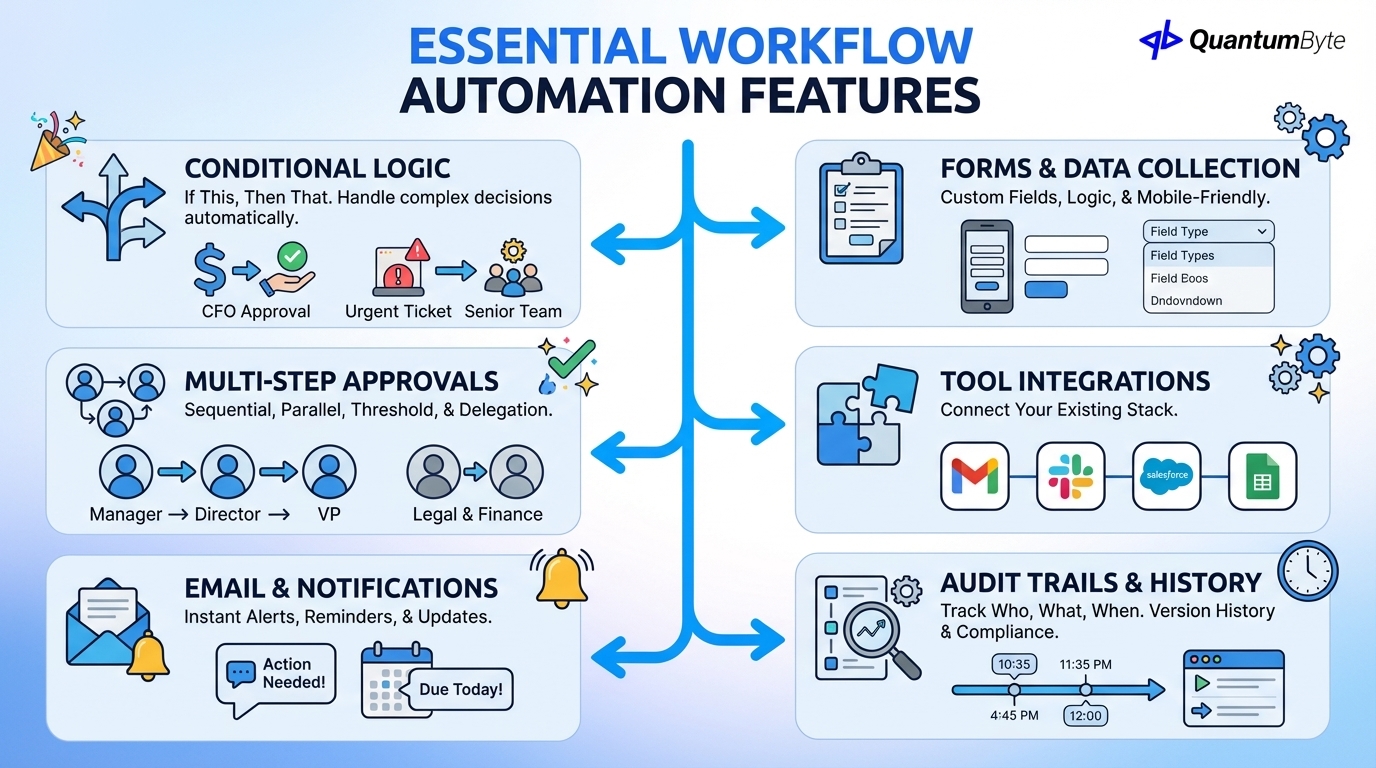
When evaluating workflow automation software, these capabilities separate effective solutions from fancy task lists:
Conditional Logic and Branching
Real workflows aren't linear. Effective automation handles "if this, then that" decisions:
- If invoice > $10,000, route to CFO for approval
- If support ticket mentions "urgent," escalate immediately
- If lead score > 80, assign to senior sales rep
Without conditional logic, you're automating the simple cases and leaving the complex (often most important) cases manual.
Multi-Step Approval Chains
Many business workflows require sequential or parallel approvals:
- Sequential: Manager → Director → VP, each in order
- Parallel: Legal AND Finance must both approve, in any order
- Threshold-based: Different approvers based on amount or risk level
- Delegation: Automatic backup approver if primary is unavailable
Email and Notification Triggers
Automation that doesn't communicate leaves people in the dark. Essential notification capabilities include:
- Instant alerts when action is needed
- Reminder escalation for overdue items
- Status updates as workflows progress
- Summary digests for managers
Form Submissions and Data Collection
Workflows typically start with information. Built-in form capabilities should include:
- Custom field types (text, numbers, dates, files)
- Conditional field display
- Validation rules
- Mobile-friendly submission
- Integration with existing data sources
Integration with Existing Tools
Workflow automation software must play nicely with your existing stack:
- Email (Gmail, Outlook)
- Communication (Slack, Teams)
- Data (Google Sheets, databases)
- Applications (CRM, accounting, HR systems)
Look for native integrations with your key tools and robust API capabilities for custom connections.
Audit Trails and Version History
Compliance and continuous improvement require visibility into workflow execution:
- Who did what, and when
- Approval timestamps and comments
- Version history for workflow changes
- Export capabilities for audits
Implementation Best Practices
The difference between successful workflow automation and abandoned software comes down to implementation approach:
Start with Your Most Painful Workflow (Not the Biggest)
Counterintuitive but crucial: don't start with your highest-volume workflow. Start with the one that causes the most frustration.
Why this works:
- Painful workflows have motivated stakeholders eager for improvement
- Success generates enthusiasm for expanding automation
- Lessons learned on simpler workflows prepare you for complex ones
Map Current State Before Automating
You can't automate what you don't understand. Before building any workflow:
- Walk through the current process step-by-step with people who actually do it
- Document every decision point, including unofficial workarounds
- Identify exceptions and how they're currently handled
- Note pain points that automation should address
- Measure baseline metrics (time, errors, volume) for comparison
Common mistake: Automating the "official" process while the real work happens through undocumented workarounds. The automation sits unused while people continue their shadow systems.
Build in 20% More Flexibility Than You Think You Need
Requirements change. Business rules evolve. The workflow that works perfectly today will need adjustment in six months.
Design automation that accommodates change:
- Parameterize thresholds (approval limits, routing rules) rather than hardcoding
- Build exception handling into the design
- Create easy paths for human override when needed
- Document configuration options for future administrators
Test with Small User Group First
Piloting with a subset of users before full rollout:
- Catches issues before they affect everyone
- Builds internal champions who can help train others
- Generates real-world feedback for refinement
- Demonstrates value with measurable results
A typical pilot: 3-5 users for 2-4 weeks, with structured feedback sessions.
Measure Before/After Metrics Religiously
You can't improve what you don't measure. Essential metrics to track:
| Metric | What It Shows | How to Measure |
|---|---|---|
| Cycle Time | Speed improvement | Time from workflow start to completion |
| Touch Points | Efficiency gain | Number of people involved per execution |
| Error Rate | Quality improvement | Percentage requiring correction |
| Adoption Rate | Implementation success | Percentage of workflows using automation |
| User Satisfaction | Usability | Survey scores from workflow participants |
Case Study: SiKuWat (Farmer Cooperative Digital Transformation)
To illustrate workflow automation's impact beyond corporate settings, let's examine how a women's farmer cooperative transformed their operations.
The Challenge
In Cibiru Wetan Village, Indonesia, women farmers managed their harvest records manually—paper logs, scattered reports, and verbal communication. When records were lost or market prices changed overnight, their hard work didn't translate to fair returns.
Key pain points:
- Manual harvest logging prone to errors and loss
- No real-time visibility into market prices
- Days required to compile data for cooperative reporting
- Guesswork-based planning and negotiation
The Solution
Through QuantumByte, the village built SiKuWat, a digital harvesting app that automates:
- Harvest recording: Every yield instantly logged and stored safely
- Price tracking: Daily market updates available to all members
- Report generation: Automatic compilation of cooperative data
- Sales coordination: Group leaders manage collective sales digitally
The Impact
The transformation delivered measurable results:
| Metric | Before | After | Improvement |
|---|---|---|---|
| Harvest Reporting Time | Days | Minutes | 99% reduction |
| Data Errors | High | Near zero | 90%+ reduction |
| Price Awareness | Delayed | Real-time | Immediate access |
| Negotiation Position | Weak | Strong | Better prices achieved |
What once relied on guesswork is now guided by accurate data. Farmers negotiate better deals, avoid losses from price drops, and plan planting schedules with confidence.
This case demonstrates that workflow automation isn't just for corporate environments. It transforms operations anywhere manual processes create friction and waste.
For more examples, see how SiBerDes digitized rice stock management with 90% error reduction, and how Avian unified 15,000 daily deliveries across 142 branches.
QuantumByte Provides Custom Apps That Streamline Your Workflows
Traditional workflow automation requires choosing between limited off-the-shelf tools or expensive custom development. QuantumByte offers a third path: we develop custom apps that streamline your workflows for internal use, combining accessibility with power.
Natural Language to Custom App in Minutes
Describe your workflow needs in plain English, and QuantumByte's AI generates a functional app tailored to your processes. No flowchart diagramming, no complex configuration.
Example: "I need an expense approval app. Expenses under $500 go directly to the department manager. Over $500 requires finance review. Over $5,000 needs CFO approval. Send reminders after 2 days of no response."
From this description, QuantumByte builds a complete app with forms, routing logic, notifications, and approval tracking—all designed for your internal use.
Visual App Builder with Drag-and-Drop
For refinement and complex logic, Canvas Studio provides a visual interface to:
- Add and modify app features
- Configure conditional routing
- Adjust notification templates
- Set up integrations
- Test app functionality
We provide a head start on Common Workflow Apps
Don't start from scratch. QuantumByte can help you get running quickly with custom apps for:
- Expense approval
- Purchase requisitions
- Leave requests
- Customer onboarding
- Support ticket routing
- Contract approval
- And dozens more
Unlimited Complexity with Dev Team Support
When your workflow apps require sophisticated integration or custom logic, QuantumByte's development team provides support to ensure your app handles edge cases and scales with your business.
This combination—AI-powered app generation, visual refinement, templates, and expert support—delivers enterprise-capable workflow apps at SMB-accessible pricing.
If this sound interesting, contact us and let's get building today!
Your First Workflow Awaits
The math is clear: manual workflows drain 30% of your potential revenue. Workflow automation software can recover half or more of that waste while freeing your team for higher-value work.
Start today:
- Identify your most painful workflow: the one that causes the most frustration
- Map the current process step-by-step with the people who do it
- Calculate the cost using the formulas in this guide
- Evaluate automation options based on your specific needs
- Implement, measure, and iterate
Every workflow you automate compounds your competitive advantage. The business that automates today captures the efficiency gains that fund tomorrow's growth.
Ready to automate your first workflow? Start with a free consultation to identify your highest-impact automation opportunities.
Other Guides to Explore
- How to Automate Business Processes to Increase Revenue in 2025
- Custom Business Software Development: When to Build vs. Buy
- How to Calculate and Maximize Your Automation ROI
- Invoice Automation: How to Get Paid Faster and Reduce Costs
- HR Automation Software: Reduce Admin Time and Improve Employee Experience
Frequently Asked Questions (FAQ)
How much does workflow automation software typically cost?
Costs range from free (basic tools like Zapier's free tier) to $50,000+ for enterprise platforms. Most SMBs invest $100-500/month for cloud-based workflow automation software, or $5,000-25,000 for custom solutions built on platforms like QuantumByte. The key metric is ROI: automation that costs $10,000 but saves $50,000 annually is a clear winner.
What's the difference between workflow automation and business process automation?
Workflow automation focuses on specific, defined sequences of tasks (like an approval chain). Business process automation (BPA) encompasses broader end-to-end processes that may span multiple workflows, systems, and departments. Workflow automation is often a component of larger BPA initiatives.
How long does it take to implement workflow automation?
Simple workflows (approval chains, notifications) can be automated in hours to days. Complex workflows with multiple integrations and conditional logic typically take 2-4 weeks. Enterprise-wide workflow transformation is a multi-month initiative. Start small, learn, and expand.
Will workflow automation eliminate jobs?
Workflow automation eliminates tasks, not jobs. The goal is to redirect human effort from repetitive, low-value work to strategic, high-value activities. Most companies that implement workflow automation redeploy rather than reduce staff, with employees moving to customer-facing, strategic, or creative roles.
How do I get employee buy-in for workflow automation?
Involve employees in identifying painful workflows—they know better than anyone where time is wasted. Start with automations that make their jobs easier, not those that feel threatening. Celebrate time savings and reinvest that time in more meaningful work. Address concerns directly and honestly.
What happens when automated workflows break?
Good workflow automation software includes monitoring, alerts, and fallback procedures. Design workflows with exception handling built in. Maintain documentation so issues can be diagnosed quickly. Choose platforms with reliable support and clear escalation paths. Test workflows regularly, especially after system changes.
Can workflow automation handle exceptions and edge cases?
Yes, with proper design. Build exception handling into workflows from the start. Use conditional logic to route unusual cases to human review. Create escalation paths for situations the automation can't handle. The goal isn't 100% automation—it's automating the predictable 80% so humans can focus on the complex 20%.
New 2026 AI automation comparisons
If you are comparing automation platforms, read best AI automation vendors for scalable solutions in 2026, AI automation best company for services in 2026, and best AI platforms for non-technical business users.