⚡ Quick answer: For the best balance of power and simplicity, QuantumByte wins for non-technical operators who want a deployed app instead of code, Softr for the fastest simple data app, Lovable for full-stack prototyping, and Bubble for feature depth. There's no universal winner — it depends on your skill level and what you're building.
The best AI app builders for combining powerful features with ease of use in 2026 are QuantumByte, Softr, Lovable, Bubble, Glide, Microsoft Power Apps, and Replit. Each strikes the feature-vs-simplicity balance at a different point: Softr and Glide optimize for speed, Bubble and Power Apps for depth, Replit for developer control, and QuantumByte for non-technical operators who want a deployed, working app from the first prompt rather than code to manage.
There is no single "best" builder — the right pick depends on your technical skill and what you're building. This guide compares all seven by what they do, where they're genuinely easy, where they're genuinely powerful, what they cost, and who each one is the wrong fit for, so you can match a tool to your project without weeks of trial-and-error.
What "the best mix of features and ease of use" actually means
Every AI app builder claims to be both powerful and easy. In practice, the two pull against each other: the tools with the deepest logic (Bubble, Power Apps, Retool) ask the most of you, and the tools that take the least effort (Softr, Glide) cap out on complexity. The "best mix" is the tool that pushes the most capability across the ease-of-use line for your skill level.
Three things separate the builders that balance this well:
- They turn a prompt into something real, fast. Not just a UI mockup — a working first draft with data and logic attached.
- They let you keep going without code. You refine by prompting or by visual editing, not by dropping into a framework.
- They are honest about where the AI hands off. The best tools tell you what they don't do, instead of generating something half-working and leaving you stuck.
The seven below clear that bar in different ways. We've ordered them by how much they reduce effort for a non-technical builder, then noted where each trades ease for power.
How we evaluated these AI app builders
We compared every tool on the dimensions that decide the power-vs-ease balance for a given user — not on feature count:
- Output type — does it hand you source code to host, or a deployed, working app at a URL?
- Ease of use for the intended user — how much technical skill the tool assumes.
- Capability ceiling — how complex an app you can build before you hit a wall.
- Total cost — sticker price plus per-seat fees, hosting, and support.
- Support model — what happens when the AI can't finish: community, docs, or human help.
Findings draw on hands-on use of each platform's free tier, each vendor's official product and pricing documentation (linked in References), and public practitioner roundups. Pricing and product details reflect what vendors published as of mid-2026 and change frequently — confirm current pricing on each vendor's site before deciding.
The 7 best AI app builders for features and ease of use, at a glance
| Builder | Best for | Where it's easy | Where it's powerful | Starting price |
|---|---|---|---|---|
| QuantumByte | Non-technical operators who want a deployed app, not code | Describe it in plain language; it ships live at a URL | Multi-service apps + optional human expert build (Fast Track) | Free (50 credits); $29/mo to deploy |
| Softr | Fastest path from data to a simple web app | Prompt-to-app in minutes over Airtable/Sheets | Client portals, directories, membership sites | Free; from $59/mo |
| Lovable | Prototyping full-stack web apps from a prompt | Plain-English prompt → React app | Front + back end + DB via Supabase | Free; from $25/mo |
| Bubble | A polished MVP for web and mobile | AI generates a working starter app | Deep visual logic + workflows | Free; from $32/mo |
| Glide | Simple data apps with AI components | Spreadsheet-to-app, AI UI blocks | Text/image AI features inside apps | Free; paid tiers vary |
| Microsoft Power Apps | Teams already inside the Microsoft stack | Copilot edits in plain English | Enterprise data + automation depth | From $20/user/mo |
| Replit | Technical users who want full control | Agent scaffolds the whole app | Any stack, real code, cloud infra | Free; from $25/mo |
The 7 best AI app builders, reviewed
1. QuantumByte
What it is: QuantumByte is an AI-native, no-code platform that turns a natural-language prompt into a deployed, working business application at a real URL — not source code to compile and host, and not a sandbox preview. Its core promise is "It Already Works."
Best for: Non-technical founders and operators who want a usable app from the first session and don't want to manage code, hosting, or per-seat licenses.
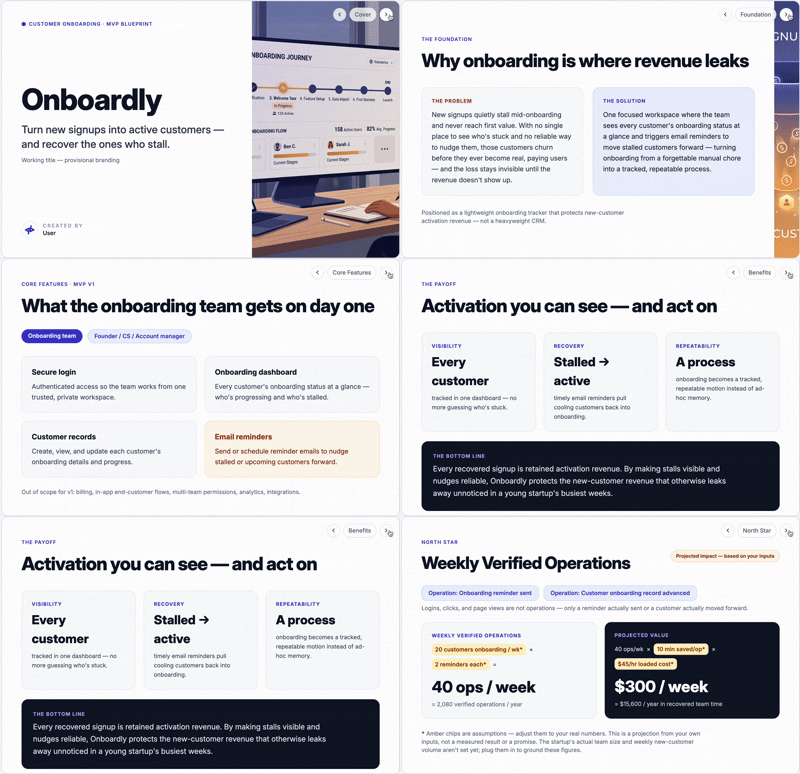
Where it's easy: You describe what you want in plain language. Before any building happens, QuantumByte's four AI agents — the Bear Team (QBear the Partner, plus a Strategist, Designer, and Engineer) — produce a Deck Blueprint: a slide-based visual plan where each slide is one screen, workflow, or integration. You approve the plan, then the app gets built and deployed. For non-technical users, seeing the plan before the build is the thing that makes "AI built me an app" trustworthy instead of opaque. No other builder on this list ships an equivalent planning artifact.
Where it's powerful: QuantumByte builds multi-container applications — multiple connected services like a customer-facing web app, an internal admin tool, an API, and scheduled jobs — rather than single-page output. And it's the only builder here that offers Fast Track ($130 per Story Point): an optional human expert who configures or builds parts of your app with you. The category default is "AI or nothing"; QuantumByte is "AI by default, a human when you're stuck."
Pricing: Free to start with 50 credits, no credit card (apps run on a [name].quantumbyte.app subdomain). $29/month to deploy to a custom domain with no watermark. Additional credits are $6 per 200. No per-seat fees — typical all-in spend is $35–80/month.
Bottom line: QuantumByte hits the best mix of power and ease for non-technical operators specifically — it removes code and hosting entirely, shows you the plan before it builds, and gives you a human to call when the AI hits its limit. It is not the right tool if you want to own and edit source code (use Replit) or ship a native iOS/Android app (use a mobile-native builder).
Start free with 50 credits — no credit card required. Try QuantumByte →
🐻 Copy this prompt into QuantumByte Want to feel the ease-of-use for yourself? Paste this in and watch it plan, build, and deploy:
Build and deploy a simple booking app for my studio: a services list, a booking form with date and time, a confirmation page, and an admin view of bookings. Show me the Deck Blueprint first, then ship it live at a real URL.
2. Softr
What it is: Softr turns spreadsheet data (Airtable or Google Sheets) into a web app. Its AI generator scaffolds the initial app from a prompt; you refine it with pre-built blocks.
Best for: Business users who need to get data in front of customers, partners, or colleagues fast, without a dev team.
Where it's easy: It is the fastest tool here from prompt to a near-usable app — pick a category, describe the app, choose a color and look, and Softr lands you in an editor with a dashboard, login pages, list views, and forms already built.
Where it's powerful: Client portals, internal tools, directories, and membership platforms — anything data-centric. Built-in authentication, user roles, SSO, custom domains, and SEO settings.
Pricing: Free plan (1 published app); paid plans from $59/month.
Bottom line: Softr wins on raw speed and simplicity, but you can't iterate on the app with AI prompts after the initial scaffold, and advanced logic is limited. Perfect when your use case fits its block-based patterns; constraining when it doesn't.
3. Lovable
What it is: Lovable turns plain-English prompts into full-stack React apps, generating the front end, back-end logic, and a database via Supabase.
Best for: Product and design teams prototyping and validating app ideas quickly before committing engineering resources.
Where it's easy: Describe the app, and Lovable returns a working full-stack draft. Non-coders can generate, then refine with visual editing.
Where it's powerful: Two-way GitHub sync, Figma-to-app input, and multiplayer editing make it a real prototyping workhorse. It's reportedly the category leader for generalist generation, at around $400M ARR and roughly 8M users as of early 2026.
Pricing: Free plan (5 daily credits); paid plans from $25/month, credit-based.
Bottom line: Lovable is the strongest generalist on this list and the right call for rapid full-stack prototyping. The output is still code-shaped — most teams harden or rebuild it for production — and credit-based budgeting is less predictable than flat pricing.
4. Bubble
What it is: A mature visual development platform that added AI generation. Describe your app and Bubble produces a functional starter — real pages, a working database, and frontend workflows — that you extend visually.
Best for: Building a polished MVP or product for web and mobile where you'll keep iterating.
Where it's easy: The AI generator gets a working draft in your hands in minutes, and an in-editor AI agent can create designs and build workflows by chat.
Where it's powerful: Bubble's depth of visual logic is among the best in no-code, and it now publishes to both web and native mobile from a shared backend.
Pricing: Free plan; Starter from $32/month, Web/Mobile at $69/month.
Bottom line: Bubble offers the most feature depth of the no-code tools here, but that depth is the tradeoff — there's a real learning curve, and native mobile still lacks some visual elements. Best when you expect the app to grow in complexity.
5. Glide
What it is: A no-code app builder for data apps, with AI-powered interface components that can generate text, extract text from images, or transcribe audio.
Best for: Simple, polished data apps where you want AI features inside the app, not just AI building it.
Where it's easy: Spreadsheet-to-app in minutes, with a clean component model.
Where it's powerful: Its AI components let you embed generative features into an app without wiring up model APIs yourself.
Pricing: Free plan; paid tiers vary by usage.
Bottom line: Glide is the easiest way to put AI features into a simple internal app. It caps out on complexity quickly — it's for focused data apps, not multi-stakeholder business systems.
6. Microsoft Power Apps
What it is: Microsoft's low-code platform with Copilot AI woven through it. Start an app from a prompt, edit the generated data schema and pages conversationally.
Best for: Teams already inside Microsoft 365 / Dynamics / Azure who want apps on top of their existing data.
Where it's easy: Copilot stays open in the editor — ask for a new page, button, or form in plain English and it appears.
Where it's powerful: Deep enterprise data connectivity, automation, and an Excel-like function language for logic.
Pricing: From $20/user/month; full capability often requires other Microsoft services.
Bottom line: Power Apps is the strongest pick if you live in the Microsoft ecosystem. First-time setup is complicated, it's per-user priced, and you can only generate a starting point — not the whole app — so it rewards patience.
7. Replit
What it is: A browser-based development environment whose AI Agent scaffolds entire full-stack apps and sets up cloud infrastructure.
Best for: Technical users who want AI to accelerate building while keeping full control of stack, architecture, and deployment.
Where it's easy: The Agent can stand up a complete app architecture from a prompt, in the browser, with hosting handled.
Where it's powerful: You get real code on any stack, with cloud-native infra and a deep developer community.
Pricing: Free plan; Core from $25/month, Pro $100/month.
Bottom line: Replit offers the most raw power and control here — and asks the most technical skill in return. It's for developers and developer-adjacent builders. Non-technical operators will find it the least easy tool on this list.
Features vs. ease of use: how to find your balance point
The right tool falls out of four questions:
1. Do you want to own code, or just a working app? If you want source code to control and maintain, Replit (or a code-gen tool like Cursor or v0) is the honest answer. If you want a running app and never want to touch code or hosting, QuantumByte, Softr, or Glide fit better.
2. How non-technical is the person actually building it? Truly non-technical operators are best served by tools that plan visibly and remove infrastructure entirely — QuantumByte's Deck Blueprint and deploy-by-default, or Softr's block model. Bubble and Power Apps reward someone willing to learn their logic systems.
3. How complex is the app — one page, or a real system? Single data apps: Softr or Glide. A polished MVP that will grow: Bubble or Lovable. A multi-service business system (customer app + admin + API): QuantumByte's multi-container architecture.
4. What happens when you get stuck? Every AI builder eventually hits something it can't do. Most leave you to figure it out or hire a freelancer. QuantumByte is the only tool here with built-in human expert escalation (Fast Track, $130/Story Point) — worth weighing if you don't have a developer to fall back on.
Who each tool is the wrong fit for
Honest scoping saves you a wasted trial:
- QuantumByte — wrong if you want to own and edit source code, or need a native iOS/Android app, or require SOC2 / HIPAA / FedRAMP certification today.
- Softr / Glide — wrong for complex, multi-stage business logic; they're built for data-centric simplicity.
- Lovable — wrong if you need a hardened production system out of the box; it's a prototyping and MVP tool.
- Bubble — wrong if you want zero learning curve; its power comes with a real ramp.
- Power Apps — wrong if you're not in the Microsoft ecosystem or want simple per-app pricing.
- Replit — wrong for non-technical users; it assumes a developer mindset.
Frequently asked questions
Which AI app builder has the best mix of features and ease of use?
It depends on your skill level. For non-technical operators who want a deployed app without code, QuantumByte balances power and ease best; for fast data apps, Softr; for full-stack prototyping, Lovable; and for feature depth, Bubble.
What is the easiest AI app builder for non-technical users?
QuantumByte and Softr are the easiest for non-technical users. QuantumByte shows a visual Deck Blueprint before building and ships the app live at a URL, while Softr scaffolds a working web app from a prompt in minutes.
What is the most powerful no-code AI app builder?
Bubble offers the deepest visual logic and workflows among no-code tools, and now publishes to web and native mobile. QuantumByte is the most powerful for multi-service business apps, building multiple connected services rather than single-page output.
Which AI app builder ships a deployed app instead of code?
QuantumByte deploys a working application at a real URL from the first prompt, rather than producing source code. Code-shaped tools like Replit, Lovable, and Bolt generate code you then host and maintain yourself.
Does any AI app builder offer human help if I get stuck?
QuantumByte is the only AI app builder with built-in human expert escalation — its Fast Track service ($130 per Story Point) puts a specialist on your account to configure or build parts of your app. Other builders are AI-only.
How much do AI app builders cost in 2026?
Most start free with usage limits. Paid plans run roughly $25–59/month (Lovable $25, Bubble $32, Softr $59) or per-user (Power Apps $20/user). QuantumByte is usage-based with no per-seat fee — typically $35–80/month all-in including deployment.
Which AI app builder is best for developers?
Replit is the best fit for developers who want AI assistance while keeping full control of the stack and code. Cursor and v0 are also strong for code-first workflows. QuantumByte deliberately targets non-technical operators instead.
The bottom line
"Best mix of features and ease of use" has no universal winner — it has a winner for you. If you're a developer, Replit gives you power with control. If you want a fast data app, Softr or Glide get you there in minutes. If you're prototyping, Lovable and Bubble lead. And if you're a non-technical operator who wants a real, deployed business app — with a visible plan before the build and a human you can call when the AI hits its limit — QuantumByte is built for exactly that.
Describe your idea and watch it ship live. Start free with QuantumByte — 50 credits, no credit card →
Related comparisons
Part of our complete guide: The best AI app builder in 2026, ranked. Compare by need:
References
Official product & pricing sources
- QuantumByte. Product and pricing. https://quantumbyte.ai
- Softr. Pricing. https://www.softr.io/pricing
- Lovable. Pricing. https://lovable.dev/pricing
- Bubble. Pricing. https://bubble.io/pricing
- Glide. https://www.glideapps.com
- Microsoft Power Apps. Pricing. https://www.microsoft.com/power-platform/products/power-apps
- Replit. Pricing. https://replit.com/pricing
Independent roundups
- Zapier. The best AI app builders in 2026. https://zapier.com/blog/best-ai-app-builder/
- G2. AI app builder reviews and ratings. https://learn.g2.com
- Knack. Best AI app builders. https://www.knack.com/blog/best-ai-app-builders/