
If you have ever asked what is a transport management system, the simplest answer is this: it is software that plans, runs, and tracks how goods move from point A to point B, while keeping costs, service levels, and paperwork under control. A Transport Management System (TMS) turns shipping from a daily scramble into a repeatable system you can measure and improve.
What is a transport management system (TMS)?
A transport management system is a platform that helps you manage the full shipment lifecycle, from planning loads to settling carrier invoices.
Most modern TMS platforms cover three big jobs:
- Planning: choosing the best mode, route, and carrier for each shipment
- Execution: tendering the load to a carrier, creating documents, and coordinating pickup and delivery
- Visibility and control: tracking where freight is, spotting exceptions early, and reporting performance
Oracle defines a TMS as a logistics platform that helps businesses plan, execute, and optimize the physical movement of goods, while also supporting compliance and documentation needs. NetSuite describes a TMS as overseeing the complete transportation lifecycle of a shipment, including planning, execution, tracking, payment, and reporting.
How a TMS works (end-to-end workflow)
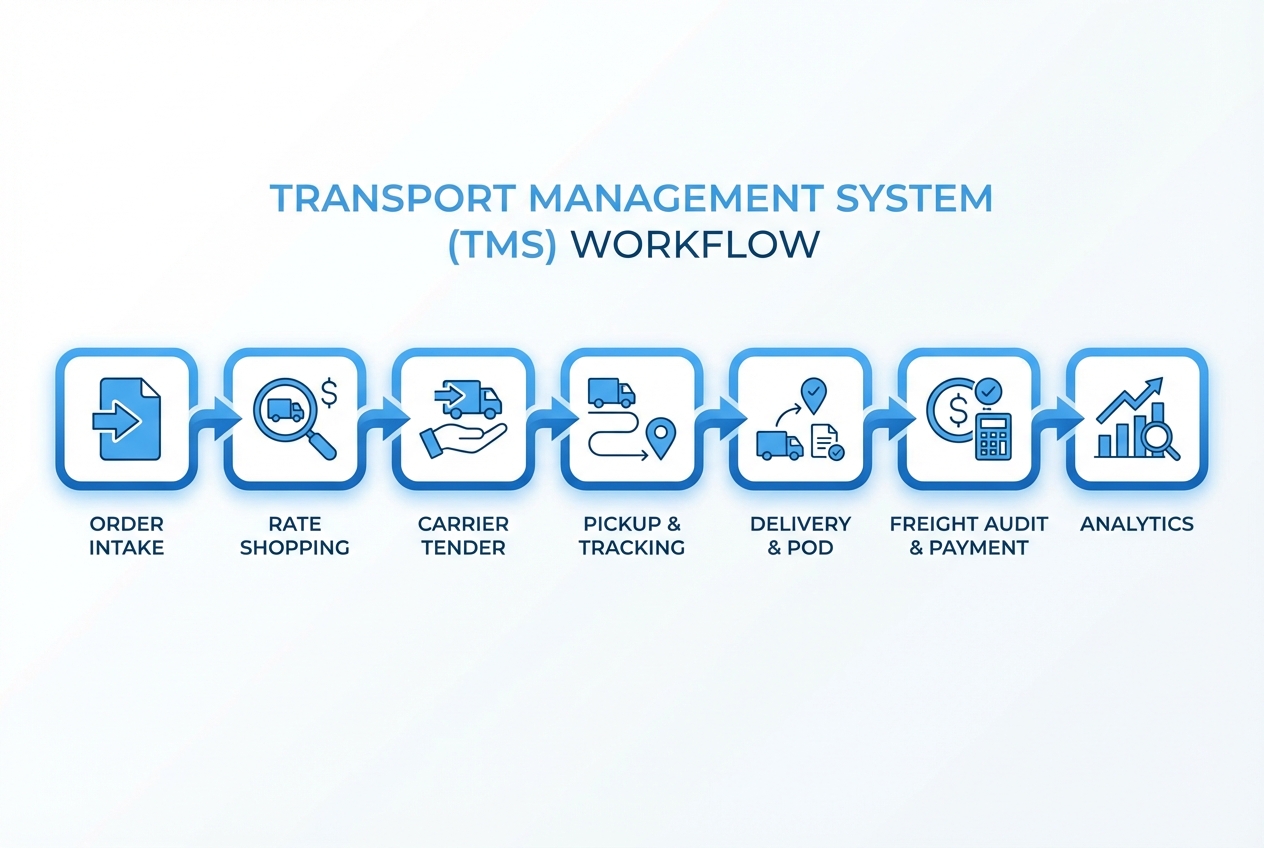 An end-to-end TMS flow: intake, rate shopping, tendering, tracking, proof of delivery, freight audit, and analytics.
A TMS sits in the middle of your orders, your carriers, and your finance process. A typical flow looks like this (for a deeper dive into each step, see how does a transport management system work):
- Order intake: shipments enter the TMS from your Enterprise Resource Planning (ERP) system, ecommerce store, or manual entry.
- Rate shopping: the system compares contract rates, spot quotes, and service options.
- Load building: shipments are grouped into loads based on rules like lanes, cutoffs, weight, and equipment.
- Carrier selection and tendering: the TMS offers the load to carriers in a sequence, or runs a mini bid.
- Pickup scheduling: dock appointments and pickup windows get confirmed.
- In-transit tracking: statuses update via carrier portals, Application Programming Interfaces (APIs), email parsing, or telematics.
- Delivery and Proof of Delivery (POD): delivery confirmation is stored and shared.
- Freight audit and payment: carrier invoices are matched against expected charges, then approved for payment.
- Analytics: you track cost, service, carrier performance, and exception reasons so next week runs smoother than this week.
Core features you should expect in a transport management system
Not every TMS is built the same. But the best systems usually include these building blocks.
- Rate management: your contract rates, fuel tables, and accessorial rules (extra charges) live in one place so you can predict landed cost.
- Carrier management: you store carrier profiles, insurance, preferred lanes, service history, and tendering rules.
- Tendering and dispatch: you automate who gets the load first, how long they have to accept, and what happens when they decline.
- Shipment tracking and exception management: you see late pickups, missed appointments, and delivery risks early enough to act.
- Freight audit and settlement: you catch common billing problems by matching invoices to agreed rates and shipment events.
- Documents and compliance: you generate labels, Bills of Lading (BOL), customs docs (when needed), and customer-facing shipment details.
- Reporting and analytics: you turn day-to-day shipping data into decisions like “which carriers actually hit service” and “which lanes are bleeding margin.”
IBM frames a TMS as a real-time logistics tool that streamlines inbound and outbound shipping and highlights automation around workflows, tendering, and invoicing (IBM).
Who uses a TMS (and when it is worth it)
While enterprise shippers frequently use a TMS, the system becomes worth serious attention for any business when shipping starts to create friction, margin leaks, or customer churn.
You are a strong fit if you are:
- A manufacturer shipping to distributors or retailers: you need consistent routing, predictable costs, and fewer “where is my freight” escalations.
- A wholesaler or ecommerce brand scaling fast: manual booking and tracking does not survive volume spikes.
- A 3PL (Third-Party Logistics) provider: you need a repeatable system that can serve many customers without hiring a new coordinator for every growth jump.
- A service business with field logistics: you might not think of yourself as “logistics,” but routing, dispatch, and proof of service can look a lot like transportation workflows.
What problems a transport management system solves
TMS value is not abstract. It shows up in specific daily bottlenecks.
- Manual rate decisions: your team stops guessing and starts selecting carriers based on rules and data.
- Inbox-based tendering: loads stop living in email threads that only one person understands.
- Poor shipment visibility: customers and internal teams get proactive updates instead of chasing down statuses.
- Accessorial charge surprises: you spot patterns like detention, re-delivery, or liftgate fees and fix the root cause.
- Freight invoice errors: you reduce overpayments by matching invoices to expected charges and shipment events.
If accessorials are a real issue for your business, the playbook in Accessorial charges automation is a good next read.
Benefits of a TMS for a small team
When you are a founder-led company, the real win is leverage. A good TMS gives you operational freedom.
- Faster shipping decisions: you pick carriers and routes with less back-and-forth because rules are already set.
- Cleaner handoffs: sales, ops, and finance stop re-entering the same shipment details.
- Fewer fire drills: exception alerts help you act before a late delivery becomes a customer problem.
- Better margins: when you can see costs by lane, customer, and carrier, you can price smarter.
TMS vs WMS vs ERP: what each system does
Many teams buy the wrong tool because the names sound similar. Here is the clean separation.
| System | Primary job | Best at | Usually weak at |
|---|---|---|---|
| TMS (Transport Management System) | Move freight efficiently | Rate shopping, tendering, tracking, freight audit | Deep inventory processes inside the warehouse |
| WMS (Warehouse Management System) | Run warehouse operations | Picking, packing, slotting, cycle counts | Carrier procurement and freight settlement |
| ERP (Enterprise Resource Planning) | Run the business backbone | Orders, accounting, procurement, master data | Real-time shipment execution and carrier workflows |
A TMS often connects to both your WMS and ERP so your shipping plan matches what is actually being picked and billed.
Cloud vs on-premise TMS (and why most teams choose cloud)
For most small and mid-sized teams, cloud (Software as a Service) is the default choice.
- Cloud TMS: faster to roll out, easier updates, simpler integrations, and less IT overhead.
- On-premise TMS: more control, but higher upfront effort and slower upgrades.
A practical middle path is a cloud TMS with custom workflows on top. That is often the sweet spot when “off-the-shelf” gets you 70% there, but your last 30% is where the profit lives.
Implementation: a realistic rollout plan
A TMS rollout goes better when you treat it as a comprehensive system change rather than a simple software installation.
- Define your shipping rules first: document your carrier hierarchy, service levels, and cutoff times so the system can make decisions consistently.
- Start with one mode or region: prove the workflow in a controlled slice of the business.
- Integrate the minimum viable data: orders in, statuses out, and invoicing details to finance.
- Add exception handling early: build playbooks for late pickups, shortages, and appointment misses.
- Lock down reporting: decide what you will track weekly so the team uses the data.
If you want to move fast, QuantumByte’s AI app builder can help you prototype the exact screens and workflows you need in days, then iterate with real users before you invest in a full rollout. The workflow overview in How does an AI app builder work shows what that looks like in practice.
Data and integrations a TMS depends on
A TMS becomes powerful when it is connected to the rest of your operation.
- Orders and customers: from your ERP, ecommerce platform, or CRM (Customer Relationship Management).
- Carriers: via EDI (Electronic Data Interchange), APIs, or carrier portals.
- Warehouse and fulfillment: weights, dimensions, and ready times to prevent bad tenders.
- Finance: General Ledger (GL) coding, invoice approvals, and cost allocation.
The goal is simple: one source of truth for shipment data, and no double entry.
How to choose the right transport management system
Most “TMS disappointment” comes from buying based on feature lists instead of fit.
- Map your must-have workflows: write down what you do today, what you wish you did, and what you will never do.
- Audit your messy edge cases: returns, multi-stop routes, cross-docks, appointment scheduling, and accessorial complexity.
- Ask how the system handles exceptions: late pickup and missed appointment handling matters more than pretty dashboards.
- Validate integration reality: get specific about how orders arrive and how carrier updates flow back.
- Check total cost drivers: pricing often scales with users, shipment volume, modes, or integrations.
For a deeper breakdown of cost models and what drives them, see TMS software pricing.
Buy vs build: when custom TMS software is the smarter play
Buying a TMS is usually faster. Building can be smarter when your business model depends on a unique workflow.
Here is a grounded way to think about it.
| Option | Best for | Tradeoff |
|---|---|---|
| Buy a TMS | Standard shipping operations that match common workflows | You may end up changing your process to fit the tool |
| Build a custom TMS | Differentiated routing logic, complex customer promises, or unique billing rules | You must own product decisions, support, and ongoing iteration |
| Hybrid (buy + custom layer) | You want core TMS strength but need custom workflows and views | Requires solid integration design |
If you are building a logistics-enabled service, a custom layer can become your moat. It can also become the product you sell.
QuantumByte is built for this hybrid reality. You can prototype a TMS-like internal tool with the AI builder, then have our in-house dev team harden it for production when the prototype proves value. If you are operating at enterprise scale, the right place to start is QuantumByte Enterprise.
A practical next step if you are exploring a TMS
If your current process lives in spreadsheets, inboxes, and tribal knowledge, start by scoping a clear first version that gets you unstuck, then grow it over time.
QuantumByte is designed for that “build the system, then scale it” moment. You can turn your TMS requirements into structured documentation and working software, then iterate quickly as your lanes, carriers, and customer promises evolve.
If you want context on where QuantumByte fits overall, grab some time and talk to us.
Wrap-up: turning shipping chaos into a system
A transport management system is the operating layer for transportation. It helps you plan shipments, execute tendering, track freight, and audit invoices so your team stops firefighting and starts improving.
You now have a clear definition of a TMS, what features matter, how it works end-to-end, how it compares to WMS and ERP systems, and how to decide between buying, building, or taking a hybrid path. The next step is to map your real workflows and pick the approach that gives you leverage, not more admin.
Frequently Asked Questions
What is the main purpose of a transport management system?
The main purpose of a TMS is to control transportation execution end-to-end: choosing carriers and routes, tendering and tracking shipments, and reconciling freight bills so shipping runs predictably.
Is a TMS only for trucking?
No. Many TMS platforms support multiple modes, including truckload, less-than-truckload (LTL), parcel, air, ocean, rail, or combinations. What matters is whether the system supports your modes and workflows.
What is freight audit in a TMS?
Freight audit is the process of checking a carrier invoice against what you expected to pay based on contracted rates, shipment details, and events (like detention). A TMS can automate parts of this by matching invoices to orders, rates, and proof of delivery.
How is a TMS different from dispatch software?
Dispatch software usually focuses on assigning jobs and tracking vehicles. A TMS covers a broader shipment lifecycle: procurement and rate shopping, tendering, documents, tracking, and freight settlement.
Do small businesses need a transport management system?
A small business needs a TMS when shipping becomes a growth bottleneck. If your team spends hours booking loads, chasing status updates, or disputing invoices, you are already paying the “no TMS tax” in time and margin.