
If you have ever asked, "how does a transport management system work," you are usually feeling the pain of shipping chaos: rates in spreadsheets, carrier emails in ten threads, late loads you learn about too late, and invoices that do not match what you were quoted.
A Transport Management System (TMS) fixes that by acting as the control center for moving freight. It connects orders, rates, carriers, dispatch, tracking, and billing into one workflow. It takes shipment demand in, builds the best plan, executes it with carriers, tracks what happens in the real world, and then reconciles cost and performance so you can improve.
What a transport management system (TMS) actually does
A Transportation Management System is software that helps you manage the logistics of moving goods across transportation modes. SAP describes a TMS as a system that supports transportation planning and execution and freight management, including freight billing and settlement.
At a practical level, a TMS replaces a scattered set of manual steps with a single operating rhythm.
-
Turns shipping into a repeatable process: Instead of every planner doing things their own way, the TMS enforces the same steps: create shipment, rate it, tender it, track it, close it out.
-
Creates real visibility: A good TMS makes status updates a system output, not a daily chase. That includes exceptions, estimated time of arrival (ETA), and proof of delivery.
-
Protects margin: When invoices flow through the same system that generated the shipment and rate, you can catch mismatches, accessorials, and duplicate billing earlier.
How does a transport management system work end to end?
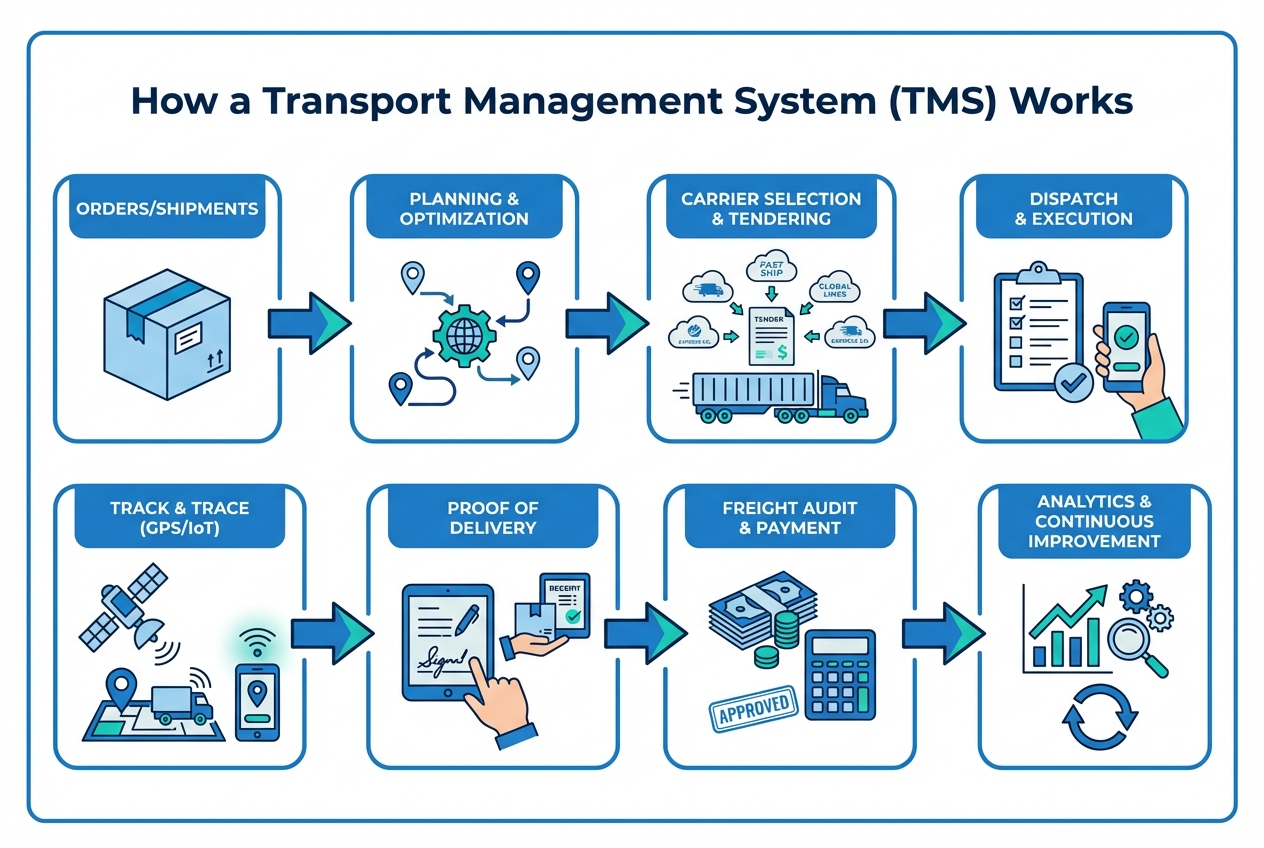
Visualization of TMS workflow
A TMS workflow is easiest to understand as a loop. The system plans, executes, monitors, and then feeds learning back into the next plan.
1) Shipments enter the system (order intake)
A shipment usually starts in your Enterprise Resource Planning (ERP) system, your eCommerce platform, a Warehouse Management System (WMS), or even a spreadsheet.
A TMS pulls in:
-
Locations: Customer, pickup, and delivery locations so routing and appointment planning are accurate.
-
Dates and service level: Requested ship and delivery dates plus service requirements like standard or expedited.
-
Freight characteristics: Weight, volume, pallet count, and hazardous classification (if applicable) so the system can choose the right mode and equipment.
-
Operational constraints: Appointment windows, special equipment needs, and handling notes that impact planning and execution.
When this intake is automated, planners stop retyping the same details.
2) The TMS plans the move (planning and optimization)
Planning is where a TMS earns its keep.
In practice, planning can include:
-
Shipment building: Grouping orders into shipments based on location, time windows, and equipment constraints.
-
Mode selection: Choosing parcel, less-than-truckload, full truckload, intermodal, or another mode based on cost and service needs.
-
Route design: Building multi-stop routes and sequencing stops in a way that reduces wasted miles and missed appointments.
-
Tradeoff management: Balancing cost vs time vs capacity so you can meet service commitments without overspending.
For small teams, this is often the first step where "one person doing hero work" becomes a scalable system.
3) The TMS chooses carriers and rates the load
A TMS typically stores carrier contracts (or connects to them) and applies business rules.
It can evaluate:
-
Rate types: Contracted rates vs spot rates depending on lane, seasonality, and urgency.
-
Capacity fit: Carrier capacity by lane and equipment type (van, reefer, flatbed) so tenders go to carriers who can actually cover.
-
Service history: Carrier scorecards (service, claims, on-time) to protect customer experience.
-
Business constraints: Rules like preferred carriers for certain customers, facilities, commodities, or service levels.
This is also where teams set guardrails, like "do not tender to carriers below a service score" or "do not exceed a rate threshold without approval."
4) The TMS tenders the load (execution)
Once a plan and carrier are selected, the TMS moves into execution.
Tendering can happen through:
-
Portals and email: Sending tenders via email or dedicated web portals.
-
APIs: Using Application Programming Interfaces (APIs), which are standard ways for software systems to talk to each other.
-
EDI: Using Electronic Data Interchange (EDI), which the National Institute of Standards and Technology (NIST) defines as the computer-to-computer transmission of strictly formatted messages representing documents.
The goal is simple: the system should create fewer back-and-forth messages while still capturing a clean acceptance trail.
5) Dispatch and execution happen in the real world
At this point, your TMS becomes the record of truth for:
-
Appointments: Pickup and delivery appointment details that keep facilities, drivers, and customer service aligned.
-
Instructions: Instructions for drivers and facilities so special requirements are not lost in email threads.
-
Documents: Required documents like bills of lading, labels, and customs paperwork (if applicable).
If you are running your own fleet, this may overlap with fleet dispatch tools. If you are using carriers, it is more about coordination and confirmation.
6) Track and trace keeps you ahead of problems
Visibility is what turns "we hope it is on time" into "we know what is happening and can act." Many TMS platforms integrate location signals through Global Positioning System (GPS) pings, carrier updates, or Internet of Things (IoT) sensors.
A useful mental model is traceability. GS1 frames traceability as the ability to trace the history, application, or location of an object and ties it to an "Identify, Capture, Share" approach.
In a TMS, that translates to:
-
Status automation: Automated status updates (departed, arrived, unloaded) so your team stops chasing basics.
-
Exception control: Exception management (late pickup, missed appointment) that flags issues early enough to act.
-
Customer communication: Proactive customer notifications that reduce "where is my shipment" calls.
7) Proof of delivery closes the shipment loop
Closing a load cleanly matters because it drives billing, customer service, and claims.
Proof of delivery (POD) can be:
-
Signed documentation: A signed document that confirms receipt and condition.
-
Photo evidence: A photo that captures delivery context when signatures are not practical.
-
Electronic signature: An electronic signature collected on a device for faster closeout.
-
Time-stamped confirmation: A timestamped facility confirmation that helps when paperwork arrives late.
When POD is captured inside the TMS (or flows into it), fewer shipments get stuck in billing limbo.
8) Freight audit and payment reconciles cost
Freight invoices should match what was planned, tendered, and executed.
The National Motor Freight Traffic Association (NMFTA) highlights freight audit and payment as a key TMS function, including automated invoice matching and cost allocation.
This step typically involves:
-
Invoice matching: Matching invoices to shipments so you are always validating against the same shipment record.
-
Charge validation: Validating rate, fuel, and accessorial charges so surprises do not hit margin weeks later.
-
Payment approval: Approving payment and exporting to accounting so finance can close books without manual rework.
-
Dispute handling: Flagging exceptions and routing them to the right owner before they turn into customer or carrier conflict.
If you have ever found margin leaks from detention, layover, or reweigh fees, this is the stage to tighten.
For a deeper dive on this problem, see accessorial charges automation.
9) Analytics improves the next plan
A TMS runs daily operations and acts as a feedback engine.
Teams use analytics to answer questions like:
-
Lane trends: Which lanes are trending more expensive and why.
-
Carrier performance: Which carriers are slipping on service or creating exceptions.
-
Appointment misses: Where you are missing pickup windows and which facilities contribute most.
-
Customer friction: Which customers or order profiles create the most exceptions.
-
Policy gaps: Where your rules are too loose, too strict, or not enforced consistently.
Over time, those answers become policy and automation rules, which reduces the need for constant firefighting.
The core components inside transportation management system software
Most TMS platforms share a common set of building blocks, even if they name them differently.
| Component | What it does | What it replaces in a manual process |
|---|---|---|
| Order and shipment management | Creates shipments from orders and tracks lifecycle status | Spreadsheets, inbox triage, sticky notes |
| Rate management | Stores contracts, applies tariffs, requests spot quotes | Rate emails, static rate sheets |
| Planning and optimization | Consolidates, routes, sequences stops, selects mode | Planner tribal knowledge |
| Carrier selection and tendering | Sends tenders, tracks accept/reject, keeps audit trail | Phone calls and one-off emails |
| Track and trace | Pulls status updates and flags exceptions | Daily check calls and guesswork |
| Documentation | Generates bills of lading, labels, manifests | Copy-paste templates |
| Freight audit and payment | Matches invoices to loads and validates charges | Manual invoice checks |
| Reporting and analytics | Lane cost trends, service scorecards, compliance | Exporting CSVs and rebuilding reports |
If you are a broker, this often overlaps with customer quoting and carrier onboarding workflows. This guide on TMS software for freight brokers helps you map those specifics.
The data and integrations that make a TMS work
A TMS becomes far more valuable when it is connected. Without integrations, it can turn into a second place to type the same information.
Here are the connections that usually matter most.
-
ERP integration: Pulls orders in and pushes freight cost out for accounting. This is what keeps finance and operations aligned.
-
WMS integration: Aligns shipping plans with dock schedules, inventory readiness, and loading constraints.
-
Carrier connectivity (API or EDI): Speeds up tendering, status updates, and invoicing. EDI is still common because many carriers operate on standard document formats.
-
Telematics and GPS: Gives live location and ETA signals, which is the foundation of exception alerts.
-
Customer visibility: A portal or automated emails that reduce "where is my shipment" calls.
If you are choosing between cloud and on-premise setups, start with speed and integration flexibility. A practical overview is in cloud-based TMS.
How to implement a TMS without creating more chaos
A TMS implementation fails when it tries to fix everything at once. The winning approach is to stabilize one workflow, prove value, then expand.
Step 1: Pick one workflow to standardize first
Choose a workflow with real volume and clear pain.
Good first candidates:
-
Outbound truckload: Start where you already have carrier contracts, which makes rating and tendering easier.
-
Inbound freight: Prioritize inbound when delays create real cost, like production downtime or missed customer commitments.
-
High-variance lanes: Target the lanes that create constant exceptions, because the TMS can enforce rules and surface issues early.
Set a single outcome for this first phase: make the lane predictable. Once you have that, expanding to other lanes becomes much easier.
Step 2: Define your shipment data model
Before you automate, you need shared definitions.
-
What counts as a shipment: One order, a group of orders, or a route with multiple stops.
-
Required fields: Weight, dimensions, accessorial flags, temperature control, appointment windows.
-
Who owns updates: Operations, customer service, warehouse, or carriers.
This step feels boring. It is also where most long-term scalability is won.
Step 3: Start with planning rules you can explain
If a rule is too complex to explain, it is too complex to automate on day one.
-
Preferred carrier hierarchy: Define what "preferred" means and where it applies.
-
Rate thresholds: Decide when a load needs approval.
-
Service level rules: Define when to use expedited and who can authorize it.
Once the basics are stable, then layer in optimization.
Step 4: Implement tendering and status updates next
This is where you remove the email treadmill.
Aim for:
-
One tender path: A single tender process that everyone uses, so you can measure compliance and performance.
-
Clean acceptance tracking: Consistent accept/reject tracking with timestamps, so you always know who owns the load.
-
Alert-driven updates: Status updates that trigger alerts, not manual chasing, so exceptions get handled before they escalate.
Step 5: Close the loop with freight audit
Do not wait six months to add invoice controls.
Even a lightweight freight audit process that checks key fields (lane, rate, fuel, accessorial approvals) will protect margin while you scale.
If accessorial disputes are a major leak, this is a strong moment to automate. See accessorial charges automation.
Build vs buy: when a custom TMS workflow is the smarter move
Off-the-shelf TMS platforms are strong when you fit their model. But many small and mid-sized operators do not need a huge platform. They need a tight workflow that matches how they actually run.
Here is a practical way to decide.
| Decision point | Buy a TMS | Build a custom workflow layer |
|---|---|---|
| Your process is standard | You can adopt best practices quickly | Custom adds complexity you do not need |
| You need a few unique steps | You may end up with workarounds | You can design the workflow around your exact rules |
| Integrations are the bottleneck | You depend on vendor connectors and timelines | You can prioritize your exact ERP, WMS, or carrier connections |
| You want faster iteration | Roadmaps move at vendor pace | You can ship improvements weekly |
If you are weighing this strategically, use this framework: custom business software development: build vs buy.
When custom makes sense, QuantumByte can be a practical path because you can prototype your TMS workflow from natural language, then bring in engineers for the hard parts like integrations and permissions. Start turning your current process into a build-ready spec.
For readers who want to understand how conversational building works before they commit, this breakdown helps: how does an AI app builder work.
Common reasons TMS projects fail (and how to avoid them)
These failure patterns show up in small teams and large ones. The difference is whether you design around them.
-
Trying to automate before you standardize: If every planner has a different process, automation just locks in confusion. Standardize the workflow first, then automate.
-
Bad data in, bad results out: If weights, appointment windows, and accessorial flags are missing, planning and audit will be wrong. Define required fields and enforce them.
-
No owner for exceptions: A TMS can detect exceptions, but people still need to act. Assign clear ownership for late pickups, missed appointments, and customer updates.
-
Overbuilding dashboards: Reporting is valuable, but it is not step one. Get tendering, tracking, and audit working first. Then build reporting that drives decisions.
Turning transportation chaos into a system
A TMS works by taking your shipment demand, turning it into an executable plan, connecting you to carriers, tracking reality as it unfolds, and reconciling cost and performance afterward.
If you implement it in that order, you get leverage. Less chasing. Fewer surprises. More predictable margins.
Frequently Asked Questions
What is the difference between a TMS and a WMS?
A TMS manages transportation: planning shipments, selecting carriers, tendering loads, tracking, and freight audit. A Warehouse Management System (WMS) manages what happens inside the warehouse: inventory, picking, packing, staging, and dock operations. Many businesses use both and integrate them.
Does a transport management system work for small businesses?
Yes, if you focus on one workflow first. Small teams often see fast wins by standardizing tendering, tracking, and invoice matching. Focus on the smallest system that removes your biggest bottleneck rather than the biggest platform with features you will not use.
What data do you need to run a TMS well?
At minimum: accurate ship-from and ship-to addresses, dates, service level, weight and dimensions, equipment requirements, and accessorial flags. If those are inconsistent, planning and audit will be inconsistent.
Do TMS platforms use EDI?
Many do. Electronic Data Interchange (EDI) is still common for transmitting standardized documents between shippers, brokers, and carriers. NIST defines EDI as computer-to-computer transmission of strictly formatted messages representing documents.
Can you build a custom TMS?
Yes. Many operators build a custom layer that handles their unique workflows, then integrates with carriers, accounting, and warehouse tools. This is especially useful when your competitive advantage is in your process and you need software that matches it.