There's a persistent myth in operations management: warehouse management systems are only for big companies. This belief costs small businesses millions in cumulative inefficiency every year. Even operations with 2,000 square feet and a handful of employees see dramatic improvements from proper warehouse management systems.
This complete guide shows you when your small business needs a WMS, what features matter most, how to evaluate your options, and how to implement a system that pays for itself within months.
Why Small Warehouses Need Systems Too
The complexity threshold for needing a WMS is about the cost of inefficiency.
Consider what happens in a typical small warehouse without a system:
- Finding inventory: Walking the warehouse to locate items, sometimes searching for 10-15 minutes per order
- Picking errors: Grabbing the wrong item because locations aren't tracked or verified
- Inventory discrepancies: Physical counts don't match records, leading to stockouts or overstocks
- Time-consuming counts: Full inventory counts take days and halt operations
- Blind spots: No visibility into what's actually happening until problems surface
These inefficiencies might seem small individually. Multiplied across hundreds of transactions per week, they consume thousands of dollars monthly.
The Revenue Impact of Warehouse Inefficiency
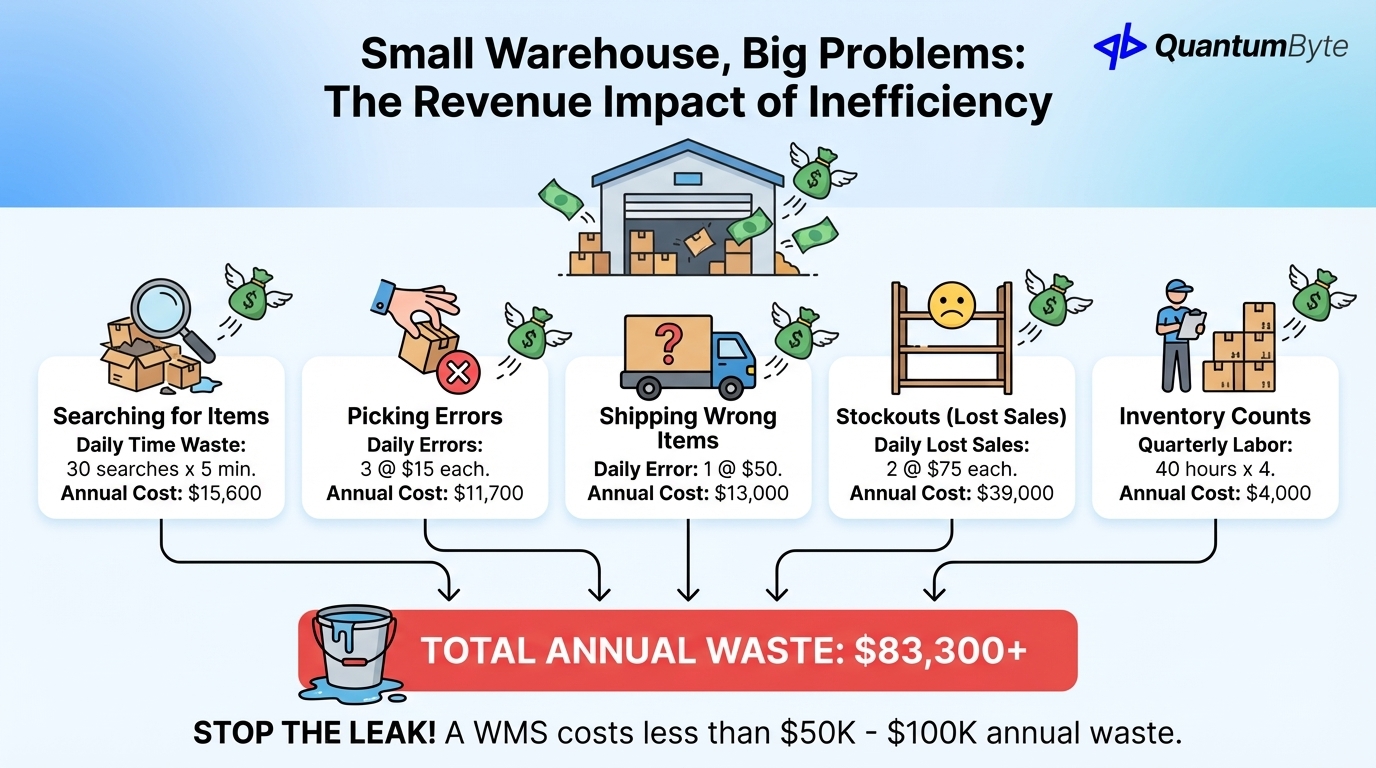
For a warehouse handling 100 orders per day:
| Inefficiency | Time/Cost per Occurrence | Daily Occurrences | Annual Cost |
|---|---|---|---|
| Searching for items | 5 min × $25/hr | 30 searches | $15,600 |
| Picking errors | $15 per error | 3 errors | $11,700 |
| Shipping wrong items | $50 per error | 1 error | $13,000 |
| Stockouts (lost sales) | $75 average order | 2 per day | $39,000 |
| Inventory count labor | 40 hours quarterly | 4 counts | $4,000 |
| Total Annual Cost | $83,300 |
Even conservative estimates show $50,000-100,000 in annual waste for a small operation, far exceeding the cost of implementing a proper WMS.
7 Signs You Need a Warehouse Management System
If you're experiencing these symptoms, you've outgrown manual processes:
1. You Can't Find Inventory Without Walking the Warehouse
When locating items requires physical searching rather than a quick lookup, you're burning time on every order.
The test: Time how long it takes to locate 10 random items. If it's more than 30 seconds per item, you need better location tracking.
2. Picking Takes More Than 10 Minutes Per Order
Efficient picking with a WMS should take 2-5 minutes for a typical order. If your team averages 10+ minutes, inefficient processes are costing you.
The math: Reducing pick time from 10 minutes to 4 minutes saves 6 minutes per order. At 100 orders/day and $25/hour labor, that's $65,000 annually.
3. Inventory Accuracy is Below 95%
If physical counts regularly reveal significant discrepancies from your records, you're making decisions on bad data.
The impact: Low accuracy causes both stockouts (lost sales) and overstocks (tied-up capital). Most businesses with <95% accuracy are losing 2-4% of revenue to inventory-related issues.
4. You've Shipped Wrong Items to Customers
Picking and shipping errors destroy customer trust and create costly returns.
The cost: Each wrong shipment costs $50-150 in returns processing, replacement shipping, and customer goodwill. More importantly, customers who receive wrong orders have significantly lower repeat purchase rates.
5. You Don't Know Real-Time Stock Levels
If answering "how many do we have?" requires walking to the shelf or waiting for a report, you can't make timely decisions.
The problem: Sales makes promises based on stale data. Purchasing reorders based on outdated counts. Operations discovers stockouts at the worst moments.
6. Multiple People Manage Inventory with Spreadsheets
Spreadsheet-based inventory management breaks down as soon as multiple people touch the data.
What goes wrong: Version conflicts, overwritten formulas, delayed updates, no audit trail, and inevitable divergence from reality.
7. You're Considering Hiring More Warehouse Staff
Before adding headcount, ask: could better systems make the current team more productive?
The math: If a WMS improves productivity by 30%, you might avoid hiring 1 of every 3 additional workers—saving $40,000+ per avoided hire annually.
Core WMS Features for Small Businesses
Not every WMS feature matters for small operations. Focus on these essentials:
Inventory Location Tracking (Bin/Shelf Management)
The foundation of any WMS: knowing exactly where everything is. Assign items to specific locations, track movement, and enable directed put-away and picking. Impact: Eliminates searching time entirely.
Barcode/QR Code Scanning
Replace slow, error-prone manual data entry with fast, accurate scanning. Generate labels, scan to receive/pick/ship, and verify transactions in real-time. Impact: 90%+ reduction in data entry errors, 50%+ faster processing.
Pick/Pack/Ship Workflow Management
Transform ad-hoc picking into optimized, verified processes. Generate pick lists with efficient paths, verify each pick with scanning, and integrate with shipping for label generation. Impact: Faster picking, fewer errors, consistent processes.
Real-Time Stock Level Visibility
Instant quantity lookups by item and location, available vs. committed quantities, and low stock alerts. Impact: Confident decisions with no more surprises.
Reorder Point Alerts
Set minimum stock thresholds with automatic alerts, suggested reorder quantities, and lead time consideration. Impact: Fewer stockouts and less firefighting.
Receiving and Put-Away Workflows
Log incoming shipments against purchase orders, verify quantities, and direct items to optimal storage locations. Impact: Accurate records from the start.
Cycle Counting and Inventory Audits
Schedule counts by location or category, flag discrepancies automatically, and track accuracy trends. Impact: Continuous accuracy improvement without disruptive full counts.
Multi-Location Management
For multiple warehouses: track inventory by location, manage transfers, and consolidate views across all sites.
Reporting and Analytics
Inventory valuation, turnover analysis, accuracy metrics, and productivity reports. Impact: Data-driven optimization.
WMS Options Compared
Small businesses have several paths to warehouse management:
Enterprise Systems ($50K-500K): Overkill for Most SMBs
Examples: SAP EWM, Manhattan, Blue Yonder
Pros: Comprehensive features, proven at scale, extensive integrations
Cons: Prohibitive cost, 6-18 month implementations, complexity far exceeds small business needs, requires dedicated IT support
Best for: Large enterprises with $100M+ revenue and complex, multi-site operations
Cloud-Based SMB WMS ($100-500/month)
Examples: ShipHero, Cin7, Fishbowl
Pros: Quick implementation, reasonable cost, regular updates included, no infrastructure to manage
Cons: Generic features may not fit unique workflows, limited customization, ongoing monthly costs, potential vendor lock-in
Best for: Straightforward warehouse operations without unusual requirements
Inventory Add-Ons to Accounting Software
Examples: QuickBooks inventory, Xero inventory features
Pros: Already have it, integrated with financials, familiar interface
Cons: Very limited features, no real warehouse management, poor location tracking, inadequate for anything beyond basic needs
Best for: Very small operations where inventory is secondary
Custom WMS Built on AI-Powered Platforms
Examples: Custom solutions built with QuantumByte
Pros: Perfect fit for unique workflows, cost-competitive with SaaS over time, no monthly per-user fees, you own the code
Cons: Requires clear understanding of needs, upfront development investment
Best for: Businesses with unique processes, specific integration needs, or wanting to avoid subscription costs
| Approach | Cost (Year 1) | Cost (5-Year) | Implementation | Flexibility | Best For |
|---|---|---|---|---|---|
| Enterprise | $100K-500K+ | $200K-1M+ | 6-18 months | High (with budget) | Large enterprises |
| Cloud SMB WMS | $1,200-6,000 | $6K-30K | 2-8 weeks | Medium | Standard operations |
| Accounting Add-on | Included | Included | Days | Very Low | Minimal needs |
| Custom (AI-built) | $10K-30K | $15K-45K | 2-6 weeks | High | Unique requirements |
Expected ROI from WMS Implementation
For a small warehouse (5-10 employees, 100 orders/day), expect these improvements:
- Picking accuracy: 85% → 99% through scan verification
- Picking speed: 40% faster with optimized paths
- Inventory accuracy: 90% → 99% with real-time tracking
- Customer retention: 10-15% improvement from fewer errors
| Benefit Category | Annual Value |
|---|---|
| Picking accuracy improvement | $40,000 |
| Picking speed improvement | $35,000 |
| Reduced inventory write-offs | $15,000 |
| Reduced count labor | $8,000 |
| Customer retention improvement | $25,000 |
| Total Annual Benefit | $123,000 |
| Implementation Cost | $15,000-25,000 |
| Payback Period | 2-3 months |
Implementation Guide: 4-Week Timeline
Successful WMS implementation follows a structured approach:
| Week | Focus | Deliverable |
|---|---|---|
| 1 | Audit inventory, design location schema, label locations | Clean data foundation |
| 2 | Configure system, import data, set up users | Configured WMS ready for testing |
| 3 | Train team, run parallel with old system | Validated system with confident users |
| 4 | Go live, monitor metrics, optimize | Operational WMS with measured improvements |
Critical success factors:
- Complete physical inventory count before import
- Involve warehouse staff early—they know current problems best
- Run parallel systems during Week 3 to catch issues
- Document baseline metrics to prove ROI definitively
Building Your Custom WMS with QuantumByte
When off-the-shelf warehouse management systems don't fit your needs, custom development is more accessible than ever.
What QuantumByte delivers:
- Template-based or fully custom: Start with proven WMS workflows or build from scratch for unique operations
- Mobile-first design: Native apps optimized for warehouse scanners, works offline
- Full integration: Connect to Shopify, QuickBooks, shipping carriers, and your existing systems
- Scalable complexity: Start with core features, add capabilities as you grow
Typical timeline: 2-3 weeks from requirements to go-live. Starts from $468/year, way less than a year of monthly SaaS fees.
Conclusion: Transform Your Warehouse Operations
Small warehouses have big opportunities. A well-implemented WMS delivers:
- Time back: Stop searching, start fulfilling
- Money saved: Fewer errors, lower labor costs
- Customers retained: Accurate, fast fulfillment builds loyalty
- Decisions improved: Real-time visibility enables smart choices
- Growth enabled: Scale without proportional chaos
The question isn't whether you can afford a WMS, it's whether you can afford to operate without one.
Next steps:
- Audit your current warehouse performance against the 7 signs above
- Quantify your inefficiency costs using our calculation framework
- Evaluate options: cloud SaaS, custom build, or hybrid approach
- Plan implementation with clear success metrics
- Execute and measure results
Ready to transform your warehouse operations? Schedule a consultation to explore how a custom WMS could fit your specific needs.
Other Guides to Explore
- Supply Chain Automation: How to Reduce Costs and Increase Revenue
- Inventory Management Automation: Reduce Stockouts and Increase Sales
- Order Fulfillment Automation: Speed Up Delivery and Reduce Costs
- How to Automate Business Processes to Increase Revenue in 2025
Frequently Asked Questions (FAQ)
What size warehouse needs a WMS?
Size matters less than complexity. A 2,000 sq ft warehouse with 500+ SKUs, multiple staff, and 50+ daily orders will benefit significantly. If you're experiencing the 7 signs listed above, you likely need a WMS regardless of physical size.
How much does a warehouse management system cost?
Cloud-based SMB systems run $100-500/month. Enterprise systems cost $50K-500K+. Custom-built WMS typically costs $10,000-30,000 upfront. Calculate your 5-year total cost of ownership, not just first-year costs.
How long does WMS implementation take?
Cloud systems: 2-8 weeks. Custom systems: 2-6 weeks. Enterprise systems: 6-18 months. Clean data and documented processes accelerate any implementation.
What's the ROI timeline for a WMS?
Most implementations achieve payback within 3-6 months through labor savings and error reduction. Customer retention improvements often deliver additional returns over 12-24 months.