
When you sell products or services with options, bundles, and pricing that varies by customer or volume, quotes can take too long and too often go out wrong, wrong config, wrong price, or stuck in approval. CPQ (Configure, Price, Quote) software gives business owners a single system for product rules, pricing logic, and approvals, so your team can generate accurate, compliant quotes on demand and you keep control over margin and consistency without slowing down sales.
What CPQ software does
CPQ stands for Configure, Price, Quote. In practice, cpq software helps you sell complex products or services by standardizing how a deal is built, priced, approved, and sent to a customer.
A solid CPQ system typically covers:
- Configuration rules: Enforces which products, bundles, tiers, and add-ons can be sold together, and under what constraints.
- Pricing logic: Applies rate cards, tiering, volume breaks, contract pricing, discount guardrails, taxes, and multi-currency rules.
- Quote generation: Produces consistent, customer-ready quotes and proposals, often with standardized terms, renewals, and line-item detail.
- Approvals and controls: Routes exceptions (like steep discounts or non-standard terms) to the right approver so reps can move fast without breaking margin.
Salesforce summarizes CPQ clearly as Configure, Price, and Quote, with each stage automating the repetitive work that usually causes quoting delays and errors: Salesforce CPQ overview.
How CPQ software works end to end
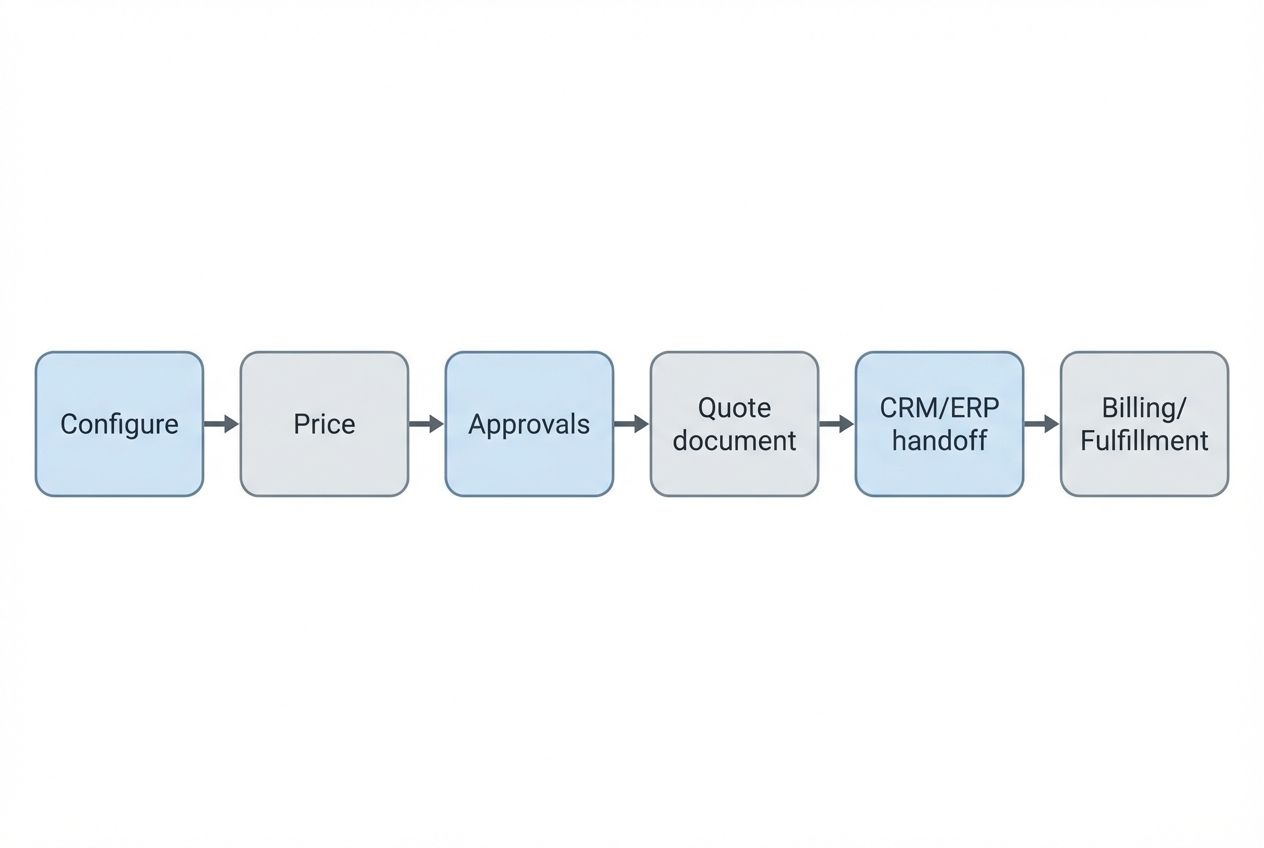
Even when you buy a full CPQ suite, the shape of the workflow is usually consistent. What changes is where data lives and how strict your controls are.
- Select a base offer: A rep (or a buyer in self-serve) starts from a product, package, or service template. This reduces blank-page quoting and makes early discovery calls faster because you are always starting from something sellable.
- Validate the configuration: The system applies product rules so the quote stays feasible. The outcome you want is simple: no incompatible combinations, no "we cannot deliver that" surprises.
- Calculate pricing in real time: As options change, pricing updates immediately using your rules. This is where CPQ prevents most spreadsheet errors, especially on tiering, volume breaks, multi-year terms, and regional price books.
- Trigger approvals for exceptions: Discounts, non-standard terms, or unusual bundles route to the right approver automatically. The goal is speed with control: most quotes should flow through, and only true exceptions should slow down.
- Generate the quote document or order form: CPQ renders line items, totals, terms, and renewal dates into a consistent format. This reduces back-and-forth because customers can actually understand what they are buying.
- Hand off to downstream systems: Approved quotes convert into clean orders for billing, provisioning, and fulfillment, minimizing re-entry and reconciliation work.
This matters because CPQ rarely lives alone. Oracle frames CPQ as bridging customer relationship management (CRM) and enterprise resource planning (ERP) systems in the order-to-cash workflow: Oracle CPQ overview. ServiceNow makes the same point from an integration angle, noting modern CPQ integrates with CRM and syncs with ERP to validate pricing and operational constraints: ServiceNow on CPQ.
When you need CPQ software and when you do not
CPQ is most valuable when your quote changes based on choices, constraints, or deal context.
You likely need CPQ if:
- Your product has many valid combinations: Options, tiers, bundles, or usage components create too many "legal" configurations to manage with a static price sheet.
- Pricing depends on rules, not memory: Volume breaks, contract rates, region-based pricing, partner discounts, or margin floors should not rely on a rep remembering policies.
- Approvals slow you down: Discounting or non-standard terms trigger manual escalation and create bottlenecks.
- Quote errors are expensive: The cost of a wrong stock keeping unit (SKU), wrong term, or wrong price shows up as rework, churn, or margin leakage.
You might not need CPQ yet if:
- You have one or two simple packages: A well-maintained pricing page and a lightweight quoting template could be enough.
- You are still searching for pricing fit: If you are iterating pricing weekly, a heavy CPQ rollout can become a drag.
- Your deal volume is low: The overhead of implementation might outweigh savings until you have more repetitive quoting.
NetSuite describes why CPQ becomes essential as configuration complexity rises: as combinations explode, a rules-driven Configure, Price, Quote loop prevents incompatible choices while pricing updates in real time: NetSuite CPQ explanation.
Pick the right CPQ approach: suite, point solution, or custom
Before you compare vendors, decide which category fits your business and your constraints.
| Approach | Best for | Trade-offs |
|---|---|---|
| CPQ suite (enterprise platform) | Complex products, large sales teams, strong CRM and ERP requirements | Higher implementation effort, heavier change management, slower to adapt to unique workflows |
| Point CPQ tool | Faster time-to-value for quoting, lighter integrations | Can create another silo if it does not connect cleanly to billing, provisioning, or finance workflows |
| Custom CPQ workflow | Highly specific logic, unusual approval paths, or industry-specific quoting | You must own requirements, testing, and ongoing iteration, or it becomes brittle |
| Hybrid (buy core, customize edges) | Teams that want vendor stability but need tailored workflows | Requires clear boundaries between what the vendor does and what your custom layer does |
A practical decision rule: if your "quote" is really an internal workflow (validation, approvals, contract rules, downstream handoffs), a custom layer can be the difference between "we have CPQ" and "we have quoting that actually matches how we sell."
How to implement CPQ software step by step
Implementation succeeds when you treat CPQ like a product. You scope it, you test it, and you improve it. Done well, you end up with quoting that is faster and safer at the same time.
1) Map your products the way you actually sell them
Start by modeling your catalog around buying decisions, not internal org charts.
If your sellers talk in packages and outcomes, reflect that. If your delivery team thinks in components and workstreams, keep that structure behind the scenes and expose only what helps a customer choose.
A practical way to do this is to write down:
- Base offers: What the customer buys first most often.
- Add-ons: What expands value after the base.
- Bundles: What you commonly sell together because it consistently wins.
- Constraints: What must be true for an option to be valid.
Expected outcome: one shared product structure that sales, finance, and delivery can all recognize and maintain.
2) Turn pricing policies into explicit rules
If a rep has to ask someone to know whether a discount is allowed, the policy is not enforceable in day-to-day selling, and the team ends up relying on tribal knowledge.
Translate your pricing into rules that a system can enforce. This usually takes one focused working session with sales leadership and finance, plus one pass through real closed-won deals to see what exceptions happen in practice.
Document and encode:
- Rate cards and tiers: Including region, channel, partner, and segment differences.
- Discount guardrails: What is allowed by default, and what triggers approval.
- Term logic: Monthly versus annual, ramp deals, prepaid commitments, co-terming.
- Tax handling boundaries: What CPQ calculates versus what a tax engine determines.
If tax complexity is part of your quoting pain, it helps to separate "quote price logic" from "tax determination logic" and connect them intentionally. This guide to sales tax automation software is a useful lens for where errors tend to hide.
Expected outcome: pricing becomes consistent across reps and channels, and discounting becomes controllable without slowing every deal.
3) Design the quote output before you automate it
A CPQ rollout often stalls because teams leave the quote document until the end, then discover legal, finance, and branding requirements late.
Define your quote output early, while rules are still being shaped. When stakeholders can see the final artifact, they give better feedback on what matters and what is noise.
Decide:
- Line-item detail: What is shown, what is grouped, what is hidden.
- Legal and terms: Standard clauses, exception handling, versioning.
- Signature flow: What triggers electronic signature (e-signature) and who signs.
- Renewal fields: Start date, end date, auto-renew language, usage clauses.
Expected outcome: a quote format that reduces customer questions and internal rework.
4) Decide where CPQ will pull truth from
CPQ only works if it knows what is true. If products, price books, and customer terms are duplicated in multiple places, CPQ becomes "another spreadsheet," just with a nicer interface.
Most teams anchor:
- Customer context in CRM: Account, opportunity, segment, negotiated terms.
- Product and fulfillment truth in ERP: What can be sold, delivered, and invoiced.
Oracle explicitly frames CPQ as bridging CRM and ERP to guide the order-to-cash workflow: Oracle CPQ overview.
Expected outcome: fewer duplicate systems, less manual re-entry, and cleaner downstream orders.
5) Build approvals that protect margin without blocking deals
Approvals are where CPQ becomes either a guardrail or a bottleneck.
Design approvals around your normal deal flow. A good pattern is to make the default path fast and predictable, and reserve approvals for clear exceptions.
- Default path: Most quotes should auto-approve when they are within pre-defined guardrails.
- Exception path: Discounts above thresholds, non-standard terms, and unusual bundles should route automatically to the right approver.
- Visibility: Reps should see what triggered the approval and what they can change to remove the block.
If your approvals are currently managed in chat threads or email, it can help to review how teams implement rule-based routing and auditability in other finance workflows. This overview of accounts payable workflow automation includes practical approval patterns you can borrow.
Expected outcome: controlled discounting with fewer delays and fewer end-of-quarter escalations.
6) Pilot with a "thin slice" before you roll out
Do not start with every product, every region, and every edge case. Start with one slice that is representative and revenue-relevant.
A good pilot slice is one product line or one segment with steady deal volume. The goal is to validate the full quote-to-order flow, not just the CPQ screens.
During a pilot, pay attention to:
- Configuration confusion: Where reps hesitate or choose the wrong option, which signals your product model or UI needs tightening.
- Rule friction: Which discount and pricing rules create the most exceptions, which signals your guardrails are either too strict or poorly expressed.
- Approval latency: Where approvals stall, which signals routing needs adjustment or approvers need clearer context to decide quickly.
- Downstream breakpoints: Where handoffs to billing, provisioning, or fulfillment fail under real usage, which signals integration and data mapping gaps.
Expected outcome: one end-to-end CPQ path that works in the field and can be scaled confidently.
If you are building automated follow-ups or tracking stalled quotes as part of the rollout, this workflow guide can help you think through the operational glue around quoting: how people use workflows in 2026.
7) Harden the money paths and permission model
Quoting touches revenue. Treat testing and security as first-class work.
This is where you deliberately test money paths such as upgrades, downgrades, proration, credits, and co-terming. You also lock down who can override pricing, who can approve, and what changes are recorded.
Focus on:
- Permissions: Who can create, approve, override, and export.
- Audit trails: What changed, when, and by whom.
- Edge cases: Credits, upgrades, downgrades, co-terming, proration, multi-currency.
For a useful perspective on what it takes to move from "prototype" to "reliable business system," see this production hardening guide.
Expected outcome: a CPQ system that is safe to run at scale, especially during pricing changes and quarter-end.
How to build a lightweight CPQ workflow fast with QuantumByte
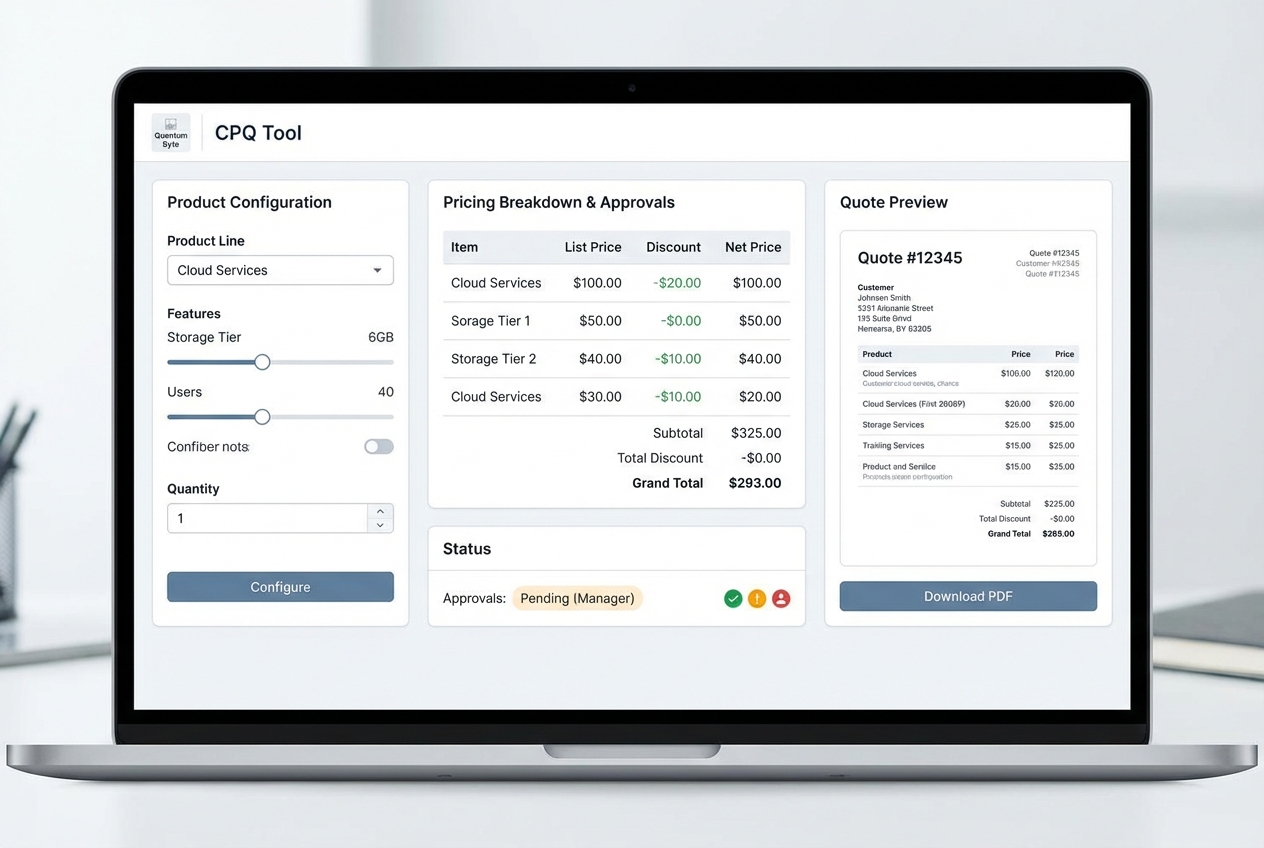
If your main CPQ pain is that quoting is tightly coupled to internal operations, a lightweight custom CPQ layer can be the fastest route to accuracy.
We are a good fit when you need custom logic quickly, but you still want the workflow to be maintainable as your pricing evolves. We have seen non-technical founders go from requirements to a working app in minutes, and the same speed applies to CPQ workflows. That is the benefit founders care about: fast iteration without giving up the ability to tailor logic as your pricing and approvals evolve.
A build pattern that works well in practice:
- Model your catalog: Define products, packages, add-ons, and constraints so the system can prevent invalid combinations. The goal is fewer "special-case" deals and fewer delivery surprises.
- Capture deal inputs: Collect the fields that truly change price and terms, such as segment, region, term length, quantity, and contract start date. The outcome is pricing that updates automatically based on context.
- Apply pricing logic with guardrails: Encode deterministic rules first (tiers, bundles, contract rates), then add controlled override paths. This keeps pricing consistent without removing the flexibility your team sometimes needs.
- Generate the quote as a record: Create a quote object with line items, totals, and an approval status. This gives you traceability and makes reporting possible.
- Route approvals intentionally: Route by discount threshold, product family, margin floor, or term exception. The expected outcome is predictable approvals and less "approval chasing."
- Export downstream only after approval: Push approved quotes into billing and fulfillment systems, or generate an order form that downstream teams can trust.
If you want a custom CPQ that is faster to get live, easy to change as your rules evolve, and future-proof without depending on a vendor roadmap, we built our platform for that. Start spec-first so your rules are explicit before you automate, our Packets captures requirements as structured inputs the build can follow. Templates and the AI builder let you set up a workflow that fits your catalog and pricing logic, so your team does not have to learn and onboard on a whole new platform.
When the CPQ workflow becomes business-critical, use an enterprise posture: strict permissions, audit trails, and controlled deployments. If that is where you are heading, start with QuantumByte enterprise.
Common CPQ pitfalls and how to avoid them
Most CPQ projects fail for predictable reasons. Fix the cause, not the symptom.
- Over-modeling the catalog: If you try to represent every edge case on day one, you slow the rollout and confuse sellers. Start with the deals you close most.
- Hidden pricing logic: If discounts live in side conversations, you will keep getting quote errors. Make thresholds explicit and enforceable.
- Approval bottlenecks: If approvals are slow, reps will route around the system. Keep exceptions narrow and provide clear next steps.
- Poor data ownership: If nobody owns product truth, your CPQ becomes outdated immediately. Assign clear owners for product, pricing, and terms.
- Disconnected downstream systems: If CPQ does not hand off cleanly to invoicing and fulfillment, your team will re-enter data and errors will reappear.
For an industry-specific example of why validation and contract compliance matter at the line-item level, see this breakdown of accessorial charges automation.
CPQ software evaluation criteria that actually matter
Vendor demos are polished. Your reality is messy. Use criteria that reflect your workflow.
- Rules engine quality: The system must express your constraints and pricing without fragile workarounds.
- Approval flexibility: You should be able to route by deal size, discount percentage, product family, region, or customer segment.
- Document control: Quote templates, terms, and versions should be manageable without breaking formatting or compliance.
- Integration depth: Confirm how it connects to CRM, ERP, billing, and provisioning. ServiceNow notes that modern CPQ integrates with CRM and syncs with ERP to validate pricing and operational constraints: ServiceNow on CPQ.
- Reporting and auditability: You need traceability for pricing overrides and approval decisions.
- Change management: The easiest CPQ to maintain is the one your team can update safely when pricing changes.
If you are evaluating whether to buy or build, anchor the decision on how unique your quoting workflow is. If your quote process is entangled with internal operations, automation, or validation, a custom workflow can outperform a one-size-fits-most CPQ.
For a broader lens on identifying which steps to systemize first, this guide on automating business processes is a good place to start.
What you should have now
You now have a practical way to think about cpq software as a workflow, not a buzzword:
- Definition clarity: Configure, Price, Quote and how CPQ supports quote-to-cash.
- Fit signals: When complexity and volume justify CPQ, and when a lighter approach is enough.
- Implementation path: How to go from catalog and pricing rules to approvals, integrations, and production hardening.
- Build vs buy framing: When a custom or hybrid approach is the better match for how you sell.
Frequently Asked Questions
What is CPQ software in simple terms?
CPQ software is a system that helps you build an accurate deal by enforcing product rules (configure), calculating the right price (price), and generating a customer-ready quote (quote). Salesforce provides a clear breakdown of these stages: Salesforce CPQ overview.
What is the difference between CPQ and CRM?
CRM (customer relationship management) tracks accounts, contacts, and opportunities. CPQ focuses on building and pricing the actual deal and generating the quote. In many stacks, CPQ sits between CRM and ERP so that approved quotes become clean orders.
Does CPQ replace ERP?
No. ERP (enterprise resource planning) runs back-office functions like inventory, finance, and fulfillment. CPQ supports selling workflows and then passes approved orders downstream. Oracle describes CPQ as bridging CRM and ERP in an end-to-end order-to-cash process: Oracle CPQ overview.
When should a startup implement CPQ?
Implement CPQ when quote complexity and volume create recurring errors or delays, or when pricing policies and approvals are slowing growth. If you are still experimenting with pricing weekly, start with a lightweight approach and evolve as the product matures.
Can I build my own CPQ instead of buying a CPQ tool?
Yes, especially when your quoting process is tightly coupled to internal workflows and unique logic. The key is to keep scope tight, test money paths, and design a system that stays maintainable as pricing evolves. If you are productizing a niche quote generator, it can help to study focused software wedges like those in these micro-SaaS examples.