
Manual budget tracking is a silent killer of agility. Organizations can lose an average of 20 to 30% in potential savings when tracking and visibility are poor, because overspend hides in plain sight and decisions arrive too late to matter.
And in a volatile market, waiting 15 days after month-end to find out "how you did" leaves you managing the business with outdated information.
The good news: AI-driven FP&A is pushing budget vs actual (BvA) automation from "nice to have" to a standard operating system. In this guide, you'll build the mental model for a modern BvA architecture, from automated ingestion to driver-based planning and real-time drill-down into General Ledger (GL) detail.
If you are new to finance automation, start with accounting process automation and our framework for finance automation ROI.
The Problem with Manual Budgeting vs Actuals Tracking
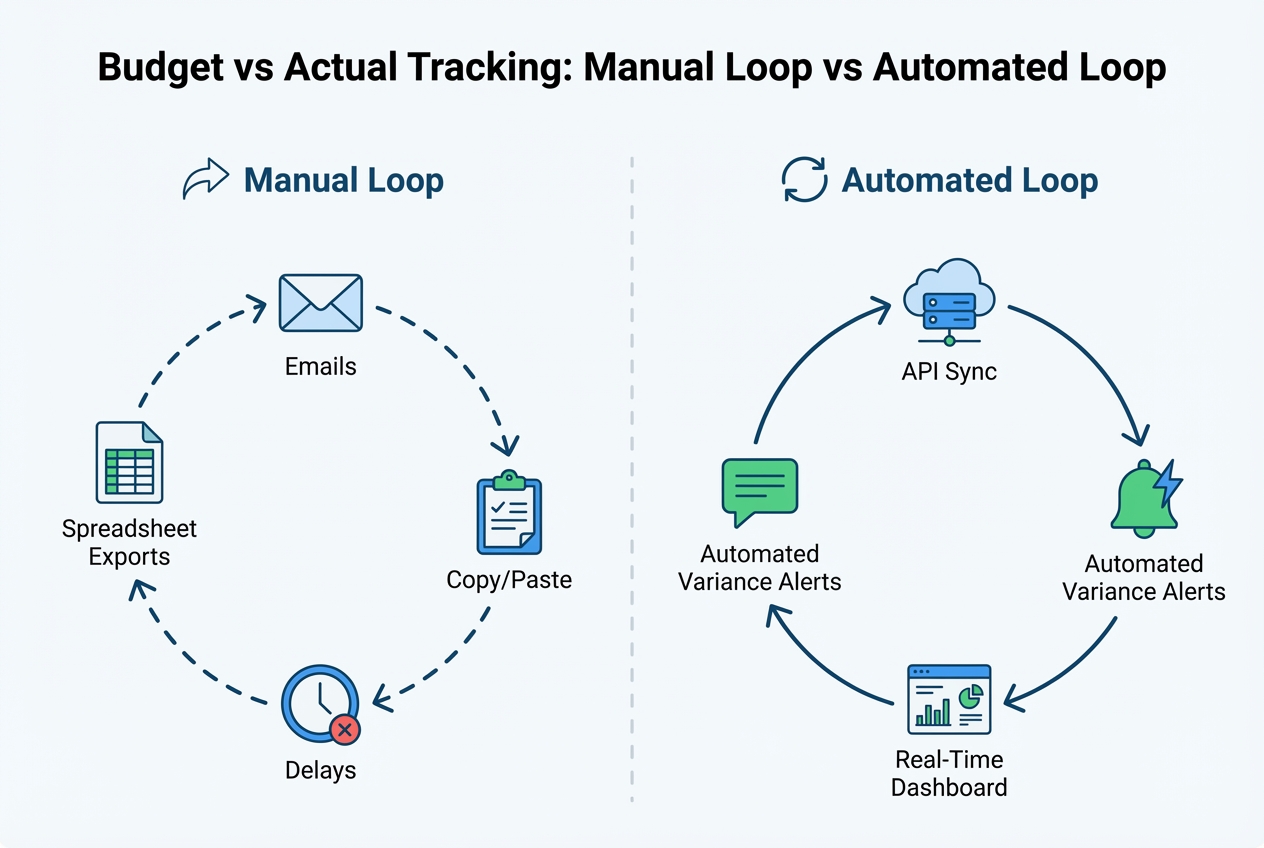
Manual BvA tracking creates hidden drag. It slows decisions, adds risk, and burns your team's attention on work that software should do for you.
- The spreadsheet trap: Version control breaks fast once more than one person touches the file. Add copy/paste from exports, and errors become normal. In real-world spreadsheet environments, errors are common (especially as complexity rises) even when teams are careful.
- Latency issues: Manual export/import creates a time lag. By the time the CFO sees the variance report, the business has already moved on. Decisions get made on stale numbers.
- Resource drain: Many finance teams spend more time prepping and reconciling data than explaining it and improving outcomes.
Manual Loop vs Automated Loop (Visual)
Core Pillars of Budget vs Actual Automation
A modern BvA system is not "one report." It's a set of connected parts that keep each other honest.
- Automated data ingestion: Your "Actuals" should flow from your ERP/accounting system automatically, and your "Budgets" should flow from your planning model or budget portal. No human intervention, no manual downloads.
- Real-time actuals sync: The best setups sync continuously or on a schedule (like hourly or daily) so stakeholders can trust the numbers. This is the foundation of real-time reporting (LiveFlow).
- Dynamic variance calculations: Real variance analysis is more than Budget minus Actual.
- Percent variance: Helps you compare across departments and line sizes so you don't miss "small dollars, big signal."
- Trend and run-rate: Shows whether you have a one-time blip or a pattern that will compound next month.
- Forecast impact: Translates "we're over" into "here's what this means for the quarter if nothing changes."
How to Implement Budget vs Actual Automation (Step-by-Step)
This implementation is designed for business owners and lean finance teams.
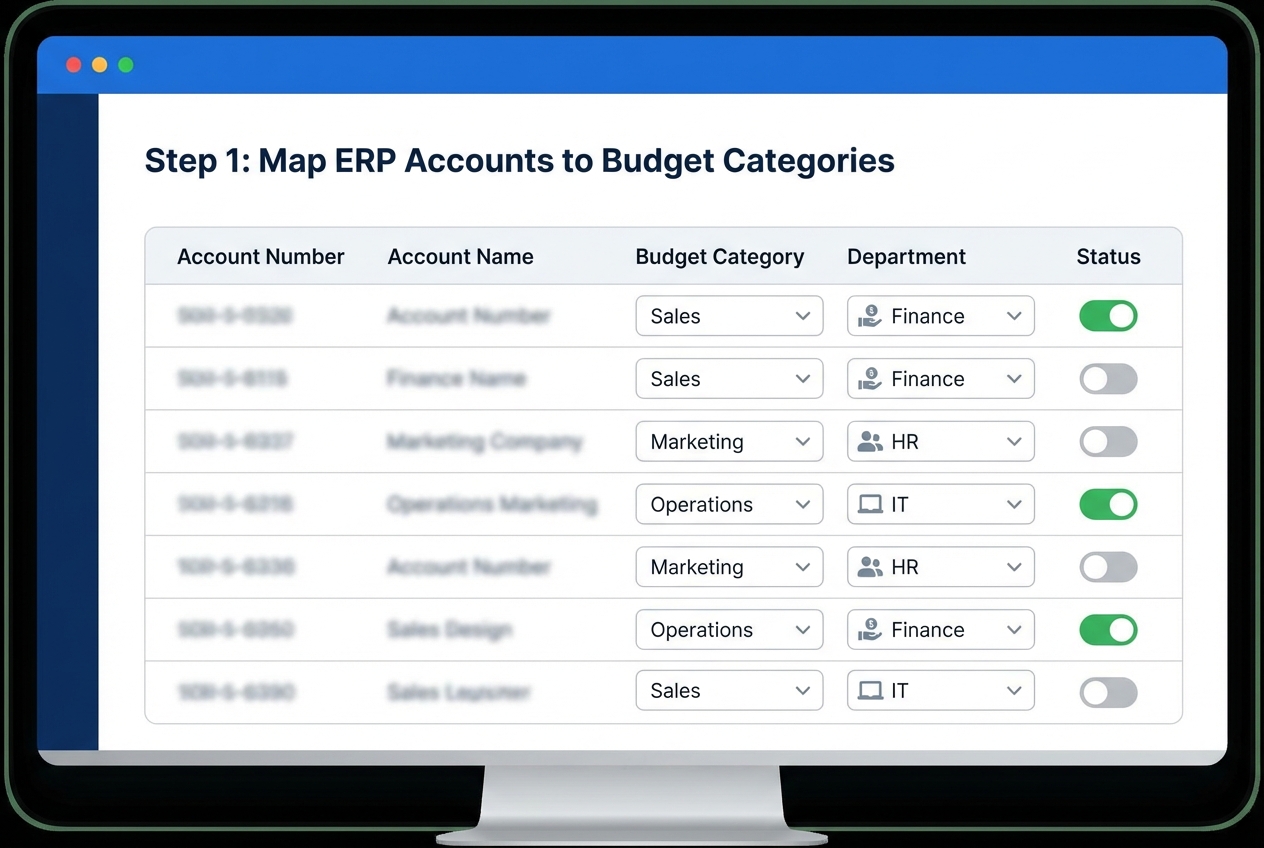
Step 1: Automating Budget Ingestion and Actuals Sync
If you're building a custom workflow (common for fast-moving teams), this is where an integration engine matters. For example, QuantumByte can help connect your existing stack and help you stand up an automation layer quickly, without months of custom plumbing.
Map your Chart of Accounts (COA) so budget line items match actual expense categories.
If your COA mapping is sloppy, everything downstream is noise. Do this carefully:
- Account to category mapping: Each GL account should roll up to exactly one category (or a clearly defined hierarchy) so totals stay consistent.
- Naming conventions: Align labels across systems (example: "Sales Software" vs "Sales SaaS") so the same cost doesn't split into two lines.
- Exception rules: Decide upfront how you'll treat one-time costs, pass-through expenses, and shared services so your reports don't get debated every month.
If you also want automated financial statements, see our guide to automated P&L reporting.
Result you're aiming for: A single source of truth where Actuals and Budgets line up cleanly, every time.
Step 2: Configuring Automated Variance Calculations and Alerts
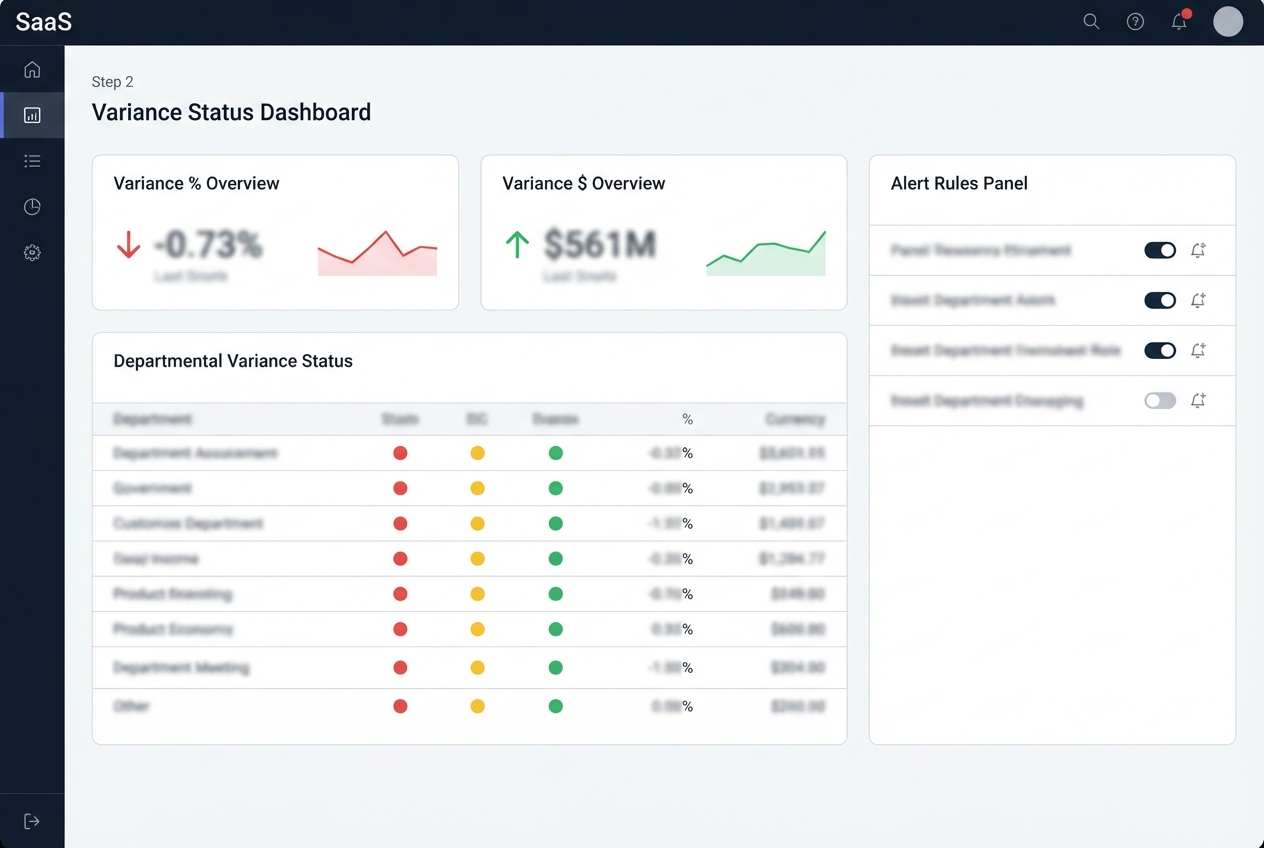
A variance is only useful if it triggers the right action. The most practical alert rules use both a percentage and a dollar amount.
- Percent threshold: Prevents small departments from hiding big percentage swings.
- Dollar threshold: Prevents large departments from generating noise on tiny changes.
Here's a simple set of starting rules you can tune over time:
| Variance Type | Suggested Alert Rule | Why It Works |
|---|---|---|
| Unfavorable expense variance | > 10% over budget AND > $5,000 | Catches meaningful overspend without alert fatigue |
| Favorable expense variance | > 15% under budget AND > $5,000 | Flags under-spend that may indicate under-investment or timing issues |
| Revenue shortfall | > 5% under budget AND > $10,000 | Protects growth targets early, not after the quarter ends |
This is where workflow automation creates leverage. You can use process automation to route alerts to the right owner, track status, and keep a clean audit trail.
Result you're aiming for: The moment you go off-track, the right person knows. No waiting for month-end.
Step 3: Streamlining Commentary Collection and Departmental Rollups
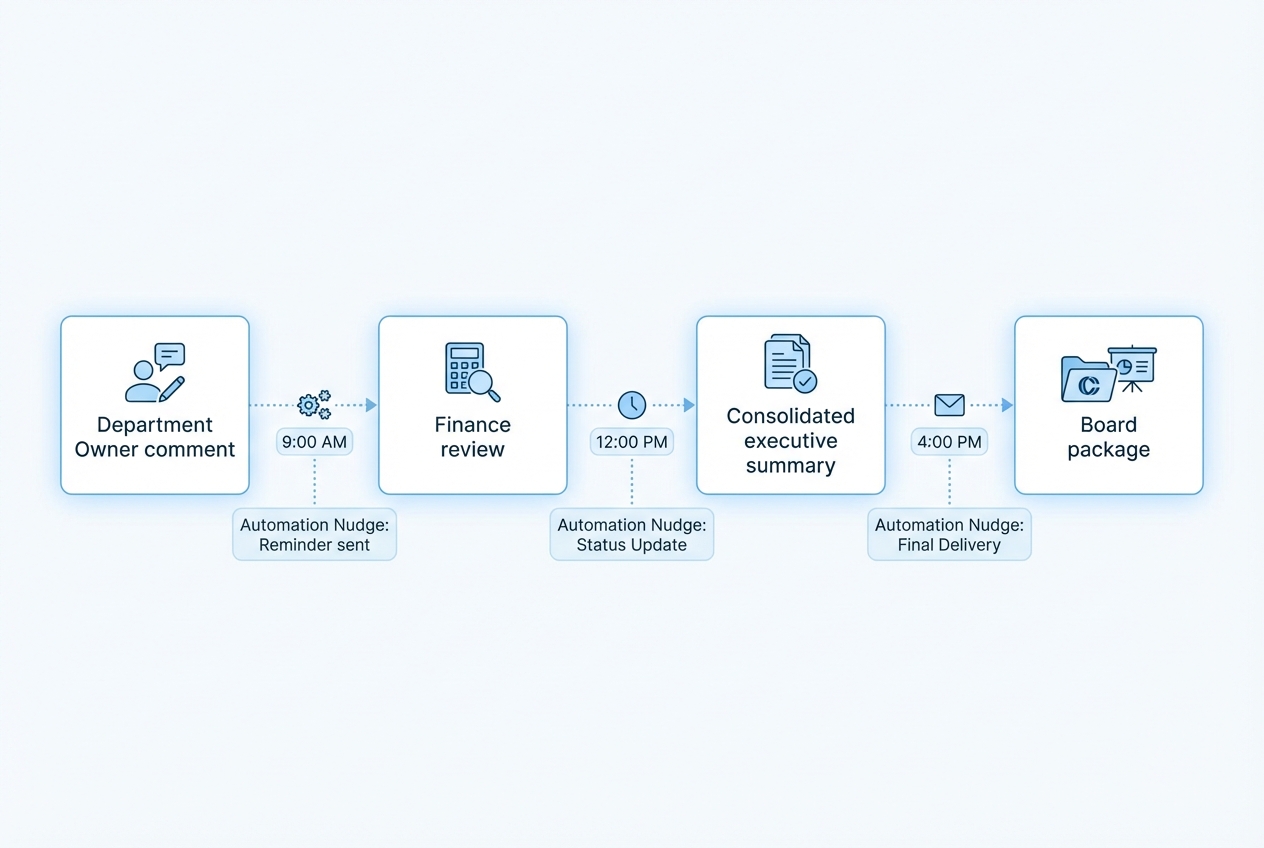
Variance commentary is where the story lives. Without it, leadership reads a report, then schedules six meetings to ask basic questions.
Build a simple system:
- Request trigger: Automatically ask the budget owner for an explanation when an alert fires, so you capture context while it's fresh.
- Clear deadline: Set a cutoff (example: 48 hours) so commentary arrives before the exec review.
- Light structure: Use a short form such as "What happened?", "Timing or permanent?", and "What will you do next?" to keep answers usable.
Integrate comments directly into the report.
This creates real accountability and tighter control. It's also aligned with classic budgetary control principles: compare actuals vs budget, explain variances, then take action.
The end result is hopefully an exec team that gets answers inside the package, not after three follow-ups.
Common pitfalls
Most "automation failures" are not tool problems. They're design problems. Fix these early and your BvA system will keep running, even when your company changes fast.
- COA mismatches: If your budget categories don't match how expenses post in the GL, you will spend every month arguing about mapping. Lock a simple rollup structure and treat mapping changes like production changes.
- Timing and accrual gaps: A budget might be monthly, but actuals arrive unevenly (prepaids, annual renewals, late invoices). Add rules for accruals and amortization, or your variance alerts will scream at the wrong moments.
- Duplicate spend owners: If two leaders share a line (example: "Contractors"), no one feels accountable. Assign a single owner per rollup line, even if you later split it into sub-lines.
- Alert fatigue: If everything triggers an alert, nothing gets actioned. Start with fewer alerts, then tighten thresholds as teams build the habit.
- No drill-down access: If budget owners can't see the transactions behind a variance, they default to guessing. Build drill-down views early, even if they are basic at first.
Advanced Techniques: Driver-Based Planning and Drill-Downs
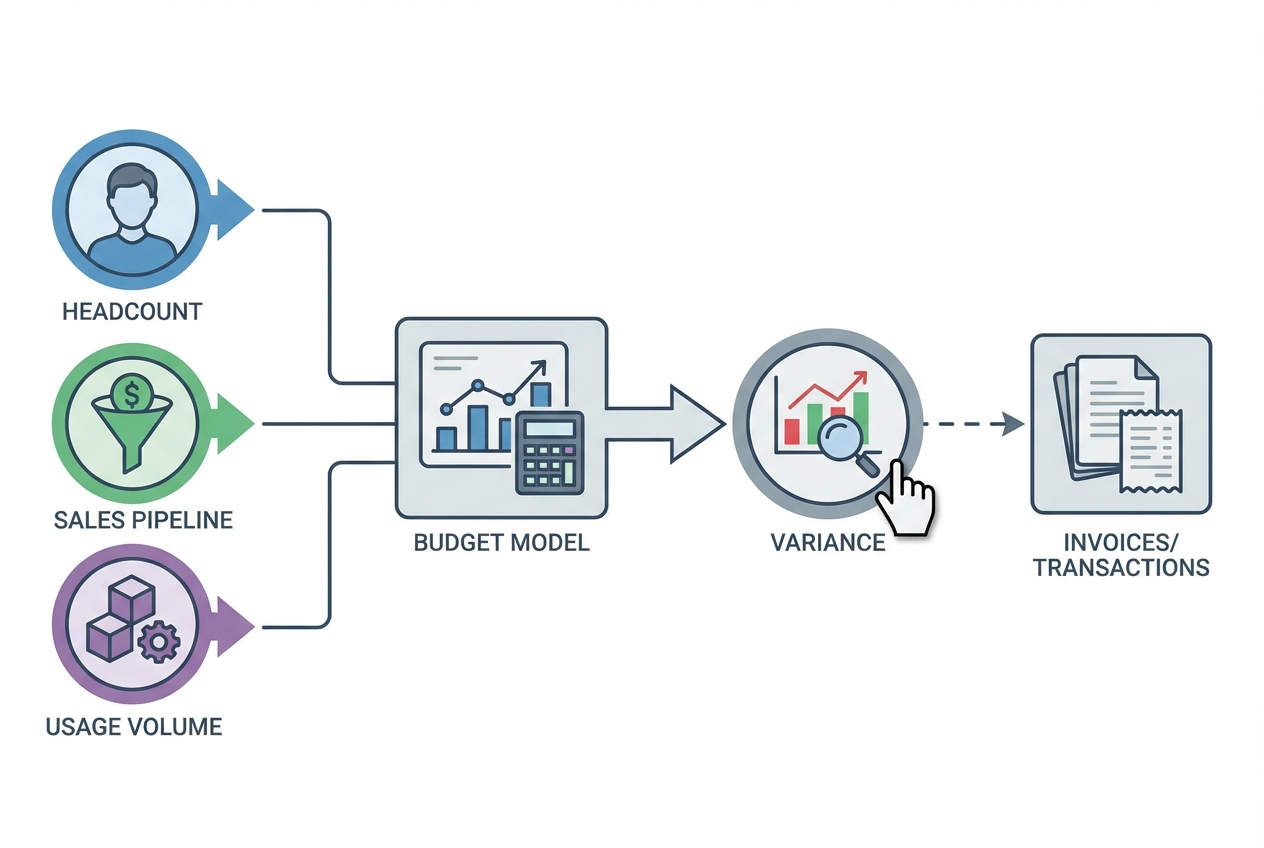
Once your core automation works, these upgrades turn reporting into a control system.
- Driver-based planning: Instead of budgeting a static number like "Marketing spend = $50k," you budget based on drivers that reflect how the business actually runs.
- Headcount: Budget tools and benefits per role, then scale with hiring plans so Finance and Ops stay aligned.
- Customer acquisition cost (CAC): Tie spend to expected pipeline or customer growth so you can spot efficiency issues early.
- Usage-based costs: Model infrastructure or vendor costs based on volume so unit economics stay visible.
- GL and project drill-down: Click a variance and see the invoices or transactions behind it. This is the difference between "we overspent" and "we overspent because of these three vendor renewals."
- Closed-loop control: Keep insight, ownership, and follow-up in one workflow so actions get tracked, not lost.
- Multi-entity consolidation: If you run multiple entities, automation can consolidate across them, apply currency rates, and handle intercompany logic so leadership sees one clean picture. A strong setup usually includes:
- Entity hierarchy rules: Define which subsidiaries roll into which parent, so reporting stays consistent even after reorganizations.
- Currency translation choices: Decide whether you'll use average monthly rates for P&L and period-end rates for balance sheet. Then lock the rule so your "why did this change?" conversations don't become FX debates.
- Intercompany eliminations: Remove internal revenue/expense (and intercompany AR/AP) so consolidated results reflect the external business, not internal billing.
- Consistent dimensions: Standardize departments, projects, locations, and class tracking across entities. Otherwise, consolidation "works" but slicing the data becomes unreliable.
The Repeatable Monthly Reporting Package Workflow
The goal is a month-end cycle you can run like clockwork. Here's a clean 5-day cadence that works for many teams:
| Day | Automation Step | Output |
|---|---|---|
| 1 | Automated sync of final month-end actuals | Actuals locked and ready |
| 2 | Automated distribution of variance reports to budget owners | Owners see their variances early |
| 3 | Automated commentary collection deadline | Explanations captured in-system |
| 4 | Executive review with automated insights and trend highlights | Leadership sees patterns, not noise |
| 5 | Board-ready package generation via one-click export | Clean deck or PDF, ready to send |
If you want this workflow to output a consistent executive or board pack, pair it with board reporting automation. For liquidity visibility alongside BvA, add cash flow reporting automation.
Why Automating BvA with QuantumByte
If your team is stuck between "we need automation" and "we don't have time for a six-month implementation," that's the gap QuantumByte is built to close.
- Centralized automation hub: Connect your existing tech stack to an automation hub at quantumbyte.ai
- AI agents for finance workflows: Reduce manual data manipulation with AI agents designed for finance ops
- Single source of truth: Align finance and ops on one set of numbers, with clear ownership and drill-down context
If you want to move fast, you can prototype a working BvA workflow from natural language and then extend it with custom code when needed. That "AI first, experts when it matters" model is how you get to real automation in days, not months.
Get started mapping your BvA workflow and requirements first, then build.
Frequently Asked Questions
What are the three primary components of a budget?
The three primary components are estimated revenues, fixed expenses, and variable expenses. Modern budget vs actual automation helps you track all three continuously by syncing directly with your ledger and planning inputs.
How does automation help with variance analysis?
Automation removes manual calculation errors and gives you fast visibility into discrepancies. You can automatically flag significant variances, route alerts to the right owners, and collect explanations while the context is still fresh.
Can budget vs actual automation handle multi-currency reporting?
Yes. Advanced platforms can apply exchange rates to actuals and support constant-currency comparisons against the original budget. This matters a lot once you operate across regions.
Is it possible to drill down into specific transactions?
Yes. The best systems let you click a high-level variance and view the GL entries, invoices, or vendor transactions that make up that total. This is where finance stops being "reporting" and starts being operational control.
What is driver-based budgeting in an automated system?
Driver-based budgeting links financial outcomes to operational activities like sales volume, headcount, or usage. Automation keeps those drivers updated with real-time data so forecasts stay accurate without constant manual edits.

