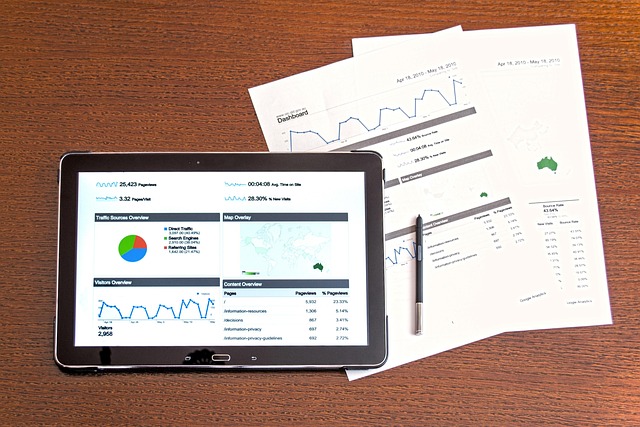
Manual board preparation drains executive energy fast. It can take weeks of back-and-forth to build a single board pack. Worse, that time usually goes into copying, cleaning, and reconciling numbers instead of explaining what they mean and what you should do next.
That matches what many finance teams report. Gartner reported that 59% of finance teams planned to increase AI spending and are seeing returns from it. Yet many teams still spend too much time preparing data instead of analyzing it. Board reporting automation flips that ratio. It turns reporting into a system that runs on schedule, with consistent data, and a clean approval trail.
In the era of rapid digital transformation, the classic Sunday-night scramble is being replaced by real-time dashboards and automated narrative drafts. This guide walks you through the shift from static spreadsheets to an automated reporting ecosystem, including data integration, template standardization, secure distribution, and governance controls.
Why Board Reporting Automation is the New Governance Standard
Automation saves time and it reduces risk.
Spreadsheets are fragile. A widely cited Forbe's estimate suggests that 88% of spreadsheets contain errors. When those spreadsheets become your source of truth, the board can end up debating the wrong numbers, or making decisions with incomplete context.
Board reporting automation helps because it creates a repeatable pipeline:
- Repeatable data pulls: Data pulls happen the same way every time, which reduces "who exported what" confusion.
- Consistent validations: Checks run on schedule, so missing values and outliers get flagged before the pack goes out.
- Shared KPI definitions: Everyone sees the same formulas and metric names, so the conversation is about decisions, not definitions.
- Tracked changes: Updates are logged and reviewable, so changes do not get lost in email threads.
That is what modern governance needs: a reliable system that produces consistent, director-ready reporting without last-minute chaos.
The Shift from Data Collection to Strategic Analysis
When you automate the "what," you finally have time for the "why."
Instead of spending days collecting numbers, your CFO and CEO can focus on:
- What changed and why: Explain drivers behind variance, not just the variance itself.
- Emerging risks: Spot cash risk, churn risk, pipeline quality, hiring gaps, or delivery bottlenecks early.
- Decision-ready recommendations: Put clear choices in front of the board, with context and trade-offs.
This is where dashboards and definitions matter. If your reporting layer is consistent, your board pack becomes a clear story, not a messy export.
How to Implement Board Reporting Automation in 5 Steps

If you want to move fast, you can prototype your workflow as a simple internal app first (data inputs, pack sections, approvals, publishing). That is the kind of "in days, not months" build Quantum Byte's AI app builder is good at, especially when you need a custom process without hiring a full team up front.
1. Define Your Standard Board Packet Structure
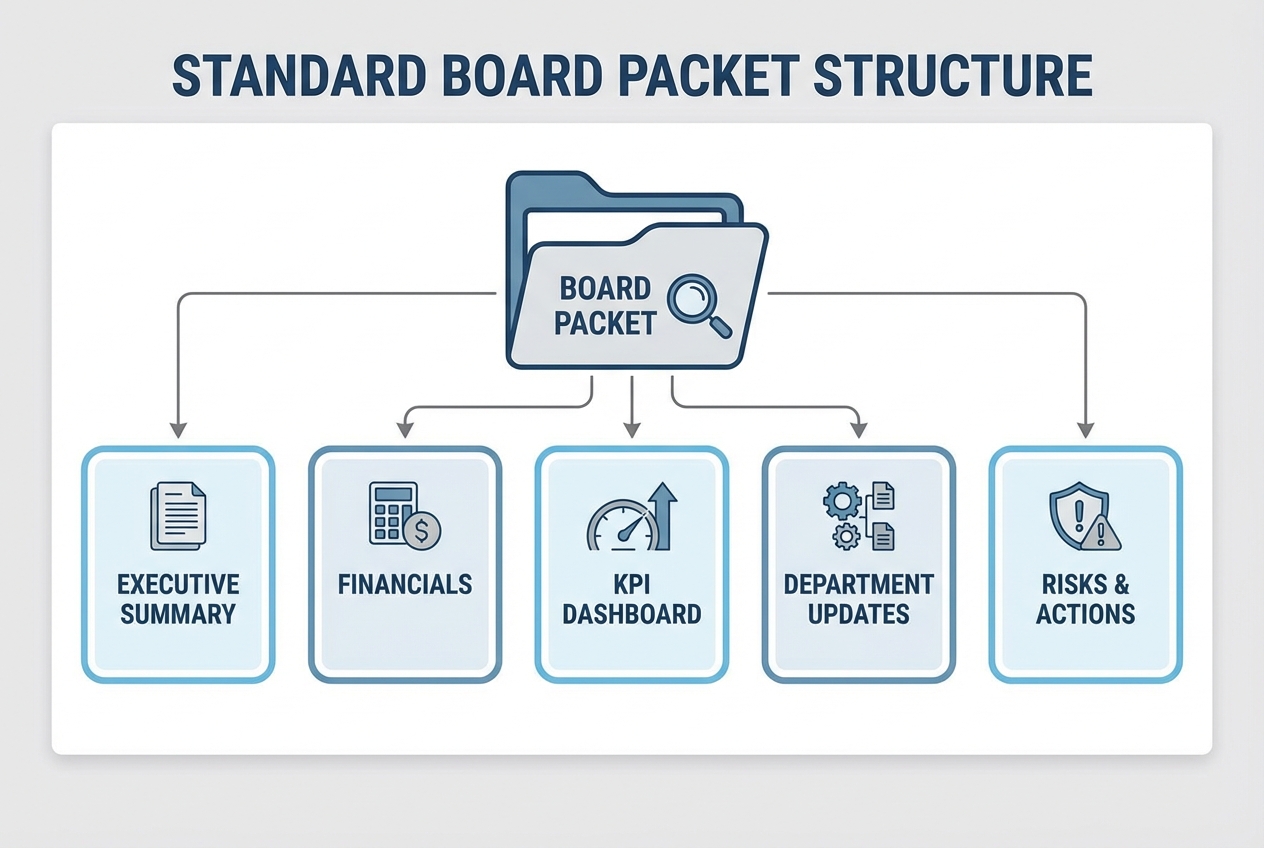
Before you automate anything, lock the structure. If every month's pack is different, automation will amplify chaos, not reduce it.
A typical automated board pack should include:
- Executive Summary: A one to two page overview of the month, what matters, and what decisions you need.
- Financial Statements: P&L, Balance Sheet, and Cash Flow, ideally pulled directly from your ERP or accounting system.
- KPI Dashboards: Sales, retention, churn, gross margin, CAC, runway, delivery performance, and whatever drives your business model.
- Departmental Updates: Short narratives from HR, Product, Marketing, and Operations with clear asks and blockers.
Practical tip: Add a "Definitions" appendix once, then keep it. If a metric like gross revenue changes meaning mid-year, your board will lose trust in every chart.
Also decide what "board-ready" means in your company:
- KPI granularity: Choose the level that supports decisions (often monthly, with a quarterly view), without flooding the pack with daily noise.
- Committee separation: Decide what belongs in the main pack vs. an audit, comp, or security appendix.
- Decision slots: Add a consistent section that says "Decisions requested" so meetings stay sharp.
2. Connect Your Data Sources for Real-Time Accuracy
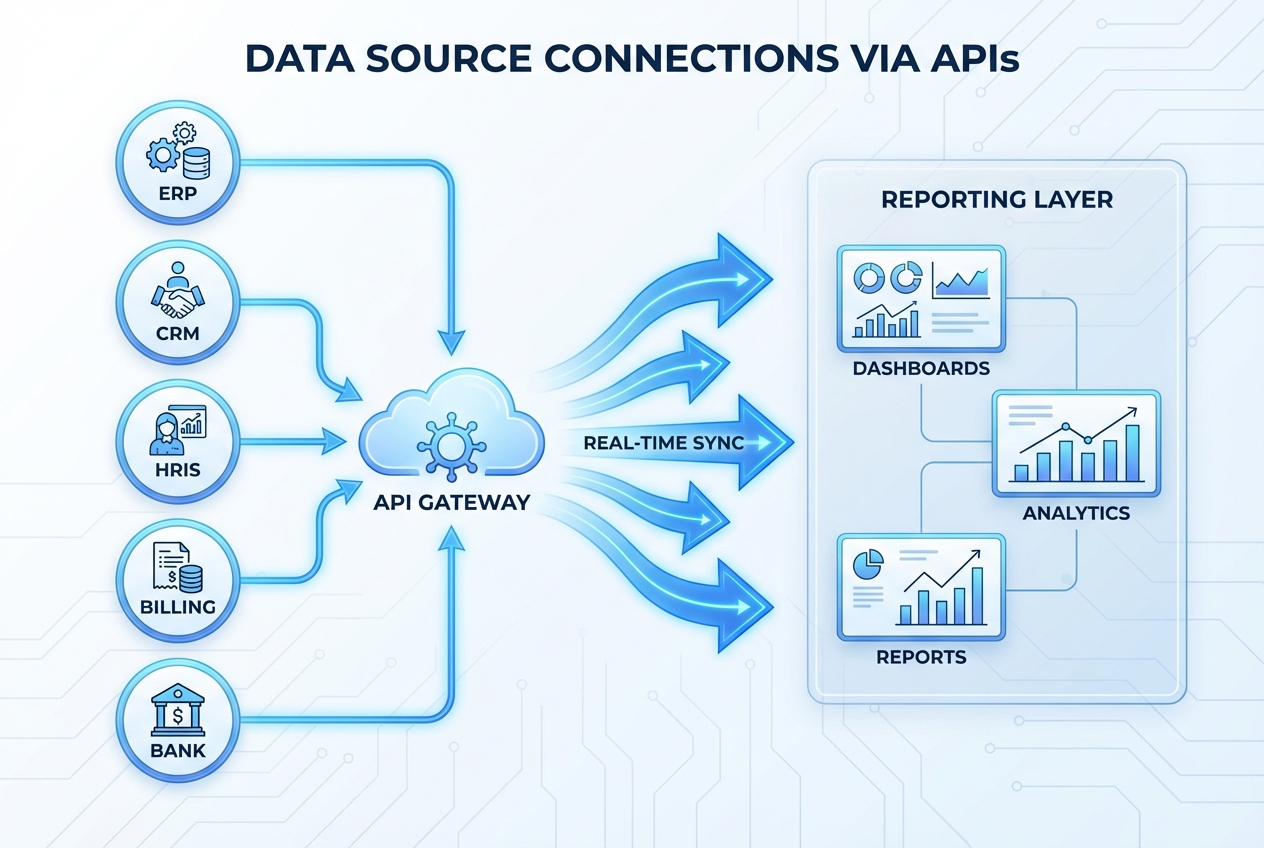
Board reporting automation lives or dies on integrations. Manual exports are where things break. They introduce delays, copy errors, and multiple versions of the truth.
Start with your core systems:
- ERP/accounting: QuickBooks, Xero, NetSuite. This is where financial statements should come from.
- CRM: HubSpot, Salesforce. This should drive pipeline, bookings, and forecast inputs.
- HRIS/payroll: Gusto, Rippling, BambooHR. This is often the cleanest source for headcount and comp.
- Billing and product data: Stripe, Chargebee, your app database. This is where you get usage, expansion, and retention truth.
Use APIs (simple definition: a secure way for systems to talk to each other) to pull data automatically into your reporting layer.
To keep accuracy high, add lightweight "trust checks" right after the sync:
- Completeness checks: Confirm expected rows exist (all active customers, all cost centers, all departments).
- Reconciliation checks: Tie key totals back to the source (for example: Stripe revenue vs. GL revenue, with known timing differences noted).
- Freshness checks: Confirm each source updated within the expected window, so you do not publish stale data.
If your data is messy across tools, you can build a lightweight "board data hub" that standardizes KPIs once and then feeds every board pack. Quantum Byte's AI app builder can get the first version working quickly; your in-house development team can handle complex integrations when needed.
3. Build Dynamic Templates
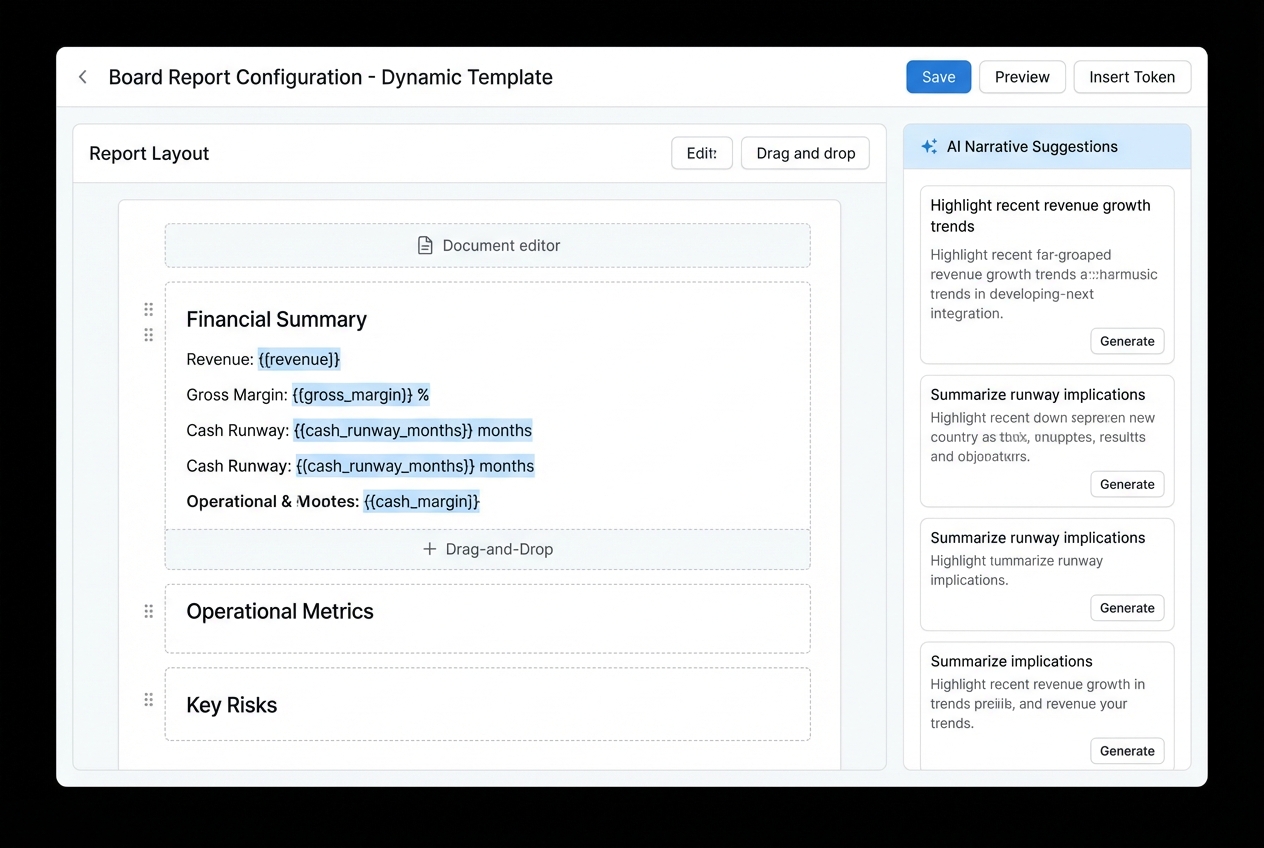
Once the data is connected, you need templates that update automatically. This is where most teams finally break the copy-paste loop.
Think of "smart templates" like a living board pack:
- Auto-refresh charts: Visuals update when the underlying data updates, so you stop re-building decks.
- Defined KPI formulas: Metrics pull from a single definition, which reduces debates and rework.
- Flexible sections: Packs can expand or collapse by business unit, product line, or region without redesigning the file.
- Built-in narrative prompts: The right leader gets prompted to comment where the variance actually appears.
If your board pack is still a Word document, move to a template-driven system first. Narrative AI will not compensate for unstable sections, inconsistent definitions, and last-minute manual edits.
4. Establish Governance and Approval Workflows
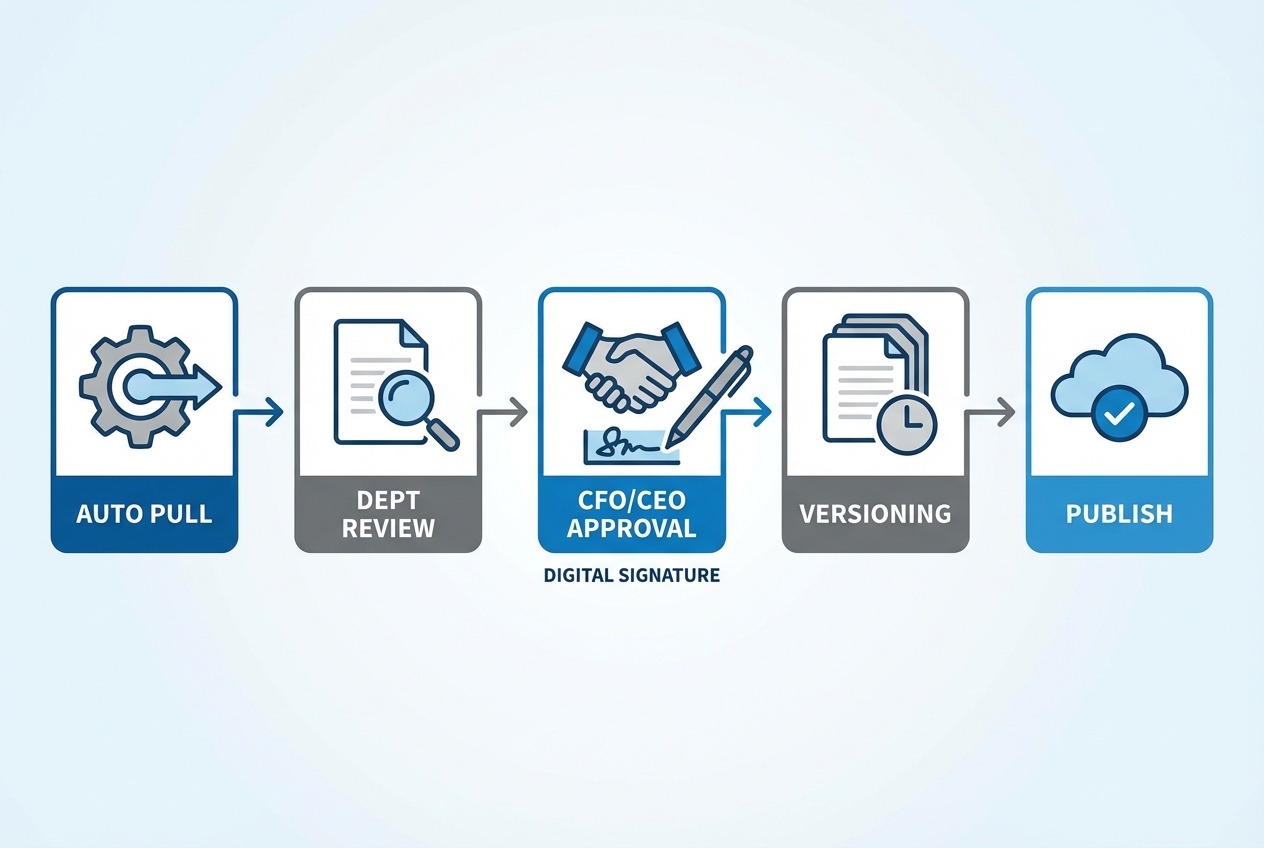
Automation should not remove oversight. It should make oversight easier, faster, and more consistent.
A strong workflow looks like this:
- Scheduled data pull: Data is pulled automatically on a fixed schedule (or on demand) and the system logs refresh time, source, and status.
- Section owner review: Department heads review their KPIs and charts, then add commentary where the pack prompts them.
- Executive approval: The CFO/CEO performs final review, confirms the "data freeze," and approves publishing via a digital sign-off.
- Version control and audit trail: Every change (data refresh, narrative edit, chart update) is recorded so you can answer "what changed?" without chasing email threads.
Governance details that prevent "board pack chaos" later
Most board pack problems are not technical. They are workflow problems.
- KPI ownership: Assign one owner per metric (not per chart). That person is accountable for definitions, anomalies, and commentary quality.
- Data freeze policy: Set a "freeze" time (example: noon on Day 6). After that, changes require a documented exception, plus a clear "what changed" note.
- Approval matrix: Decide which sections require extra sign-off (example: legal risk reviewed by counsel, security appendix reviewed by the security lead, comp details reviewed by HR and the comp committee chair).
- Exception handling: Define how you correct an error after distribution (example: publish a new version with a change note and notify directors in the portal, rather than sending a patched PDF by email).
- Evidence and lineage: For top-level numbers, link back to the source report or query. This reduces "trust debates" during the meeting.
A lightweight RACI you can copy
You do not need a massive governance program to get board reporting under control. A simple RACI (who does what) goes a long way:
- Responsible: Finance ops or analytics lead owns data refresh, validation rules, and pack assembly.
- Accountable: CFO owns final accuracy, narrative balance, and publishing approval.
- Consulted: Department leads provide context and forecasts for their areas.
- Informed: CEO, EA/governance lead, and board members get access to the final published pack.
If you want this as a real internal system (instead of a patchwork of docs and reminders), Quantum Byte can help you turn the workflow into a purpose-built app: section inputs, approvals, versioning, and one-click publishing.
5. Secure Distribution and Access Control
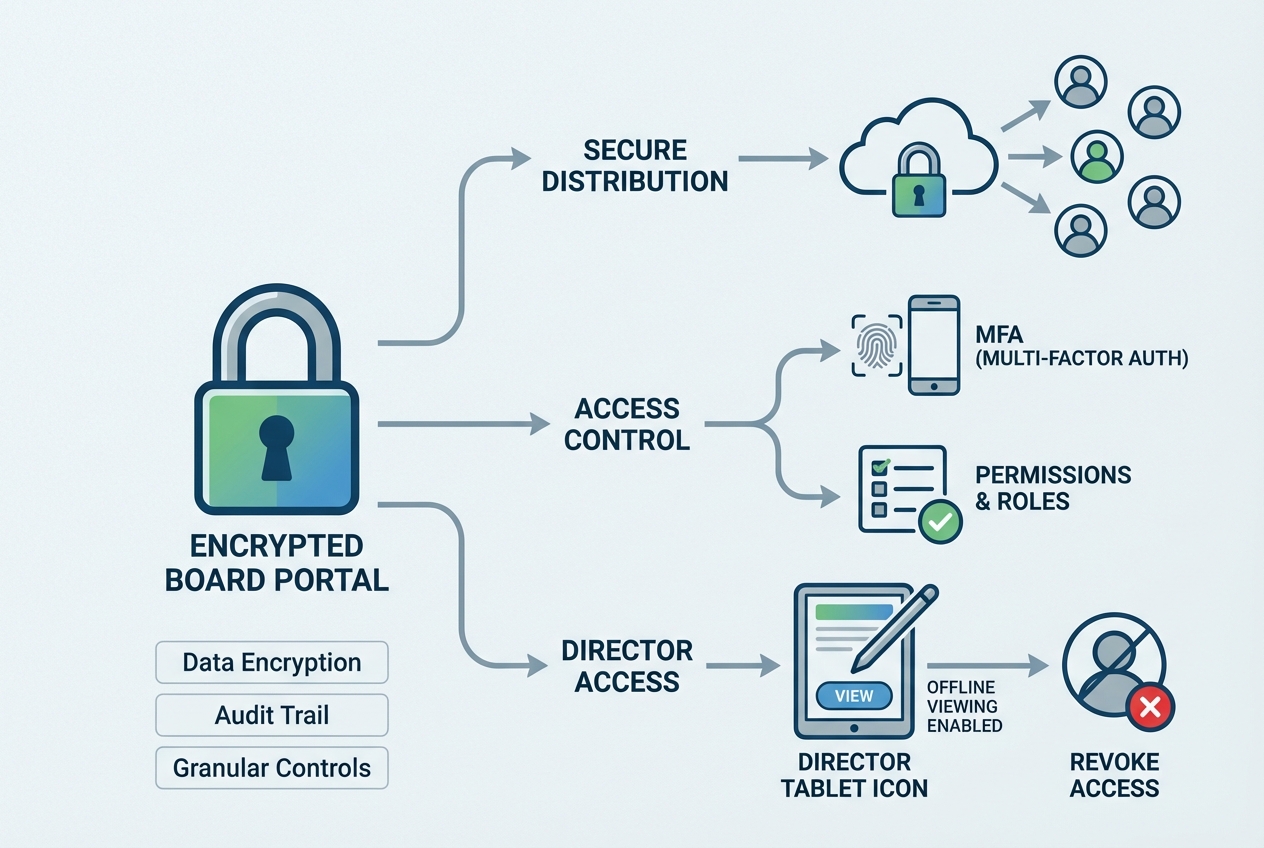
Stop emailing board packs.
Email forwarding is real. Downloads are hard to control. And once a PDF leaves your system, it can live forever in the wrong inbox.
Use a secure portal where:
- Encryption: Documents are encrypted in transit and at rest, reducing the risk of interception or leakage.
- Permission-based access: Directors only see what they are allowed to see, which supports committees and sensitive topics.
- Revocable access: Access can be removed instantly for role changes, offboarding, or interim advisors.
- Multi-factor authentication (MFA): MFA is enforced to reduce account takeover risk.
NIST's guidance on cybersecurity outcomes is a solid reference point when you are designing secure access controls.
Essential Features for Board Reporting Automation Software
When you evaluate tools, focus on the features that keep you scalable and aligned with your long-term data strategy.
Here are the non-negotiables:
- Audit trails: You should be able to see who changed what and when, including data refreshes and narrative edits. This protects credibility and makes reviews faster.
- Permission-based access: Some board members should not see everything. Restrict HR compensation detail, legal topics, or M&A notes to the right committees.
- Offline access: Directors travel. Your pack must work on a plane and in low-connectivity environments, with secure sync when they reconnect.
- Interactive visualizations: Directors should be able to drill down during a meeting without asking your team to "follow up later."
Quick decision filter: If a tool cannot show version history and approvals, it likely lacks governance-grade controls for board reporting.
Creating a Reporting Timeline for Your Automated Pack
Automation shines when you run it on a fixed cadence. It removes the "we will pull it together" vibe and replaces it with a predictable operating rhythm.
Here is a simple timeline you can reuse every month or quarter:
| Day | Owner | What happens | Output |
|---|---|---|---|
| Day 1-3 | Finance ops / data owner | Automated data fetch + validation checks | Clean, refreshed datasets |
| Day 4-5 | Department leads | Narrative contributions + KPI commentary | Draft narrative complete |
| Day 6 | CFO/CEO | Executive review + final edits | Approved board pack |
| Day 7 | Ops / EA / governance lead | Secure distribution to board | Directors receive pack |
| Day 14 | Board + executives | Board meeting | Decisions and action items |
What to automate inside this cadence:
- Validation rules: Check missing values, outliers, and KPI definition drift so the pack stays trustworthy.
- Reminders: Prompt department leads automatically when their section is due, so you stop chasing updates.
- Pack assembly: Publish the current approved version in one action, with the audit trail attached.
Conclusion
Board reporting automation is no longer a luxury. It is a practical governance upgrade for any organization that wants agility and transparency.
If you follow the roadmap above, you will move from static PDFs and spreadsheet fragility to a repeatable system:
- Standardized packet structure: Keep your pack shape stable so automation can do its job and directors build review habits.
- Real-time, validated data: Pull from source systems and run checks so your board debates decisions, not numbers.
- Template-driven narratives: Draft insights faster and collect commentary in the right place, at the right time.
- Approvals and audit trails: Make sign-off visible and version history clear, which protects trust.
- Secure delivery and access control: Treat the board pack like the sensitive asset it is, with encryption and revocable access.
If you need to build the business case and justify the investment, see Finance Automation ROI.
When you're ready to implement a scalable board reporting solution for your organization, schedule an enterprise consult with our automation experts to map your workflow and requirements.

