
Manual cash flow management is a major bottleneck. Many finance teams spend most of their week just gathering data instead of making decisions with it. When markets move fast, that delay becomes expensive.
That is why cash flow reporting automation has shifted from "nice to have" to a strategic advantage. With AI-driven data extraction and bank APIs, you can move past monthly post-mortems and run your business with daily, proactive cash visibility.
This guide walks you through the technical setup for automating direct and indirect cash flow reporting, integrating live bank feeds, and building a 13-week rolling forecast. You will also learn how to sync AR/AP, set up reconciliation rules, and track the metrics that actually drive growth.
By the end, you will have a blueprint you can implement in days, not months.
Understanding Direct vs. Indirect Cash Flow Reporting Automation
Before you automate anything, decide what "truth" you need most often.
The indirect method starts with net income and adjusts for non-cash items like depreciation and changes in working capital. It is common for formal reporting. It is also slow for day-to-day operations because it depends on clean month-end accounting.
The direct method tracks actual cash in and cash out. It gives you the clearest view of liquidity, especially when payroll, ad spend, inventory, or supplier payments can swing your balance quickly.
Automation changes the game because it removes the main downside of the direct method: manual work.
Direct vs. indirect at a glance
| Category | Direct method (cash-in/cash-out) | Indirect method (net income adjustments) |
|---|---|---|
| Best for | Daily/weekly cash decisions | Formal monthly reporting, audit alignment |
| Data needed | Bank transactions + categorization | GL, accruals, working capital movements |
| Typical pain | Historically labor-intensive | Lagging indicators, month-end dependency |
| What automation improves | Fast categorization, live visibility | Faster close, cleaner adjustments |
A practical approach for most teams is to automate both views, then keep them reconciled:
- Run weekly decisions on the direct view: Use cash-in and cash-out to make fast calls on hiring, spend, inventory, and payouts.
- Keep external reporting aligned with the indirect view: Use the net-income-based view to stay consistent with financial statements.
- Reconcile the two views: Make sure they tell the same story so leadership does not debate which number is "real."
How to Set Up Cash Flow Reporting Automation in 5 Steps
Step 1: Connecting Real-Time Bank Feeds and ERP Data
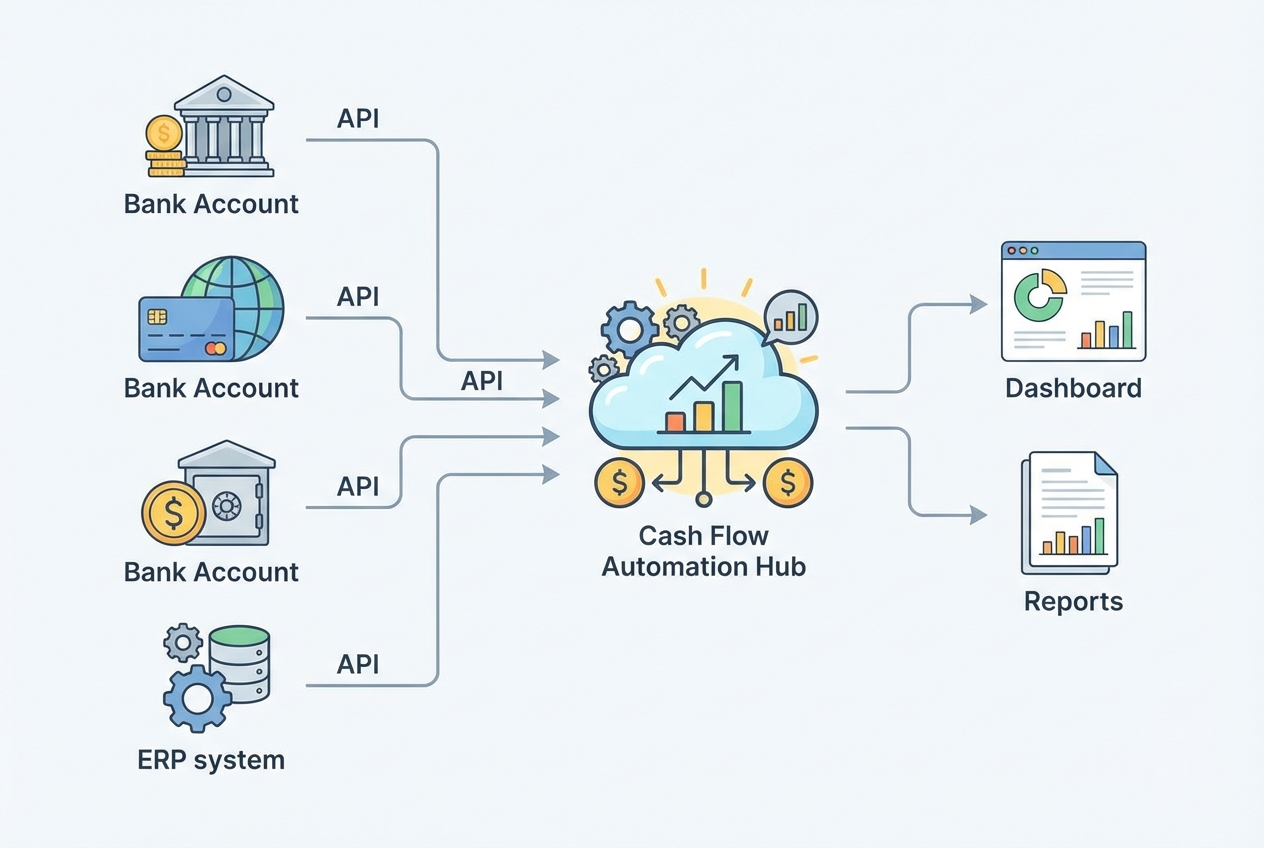
Everything depends on this step. If your bank data and ERP data are not flowing into one place, you are still doing "spreadsheet theater."
Modern setups use live APIs instead of CSV exports. That means your system pulls new transactions on a schedule (for example, every hour) and updates your cash position automatically.
A common path is using Open Banking connectors such as Plaid to securely connect accounts and stream transactions.
Key technical decisions to make:
- Bank connectivity method: API feeds are best because they refresh automatically and reduce human error. File-based imports can work, but they recreate delays and tend to break.
- Account coverage: Include every operating account, payroll account, credit card, and line of credit. Partial coverage creates false confidence and hides risk.
- Multi-currency support: If you operate globally, store amounts in both local currency and a reporting currency. Also store the FX rate used so results can be audited later.
- ERP sync: Pull your chart of accounts, vendor/customer masters, and open invoices. Bank feeds tell you what happened. ERP context helps explain why.
- Implementation tip: Create a single "cash data model" first. Even if you keep your current accounting stack, having one clean layer for transactions, categories, and entities makes every later step easier.
Step 2: Automating AR and AP Data Extraction
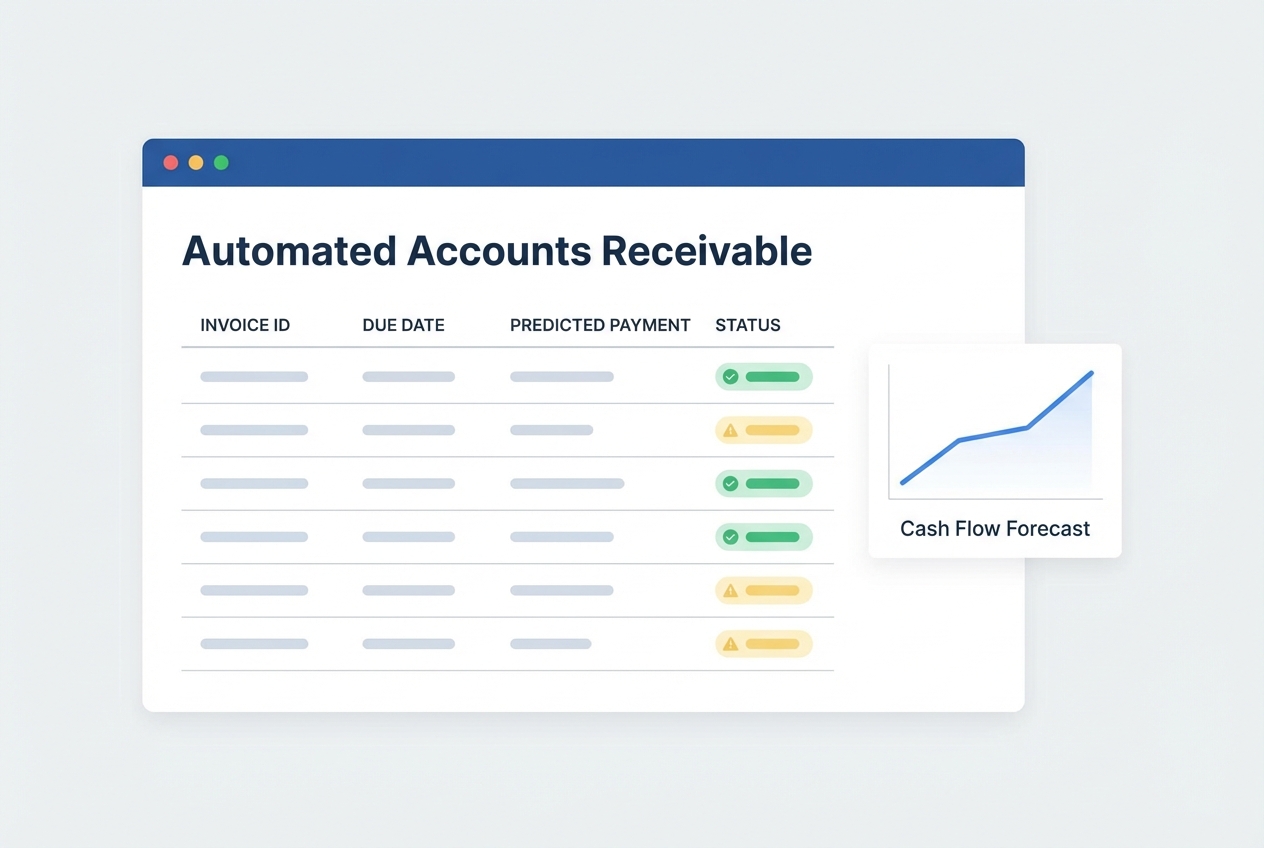
Cash forecasting fails when it treats invoices as "due date equals payment date." Real life is messier.
To improve forecast accuracy, pull open AR/AP from your sub-ledgers and calculate an expected date (when cash is likely to arrive or leave) rather than relying on the stated due date.
How to do this in practice:
- Extract open invoices and bills: Pull AR aging and AP aging from your ERP or accounting system so your forecast starts with what is actually outstanding.
- Add behavior-based prediction: Use historical payment patterns by customer and vendor. If a customer always pays 12 days late, your forecast should reflect that.
- Ingest unstructured invoices: If some invoices arrive as PDFs in email, use AI extraction to read them and structure the fields.
What to automate (and why it matters):
- Expected date: Your forecast becomes realistic because it reflects how cash actually behaves, not how contracts pretend it behaves.
- Probability weighting: For large invoices, assign confidence levels (for example, 90% likely this week). That makes it easier to plan hiring, inventory, and ad spend with less risk.
- Collections workflow signals: Track promise-to-pay dates, disputes, and partial payments. These are early warnings that your forecast should adjust.
Step 3: Establishing Automated Reconciliation Protocols
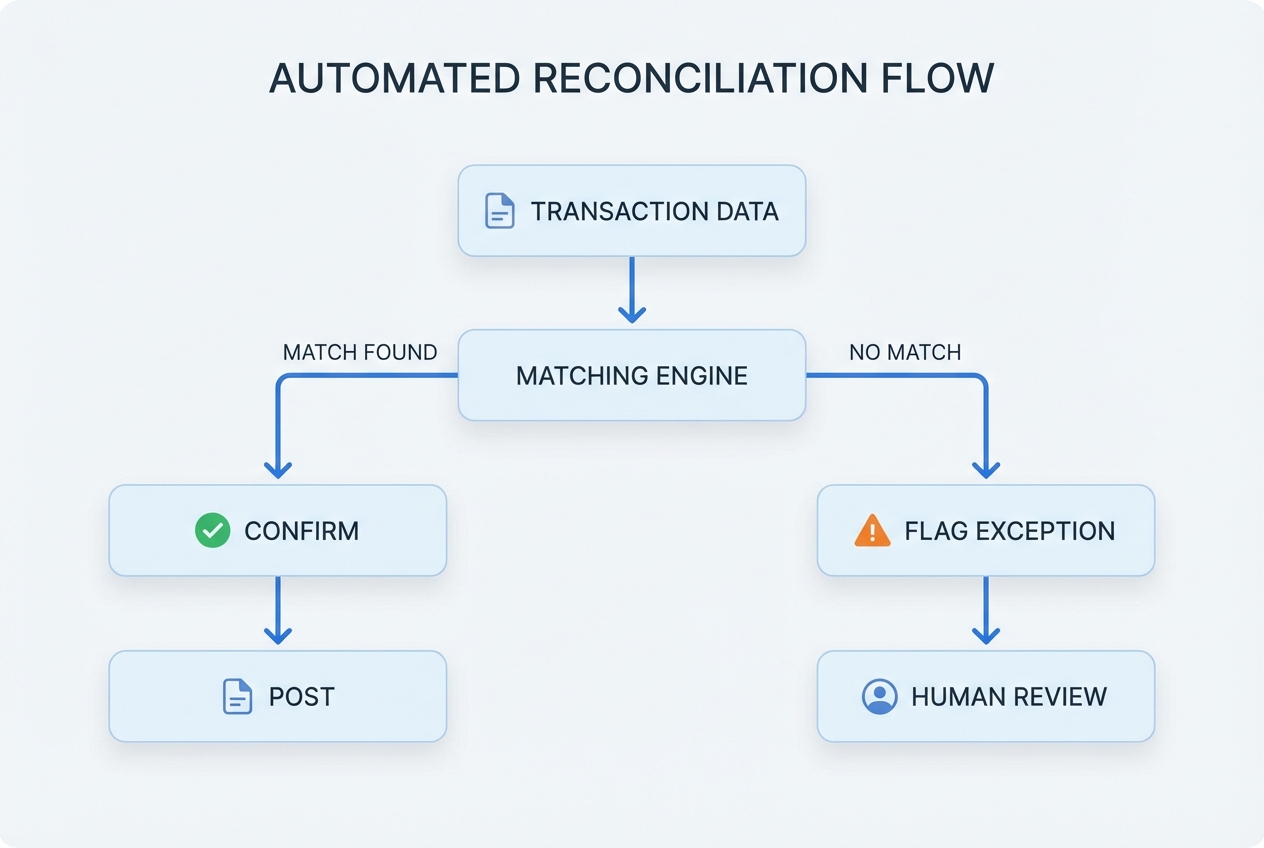
Manual reconciliation is where time disappears and errors sneak in. Automation fixes this by matching bank transactions against ERP records every day.
Your goal is simple: reach 90%+ auto-matching. Below that, your team still spends too much time in the weeds.
How it works:
- Pull bank transactions daily: Refresh transactions from every connected account on a set schedule.
- Pull ERP cash-impacting activity daily: Sync payments, deposits, and any journal entries tied to cash.
- Run matching rules: Match by amount, date window, vendor/customer, and reference IDs, then refine over time.
- Post matched items automatically: Confirm and post clean matches so your books stay current without manual effort.
- Flag exceptions for human review: Route only outliers to your team so attention goes where it matters.
What to put in your reconciliation rule set:
- Matching tolerances: Small differences happen (bank fees, FX rounding). Define thresholds so you do not create false exceptions.
- Recurring vendor learning: Machine learning can learn vendor patterns over time, but rules-based systems also work well when vendor master data is clean.
- Exception categories: Not all exceptions are equal. Label them (missing invoice, duplicate payment, unknown merchant, bank fee, FX variance) so triage is fast.
Step 4: Configuring Rolling Forecasts and Scenario Planning
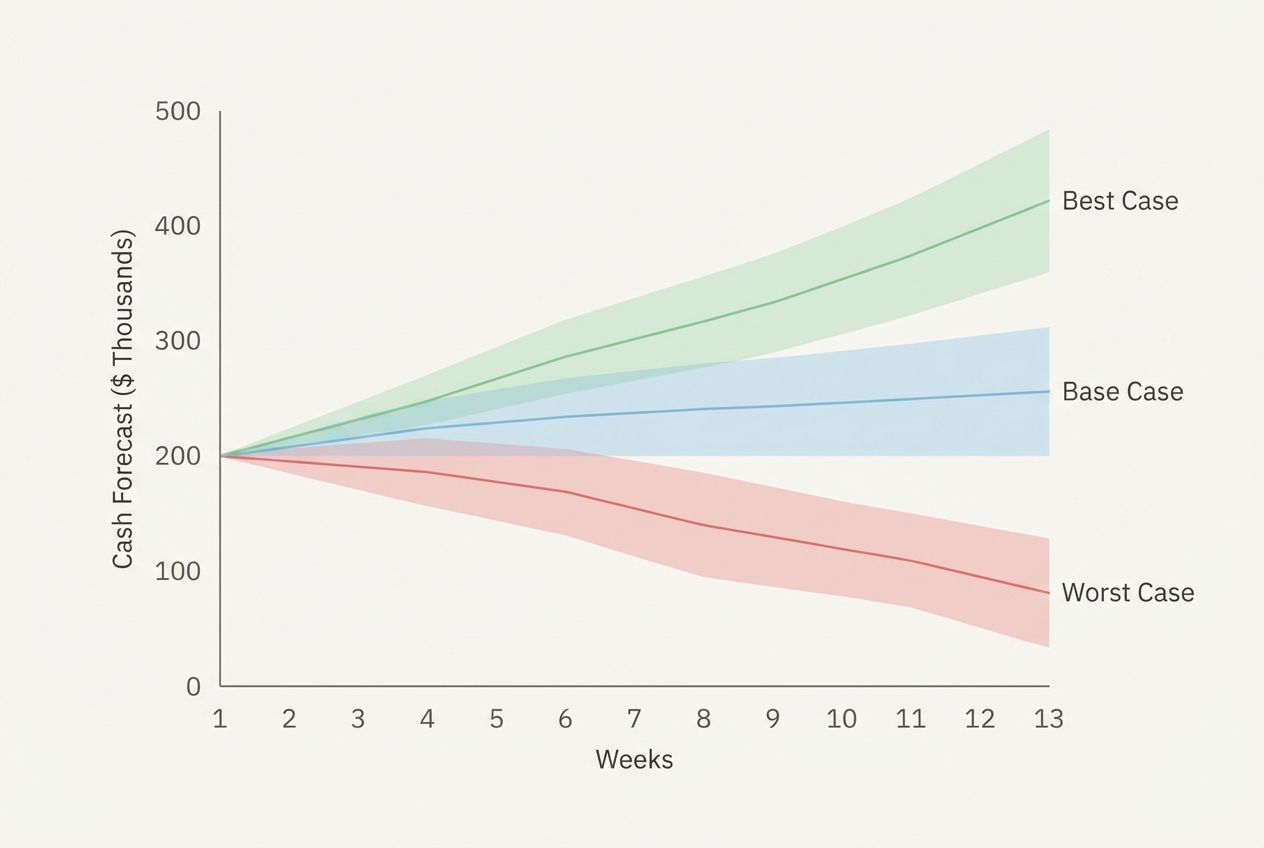
Static budgets break the moment reality changes. Rolling forecasts keep you in control because they update automatically as actuals come in.
The industry standard for tactical cash planning is a 13-week rolling forecast. It is long enough to see around corners, short enough to be actionable.
Core setup:
- Baseline forecast logic: Start with today's cash, then add projected inflows and outflows by week.
- Automated updates: When actual payments hit the bank, the forecast shifts forward without manual edits.
- Scenario parameters: Build at least three scenarios so you can stress-test liquidity before you commit to decisions.
- Best case: Model faster collections and controlled spend to see upside capacity.
- Base case: Model expected behavior so your plan stays grounded.
- Worst case: Model delayed collections and unexpected cost spikes to identify your risk window early.
Practical scenario questions to encode:
- Largest client pays 15 days late: Check what happens to payroll coverage and whether you breach any cash buffer policy.
- Ad spend increases 20% next month: Confirm whether you dip below your minimum cash reserve and when.
- Vendor terms tighten: Identify the earliest week a cash crunch appears so you can renegotiate or slow spend sooner.
Step 5: Setting Your Reporting Cadence and Dashboards
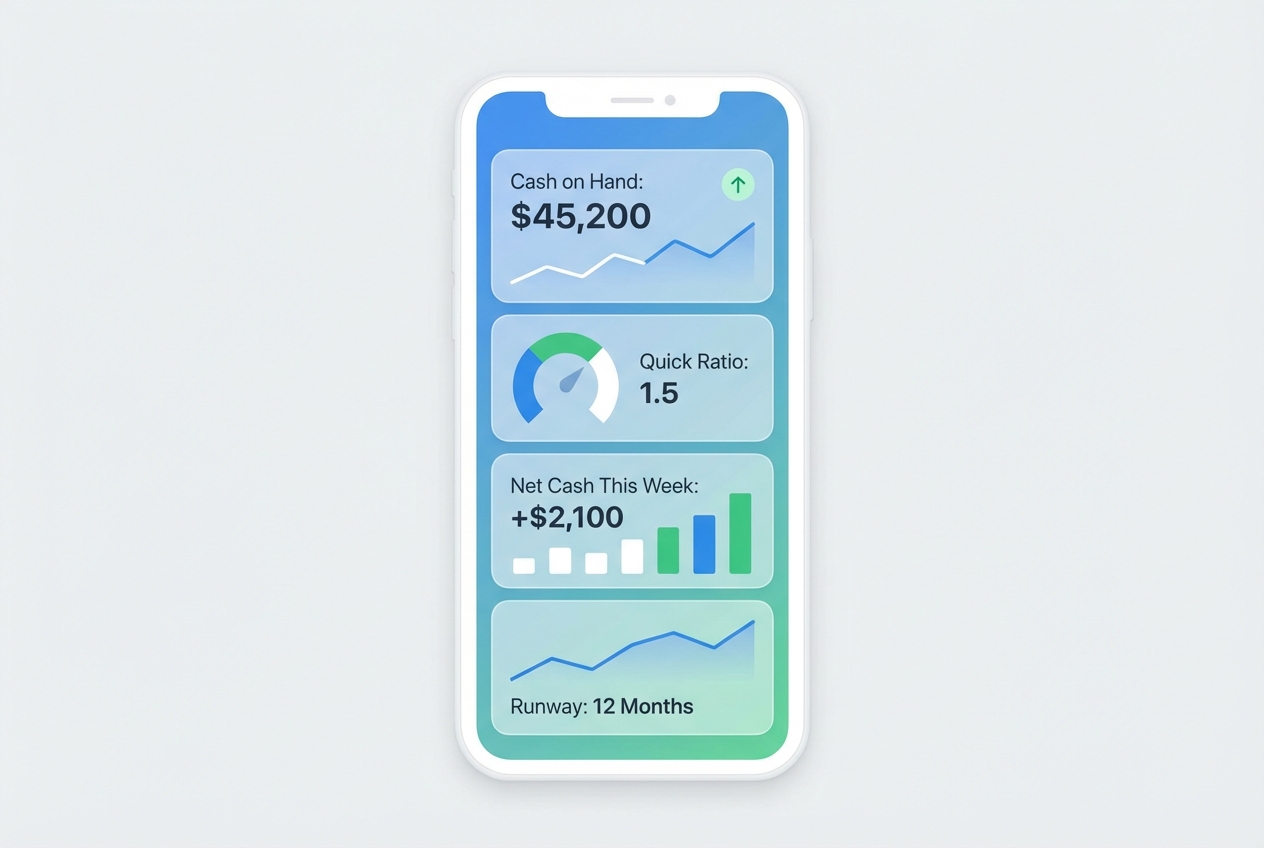
Automation changes reporting because the information can stay current on its own. That gives you a chance to build a rhythm: the right people get the right view, without chase-downs or last-minute spreadsheet rebuilds.
A tiered cadence works best:
- Treasury needs daily cash position: A quick read on cash on hand, expected inflows/outflows, and near-term constraints.
- Controllers need weekly liquidity health: A trend view that highlights upcoming risks, exceptions, and working capital shifts.
- CFOs and owners need monthly strategic forecasts plus live access: A clear story about hiring, investment capacity, and runway, backed by real-time data.
Here is a simple cadence you can copy:
| Audience | Report | Cadence | What it answers |
|---|---|---|---|
| Treasury / owner-operator | Cash position | Daily | "How much cash do we have right now?" |
| Controller / finance lead | Liquidity health | Weekly | "Are we trending into risk?" |
| CFO / leadership | Strategic forecast | Monthly + live access | "Can we invest, hire, or must we pull back?" |
Essential Metrics for Automated Cash Flow Analysis
Automation does not just save hours. It gives you clean, always-on metrics.
A powerful framework is the Cash Conversion Cycle (CCC), which measures how quickly cash moves through your business.
Focus on these three KPIs first:
- Days Sales Outstanding (DSO): How fast you collect cash from customers. With automated AR extraction and bank matching, DSO updates without manual aging reports.
- Days Payable Outstanding (DPO): How effectively you manage vendor payments while protecting relationships. Automation helps you see payment timing clearly and avoid surprise outflows.
- Burn rate and runway: Critical for high-growth firms. When your bank feeds and forecast are live, runway becomes a daily metric, not a monthly guess.
Best Practices for Data Quality and Automation Success
Automation is only as good as the data it consumes. Most "automation failures" are really data quality failures.
Build these safeguards early:
- Cleansing layer: Normalize vendor names, customer names, and currencies. This prevents duplicate entries and boosts auto-matching rates.
- Mapping rule audits: Every month, review category mappings and bank account coverage. New accounts and subsidiaries should be captured automatically, not discovered later.
- Access control and logging: Use least-privilege permissions and log who changed what. Cash reporting is sensitive, so treat it like production software, not a spreadsheet.
A key organizational point: the finance team has to be involved early. Deloitte highlights that successful finance transformations bring finance leaders into the design phase so outputs match strategic reporting needs.
Summary of Key Takeaways
Automating cash flow reporting delivers efficiency and agility at the same time. When your data refreshes automatically, you stop reacting to stale numbers and start steering the business with confidence.
When you combine real-time bank feeds, automated AR/AP extraction, daily reconciliation, and a rolling 13-week forecast, your finance function stops being reactive. It becomes a high-speed decision engine.
To make this real in your business:
- Start small: Automate the daily cash position first so you can build trust quickly.
- Lock in trust: Get reconciliation to 90%+ auto-matching so your reports stay credible.
- Scale up: Add scenario planning and executive dashboards once the foundation is stable.
If you want to build a lightweight internal cash reporting system without hiring a full dev team, you can prototype the workflow fast and then harden it as needed. QuantumByte is built for that "in days, not months" approach. You can explore ready-to-build automation.

