
Role based access control is one of the fastest ways to turn a growing app from "everyone can see everything" into a clean, scalable system your team can trust.
If you sell services or manage client work, role based access control helps you keep data private and reduce mistakes. If you run a Software as a Service (SaaS) product, it also helps you delegate work without losing control.
Below is a practical, build-ready way to design and implement Role-Based Access Control (RBAC) in your product. You will get a simple data model, concrete examples, and the common failure points that cause security incidents.
What role based access control (RBAC) is, in plain English
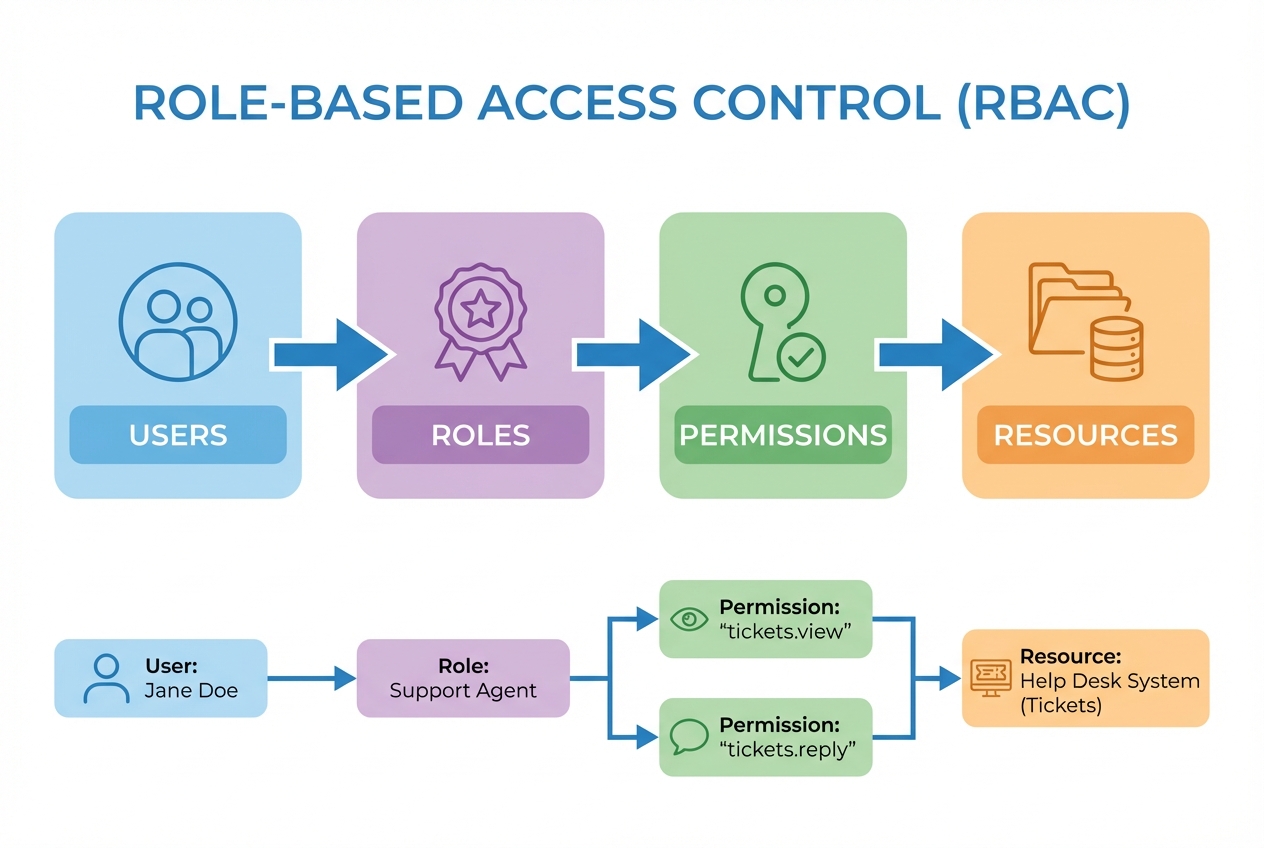
Role-Based Access Control (RBAC) is a way to control who can do what by assigning people to roles, then assigning permissions to those roles.
This matters because roles scale. People come and go, but "Support Agent" and "Admin" usually stick around.
A strong, standards-aligned definition is NIST’s: RBAC is "access control based on user roles," and role permissions may be inherited through a role hierarchy.
At a minimum, RBAC gives you three building blocks:
-
Users: The humans (or service accounts) who log in.
-
Roles: Named job functions like Admin, Support, Manager.
-
Permissions: Allowed actions like "View invoices" or "Manage users."
When RBAC is the right choice (and when it is not)
RBAC is the right choice when your app’s access rules map cleanly to job functions.
RBAC can be a poor fit when access depends heavily on context like "only during business hours," "only for deals you own," or "only for records in your region." In those cases you may need Attribute-Based Access Control (ABAC) or Relationship-Based Access Control (ReBAC).
OWASP calls out a real RBAC risk: "role explosion," where you create so many roles that the system becomes hard to manage. Their guidance also notes that ABAC and ReBAC can be better for fine-grained, object-level decisions as complexity grows. It also notes that authorization must be checked on every request.
RBAC vs ABAC vs ReBAC at a glance
| Model | Best for | How decisions are made | Where teams get stuck |
|---|---|---|---|
| RBAC | Clear job-function access (Admin, Support, Finance) | User has a role; role has permissions | Too many roles, unclear ownership of role design |
| ABAC | Context-aware rules (region, plan tier, time, device) | Policies evaluate attributes (user, resource, environment) | Policy sprawl and difficult debugging without good tooling |
| ReBAC | Relationship-based sharing (teams, folders, "can view items shared with me") | Graph-like relationships decide access | More complex data model; needs careful performance planning |
The outcomes you should expect from a good RBAC rollout
When RBAC is implemented well, you get a few predictable wins:
-
Least privilege by default: You stop giving broad access "just in case" and instead grant only what each role needs. OWASP explicitly recommends the Principle of Least Privilege, meaning code and users should have only the permissions required to do the job.
-
Faster onboarding and offboarding: New team members get the right access in minutes by assigning a role.
-
Cleaner audits and fewer surprises: It becomes obvious who can refund, export data, or manage users.
-
Safer delegation: You can hand off work without handing over keys to the whole business.
How to implement role based access control (step by step)
The flow below is intentionally practical. It works for internal tools, client portals, and SaaS products.
1) Define what you are protecting (resources) and what people do (actions)
Start by listing your sensitive resources and the actions users take.
Keep it close to real workflows. Avoid abstract "manage everything" permissions until the end.
A solid starting point looks like this:
-
Customers: View, create, edit, delete, export.
-
Invoices: View, create, send, void, refund.
-
Users: Invite, deactivate, reset password, change roles.
-
Settings: View settings, change billing, connect integrations.
If you already have processes mapped out, reuse them. If not, it often helps to review your existing system flows and automation points first. Then layer access on top. The guide on automating business processes pairs well with this step.
2) Draft roles based on job functions (not people)
Roles should reflect responsibilities rather than LinkedIn titles.
Most small SaaS and service businesses can start with 3 to 6 roles:
-
Admin: Full control, including roles and billing.
-
Manager: Can approve work, view reports, manage assigned team members.
-
Support Agent: Can view and resolve tickets, but cannot change billing or users.
-
Finance: Can view invoices and export reports, but cannot manage users.
-
Read-only: Can view data, cannot change anything.
A simple test: if you can explain a role’s purpose in one sentence, you are on the right track.
3) Turn roles into a permission matrix
Create a table that maps each role to each permission.
| Permission | Admin | Manager | Support Agent | Finance | Read-only |
|---|---|---|---|---|---|
| tickets.view | Yes | Yes | Yes | No | Yes |
| tickets.reply | Yes | Yes | Yes | No | No |
| users.manage | Yes | Limited | No | No | No |
| billing.refund | Yes | No | No | Yes | No |
| reports.export | Yes | Yes | No | Yes | No |
Write permissions in a consistent naming format like resource.action.
-
Consistency: It prevents duplicates like
refund_invoiceandinvoice_refund. -
Searchability: You can quickly find where a permission is used.
4) Decide your RBAC scope: app-wide, workspace, or tenant
Most real apps need a scope.
For example, in a multi-tenant SaaS product, the same user might be an Admin in one workspace and Read-only in another.
A useful mental model is Microsoft’s: a role assignment includes a security principal (who), role definition (what), and scope (where). You do not need Azure to benefit from the idea.
Common scopes:
-
Global: Rare. Usually only for platform super-admins.
-
Tenant/workspace: The default for SaaS.
-
Project/client account: Great for agencies managing multiple clients.
5) Build the data model
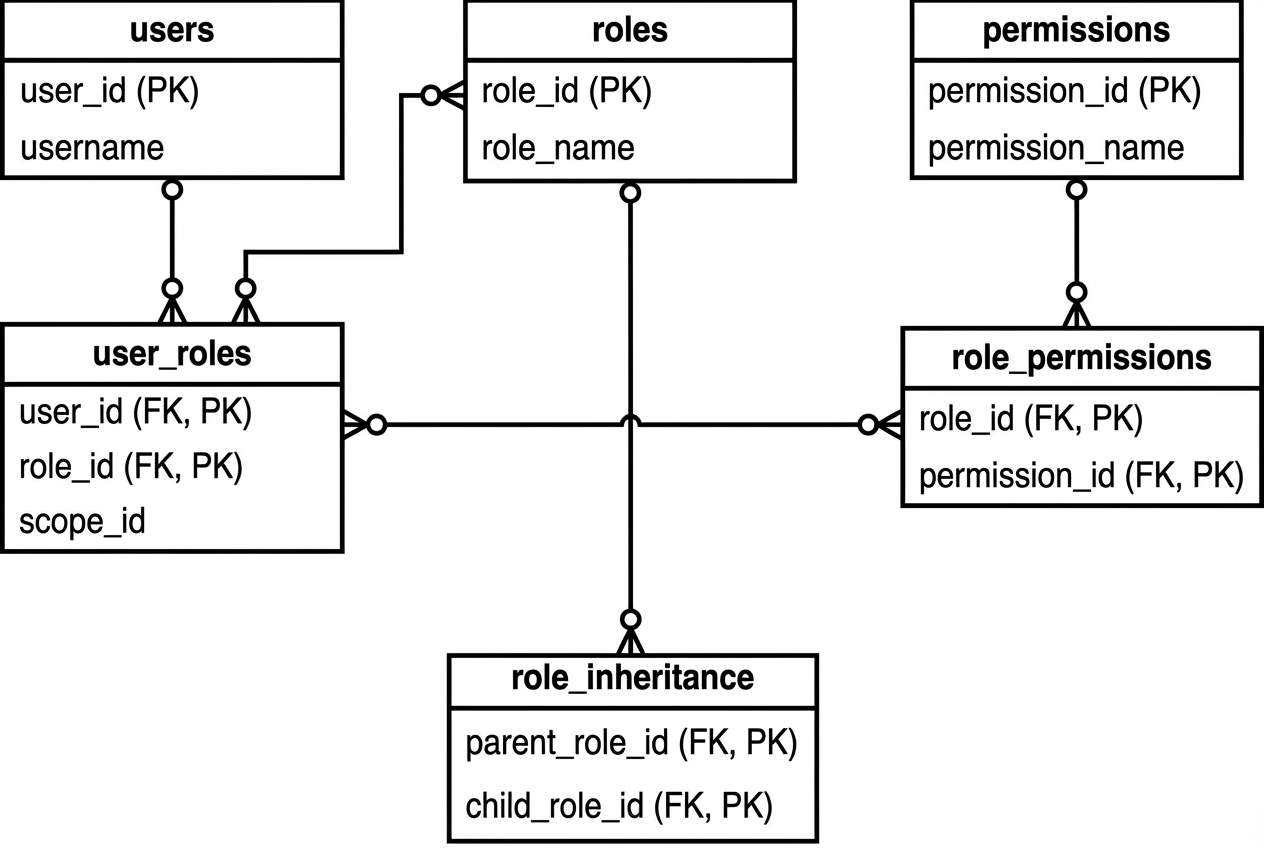
Most RBAC implementations become painful because the data model is fuzzy.
A straightforward schema that scales:
-
Table
users: Stores your primary user records (email, status, auth provider identifiers). -
Table
roles: Stores role definitions like Admin, Manager, Support Agent. -
Table
permissions: Stores atomic actions liketickets.replyorbilling.refund. -
Table
user_roles: Stores role assignments, usually as(user_id, role_id, scope_id)so the same person can hold different roles in different workspaces. -
Table
role_permissions: Stores which permissions belong to which roles, typically as(role_id, permission_id).
If you want role inheritance, keep it explicit:
- Table
role_inheritance: Stores parent and child role relationships so one role can inherit the permissions of another.
This aligns with NIST’s note that role permissions may be inherited through a role hierarchy.
6) Centralize authorization checks in your backend
Your backend must be the source of truth. User interface controls are helpful, but they are not security.
OWASP is direct about this: permissions should be validated on every request.
In practice, that means:
-
One authorization module: A single place in code that answers "Can this user do X on Y?" so behavior stays consistent.
-
A deny-by-default stance: If the permission is missing, the action fails. This prevents accidental privilege creep.
-
Resource-level checks: Not just "can view invoices," but "can view this invoice," enforced with tenant and ownership rules.
Example pattern:
-
Request entry: The request hits an endpoint.
-
Context loading: You load user context (workspace, roles).
-
Permission decision: You check permission for that action.
-
Scope enforcement: You confirm the resource belongs to the right workspace or customer.
7) Add an admin experience for managing roles
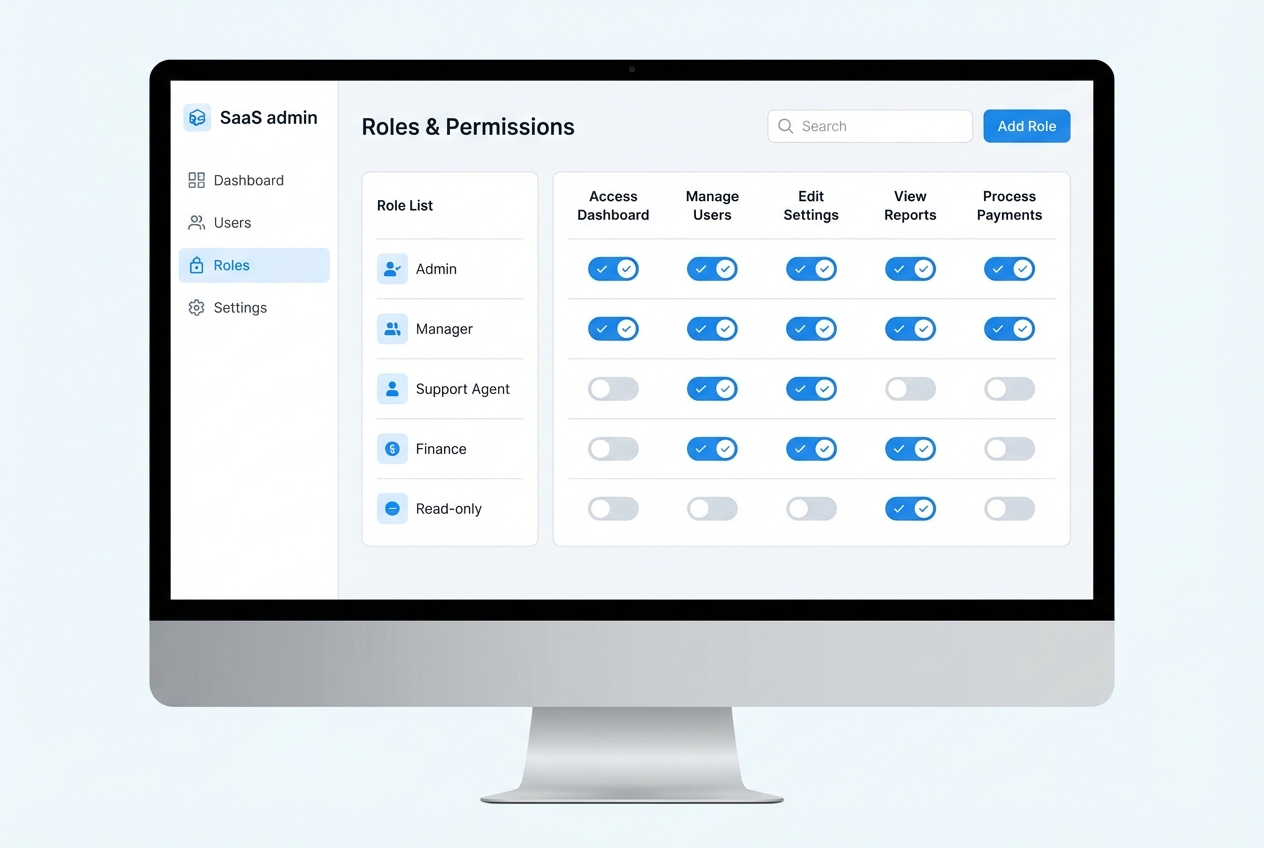
RBAC falls apart when only developers can change roles.
At minimum, build:
-
Role editor: Add or remove permissions per role so you can evolve access without code changes.
-
User access screen: Assign roles within a scope (workspace, project) so onboarding is fast and consistent.
-
Audit log view: Track who changed access and when so you can investigate issues and answer customer questions.
This is a spot where an AI-first build approach can save serious time. If you are building a client portal or internal ops tool, QuantumByte’s AI app builder can help you spin up the admin screens and data model quickly. Then your team can iterate on the permission rules without waiting weeks.
If you want to understand how natural-language app building works end-to-end, see how an AI app builder works.
8) Design the user experience so people do not lock themselves out
Most RBAC "bugs" are actually user experience issues.
Plan for:
-
Break-glass admin: A safe way to recover access (for example, a platform owner who can restore Admin in a workspace).
-
Clear error messages: "You do not have permission to refund invoices" beats a generic 403.
-
Role previews: Show what a role can do before you assign it, so you reduce accidental over-permissioning.
9) Test RBAC like you test payments
Access control mistakes are expensive and hard to explain to customers.
Test at three levels:
-
Unit tests: The
can(user, action, resource)logic. -
API tests: Every sensitive endpoint returns the right status when permissions are missing.
-
Abuse tests: Try horizontal access control attacks, like accessing another tenant’s record by changing an ID.
If you are also implementing approvals, pair RBAC with a strong audit trail. The security discussion in approval workflow software is a helpful companion here.
Common RBAC pitfalls that break security (and how to avoid them)
These patterns show up in real products, even mature ones.
-
Overpowered default roles: If "Member" can export, delete, and manage settings, you are one misclick away from a mess. Start strict, then open up.
-
UI-only restrictions: A hidden button improves the interface, but it does not enforce authorization. Always enforce checks server-side.
-
No scope in a multi-tenant app: If roles are global but data is tenant-based, you will ship cross-tenant data leaks.
-
Role explosion: If you keep creating new roles for edge cases, step back and consider ABAC or ReBAC for those specific rules.
-
No audit log for access changes: You will not be able to answer "who gave access" when it matters.
If you are planning custom software and want to avoid costly rework, it helps to think about security and access control during your build-vs-buy decision. This guide on custom business software development: build vs buy frames that decision well.
A practical RBAC blueprint you can copy
Here is a minimal, safe baseline for many SaaS and client portal apps:
-
Default role: Start with Read-only so new users can see what they need without risking destructive changes.
-
Elevated roles: Add Support Agent and Manager to delegate day-to-day operations without handing over billing and user management.
-
Highest role: Keep Admin limited to a small number of trusted users, and treat it like production access.
-
Sensitive permissions: Protect refunds, exports, role changes, and deleting data with extra care because these actions create real business damage.
-
Core rules: Deny by default, validate on every request, and always enforce tenant scope.
If you are moving fast, you still need a clean security foundation. QuantumByte can help you prototype the RBAC model in days. Then the in-house development team can handle the hard edges like inheritance, audit logging, and complex policies.
You can start drafting your RBAC-enabled app flow in QuantumByte.
Wrap-up: turning access chaos into a scalable system
Role based access control is a practical way to protect data, delegate work, and scale your product without constant manual gatekeeping. You now have a build-ready approach: define resources and actions, create job-based roles, map them to a permission matrix, add scope for multi-tenant realities, centralize checks in the backend, and test authorization as aggressively as any other critical system.
Done right, RBAC becomes one of those invisible systems that multiplies impact: fewer mistakes, faster onboarding, and a product your customers can trust.
Frequently Asked Questions
What is the difference between authentication and authorization in RBAC?
Authentication proves who a user is (log in). Authorization decides what that user can do after they log in. RBAC is an authorization model.
Should I store roles in a JSON field on the user record?
It works for simple apps, but it becomes limiting fast. A join-table model (user_roles, role_permissions) makes scoped roles, inheritance, and audits much easier.
How many roles should my app start with?
Start with the smallest set that reflects real job functions, usually 3 to 6 roles. Add permissions before you add roles. If you keep adding roles, you may be masking a need for ABAC or ReBAC.
Is hiding buttons enough to implement RBAC?
No. Hiding buttons improves user experience, but it does not prevent direct API calls. You must enforce permission checks on the backend for every sensitive request.
How do I handle "users can only see their own records" with RBAC?
That is typically a resource-level rule (often called object-level or horizontal access control). RBAC can handle it when combined with ownership checks, but if these rules dominate your product, ABAC or ReBAC can be a better fit.