
Payroll seems straightforward until you're responsible for it. Gather hours, calculate pay, withhold taxes, process deductions, generate payments, and do it all perfectly, on time, every time. One mistake and you face angry employees, IRS penalties, or both.
Manual payroll is a recipe for errors. The complexity of tax rules, benefit deductions, and overtime calculations virtually guarantees mistakes when processed by hand. And those mistakes are expensive. Just think about the correction time, penalties, and damaged employee trust.
Payroll automation transforms this high-stakes process into a reliable system. Accurate calculations, automatic tax updates, seamless integrations, and error prevention deliver every paycheck correctly, every time.
The Payroll Automation Pain Point
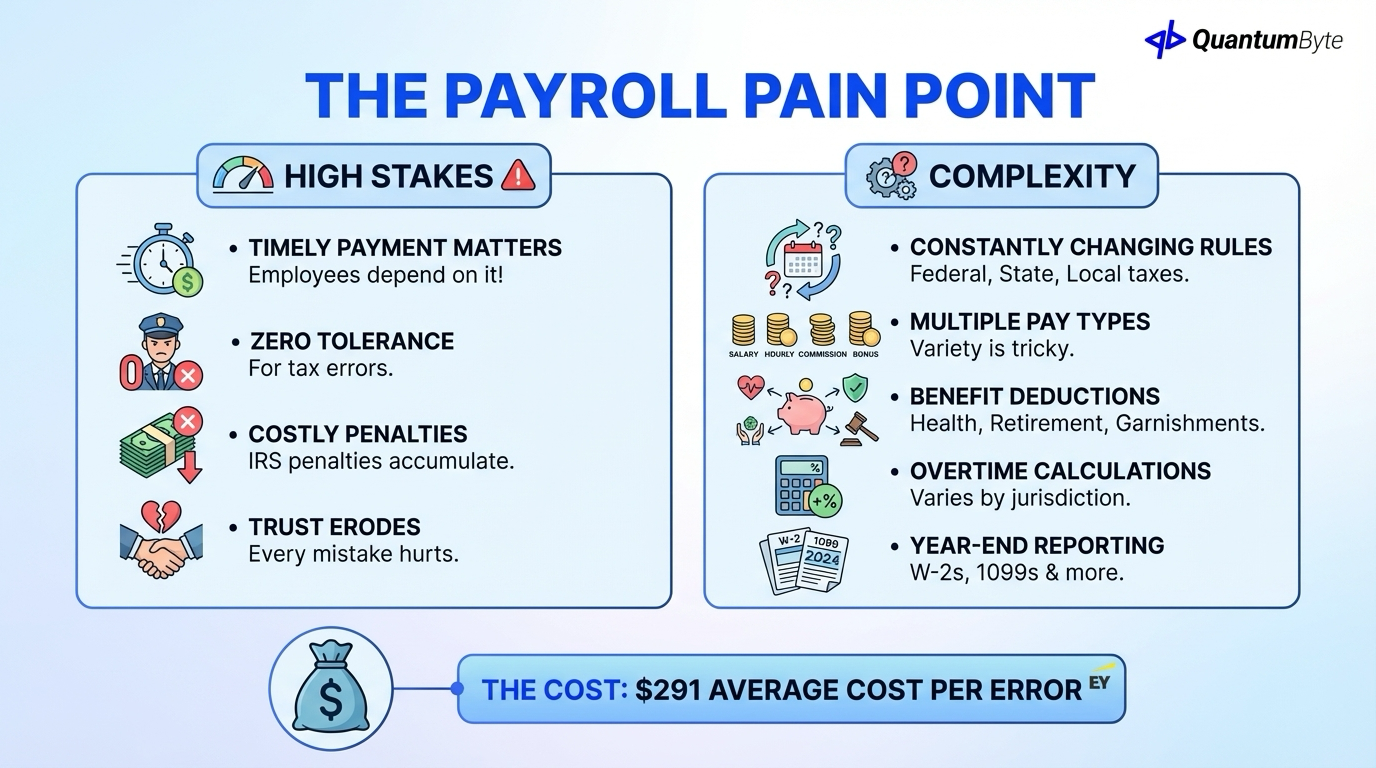
Payroll carries unique pressure:
The stakes:
- Employees depend on accurate, timely payment
- Tax authorities have zero tolerance for errors
- Regulations change constantly
- IRS penalties accumulate quickly
- Trust erodes with every mistake
The complexity:
- Federal, state, local tax rules (all changing)
- Multiple pay types (salary, hourly, commission, bonus)
- Benefit deductions (health, retirement, garnishments)
- Overtime calculations (varies by jurisdiction)
- Year-end reporting (W-2s, 1099s)
According to the EY, the average error rate varies depending on the payroll category, but each error costs around $291 to correct.
10 Payroll Automation Processes
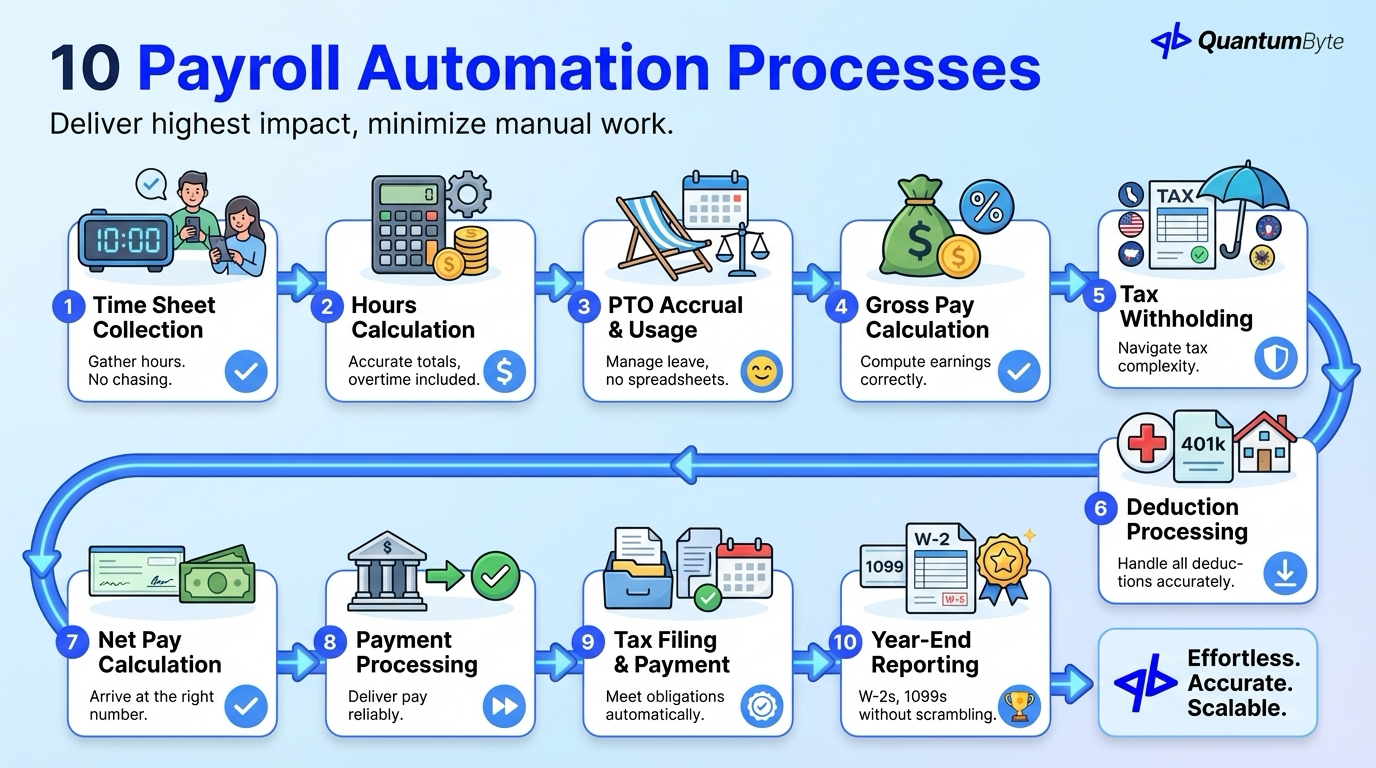
These payroll automations deliver the highest impact:
1. Time Sheet Collection and Approval
Gather hours without manual aggregation.
What to automate: Digital time submission, approval workflows, missing timesheet alerts, exception flagging, and automatic aggregation.
Impact: Hours collected accurately without chase.
2. Hours Calculation
Accurate totals including overtime.
What to automate: Regular hours tallying, overtime threshold tracking, double-time calculations, holiday premium pay, and shift differentials.
Impact: Correct calculations every time, every jurisdiction.
3. PTO Accrual and Usage Tracking
Manage leave balances automatically.
What to automate: Accrual calculations by policy, usage deduction, balance reporting, carryover handling, and policy variation by employee.
Impact: Accurate leave balances without spreadsheets.
4. Gross Pay Calculation
Compute earnings correctly.
What to automate: Salary proration, hourly rate application, commission calculation, bonus processing, and retroactive adjustments.
Impact: Every pay type calculated correctly.
5. Tax Withholding
Navigate tax complexity automatically.
What to automate: Federal income tax, state income tax (including multi-state), local income tax, FICA (Social Security, Medicare), and additional Medicare tax.
Impact: Correct withholding at every level.
6. Deduction Processing
Handle all deductions accurately.
What to automate: Health insurance premiums, 401(k)/retirement contributions, HSA/FSA deductions, garnishments, and voluntary deductions.
Impact: All deductions processed correctly.
7. Net Pay Calculation
Arrive at the right number.
What to automate: Gross to net calculation, verification checks, historical comparison, exception flagging, and audit trails.
Impact: Accurate paychecks, every time.
8. Payment Processing
Deliver pay reliably.
What to automate: Direct deposit file generation, check printing (if needed), payment timing, bank integration, and confirmation tracking.
Impact: Payments delivered on time.
9. Tax Filing and Payment
Meet obligations automatically.
What to automate: Deposit schedule determination, tax payment file generation, filing submission, confirmation tracking, and deadline monitoring.
Impact: Tax compliance without manual tracking.
10. Year-End Reporting
W-2s, 1099s without scrambling.
What to automate: W-2 generation, 1099 creation, electronic filing, employee delivery, and correction handling.
Impact: Year-end completed accurately, on time.
Benefits of Payroll Automation
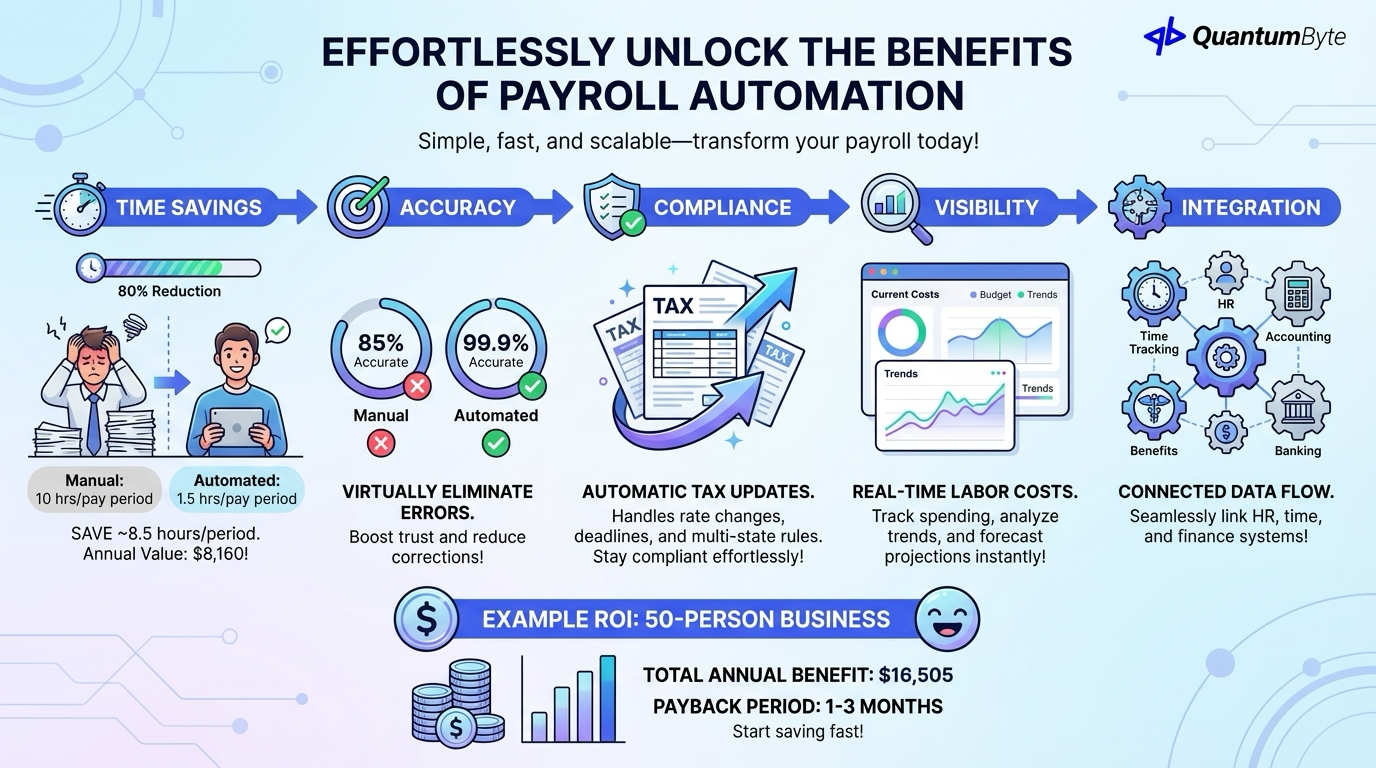
Time Savings: 80% Reduction
| Activity | Manual Time | Automated Time | Savings |
|---|---|---|---|
| Data collection | 3 hours | 15 min | 92% |
| Calculation/entry | 4 hours | 30 min | 88% |
| Review/verification | 2 hours | 30 min | 75% |
| Tax filing | 1 hour | 15 min | 75% |
| Total per pay period | 10 hours | 1.5 hours | 85% |
Annual value: 8.5 hours saved × 24 pay periods × $40/hour = $8,160
Accuracy: 99.9% vs. 85%
Manual payroll error rates: 10-15% of pay runs Automated payroll error rates: <0.1%
Impact: Virtually eliminate correction time, employee complaints, and trust erosion.
Compliance: Automatic Tax Updates
Tax rules change constantly. The IRS updates regulations regularly. Payroll automation handles:
- Rate updates (automatic)
- Threshold changes (automatic)
- New regulations (automatic)
- Multi-state complexity (managed)
- Deadline tracking (automatic)
Visibility: Real-Time Labor Costs
Payroll automation provides:
- Current-period cost tracking
- Budget comparison
- Trend analysis
- Cost projections
- Labor allocation reporting
Integration: Connected Data Flow
Automated payroll connects to:
- Time tracking (hours)
- HR systems (employee data)
- Accounting software (expense recording)
- Benefits (deduction amounts)
- Banking (payment execution)
Example ROI: 50-Person Business
| Benefit Category | Annual Value |
|---|---|
| Processing time reduction | $8,160 |
| Error correction elimination | $2,500 |
| Penalty avoidance | $845 |
| Tax credit/optimization capture | $2,000 |
| Finance visibility value | $3,000 |
| Total Annual Benefit | $16,505 |
| Implementation Cost | $20,000-40,000 |
| Payback Period | 1-3 months |
Payroll Automation Options
Understanding your choices:
Full-Service Payroll Providers
Cost: $40-80/month + $5-12/employee
Pros: Compliance handled, tax filing guaranteed, regular updates
Cons: Ongoing costs accumulate, limited customization, per-employee fees scale
Payroll Software
Examples: QuickBooks Payroll, Xero Payroll, Wave Payroll
Cost: $20-100/month + per-employee fees
Pros: Lower cost, integration with accounting, more control
Cons: More DIY on compliance, limited support, still subscription-based
Custom Payroll Automation Solution
Cost: $25,000-75,000 (one-time development)
Best for: Complex compensation structures, multi-country payroll, unique integration requirements, high volume (subscription savings)
Pros: Exact fit for needs, no per-employee fees, complete customization, full data control
| Approach | Monthly Cost (50 emp) | Year 5 Total | Compliance Support |
|---|---|---|---|
| Full-Service (Gusto) | $350-650 | $21,000-39,000 | Included |
| Software (QB Payroll) | $100-200 | $6,000-12,000 | Partial |
| Custom | Maintenance only | $30,000-85,000 | Partner needed |
Building Payroll Automation Apps with QuantumByte
QuantumByte develops custom payroll automation apps that streamline your workflows:
Complex Compensation Structures
Handle any pay arrangement: multi-tier commissions, performance formulas, union pay rules, and industry-specific requirements.
Integration Excellence
Connect everything: time tracking systems, HR platforms, accounting software, benefits providers, and banking systems.
Tax Compliance Partnership
Stay compliant: integration with tax service providers, rate update handling, filing automation, and audit support.
Employee Self-Service
Empower employees: pay stub access, W-2 retrieval, tax withholding changes, and direct deposit management.
Manager Dashboards
Labor cost visibility: department costs, budget tracking, overtime monitoring, and trend analysis.
Conclusion: Make Payroll Automation Reliable
Payroll automation delivers peace of mind:
What you gain:
- 80%+ time savings
- 99.9% accuracy
- Automatic compliance
- Employee trust
- Real-time visibility
What you eliminate:
- Manual calculation errors
- Tax filing anxiety
- Employee complaints
- Penalty risk
- Processing burden
The path forward:
- Audit your current payroll: Where are the errors and bottlenecks?
- Calculate your opportunity: Use the formulas above to quantify potential gains
- Prioritize quick wins: Start with highest-impact automations
- Build for scale: Choose solutions that grow with you
Every day you delay, you accept the risk and burden of manual payroll processing.
Ready to transform your payroll? Schedule a consultation to explore your specific automation opportunities.
Other Guides to Explore
- HR Automation Software: Reduce Admin Time and Improve Employee Experience
- Employee Scheduling Software: Optimize Labor Costs and Reduce Conflicts
- Employee Onboarding Software: Improve Retention and Speed to Productivity
- How to Automate Business Processes to Increase Revenue in 2025
Frequently Asked Questions (FAQ)
How much does payroll automation cost?
Full-service providers: $40-80/month base + $5-12/employee. Payroll software: $20-100/month + per-employee fees. Custom solutions: $25,000-75,000 development. Calculate 5-year TCO including the value of time savings and error prevention.
Should I use a payroll service or software?
Full-service providers are best when you want compliance handled completely. Software gives more control at lower cost but requires more DIY. Custom solutions fit complex requirements or high volume where subscription savings justify development.
What about tax compliance with payroll automation?
Full-service providers typically guarantee compliance. Software includes tax tables but you're responsible for configuration. Custom solutions often partner with tax services for rate updates and filing. Regardless of approach, verify setup with a tax professional.
Can payroll automation handle contractors alongside employees?
Yes, most solutions support both W-2 employees and 1099 contractors. This includes different payment rules, separate reporting requirements, and year-end 1099 generation.