
Employee scheduling looks simple on the surface: put the right people in the right shifts. In practice, it's a complex optimization problem balancing employee availability, skills, preferences, labor laws, business demand, and fairness. All while avoiding conflicts that damage morale and drive turnover.
Manual scheduling fails this challenge. Managers spend 3-5 hours weekly building schedules, yet still produce suboptimal results: overstaffing during slow periods, understaffing during rushes, conflicts that frustrate employees, and coverage gaps that hurt service.
Employee scheduling software transforms this struggle. Automated optimization, self-service requests, and mobile access create schedules that work better for everyone, at lower cost.
The Employee Scheduling Nightmare
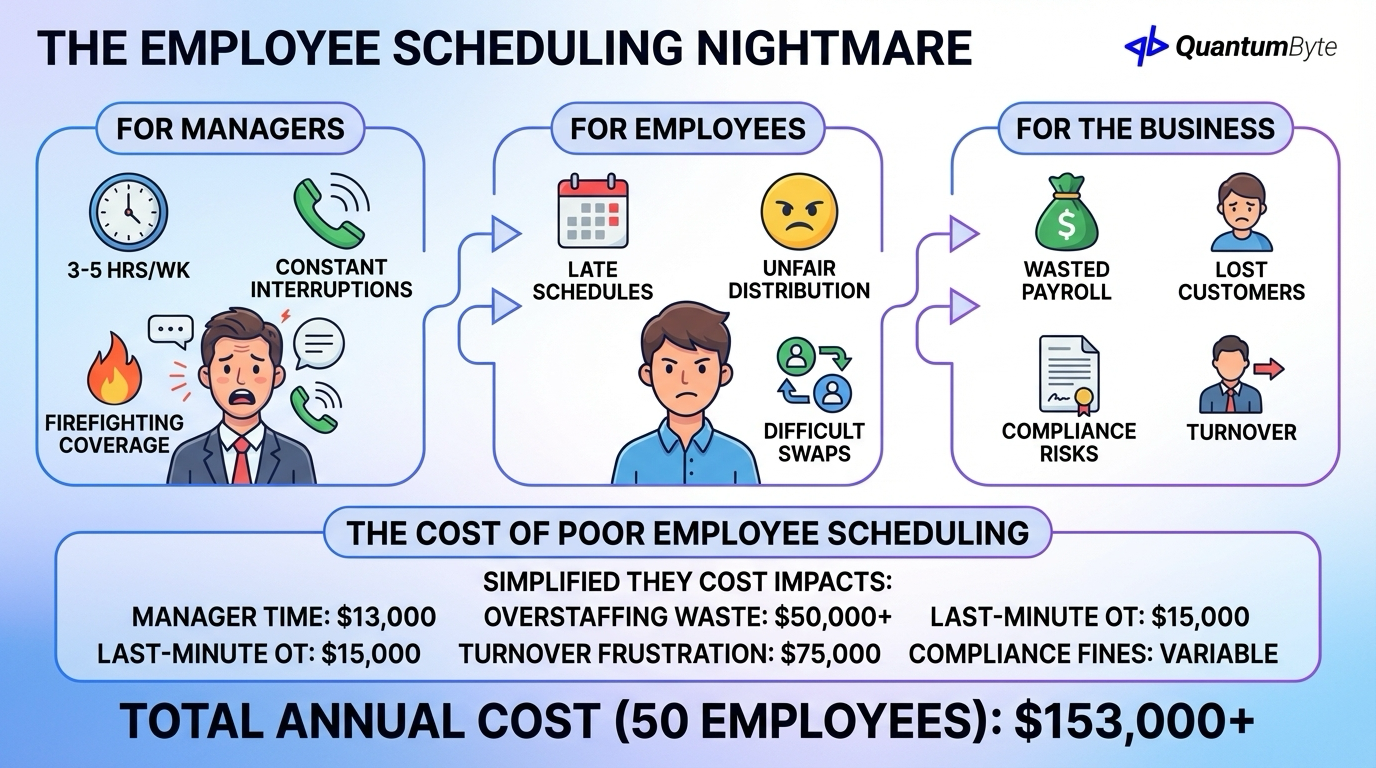
Manual employee scheduling creates problems at every level:
For managers: 3-5 hours weekly building schedules, constant text/call interruptions for changes, firefighting coverage gaps, balancing competing employee preferences.
For employees: Schedule posted late making planning impossible, unfair shift distribution, difficult swap requests, inflexible time-off process.
For the business: Overstaffing wastes payroll, understaffing loses customers, compliance violations create risk, turnover from schedule frustration.
The Cost of Poor Employee Scheduling
| Problem | Cost Impact | Annual Cost (50 employees) |
|---|---|---|
| Manager scheduling time | 5 hrs/wk × $50/hr | $13,000 |
| Overstaffing | 10% of payroll wasted | $50,000+ |
| Last-minute overtime | Premium pay for coverage | $15,000 |
| Turnover from frustration | 5% extra turnover | $75,000 |
| Compliance violations | Fines, lawsuits | Variable |
| Total | $153,000+ |
For a 50-person shift-based business, poor employee scheduling easily costs $85,000-150,000+ annually, often without appearing on any expense report.
10 Employee Scheduling Processes to Automate
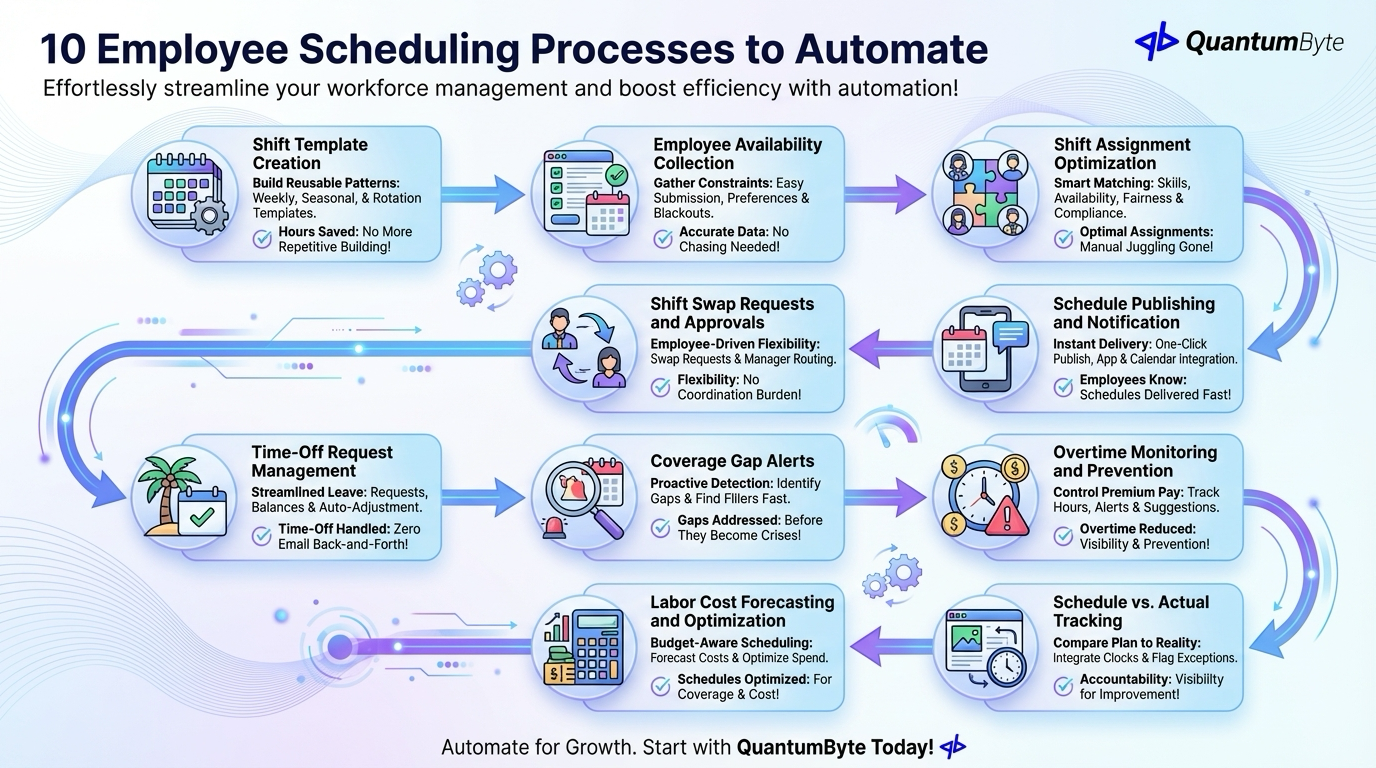
These automations deliver the highest impact:
1. Shift Template Creation
Build reusable schedule patterns with weekly shift templates by role/location, seasonal variations, special event schedules, and rotation patterns. Impact: Hours saved on repetitive schedule building.
2. Employee Availability Collection
Gather constraints without email chaos via availability submission portal, preference indication, blackout date management, and recurring availability patterns. Impact: Accurate availability data without chasing.
3. Shift Assignment Optimization
Match shifts to available, qualified staff with skill/certification matching, availability filtering, preference weighting, fairness balancing, and labor law compliance checking. Impact: Optimal assignments without manual juggling.
4. Schedule Publishing and Notification
Get schedules to employees instantly with one-click publish, automatic employee notification, mobile app delivery, and calendar integration. Impact: Employees know their schedules immediately.
5. Shift Swap Requests and Approvals
Enable employee-driven schedule flexibility with swap request submission, qualified replacement matching, manager approval routing, and both-party notification. Impact: Flexibility without manager coordination burden.
6. Time-Off Request Management
Streamline leave handling with request submission, balance checking, coverage verification, and automatic schedule adjustment. Impact: Time-off handled without email back-and-forth.
7. Coverage Gap Alerts
Proactive problem identification with gap detection, alert generation, available employee identification, and fill tracking. Impact: Gaps addressed before they become crises.
8. Overtime Monitoring and Prevention
Control premium pay with hours tracking against thresholds, approaching-overtime alerts, assignment warnings, and alternative suggestions. Impact: Overtime reduced through visibility and prevention.
9. Schedule vs. Actual Tracking
Compare plan to reality with time clock integration, variance calculation, exception flagging, trend analysis, and manager alerts. Impact: Accountability and improvement visibility.
10. Labor Cost Forecasting and Optimization
Budget-aware scheduling with cost calculation during scheduling, budget comparison, optimization suggestions, and what-if analysis. Impact: Schedules optimized for both coverage and cost.
Benefits of Employee Scheduling Automation
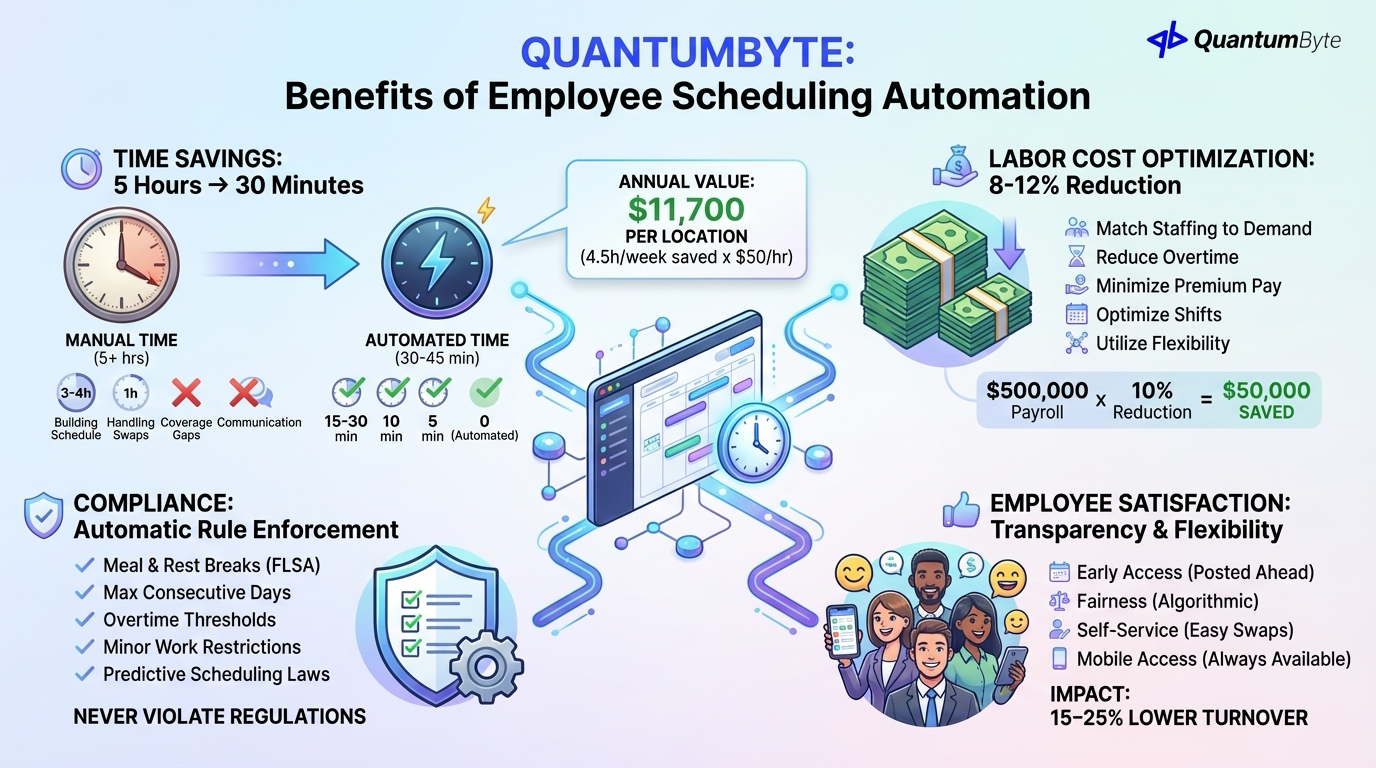
Quantify the returns:
Time Savings: 5 Hours → 30 Minutes
| Activity | Manual Time | Automated Time | Savings |
|---|---|---|---|
| Building schedule | 3-4 hours | 15-30 min | 85-90% |
| Handling swaps | 1 hour | 10 min | 83% |
| Coverage gaps | 30 min | 5 min | 83% |
| Communication | 30 min | 0 (automated) | 100% |
| Total | 5+ hours | 30-45 min | 85%+ |
Annual value: 4.5 hours saved/week × 52 weeks × $50/hour = $11,700 per location
Labor Cost Optimization: 8-12% Reduction
Smart employee scheduling reduces overstaffing without sacrificing service:
- Match staffing to actual demand
- Reduce overtime through planning
- Minimize last-minute premium pay
- Optimize shift lengths
- Better utilize part-time flexibility
Example:
$500,000 annual payroll × 10% overstaffing reduction = $50,000 saved
Compliance: Automatic Rule Enforcement
Never violate scheduling regulations: meal and rest break requirements (FLSA rules), maximum consecutive days, overtime thresholds, minor work restrictions, and predictive scheduling laws.
Employee Satisfaction: Transparency and Flexibility
Employee scheduling automation improves employee experience:
- Early schedule access: Posted days/weeks ahead
- Fairness: Algorithmic distribution removes bias
- Self-service: Swap and request without manager hassle
- Mobile access: Schedule always available
Impact: Research shows companies reducing scheduling friction see 15-25% reduction in turnover.
Key Features to Look For
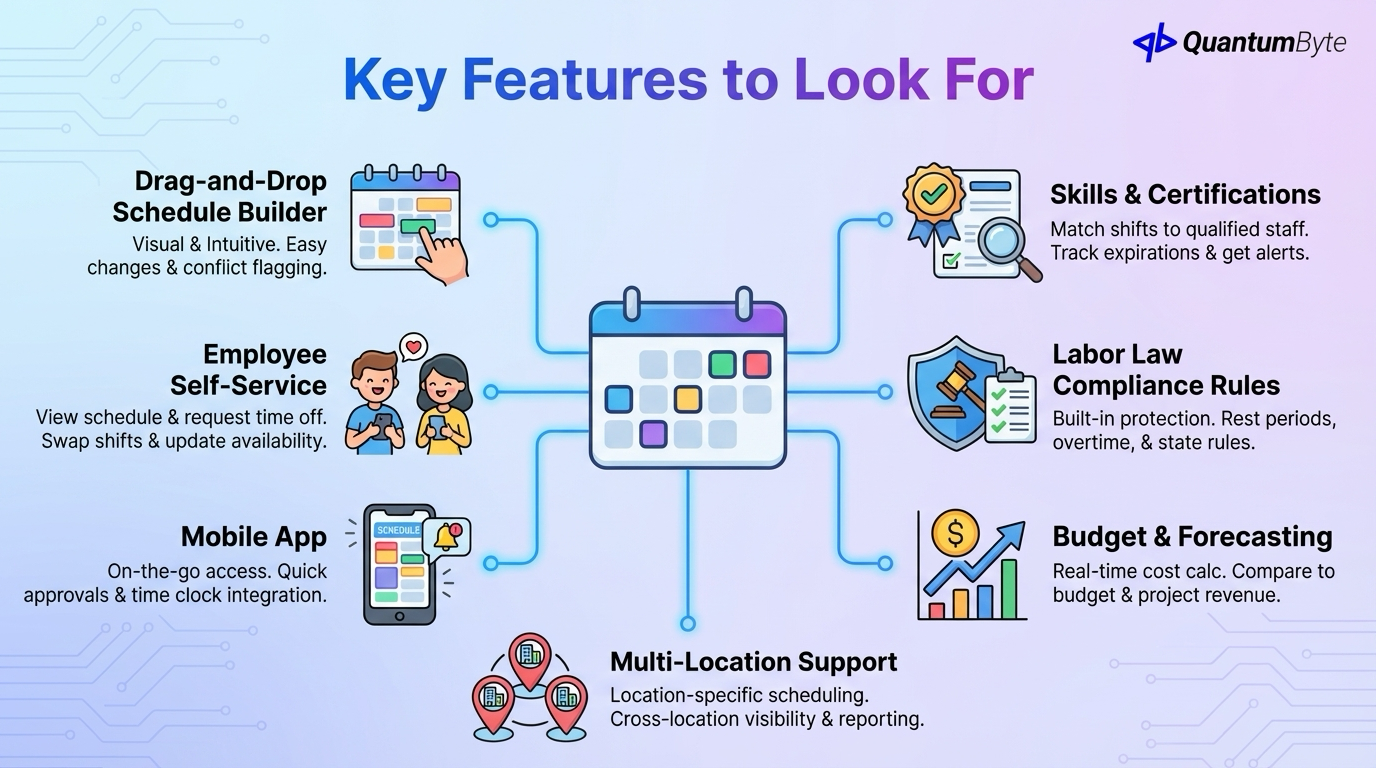
Essential capabilities in employee scheduling software:
Drag-and-Drop Schedule Builder
Visual, intuitive scheduling with calendar interface, easy assignment changes, template application, and visual conflict flagging.
Employee Self-Service
Empower employees to view schedule (mobile and web), request time off, submit swap requests, update availability, and receive notifications.
Mobile App
On-the-go access with native iOS and Android, push notifications, quick approvals, and time clock integration.
Skills and Certifications Tracking
Match shifts to qualified staff with skill requirements per shift, certification tracking, expiration alerts, and automatic filtering.
Labor Law Compliance Rules
Built-in protection with rest period enforcement, overtime rules, minor restrictions, break requirements, and state/local law variations.
Budget and Forecasting
Cost-aware scheduling with real-time cost calculation, budget comparison, revenue projection correlation, and what-if analysis.
Multi-Location Support
For businesses with multiple sites: location-specific scheduling, cross-location visibility, transfer management, and consolidated reporting.
Total Impact Summary
| Benefit | Annual Value |
|---|---|
| Manager time savings (5 locations) | $58,500 |
| Labor cost reduction (8%) | $72,000 |
| Reduced turnover | $150,000 |
| Overtime prevention | $25,000 |
| Total Annual Benefit | $305,500 |
| Implementation Cost | $15,000-40,000 |
| Payback Period | 1-2 months |
Building Your Employee Scheduling App
QuantumByte develops custom employee scheduling apps that streamline your workforce management:
Custom-Built for Your Shift Patterns
Your business, your rules: unique shift structures, industry-specific requirements, multi-site configurations, and role-based scheduling.
Employee Self-Service Portal and Mobile App
Empower your team with native mobile experience, intuitive interfaces, quick actions, and real-time updates.
Manager Dashboard with Drag-and-Drop
Easy schedule building with visual calendar interface, quick assignment, conflict highlighting, and template management.
Integration with Time Tracking, Payroll, HR
Connect your ecosystem: time clock data sync, payroll export (ADP, Gusto), HR system integration, and POS data for demand forecasting.
Labor Cost Forecasting and Optimization
Budget-aware scheduling with real-time cost calculation, budget tracking, optimization suggestions, and forecast accuracy.
Industry-Specific Features
Built for your sector: restaurant specific features, retail requirements, healthcare certifications, and manufacturing constraints.
Conclusion: Transform Employee Scheduling from Burden to Advantage
Smart employee scheduling delivers benefits at every level:
For the business: 8-12% labor cost reduction, compliance protection, lower turnover, better service coverage
For managers: 85%+ time savings, fewer conflicts to resolve, data-driven decisions, less firefighting
For employees: Schedule transparency, self-service flexibility, fair distribution, mobile access
The ROI is clear. The technology is accessible. The question is how long you'll continue accepting the cost and frustration of manual scheduling.
Ready to transform your employee scheduling? Schedule a consultation to explore your specific requirements.
Other Guides to Explore
- HR Automation Software: Reduce Admin Time and Improve Employee Experience
- Payroll Automation: Reduce Errors and Save Time on Every Pay Run
- Employee Onboarding Software: Improve Retention and Speed to Productivity
- How to Automate Business Processes to Increase Revenue in 2025
Frequently Asked Questions (FAQ)
How much does employee scheduling software cost?
Cloud platforms run $2-5/employee/month. Enterprise suites cost $5-15/employee/month. Custom solutions typically cost $15,000-40,000 for development. Compare 5-year TCO and factor in labor cost savings, most implementations achieve 200-400% ROI.
Will employees actually use an employee scheduling app?
Adoption is typically high because the app makes their lives easier. Mobile schedule access, easy swap requests, and early schedule visibility are features employees want. Key success factors: intuitive design, reliable notifications, and genuine improvement over the old process.
How long does employee scheduling software implementation take?
Cloud platforms: 2-4 weeks. Custom solutions: 4-8 weeks. The timeline depends on complexity: number of locations, integration requirements, and compliance rules. Most businesses can be live within a month.
Can employee scheduling software handle complex union rules or labor laws?
Yes, good employee scheduling software includes configurable compliance rules. Specify requirements for breaks, overtime, consecutive days, minor restrictions, and predictive scheduling laws. The system enforces rules during scheduling and flags violations.
How do I get managers to stop using spreadsheets?
Show them how much time they'll save. Involve them in selection. Make the new system easier than the old way. Provide training and support. Most resistance fades once managers experience the time savings.