
Manual reconciliation is no longer just a chore. It is a risk. Despite the availability of advanced tools, 84% of companies still rely on manual spreadsheets, a process that can take up to eight days to complete. In 2026, the shift toward real-time financial visibility has made automated matching a necessity for maintaining competitive accuracy and speed.
This article explores the evolution of automated bank reconciliation software, from basic rule-based matching to the latest agentic AI breakthroughs. You will learn what to look for, which tools fit different business sizes, and how to move your finance workflow toward a faster, cleaner close.
Why Modern Finance Teams Need Automated Bank Reconciliation Software
Traditional manual reconciliation breaks down when volume spikes, descriptions get messy, or multiple systems touch the same cash movement. It is also easy to miss small issues that become big ones later.
Industry guidance consistently treats bank reconciliations as a core control activity. Auditors care about how your reconciliation process prevents or detects misstatements, not just whether it happens at month-end. The Journal of Accountancy (AICPA) highlights how auditors evaluate internal controls around reconciliations and related cash processes.
Manual work also drives measurable error. NetSuite notes that manual processes can see error rates much higher than their automated counterparts. Automated bank reconciliation software eliminates this bottleneck by matching transactions from bank statements with general ledger (GL) entries in near real time.
Beyond saving time, automation upgrades your finance team's core purpose:
- Exception-first review: Instead of copying amounts between systems, you review exceptions and resolve only what truly needs judgment.
- Cash clarity: Instead of chasing "what happened to this deposit," you forecast cash using reconciled, trustworthy numbers.
- Close confidence: Instead of closing late, you close on time with a clean trail of approvals and evidence.
For most organizations, the primary driver is the reduction in the month-end close cycle. Implementing accounting automation can slash close times by up to 70%, freeing your team to focus on decisions that move the business forward.
Core Features to Look for in Bank Reconciliation Software
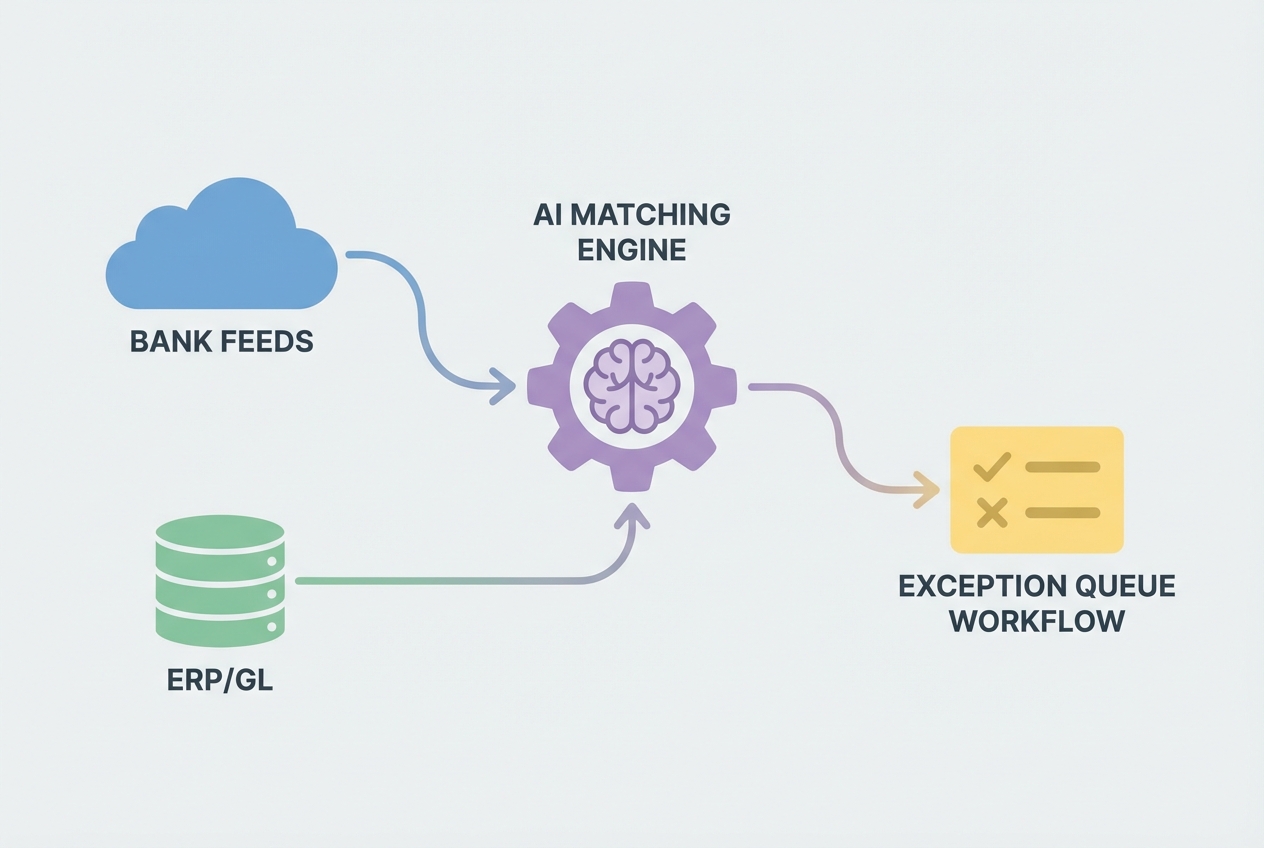 The best systems connect bank feeds to your ledger, automate matching, and route only true exceptions to humans.
To be effective, automated bank reconciliation software must go beyond simple 1:1 matching. It should act as a bridge between your banking institutions and your ERP or accounting system, while keeping a clean audit trail.
AI-Powered Matching Engines
Modern tools use machine learning to handle complex matching scenarios, such as many-to-one or one-to-many transactions. Good matching engines do more than compare amounts. They learn patterns in:
- Merchant and payee naming: Recognize that "AMZN Mktp" and "Amazon Marketplace" can be the same vendor line, depending on your history.
- Posting delays and value dates: Handle timing differences between when cash moves and when it posts, without creating false exceptions.
- Recurring fees and bank charges: Auto-classify bank fees so they do not repeatedly hit your exception queue.
- Partial payments and split deposits: Match realistic payment behavior, not idealized one-invoice, one-payment flows.
Some vendors cite 99.9% accuracy for automated matching in mature setups, exceeding the practical reality of manual work where fatigue and volume drive mistakes.
What to validate during demos:
- Bulk invoice deposit matching: Can it match a single deposit to 20 invoices without forcing manual splits?
- Processor payout handling: Can it reconcile Stripe, PayPal, or Square payouts where fees are netted out and descriptors vary?
- Learning loop: Can it learn from your approvals, or does it "forget" every month and require constant rule babysitting?
Direct Bank Feeds and API Integration
Real-time visibility requires software that connects directly to your financial institutions via secure APIs. This eliminates the fragile middle step: manual CSV exports and uploads.
CSV workflows fail in predictable ways:
- Duplicate rows: Partial exports or repeated date ranges can create duplicate transactions that look like real cash movement.
- Modified date formats: A single format change can shift posting dates, break matching, or create false aging issues.
- Missing transaction IDs: Without stable IDs, the system cannot reliably de-dupe or trace a line item back to the bank.
- Version confusion: Teams lose time debating which file is "the right one" after multiple uploads and edits.
Strong platforms support direct feeds and provide monitoring when a feed breaks. For example, both QuickBooks Online's reconciliation workflow and Xero's bank reconciliation flow center on consistent bank statement import and matching so you reconcile continuously, not once a month in a panic.
Automated Exception Management
The goal is not to look at every line. The goal is to only look at the lines that truly need a human decision.
This "management by exception" workflow should include:
- Confidence scoring: Show how sure the system is, and what signals it used to make the match.
- Exception categories: Group issues like missing invoice, amount mismatch, or timing difference so your team fixes faster.
- Routing and approvals: Assign exceptions to the right owner and capture sign-off before posting changes to the GL.
- Audit logs: Track who changed what, when, and why, so audits are less stressful and less expensive.
This is also a natural extension of financial reporting automation. When exceptions are tracked and resolved in a system, your reporting becomes more trustworthy because it is based on reconciled cash movement, not guesses.
How AI and Machine Learning Power Automated Bank Reconciliation Software
The most significant trend for 2026 is the rise of "Agentic AI." Unlike standard automation that follows fixed if-then rules, agentic AI can interpret messy, unstructured inputs and choose actions based on history and context.
In reconciliation, that means the system can do work that used to require tribal knowledge, like:
- Dynamic interpretation: Interpreting bank memo fields that change every payout and still linking them to the right customer, vendor, or processor report.
- Smart transaction splitting: Deciding whether a single bank line should be split across multiple GL accounts (revenue, fees, refunds, chargebacks).
- Fuzzy match suggestions: Suggesting likely matches even when dates or amounts are slightly off because it understands your past patterns.
This technology can reduce reconciliation time by up to 80% by autonomously resolving minor discrepancies and learning the patterns behind them.
It also changes what "automation" looks like in practice. Instead of "set up 200 rules and pray," you get a system that improves over time.
A practical example: AI-powered parsing can read scanned deposit slips, ACH descriptors, or processor settlement narratives and map them to the right customer, invoice, or GL account. This becomes critical as your transaction volume grows, because you can scale throughput without scaling headcount linearly.
If you have a unique workflow (for example, payouts that bundle subscription revenue, one-off services, refunds, and chargebacks), off-the-shelf tools can hit a ceiling. This is one place a custom build can pay off. QuantumByte’s approach is to prototype reconciliation apps from natural language quickly, then have engineers harden the pieces AI cannot finish yet, so you can move from idea to working workflow in days, not months.
The Strategic Benefits of Automating Your Bank Reconciliations
Automated reconciliation acts as a control upgrade, a cash visibility boost, and a sanity saver.
- Faster close cycles: Companies using automated systems can reduce the reconciliation phase of their close from eight days down to three hours. The practical impact is simple: you stop making decisions on stale numbers.
- Enhanced audit readiness: Automation creates a digital paper trail with clear audit logs for every match. You can show who approved exceptions, when it happened, and what evidence supported the decision.
- Reduced operational costs: Manual reconciliation can consume up to 30% of a finance team's time. Automation gives those hours back for forecasting, pricing analysis, and customer-level profitability.
- Improved fraud detection: AI can spot unusual patterns, like a new payee with an odd payment cadence or a bank withdrawal that does not match any expected vendor activity. Humans are good at judgment. Software is good at noticing anomalies at scale.
Best Automated Bank Reconciliation Software for 2026
The "best" software depends on your transaction volume, entity structure, and where your financial truth lives today (accounting platform, ERP, or close-management stack).
Quick comparison by business size
| Category | Best fit | Strengths | Watch-outs |
|---|---|---|---|
| SMBs | QuickBooks, Xero | Fast setup, built-in bank feeds and matching, good for straightforward cashflow | Can struggle with complex payouts, multi-entity, or high-volume exception routing |
| Mid-market | FloQast, BlackLine | Close workflows, approvals, reconciliations as a managed process, strong visibility | Often complements your ERP rather than replacing reconciliation inside it |
| Enterprise | Oracle NetSuite, Sage Intacct | Deep ERP integration, multi-entity, controls, scale | Implementations can be heavy; customization may require specialist support |
| Specialized automation | HighRadius (and similar) | Advanced AI for high-frequency B2B payments, complex matching | Best value when volume is high and AR/payment complexity is real |
Notes on the tools named above
- QuickBooks and Xero: These are excellent starting points for service businesses and smaller teams that need reliable bank feeds and quick matching. Their documentation shows how much the category has matured (QuickBooks, Xero).
- FloQast and BlackLine: These are built around the close. They shine when the issue is not "we cannot match" but "we cannot coordinate." FloQast positions its platform around reducing reconciliation time and improving the close workflow (FloQast Close Management). BlackLine emphasizes standardization, controls, and high-frequency reconciliations (BlackLine Account Reconciliations).
- NetSuite and Sage Intacct: These offer more integrated options for teams living in an ERP environment. NetSuite describes how "intelligent rules" reduce manual time and flag exceptions (NetSuite bank reconciliation). Sage Intacct documents bank feeds, rule sets, and reconciliation flows for daily or month-end work (Sage Intacct reconciling).
Selecting the Right Automated Bank Reconciliation Software for Your Business
The first decision is whether you should rely on what is inside your ERP/accounting platform or add a specialist layer.
Use these questions to avoid expensive regret:
- Current failure point: Where does reconciliation break today? If the pain is matching complexity, you need better matching. If the pain is ownership and approvals, you need workflow.
- Exception rate reality: What is your exception rate? If 3% of transactions cause 90% of the work, invest in exception tooling and better upstream data (invoice references, standardized memos, consistent payout reports).
- Silo risk: Will this create a new silo? A tool that does not integrate cleanly with your ledger, invoicing, and payroll becomes a second set of books over time.
If your current ERP module causes friction, you may need to consider the build vs. buy equation. This is especially true when you have niche revenue flows (marketplaces, mixed subscription + usage billing, multi-processor payouts) that generic rules cannot model well.
A pragmatic middle path is common in 2026: keep your accounting system as the system of record, but build a thin reconciliation layer that standardizes inputs, enriches transactions, and pushes clean entries back into the GL. QuantumByte is well suited to this scenario because you can prototype the workflow quickly with its AI app builder, then have a senior development team integrate it properly with your bank feeds, ERP, and internal approvals.
If you want to map your reconciliation workflow and see what could be automated first, you can get started building today
Also validate that your tool supports the rest of your stack. Reconciliation does not live alone. It touches:
- Invoicing and billing: The source of truth for what you expected to collect and when.
- Payment processors and payout reports: The place where fees, chargebacks, and payout batching can distort a simple 1:1 match.
- Expense management: The workflow that explains many "mystery" card charges and reimbursements.
- Payroll and contractor payments: High-impact cash movement that must map cleanly to the right period and entity.
If it cannot connect cleanly, it will eventually slow you down.