Your finance team is drowning in data entry. Bank reconciliation, invoice processing, expense categorization, report compilation—tasks that consume 60-70% of their time but add little strategic value. Meanwhile, the analysis, forecasting, and business partnering that could actually drive growth gets squeezed into whatever time remains.
Accounting automation software breaks this pattern. By automating repetitive, rule-based tasks, you free your finance team to focus on what humans do best: interpret, advise, and strategize.
The Accounting Bottleneck
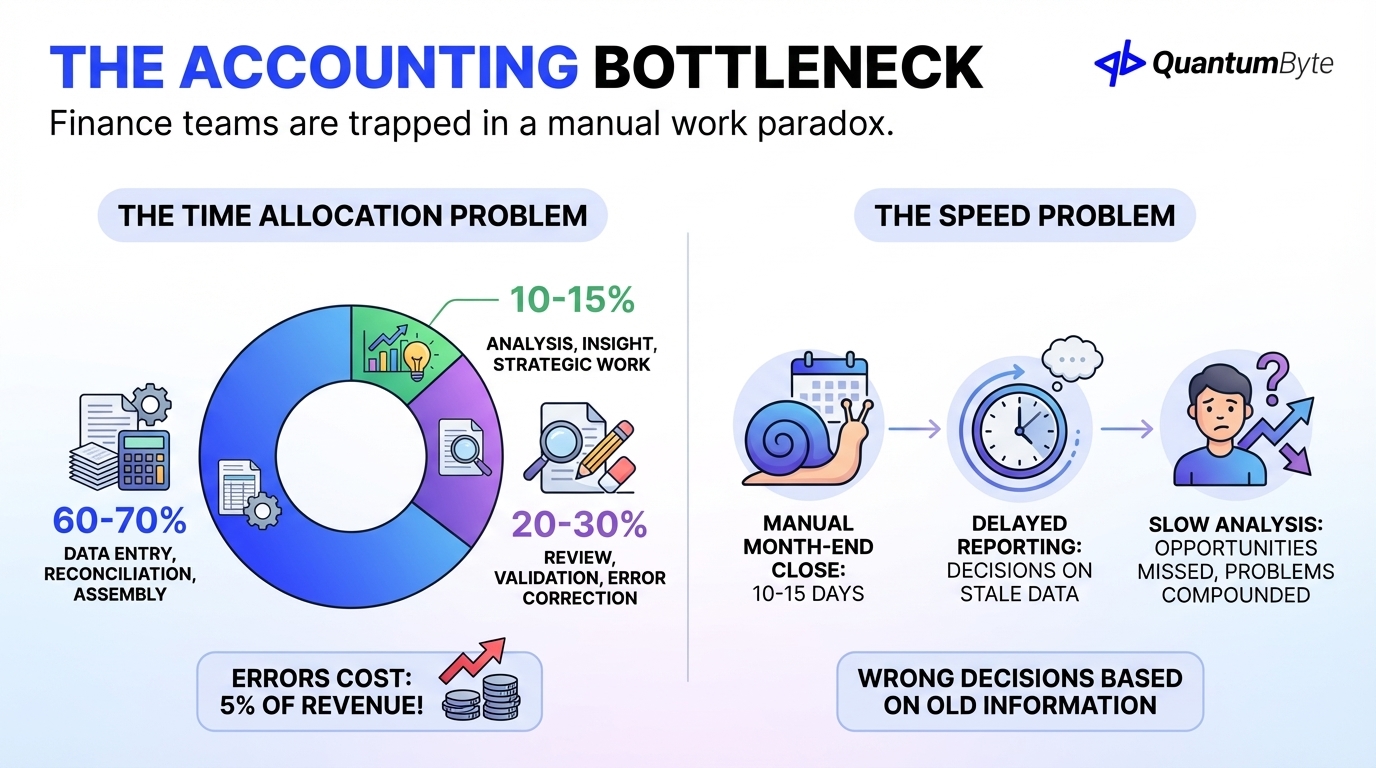
Finance teams are trapped in a manual work paradox:
The time allocation problem:
- 60-70% of time: Data entry, reconciliation, report assembly
- 20-30% of time: Review, validation, error correction
- 10-15% of time: Analysis, insight generation, strategic work
According to the Institute of Finance & Management, accounting errors cost the average business 5% of revenue—lost to mistakes, corrections, and downstream impacts of inaccurate financial data.
The speed problem:
- Manual month-end close: 10-15 days
- Delayed reporting: Decisions made on stale data
- Slow analysis: Opportunities missed, problems compounded
By the time manual processes deliver financial insights, the business has already made wrong decisions based on old information.
15 Accounting Tasks to Automate
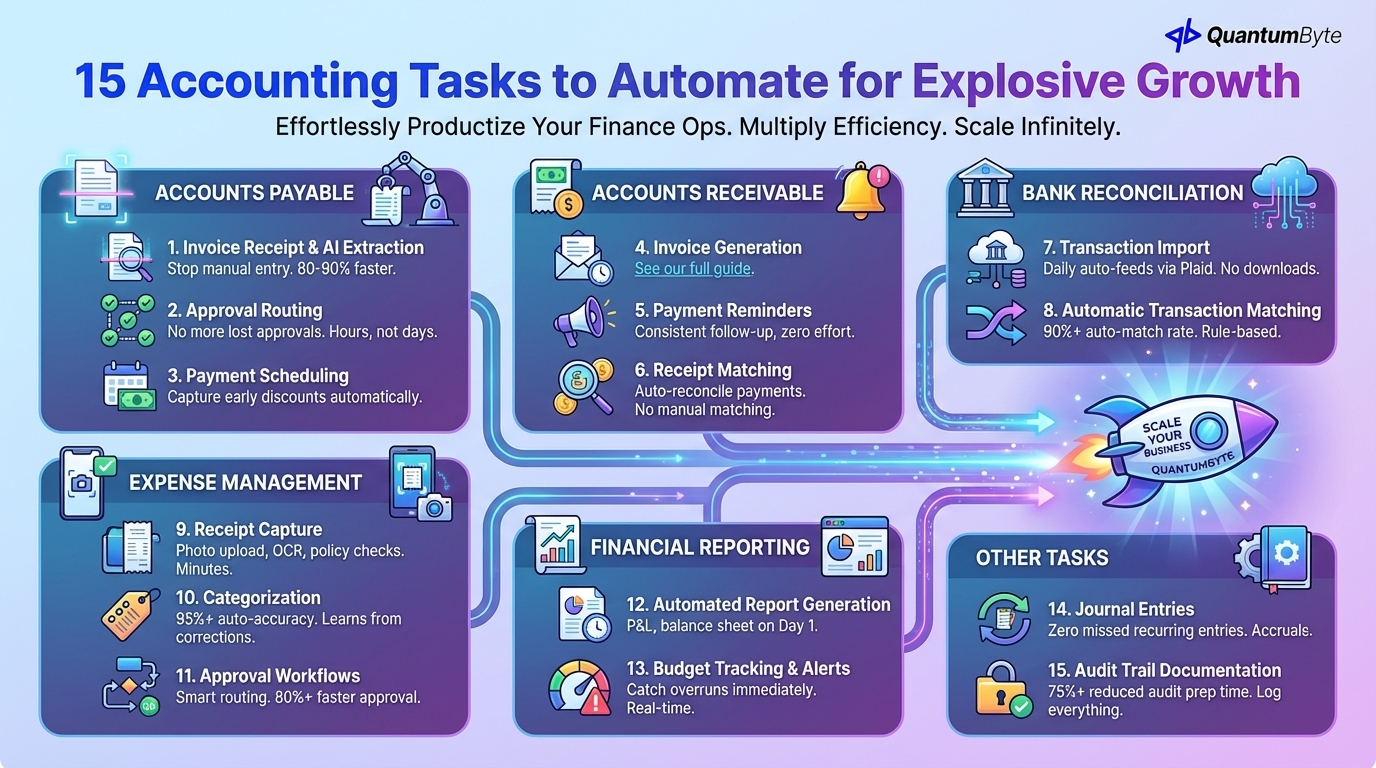
These tasks deliver the highest returns when automated:
Accounts Payable
1. Invoice Receipt and Data Extraction
Stop manual data entry from vendor invoices.
What to automate: Invoice receipt via email/portal/scan, OCR/AI extraction of invoice details, validation against purchase orders, exception flagging, data entry into accounting system.
Impact: 80-90% reduction in AP data entry time.
2. Approval Routing
Eliminate email chains and lost approvals.
What to automate: Rule-based routing (amount, vendor, category), multi-level approval chains, reminder escalation, delegation for absent approvers.
Impact: Approval time reduced from days to hours.
3. Payment Scheduling
Optimize payment timing automatically.
What to automate: Early payment discount capture, cash flow-optimized payment timing, payment batch generation, vendor notification.
Impact: Capture 100% of available early payment discounts.
Accounts Receivable
4. Invoice Generation
Covered in detail in our invoice automation guide.
5. Payment Reminders
Consistent follow-up without manual effort.
6. Receipt Matching
Automatic reconciliation of payments to invoices.
What to automate: Payment detection from bank feeds, intelligent matching to open invoices, partial payment handling, overpayment/underpayment alerting.
Impact: Manual cash application eliminated.
Bank Reconciliation
7. Transaction Import
What to automate: Daily bank feed connection via Plaid or direct integrations, transaction import, currency conversion, multi-bank aggregation.
Impact: Eliminate manual statement downloads and entry.
8. Automatic Transaction Matching
What to automate: Rule-based matching, fuzzy matching for variations, batch transaction handling, exception flagging.
Impact: 90%+ automatic match rate.
Expense Management
9. Receipt Capture
What to automate: Photo upload from phone, OCR data extraction, category suggestion, policy compliance checking, approval routing.
Impact: Expense reports completed in minutes, not hours.
10. Categorization
What to automate: Auto-categorization based on vendor/description, GL account assignment, cost center allocation, tax code application, learning from corrections.
Impact: 95%+ auto-categorization accuracy.
11. Approval Workflows
What to automate: Amount-based routing, policy exception flagging, batch approval for routine expenses, reimbursement triggering.
Impact: Manager approval time reduced 80%+.
Financial Reporting
12. Automated Report Generation
What to automate: Scheduled report generation, P&L, balance sheet, cash flow assembly, variance analysis, distribution to stakeholders.
Impact: Reports available Day 1 instead of Day 10.
13. Budget Tracking and Variance Alerts
What to automate: Actual vs. budget tracking, variance threshold alerts, forecast updates, department notifications.
Impact: Budget overruns caught immediately, not at month-end.
Other Tasks
14. Journal Entries
What to automate: Recurring entries (rent, depreciation, amortization), accruals and deferrals, intercompany entries, reversal scheduling.
Impact: Zero missed recurring entries.
15. Audit Trail Documentation
What to automate: Transaction logging, approval documentation, change tracking, document attachment, report archival.
Impact: Audit preparation time reduced 75%+.
ROI of Accounting Automation
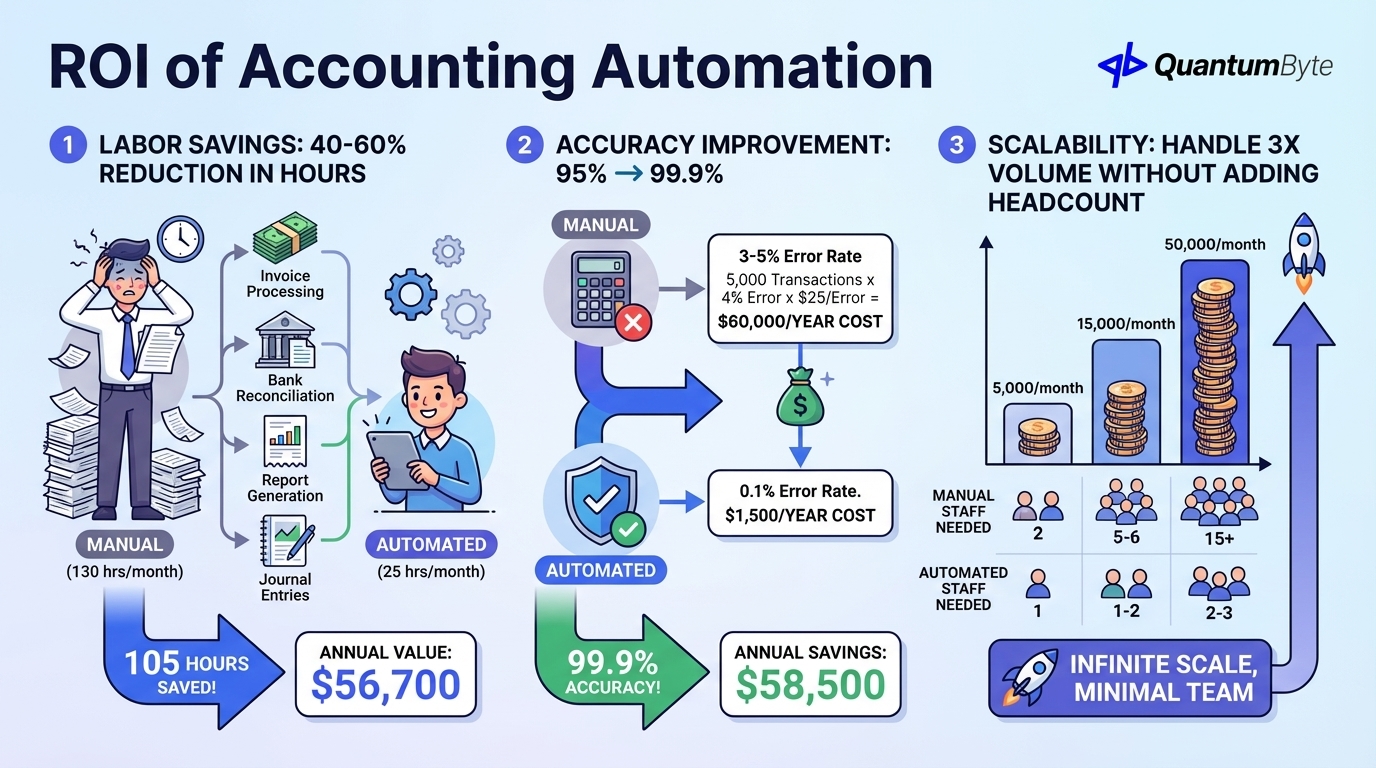
Labor Savings: 40-60% Reduction in Accounting Hours
| Task | Manual Hours/Month | Automated Hours/Month | Savings |
|---|---|---|---|
| Invoice processing | 40 | 8 | 32 hrs |
| Bank reconciliation | 20 | 4 | 16 hrs |
| Expense processing | 25 | 5 | 20 hrs |
| Report generation | 30 | 5 | 25 hrs |
| Journal entries | 15 | 3 | 12 hrs |
| Total | 130 hrs | 25 hrs | 105 hrs |
Annual value: 105 hours/month × 12 × $45/hour = $56,700
Accuracy Improvement: 95% → 99.9%
Manual accounting has 3-5% error rates. Each error requires time to detect, investigate, correct, and may have downstream impacts.
Error cost calculation:
Monthly transactions × Error rate × Cost per error = Monthly error cost
5,000 × 4% × $25 = $5,000/month = $60,000/year
With automation (0.1% error rate): $1,500/year
Annual savings: $58,500
Scalability: Handle 3x Volume Without Adding Headcount
| Transaction Volume | Manual Staff Needed | Automated Staff Needed |
|---|---|---|
| 5,000/month | 2 | 1 |
| 15,000/month | 5-6 | 1-2 |
| 50,000/month | 15+ | 2-3 |
Example: $5M Revenue Business
| Benefit Category | Annual Value |
|---|---|
| Labor efficiency (40% savings) | $36,000 |
| Error reduction | $25,000 |
| Avoided hire (scaling) | $60,000 |
| Audit preparation | $8,000 |
| Early payment discounts captured | $12,000 |
| Total Annual Benefit | $81,000+ |
| Implementation Cost | $15,000-30,000 |
| Payback Period | 3-5 months |
Key Integration Points
Accounting automation must connect to:
- Banking: Automatic bank feeds (Plaid, direct APIs), payment initiation, real-time balance visibility
- E-Commerce/POS: Automatic revenue recording from Shopify, WooCommerce, Square
- Payroll: Integration with Gusto, ADP, or payroll systems for wage and tax recording
- CRM: Customer data from Salesforce, HubSpot for revenue attribution
- Time Tracking: Professional services billing from time systems
Building Your Accounting Automation System
QuantumByte develops custom accounting automation apps that streamline your financial workflows:
Custom Solutions for Your Chart of Accounts
Specific to your business: your account structure, your reporting requirements, your approval workflows, your compliance needs.
AI-Powered Transaction Processing
Intelligent automation: learning categorization, document extraction, anomaly detection, pattern recognition.
Integration with Any System
Connect everything: cloud accounting platforms (QuickBooks, Xero, NetSuite), banking systems, business applications, legacy systems via API or import.
Real-Time Dashboards
Know your numbers instantly: financial position, cash flow status, key metrics, trend analysis.
Conclusion: Transform Your Finance Function
Accounting automation isn't about replacing your finance team—it's about unleashing their potential. By automating the routine, you free them to:
- Analyze trends and provide insights
- Partner with business leaders on decisions
- Forecast and plan strategically
- Add real value to the organization
Next steps:
- Audit your current accounting processes
- Calculate your automation opportunity
- Evaluate integration requirements
- Plan phased implementation
- Measure and iterate
Ready to transform your finance function? Schedule a consultation to explore your accounting automation opportunities.
Other Guides to Explore
- Invoice Automation: How to Get Paid Faster and Reduce Costs
- Order Fulfillment Automation: Speed Up Delivery and Reduce Costs
- Inventory Management Automation: Reduce Stockouts and Increase Sales
- How to Automate Business Processes to Increase Revenue in 2025
Frequently Asked Questions (FAQ)
Will accounting automation replace accountants?
No—it transforms their role. Automation handles data entry and processing; accountants focus on analysis, interpretation, and business partnership. Most organizations redeploy rather than reduce staff, with accountants moving to higher-value work.
How long does accounting automation take to implement?
Basic automation (bank feeds, invoice templates): Days to weeks. Comprehensive automation with integrations: 2-4 months. Start with high-impact areas and expand progressively.
Can I automate if I'm using QuickBooks or Xero?
Yes, these platforms support significant automation through their built-in features and integrations. Additional automation layers can extend their capabilities.
What about security and data protection?
Modern accounting automation includes security features: role-based access, encryption, audit trails, and compliance certifications. Evaluate vendor security practices and choose platforms that meet your requirements.
How do I maintain control with automated processes?
Automation doesn't mean lack of control. Configure approval workflows, exception handling, and alerts to maintain oversight. Review automation outputs regularly. The goal is consistent execution with appropriate human oversight.

