
Manual corporate card reconciliation is a notorious bottleneck, often consuming 30-40% of a finance team's time every month-end. In an era where real-time data is the standard, waiting weeks for receipt matching is no longer sustainable for growing enterprises.
Time is only the surface problem. When your spend data is stale, you hesitate on hiring, pause on ad budgets, and delay investments that could multiply impact.
This guide explores how corporate card reconciliation automation transforms chaotic paper trails into seamless, error-free digital workflows. We will cover the specific steps to implement automation, the critical features to look for in software, and how to integrate these tools into your existing ERP for maximum efficiency. If you are evaluating the broader landscape, our guide to expense management automation covers the full spectrum of expense workflows.
Automation Readiness Checklist
Before diving into the guide, use this checklist to assess your current state:
- Card provider API access: Do you have direct API access to your corporate card provider?
- Receipt repository: Is there a centralized digital repository for employee receipts?
- Standard GL codes: Have you defined standard GL codes for common card expenses?
- Accounting integrations: Does your current accounting software support third-party integrations?
- Documented expense policy: Are your corporate expense policies clearly documented? If not, see our guide on expense policy automation for a framework.
If you checked fewer than 3 boxes, you can still automate. Start simple, then tighten the workflow once your team trusts the new system.
How to Implement Corporate Card Reconciliation Automation
This section provides a step-by-step roadmap for moving from manual spreadsheets to a fully automated system.
To keep it practical, here's the "what you do" and "what you get" at each stage:
| Step | What you set up | What success looks like |
|---|---|---|
| 1 | Direct bank and card feeds | Transactions arrive automatically every day |
| 2 | Mobile receipt capture with OCR | Receipts get captured at the moment of purchase |
| 3 | Intelligent auto-matching rules | Most transactions match without a human touching them |
| 4 | Chart of accounts mapping | Clean categories and GL coding, consistently applied |
| 5 | ERP sync | Approved spend posts to the ledger on a schedule |
Step 1: Establish Direct Bank and Card Feeds
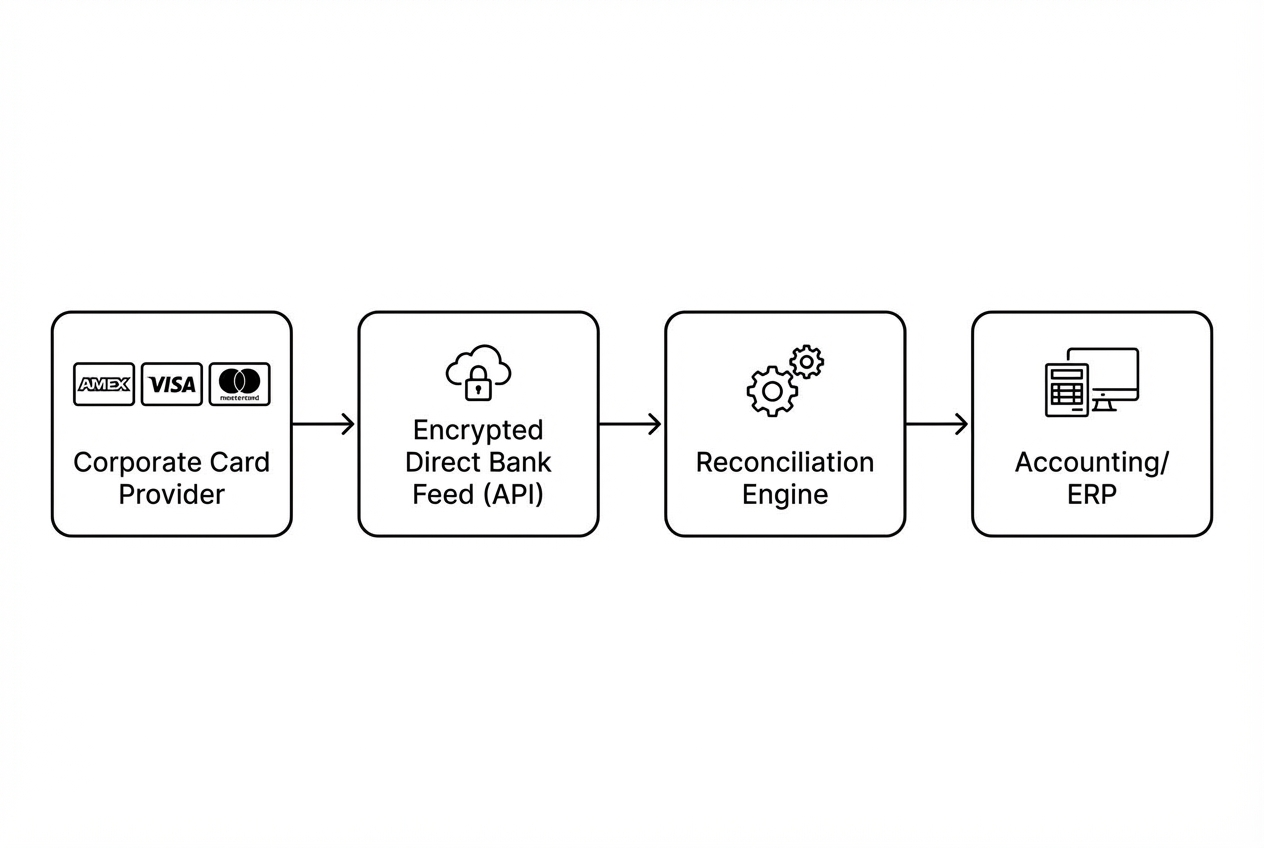
Stop relying on manual CSV downloads. Automation begins with a direct, encrypted connection between your corporate card provider (Amex, Visa, Mastercard) and your automation platform.
- Action: Select a tool that offers direct bank feeds rather than screen scraping for higher security and reliability.
Direct feeds matter because they are stable. Screen scraping breaks when a bank changes a login flow. That is the last thing you want during close.
Quick setup checklist for Step 1
- Confirm feed type: Ask the vendor if the connection is API-based or scraping-based.
- Decide refresh frequency: Daily is a great default. Some teams prefer multiple refreshes per day.
- Lock down access: Use least-privilege roles so only finance admins can connect or change feeds.
Step 2: Deploy Mobile Receipt Capture with OCR
The biggest hurdle to reconciliation is missing receipts. Use mobile apps with Optical Character Recognition (OCR) to allow employees to snap photos of receipts instantly.
- Action: Ensure the tool can extract date, merchant, amount, and tax data automatically.
Think of this as moving receipt capture to the moment of purchase. That's the win. You stop chasing receipts days later. For a deeper dive on receipt workflows, see our expense report automation guide.
How to drive adoption (without becoming the receipt police)
- Make it immediate: Require capture within 24 hours. Short windows build habits fast.
- Make it simple: One button, one photo, done. If it feels like admin work, people resist.
- Make it visible: Give employees a "missing receipts" view so it's self-serve.
Step 3: Configure Intelligent Auto-Matching Rules
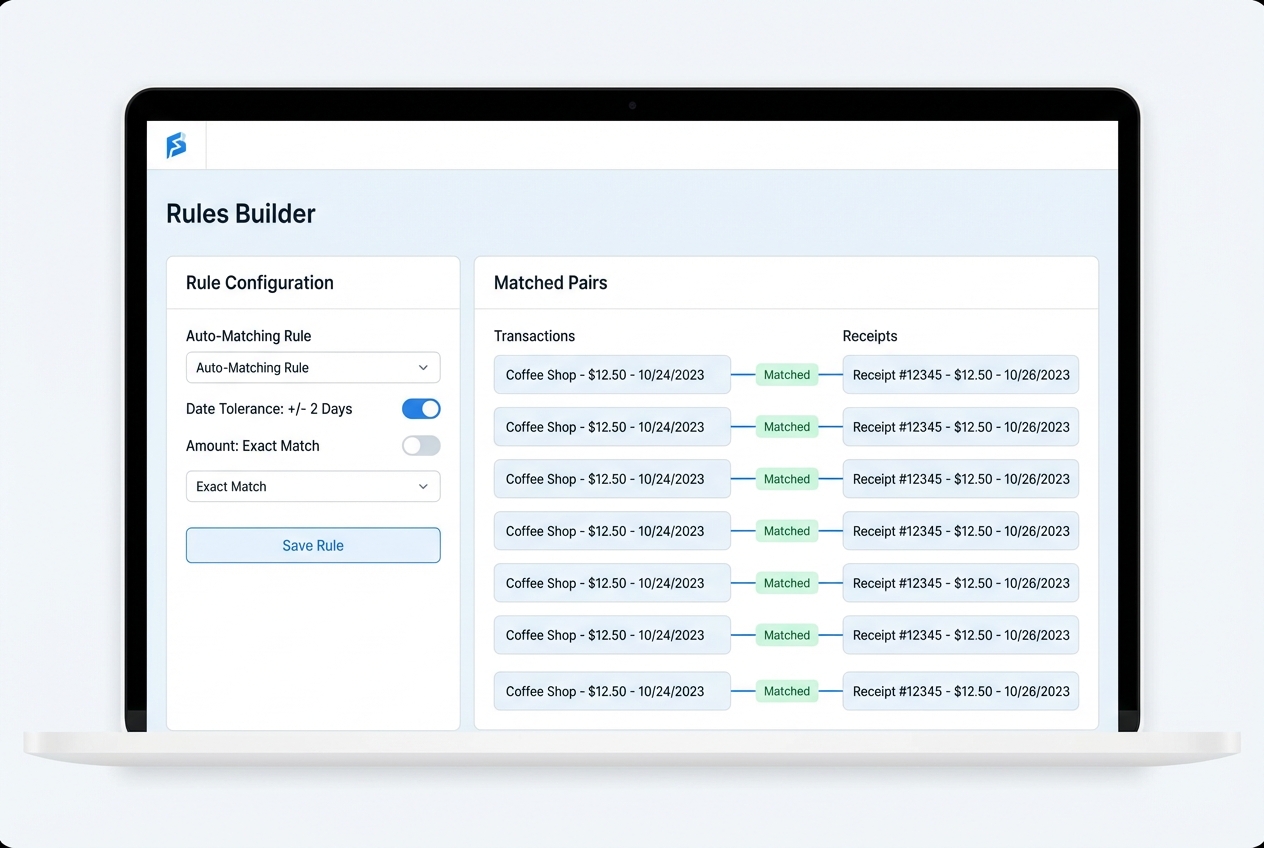
Corporate card reconciliation automation works best when the software does the heavy lifting of matching the bank transaction to the captured receipt based on date and amount.
- Action: Set tolerance levels (for example, matching transactions within +/- 2 days) to account for processing delays.
A strong matching engine usually combines:
- Amount matching: Match exact amounts first, then allow small tolerances where your business needs it (like tips).
- Date matching: Use a configurable window to handle posting delays from card networks.
- Merchant matching: Use merchant name signals to separate similar amounts across vendors.
Rule patterns that usually work well
- Exact match first: Start strict, then loosen only where you see real exceptions.
- Tolerance by category: Meals might need different date tolerance than hotel deposits.
- Exception routing: If confidence is low, route it to the right approver, not a generic inbox.
If your process is unique, this is where custom software can be a cheat code. A lightweight "reconciliation control panel" often beats forcing every edge case into off-the-shelf rules. Quantum Byte can build that kind of layer quickly and connect it to your existing tools, so your team spends time reviewing exceptions instead of fighting the system.
Step 4: Map Transactions to Your Chart of Accounts
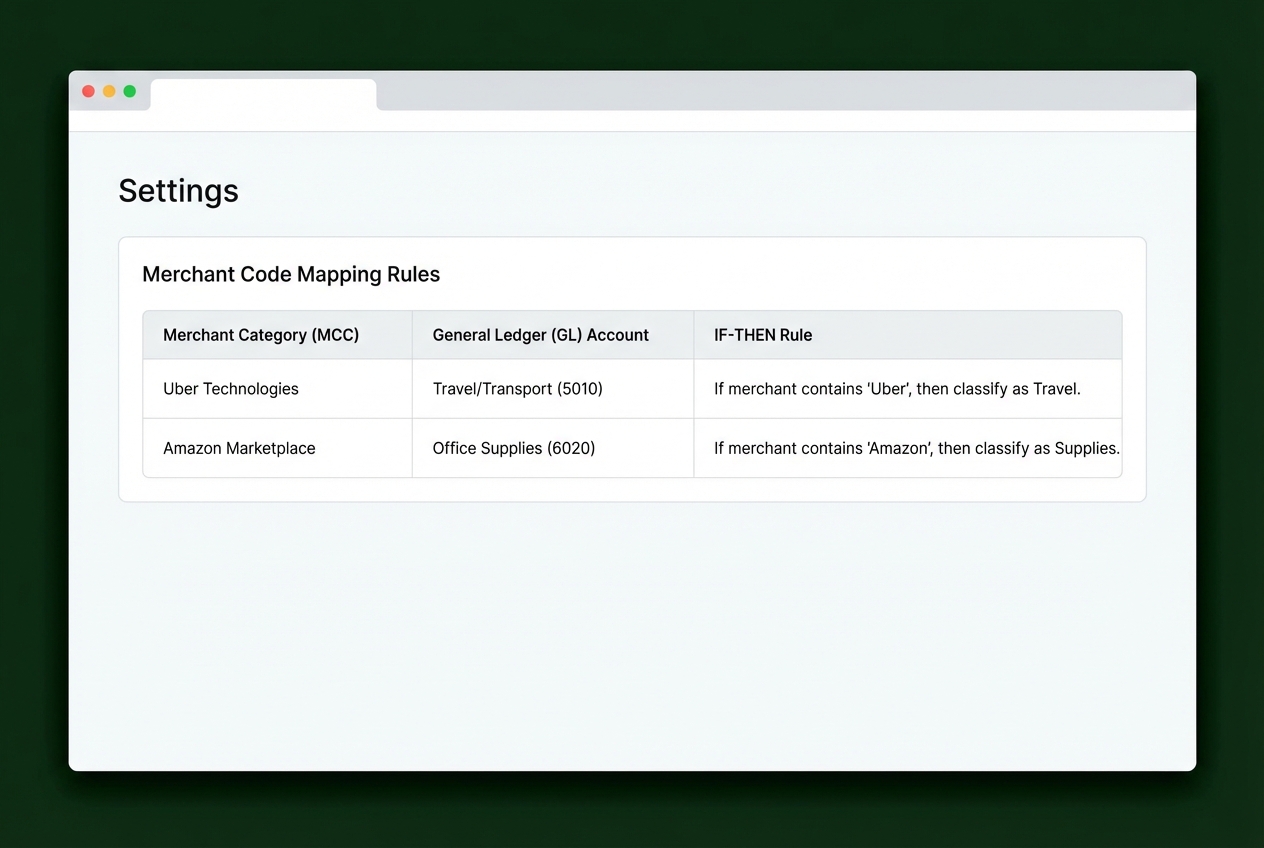
Automate the categorization of expenses by mapping merchant category codes (MCC) to your specific General Ledger (GL) codes.
- Action: Create if-then rules (for example, if merchant is Uber, then category is Travel/Transport).
MCCs are standardized codes used by card networks to classify merchants. In practice, you'll use them as a default category signal, then override for your biggest vendors.
A practical mapping approach (fast, not perfect)
- Start with your top merchants: Begin with the top 20 merchants to cover most spend quickly.
- Add MCC-based defaults: Use MCCs for the long tail of one-off merchants.
- Allow overrides: Some merchants sell multiple things, so give employees 2–3 approved options when needed.
Step 5: Sync Reconciled Data to Your ERP
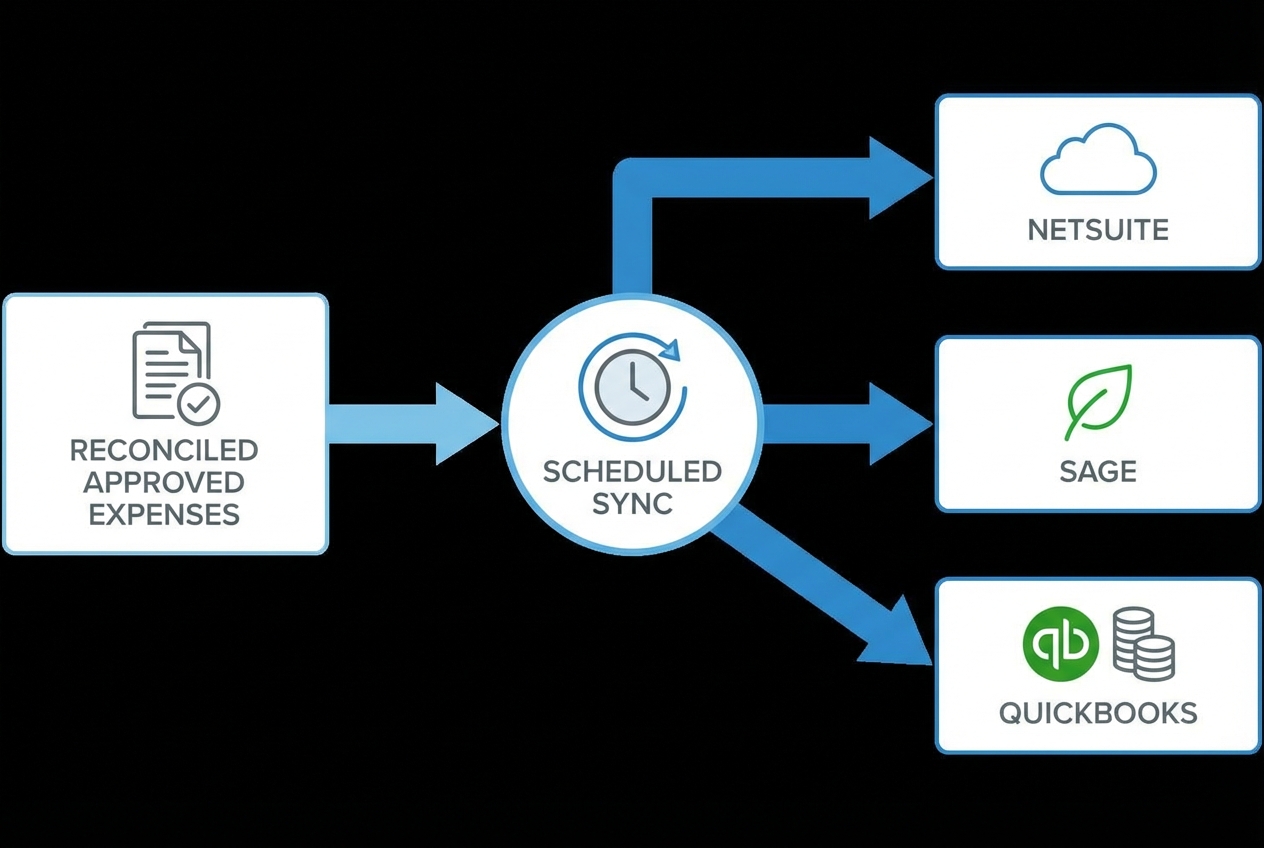
The final step is pushing the reconciled, approved data into your accounting system (NetSuite, Sage, QuickBooks) to close the books.
- Action: Schedule daily or weekly syncs to maintain real-time visibility into company spend.
The goal is simple: one source of truth. Your ERP should reflect approved reality to ensure you avoid the risks of half-finished spreadsheets. For more on ERP-level automation, see our guide to accounting automation software.
ERP sync choices you need to make
- Sync cadence: Use daily sync for fast-growing teams, and weekly sync for lower volume.
- Posting level: Post as expenses, bills, journal entries, or card charge records based on your accounting model.
- Approval gates: Sync only transactions that are matched and approved.
If your ERP integration is the sticking point, that's a common last-mile problem. It's also where a development partner can save months. Quantum Byte often helps teams connect the final dots, especially when the integration needs custom logic and clean error handling.
The Strategic Benefits of Automating Card Reconciliation
Beyond just saving time, automation provides a layer of financial integrity that manual processes cannot match.
Elimination of Human Error and Duplicate Entries
Manual data entry has an error rate as high as 4%, which can lead to significant discrepancies over thousands of transactions. Automation ensures that the data in your ERP matches the bank statement exactly.
That accuracy compounds into better decisions:
- Cleaner department budgets: Your reporting reflects reality, not miscoded spend.
- More trustworthy cash forecasting: Fewer surprises means better timing on hiring and vendor commitments.
- Faster closes with fewer variances: You spend less time hunting "mystery" items. Our financial reporting automation guide covers how to turn this accuracy into real-time dashboards.
Enhanced Fraud Detection and Policy Compliance
Automated systems can flag out-of-policy spend immediately. For instance, if an employee uses a card on a weekend or at an unauthorized merchant, the system can trigger an alert before the reconciliation is even attempted.
Common compliance and risk controls you can automate:
- Policy checks: Flag merchant type, spend limits, weekend rules, or banned categories the moment a charge hits.
- Duplicate detection: Detect same amount, same merchant, and tight time windows that signal double charges or double submissions.
- Receipt enforcement: Send reminders, then escalate for repeat missing receipts if your card program supports it.
Best Practices for Successful Corporate Card Reconciliation Automation
To get the most out of your investment, follow these industry-standard practices:
- Reconcile daily, not monthly: Shift from month-end crunch to continuous reconciliation so issues surface while they are still easy to fix.
- Centralize all card programs: If you use multiple card types (like Amex plus virtual cards), use a single platform to view all automated business processes in one dashboard. This reduces blind spots and duplicate policy work.
- Audit your rules regularly: Review your auto-matching logic so it stays aligned with your evolving expense policy and vendor mix.
A simple weekly rhythm that works
- Monday: Review exceptions and unmatched items.
- Mid-week: Confirm approvals are flowing and nothing is stuck.
- Friday: Spot-check category mappings and policy flags.
Overcoming Implementation Challenges
Transitioning to corporate card reconciliation automation isn't without hurdles. Common issues include:
- Legacy bank limitations: Some older banks don't support modern APIs. In these cases, look for tools that offer robust SFTP import options. While it is not as live as an API feed, it still removes manual exports.
- Employee adoption: Resistance to new apps is common. Choose tools with zero-training interfaces to maximize compliance. Adoption usually comes down to design, speed, and convenience.
- Data security concerns: Ensure any vendor you choose is SOC 2 compliant to protect sensitive financial data. SOC 2 reports assess controls against the AICPA Trust Services Criteria.
One more real-world challenge is edge cases. You will have them:
- Split receipts: One receipt that needs to be allocated across departments or projects.
- Hotel incidentals: Room rates and incidentals can post separately and confuse matching.
- Tips: Amounts differ from the pre-tip receipt, so you need tolerance rules.
- Foreign currency holds and reversals: Temporary authorizations can create duplicates until they settle.
This is where you either accept a small manual exception queue, or you build a custom workflow layer that fits your policies.
A Simple Next Step (That Keeps You Moving)
If you want corporate card reconciliation automation without a long, risky build cycle, start by mapping your process on one page. Then automate the highest-friction step first (usually receipts or matching). To build a business case, our finance automation ROI guide walks through how to quantify the savings.
If you're ready to turn your reconciliation workflow into a lightweight internal app, you can prototype it fast using Quantum Byte's AI-powered app builder, then bring in the team for the tricky parts like ERP sync and custom logic.
What you're working toward is real breathing room. Faster close. Cleaner books. And the confidence to grow without finance becoming the bottleneck.

