
Manual expense management is a notorious drain on resources. Research shows that slow reimbursements and human error create hidden overhead that can quietly cost companies real money. Expense policy automation fixes that by embedding your spending rules into the workflow, so compliance happens at the point of purchase instead of weeks later during cleanup. If you want a broader look at what automation can do across expense management, see our guide on expense management automation.
This guide walks you through the shift from a static PDF policy to a living, self-enforcing financial ecosystem.
In the last few years, AI-powered OCR (receipt scanning) plus real-time card and bank feeds turned automation from "nice to have" into "you should probably do this before you scale."
We'll cover how automated enforcement works, a confident step-by-step implementation plan, and how to choose tools that cut manual data entry. By the end, you'll have a clear roadmap to modernizing your expense workflow. Of course, we'll always be here when off-the-shelf tools do not match how your business actually runs.
What is Expense Policy Automation?
Expense policy automation is the use of software to enforce company spending rules during the expense process, not after the fact.
Instead of your finance lead manually checking every receipt against a PDF, automation turns policy into a system:
- Real-Time Alerts: It flags problems immediately, while the purchase is still fresh.
- Hard Stops: It blocks what should never be allowed, before it hits your books.
- Smart Routing: It routes exceptions to the right person with the right context, so approvals do not stall.
Oracle NetSuite explains it well: modern expense automation replaces most manual work with receipt capture, categorization, and reconciliation inside the tool, so finance teams spend less time on policing and more time on decisions.
If you're also systemizing other parts of the business, this pairs nicely with our broader guide on workflow automation.
How Expense Policy Automation Works
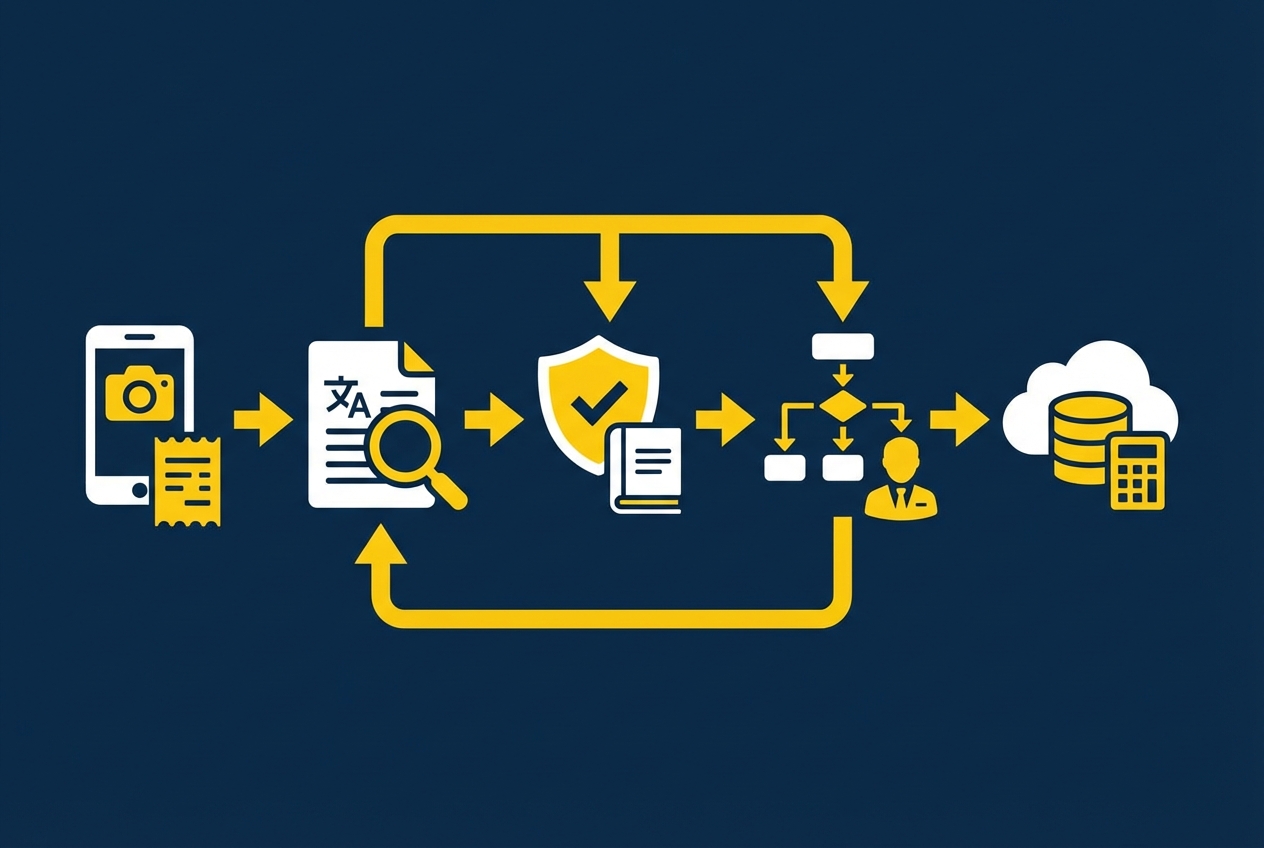
To get the value, it helps to see what's happening behind the curtain. Most modern stacks combine:
- AI Extraction: OCR and smart categorization pull key fields from receipts and transactions.
- Policy Logic: Your rules become checks the system can run every time.
- Connected Systems: Cards, banks, and accounting/ERP sync data so nothing gets lost.
Here's the lifecycle:
- Receipt capture and OCR: Your employee snaps a photo. The system extracts vendor, date, amount, and tax.
- Rule analysis: The system compares the extracted data to your policy rules (example: meal limit, required receipt, banned merchant category).
- Real-time enforcement: The employee gets a warning, needs extra info, or the expense is blocked.
- Automated routing: Approvals go to the right manager, and exceptions go to finance with context.
- Accounting sync: Approved expenses sync to your general ledger with correct categories and attachments.
5 Steps to Implement Expense Policy Automation
This is the "do it this week" plan. Each step includes a visual so you can align your team quickly.
1. Audit and Refine Your Static Policy

Before you automate anything, you need rules that are clear enough for software.
Pull up your current travel and expense policy and look for:
- Missing Definitions: Clarify what counts as "client meal," "team meal," "travel day," or "training."
- Exception Owners: Specify who can approve overages, and what proof they need to do it.
- Unwritten Rules: Capture the stuff finance "just knows," because software cannot enforce what is not written down.
Your goal is to reduce gray areas. Software cannot enforce "use good judgment" without becoming a mess of exceptions.
What to do in practice:
- Top Spend Scenarios: List your top 20 transactions (meals, travel, software, supplies) and write a simple "allowed/not allowed" rule for each.
- Block vs Warn Decision: Decide what must be blocked (hard risk) versus warned (needs context, but may be valid).
- Required Fields: Add the minimum fields you need for reporting and audits, like business purpose and client/project.
Tip for tax readiness: The IRS cares about substantiation. This includes amount, time, place, and business purpose. Records kept at or near the time of the expense are more credible than reconstructed logs. That lines up perfectly with real-time capture.
2. Choose the Right Automation Software

In our view, you should prioritize a tool that matches your operational reality rather than simply following your org chart.
Most teams should prioritize:
- Mobile-First Capture: If it's annoying on a phone, adoption will fail.
- Strong OCR: Better extraction means fewer edits, fewer mistakes, and fewer "finance, can you fix this?" messages.
- Custom Rules and Fields: You need more than categories. You need policy logic that matches your business.
- Card and Bank Feeds: So finance is not chasing missing transactions and employees are not retyping amounts.
- Accounting Integrations: QuickBooks, Xero, NetSuite, Sage, or your ERP so reconciliation is not a monthly fire drill.
You'll see tools like Ramp, Brex, Emburse, and others in this category. They can be great, especially when your policy is standard.
If your workflow is not standard (multi-entity bookkeeping, client billbacks, unique approval chains), you may need a small "glue layer" app that connects systems and enforces your logic.
3. Configure Your Digital Rule Engine
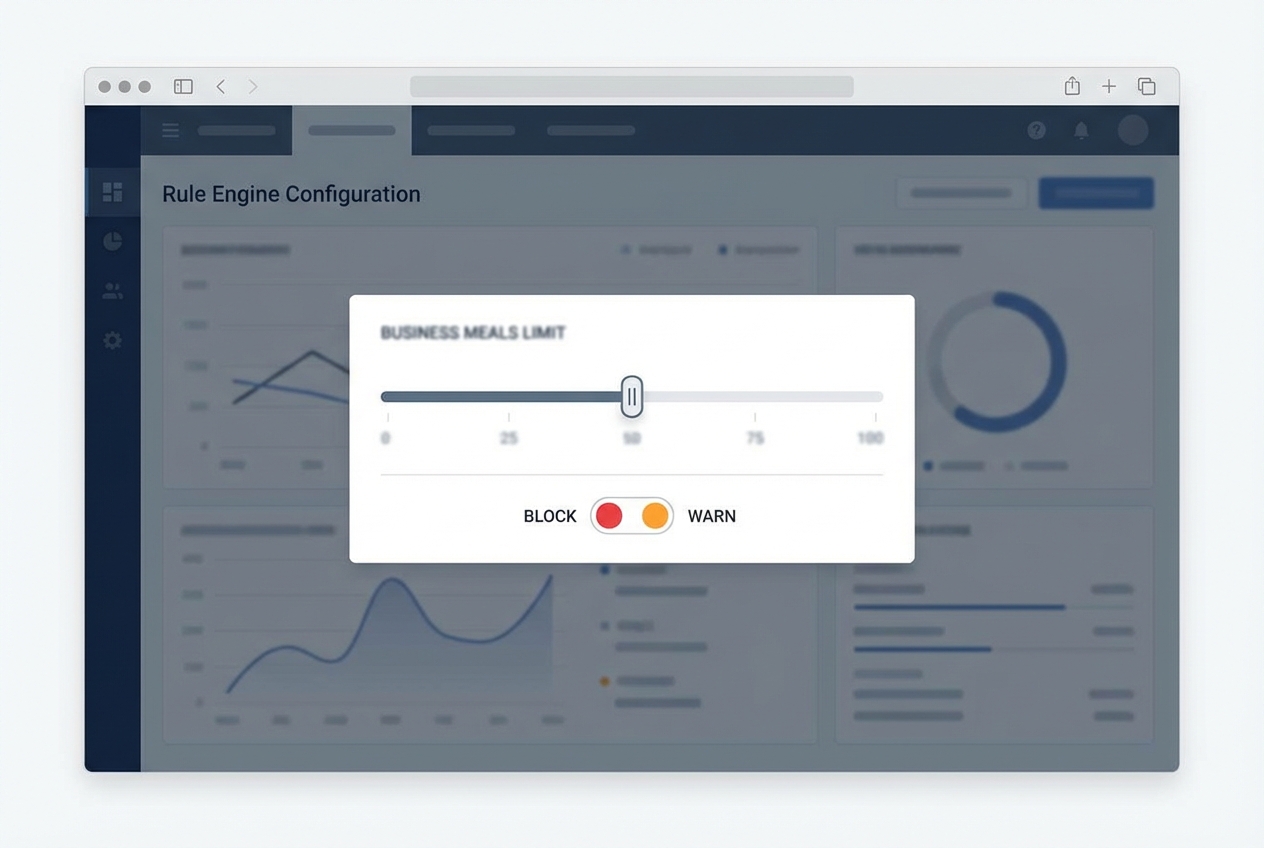
This is where the policy becomes real.
Start with your highest-impact rules first. Then add edge cases later. If you try to automate every rare scenario on day one, your rollout will stall.
Build two rule types:
- Blocking Rules: Stop submission when the risk is too high and the expense should not proceed.
- Receipt Missing Over $25: Block expenses above the threshold unless a receipt is attached.
- Alcohol Not Allowed: Block any alcohol-coded spend if your policy prohibits it.
- Lodging Hard Cap: Block lodging above a fixed per-night limit to prevent surprise overages.
- Warning Rules: Allow submission, but force clarity so finance can approve quickly.
- Meal Over $50 Needs Context: Warn and require a business purpose note for meals above the limit.
- Non-Economy Airfare: Warn and require a justification tag unless an approved role is booking it.
Also add the fields that make finance and tax compliance easier later.
Recommended required fields:
- Business Purpose: A short sentence that explains why this expense existed.
- Client or Project Tag: A simple tag so you can report spend by revenue line or engagement.
- Approver Logic: A clear routing rule based on department, budget owner, or amount threshold.
Having a custom software can unlock speed here If you want a tailored "policy assistant" that asks the right questions based on the merchant and amount, you can build a lightweight front end in days. Quantum Byte's AI app builder is designed for this kind of internal tool, especially when you want your logic to match your exact operations.
4. Integrate Corporate Cards and ERP
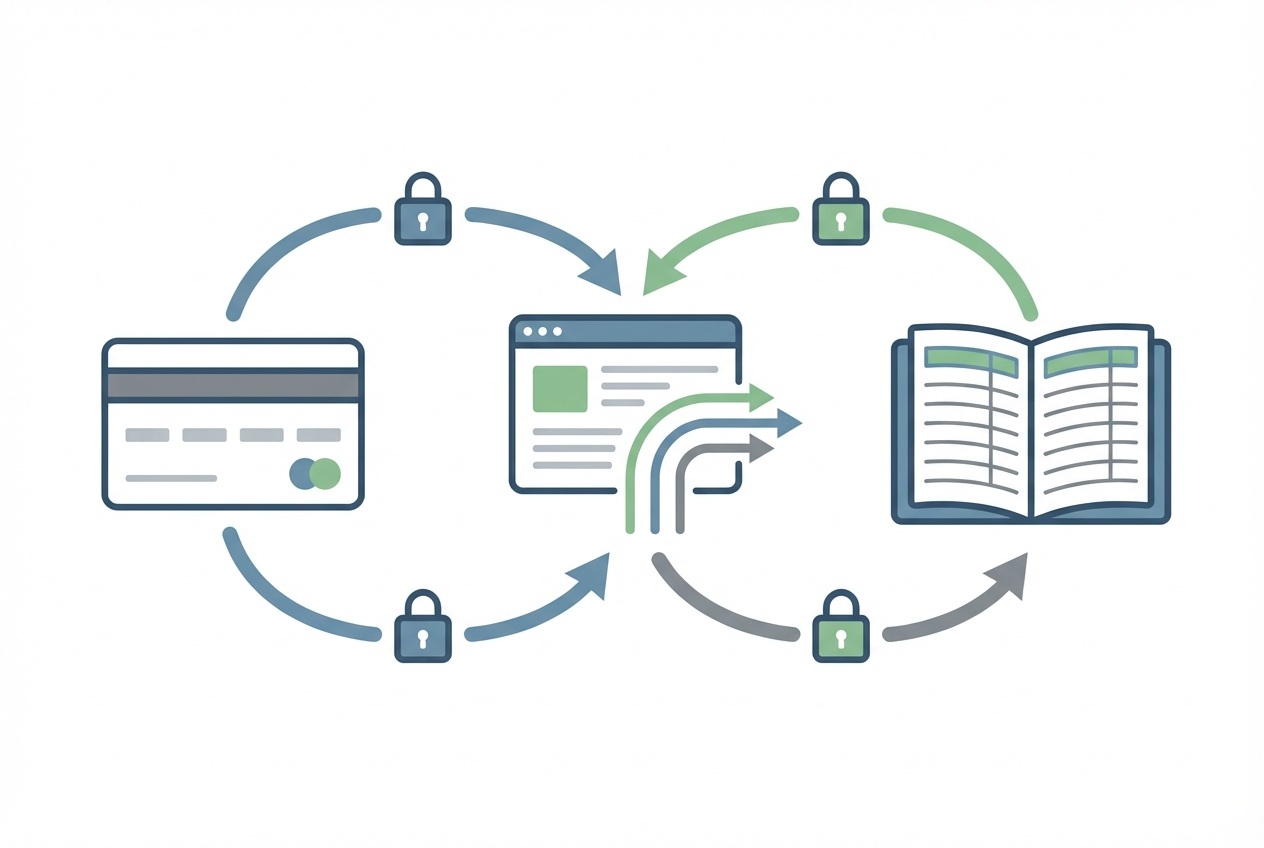
This step removes the biggest pain point: missing transactions and manual reconciliation. For a deeper dive on this specific workflow, see our guide on corporate card reconciliation automation.
When you connect card feeds:
- Automated Feeds: Transactions arrive automatically so you are not waiting on monthly statements.
- Receipt Matching: Employees match receipts to transactions instead of typing amounts, vendors, and dates.
- Live Spend Visibility: Finance can see spend as it happens, not at month end.
Then connect your accounting system so approved expenses flow straight into the general ledger with the help of accounting automation software:
- Correct Categorization: Each expense lands in the right account without manual recoding.
- Department and Class Tracking: Expenses sync with the right department, class, or location so reporting stays accurate.
- Attached Receipts: The receipt is included as part of the audit trail, not buried in email.
- Tax Fields (When Needed): VAT/GST or other tax details can flow through when your setup supports it.
If you use QuickBooks, for example, attaching receipts to expenses creates a cleaner audit trail and reduces back-and-forth.
5. Launch and Monitor Compliance
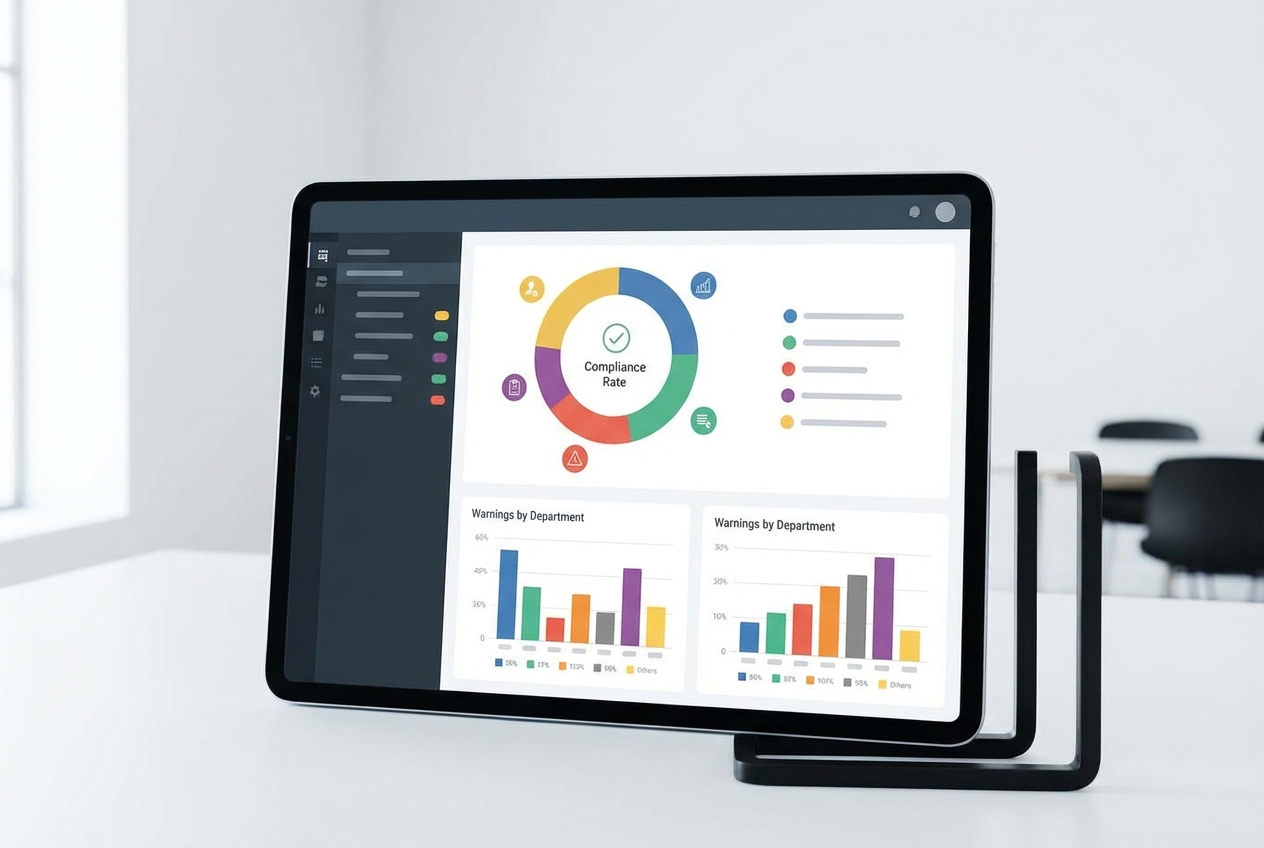
Automation is not a one-time setup. It's a feedback loop.
Roll out to a pilot group first. Aim for 10 to 20 people across different spend patterns (sales, ops, leadership). Watch where they get stuck.
What to monitor in week one:
- Receipt Capture Failures: Track where missing receipts happen most, and fix the workflow (usually a mobile habit problem).
- Confusing Warnings: If people do not know what to do when a warning appears, your rule text needs to be clearer.
- Approval Bottlenecks: Identify approvers who slow reimbursements and add backups or thresholds.
- Category Errors: Watch where OCR or auto-categorization guesses wrong, then tighten vendor rules or required fields.
Then expand rollout and use analytics to evolve your policy from "static rules" into "data-driven guardrails."
If you want a bigger view of how to systemize repetitive work across the business, see our guide on workflow automation software.
Wrapping up
We've covered a lot of ground. Let's recap.
Here's what you get when the policy runs inside the workflow.
- Reduced Fraud Risk: Automation can flag duplicate receipts, repeated vendors, suspicious patterns, and out-of-policy categories before they hit the ledger.
- Faster Reimbursements: Employees submit in minutes, approvals route automatically, and finance spends less time chasing details.
- Real-Time Visibility: Finance can see spend as it happens, which helps you control burn and forecast cash with confidence. This ties directly into financial reporting automation.
- Cleaner Audits and Tax Readiness: Policy-required fields and receipt capture support stronger documentation. For many expense types, the IRS expects records that show amount, time, place, and business purpose.
- Reduced Admin Work: Ripping states it well that automation eliminates receipt chasing, manual data entry, and repetitive approvals, freeing finance teams to focus on higher-value analysis.
If your policy lives in a PDF, you're relying on memory, good intentions, and cleanup. That works until you grow.
Expense policy automation turns chaos into a scalable system. Start simple, integrate your cards and accounting, and let real data guide the next iteration.
If you want to prototype a custom approval flow or a policy assistant that matches how your business really runs, you can explore Quantum Byte's AI builder
Frequently Asked Questions
What are the benefits of expense policy automation?
It reduces manual errors, increases policy compliance, and gives you real-time visibility into company spending. It also speeds up reimbursements because approvals and data capture happen in the same flow.
If you need a custom layer on top of your expense tools, Quantum Byte can help you connect systems and build lightweight internal apps that match your policy and approvals.
How does AI improve expense automation?
AI uses Optical Character Recognition (OCR) to read receipts and extract key fields automatically. Many platforms also use machine learning to suggest categories and detect anomalies, so finance is not manually typing and checking every line. For a step-by-step walkthrough, see our guide on expense report automation.
Can I automate travel expense policies specifically?
Yes. You can automate travel rules like:
- Airfare Class: Block business class unless an exec approves.
- Hotel Per Diem: Warn over the nightly cap and require justification.
- Mileage Tracking: Require start and end location, then calculate reimbursement automatically.
Will this integrate with my existing accounting software?
Most modern expense tools integrate with QuickBooks, Xero, NetSuite, Sage, and other accounting platforms. If your setup is more complex, you may need custom integration work so approvals, classes, departments, and attachments flow correctly.
Does automation help with tax compliance?
Yes. Automation helps you capture receipts and required details closer to the time of purchase, which supports stronger substantiation. The IRS guidance for many business expenses emphasizes keeping adequate records and credible documentation. (Source: IRS Publication 463: https://www.irs.gov/publications/p463)

