
Replit vibe coding is a practical way to turn plain-English intent into working software fast. You describe what you want. An AI agent makes changes in your project. You steer it toward a shippable result. For a business owner or solopreneur, that can mean prototypes in hours instead of weeks, without wrestling with local setup.
What “replit vibe coding” actually means (in plain English)
“Vibe coding” is the workflow where you guide an AI coding agent using natural language. Then you validate the output by running and testing the app. You iterate until it meets your goal.
In Replit, this style runs through Replit Agent. It can build and modify apps from prompts. It can create checkpoints. It can keep working across multiple steps as you refine the direction. Replit also describes extended autonomous builds that can run “up to 200 minutes,” depending on the mode and task in its own Replit Agent docs.
This works best when:
-
You have a clear outcome: You can describe what “done” looks like in user terms. That means who the user is, what they can do, and what success looks like.
-
You can test as you go: You are willing to run the app often. You click around and report what broke.
-
You can keep scope tight: A small, focused workflow beats a big, vague “build me a SaaS” prompt.
The vibe coding loop you should follow every time
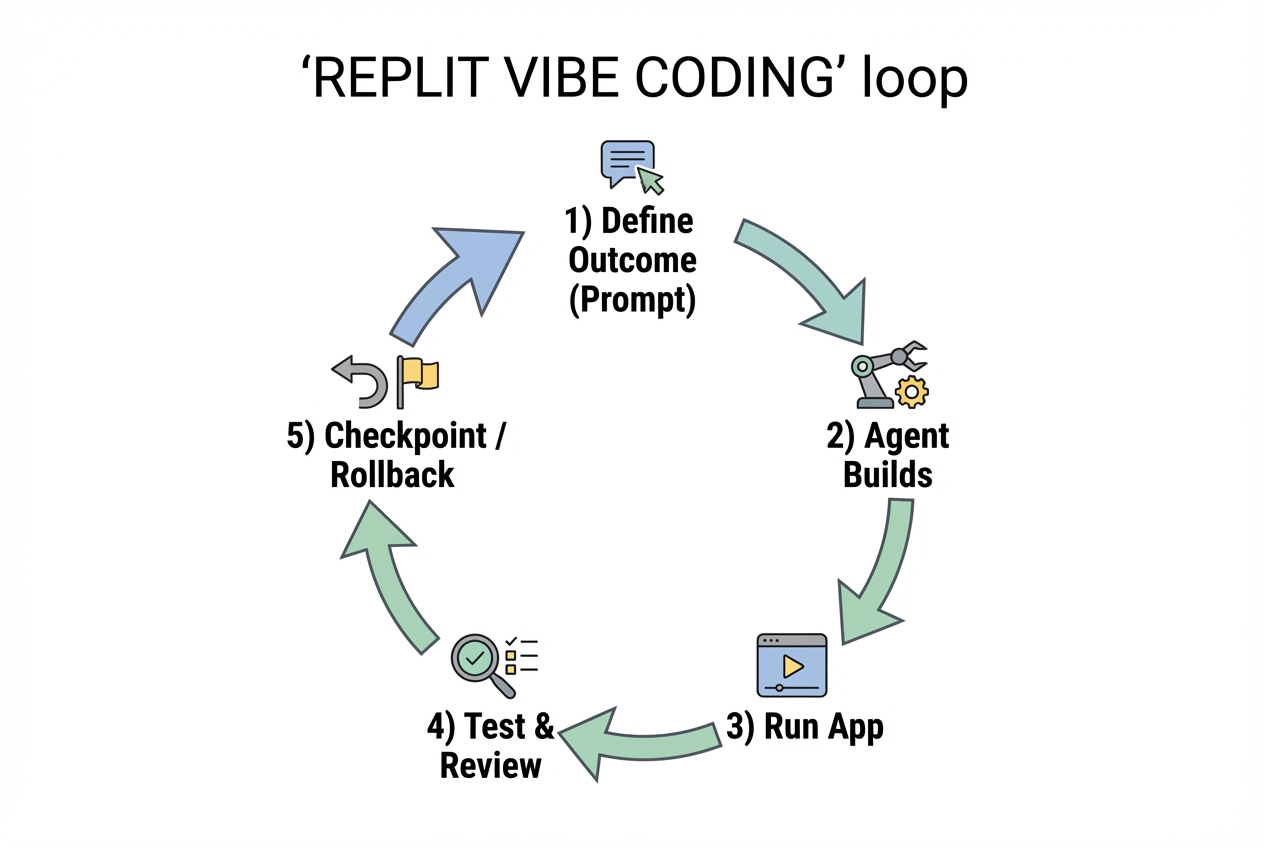
Keep this loop tight. The shorter your loop, the faster you converge on something real.
-
Define the outcome: Write a short “job to be done” statement and 3 to 7 acceptance tests.
-
Prompt the agent: Ask for one coherent change at a time. That could be a scaffold, a feature, or a fix.
-
Run the app immediately: Do not assume it works because the code “looks right.”
-
Test like a user: Click through key flows. Submit forms. Refresh pages. Try invalid inputs.
-
Checkpoint and iterate: Save a good state. Then push forward safely.
If you only remember one thing: vibe coding succeeds when you treat prompts like product specs, and tests like reality checks.
Set up your Replit workspace so the agent stays on track
Before you prompt anything, create a clean starting point. This saves you from “agent drift,” where the AI keeps piling on changes without a stable baseline.
-
Start with a tiny spec in your repo: Add a simple
README.mdwith the app’s purpose, users, and acceptance tests. The agent will often use it as context. -
Decide your stack early: Pick a straightforward stack and stick to it. If you let the agent switch frameworks mid-stream, you will pay for it later.
-
Use checkpoints intentionally: Replit Agent supports checkpoints so you can roll back if the changes go sideways in the Replit Agent docs.
If you are building something tied to real business ops (lead intake, scheduling, billing and internal approvals), it can also help to document the workflow first. QuantumByte’s guide on how an AI app builder works is a solid primer on turning fuzzy intent into structured requirements.
Prompts that produce working apps
Most vibe coding failures are prompt failures. The agent did what you asked, but you asked in a way that left too much room for interpretation.
Use this prompt blueprint.
| Prompt element | What to include | Why it matters |
|---|---|---|
| Goal | “Build a web app that…” | Prevents the agent from guessing the product. |
| User roles | “Anonymous user, admin” | Keeps authorization and screens consistent. |
| Data model | “Lead has name, email, status” | Avoids constant schema rewrites. |
| Acceptance tests | “A lead can be created, listed, updated” | Gives you a test plan and a finish line. |
| Non-goals | “Do not add payments yet” | Stops scope creep. |
| Constraints | “Keep it simple, no extra libraries” | Reduces dependency bloat and fragile code. |
High-leverage prompting habits:
-
One change per message: Ask for a scaffold. Then ask for authentication. Then ask for the dashboard. Do not blend them.
-
Ask for a plan first: A short plan exposes bad assumptions before code changes.
-
Force the agent to show its work: Ask it to list files it will modify before it edits them.
How to build a small business app with Replit vibe coding
The fastest way to learn replit vibe coding is to ship a tiny app that matches how you actually make money.
This example is a simple “Lead Inbox” app:
-
Lead capture: Public form to capture leads. This should be short and frictionless so prospects actually submit.
-
Admin access: Admin login. This is how you protect sensitive lead details without building a complex role system.
-
Lead management: Admin dashboard to review leads and change lead status. This is the core screen you will use daily.
Step 1: Define your acceptance tests
Write acceptance tests that are observable.
-
Public submission works: A visitor can submit name and email and sees a success message.
-
Admin can sign in: Admin can log in and log out.
-
Leads are stored: Submissions persist after refresh.
-
Admin can manage: Admin can mark a lead as “New,” “Contacted,” or “Closed.”
This step ensures the agent focuses on functional outcomes rather than vague concepts.
Step 2: Prompt Replit Agent to scaffold the app
Prompt example:
- Scaffold request: Create a simple full-stack web app with a public lead form and an admin dashboard. Use a clean, minimal UI (user interface). Include routes/pages for
/,/admin/login, and/admin. Add a README with setup instructions. First, respond with a short plan and the file list you will create or edit.
When the agent responds with a plan, confirm or correct it. Then let it implement.
Step 3: Run it immediately and break it on purpose
After the agent completes the first build, run the app and try to break it.
-
Invalid input: Submit empty fields.
-
Duplicate submission: Submit the same email twice.
-
Direct URL access: Try visiting
/adminin a private window.
Your job is to report reality back to the agent. Your prompt should include what you did and what happened.
- Bug report prompt: When I visit
/adminin a private window, I can still see the dashboard. That should be blocked. Fix authorization so only logged-in admins can access/admin, and redirect others to/admin/login.
Step 4: Add real storage (Replit Database)
In most business apps, persistence is the point.
Replit provides a built-in Structured Query Language (SQL) database option (PostgreSQL) designed for apps. The documentation states it “includes 10GB of free storage for every Replit App” in the Replit SQL Database docs.
Prompt example:
-
Database prompt: Add a SQL database for leads. Create a
leadstable with these columns:-
id: The unique identifier for each lead.
-
name: The prospect’s full name.
-
email: The prospect’s email address, used for contact and deduping.
-
status: The lead stage (for example: New, Contacted, Closed).
-
created_at: The timestamp of when the lead was created.
Update the app so submissions write to the database and the admin dashboard reads from it. Include a simple migration/init step and document it in the README.
-
Expected outcome: refreshing the page does not lose your leads.
Step 5: Add authentication the fast way (Replit Auth)
If you need sign-in, avoid reinventing authentication in a prototype.
Replit documents a managed authentication option, Replit Auth, designed to integrate quickly with an app in the Replit Auth docs.
Prompt example:
- Auth prompt: Integrate Replit Auth for admin access. Only authenticated users can access
/admin. Add a sign-in button to/admin/login. Ensure sessions persist correctly. Update the README with any required configuration.
Expected outcome: you can reliably protect admin-only pages.
Step 6: Create a checkpoint before adding “nice-to-haves”
Once the core flow works (submit lead → stored → admin reviews), checkpoint.
- Checkpoint habit: Save a stable version before you add filters, CSV export, email notifications, or styling.
This is how vibe coding stays fun instead of fragile.
Step 7: Deploy and share
A prototype that only runs in your workspace is not helping your business yet.
Replit supports multiple deployment options, including autoscaling and scheduled deployments, depending on your app type in the Replit Deployments docs.
Prompt example:
- Deploy prompt: Prepare the app for deployment. Ensure environment variables are used for secrets. Add production-safe settings. Then guide me through deploying it on Replit with the simplest deployment type that fits this app.
Expected outcome: you have a live URL you can send to a customer, partner, or teammate.
How to debug and steer the agent when it goes off the rails
Agents can move fast, but speed without steering becomes chaos. Use these patterns when the app breaks or the solution gets messy.
-
Ask for diagnosis before changes: Request a root-cause explanation and the smallest fix. This reduces “rewrite the world” edits.
-
Constrain the scope: Tell the agent which files it may touch. If needed, specify “only update
server.jsandauth.js.” -
Demand a minimal diff: Ask it to summarize changes file-by-file before applying them.
-
Rollback without guilt: If a change made things worse, revert to a checkpoint and try a different approach.
A useful “control prompt” when you feel drift:
- Control prompt: Stop adding features. Summarize the current architecture in 8 to 12 bullets (routes, data model, auth and deployment). Then propose the smallest next change to satisfy this acceptance test: [paste one acceptance test].
Replit vibe coding vs other ways to build
Replit is excellent for fast builds in a single browser tab. But you still need to decide how far you want to take it.
| Approach | Best for | Tradeoffs |
|---|---|---|
| Replit vibe coding | Rapid prototyping, experiments, internal tools | You must actively test, manage scope, and keep architecture clean. |
| Traditional custom development | Complex products, strict compliance, long-lived systems | Slower to start, higher upfront cost, but maximum control. |
| AI app builder + agency support (QuantumByte) | Business owners who want speed plus a safety net | You can move fast with AI, then bring in experts when you hit edge cases. |
If you are building something that will become a core system, do a quick “how critical is this?” check. Client portals, multi-tenant software, approvals, billing, and integrations all raise the stakes.
A “build vs buy” check can save months. QuantumByte’s framework on custom business software development: build vs buy is a practical way to make that call.
When you outgrow the agent-only workflow, you have options:
-
You can keep prototyping in Replit: Great when you want fast iteration and you can tolerate rough edges.
-
You can migrate to a more controlled codebase: Useful when testing, deployments, and security need stricter processes.
-
You can hybrid it: Build the first version with AI. Then have engineers harden it.
If that hybrid approach matches how you think, QuantumByte was built for it. You can start from natural language and generate a working app, then escalate to a development team when you need deeper integrations or production-grade architecture. The fastest place to start is QuantumByte's pricing guide.
For many service businesses, the greatest value comes from transforming manual tasks into repeatable, automated systems. This guide on automate business processes pairs well with vibe coding because it helps you pick the right workflow to productize first.
Wrap-up: turning “vibes” into a shipped app
Replit vibe coding works when you run a tight loop. Start with a clear outcome. Use focused prompts. Test constantly. Create checkpoints before you expand scope.
-
Define outcomes first: Your acceptance tests keep the agent honest and your build focused.
-
Iterate in small steps: Small prompts produce cleaner code and faster fixes.
-
Anchor your app in real data: A prototype becomes a business tool once storage and auth are solid.
-
Ship early: Deployment turns a project into something you can sell, demo, or use internally.
When you are ready to go from prototype to a real product, consider whether you want to keep everything inside one tool or bring in a hybrid approach. If you want speed without getting stuck on edge cases, QuantumByte’s AI builder plus expert development support can help you move from idea to live app in days, not months.
Frequently Asked Questions
Is “vibe coding” only for non-developers?
-
Expert usage: Developers often get the biggest speedups because they can spot architecture issues early, write better acceptance tests, and debug quickly.
-
Non-developer usage: Non-developers can still succeed. Testing discipline matters more because you need to validate what the agent produced and report issues clearly.
What should I build first with replit vibe coding?
Start with a small workflow you already do weekly: lead capture, intake forms, quote generation, scheduling requests, or an internal dashboard. Avoid multi-tenant Software as a Service (SaaS) builds as your first project.
How do I keep an agent from rewriting my whole app?
Ask for a plan and file list first, then approve. Constrain changes to specific files. Checkpoint after each working milestone so you can roll back quickly.
Can I use Replit for a production app?
Yes, many people do. Treat it like any production environment. Use environment variables for secrets. Test deployments. Keep your architecture simple.
Replit’s deployment options vary by app type. The official deployment documentation is the best starting point in the Replit Deployments docs.
When should I stop vibe coding and involve a professional team?
Bring in help when security or reliability becomes the main risk. The same applies to integrations and long-term maintainability.
If you are stitching together too many tools or spending more time fixing than shipping, it is a strong signal to level up the build approach. The “build vs buy” framework here is a good next read: custom business software development: build vs buy.