Purchase order automation turns purchasing from a daily distraction into a system that runs with less oversight. If you are approving requests in Slack, chasing receipts in email, and cleaning up invoice surprises at month-end, you are already paying the automation tax in time and stress.
This guide shows you how to implement purchase order automation in a practical way, even if you are a lean team. You will set up a clean approval flow, create reliable purchase orders (POs), and build the controls that keep spend predictable.
What purchase order automation is (and what it is not)
Purchase order automation is the use of software to manage the full PO lifecycle, from request to approval to sending the PO and matching it to delivery and invoices.
A purchase order is more than a nice-to-have form. It is a commercial document that lists what you are buying, how much, and at what price. Once accepted, it can become legally binding between buyer and seller, which is one reason it is so useful for preventing disputes and surprise charges. Corporate Finance Institute summarizes this clearly in its overview of a purchase order.
What purchase order automation is not:
-
Just scanning invoices: Invoice capture helps accounts payable, but it does not stop uncontrolled buying upstream.
-
A single approval button: Real automation routes requests based on rules (amount, vendor, category, budget) and logs decisions.
-
A set it and forget it project: Purchasing changes as your business changes. You will tune rules over time.
When purchase order automation is worth it
You do not need an enterprise procurement suite to benefit. In small businesses, the biggest wins usually come from reducing chaos, not from chasing advanced features.
Look for these signals:
-
Approvals are slowing delivery: If a simple purchase takes days because the right person did not see the request, automation gives you routing and reminders.
-
Spend is hard to explain: If you cannot quickly answer "Who approved this and why?", you need an audit trail.
-
Invoices arrive with surprises: If you see mismatched quantities, wrong pricing, or unauthorized add-ons, POs and matching reduce the gaps.
-
You have repeat buys: If you reorder the same services, tools, or supplies, templates and preferred vendors make it faster and cleaner.
-
You are scaling past one decision-maker: The moment you are not personally approving everything, policy and workflow become essential.
The core purchase order automation workflow
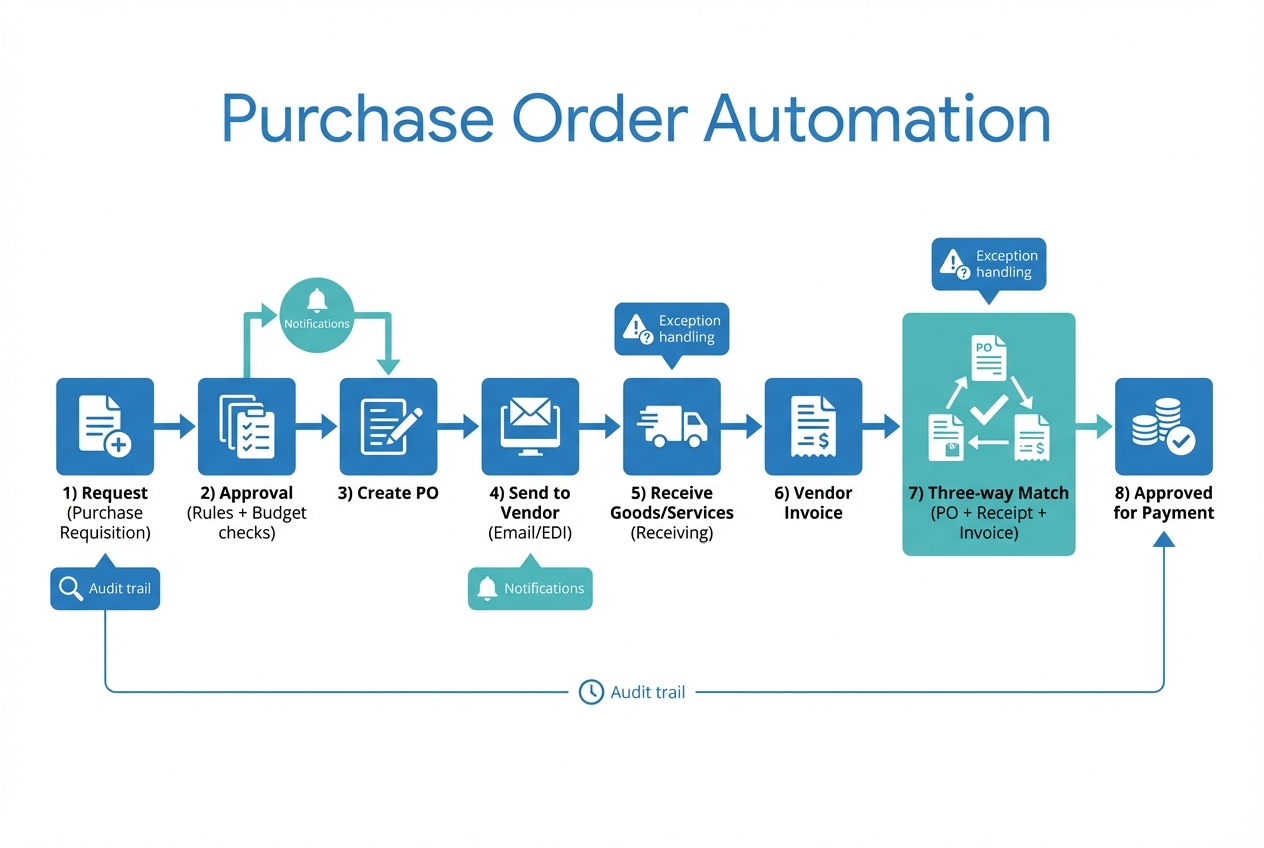
One clean flow beats ten disconnected messages.
Most purchase order automation systems follow the same backbone:
-
Purchase requisition (request): Someone submits a purchase request (also called a purchase requisition). This is where you capture the business reason, vendor, amount, and timing so approvals are based on facts instead of follow-up questions.
-
Approval routing: The request routes to the right approver based on rules. The outcome you want is speed with control: the correct person sees it quickly, and everyone else stays out of the loop.
-
Purchase order creation: The system generates a purchase order. This step turns an internal request into a formal, trackable commitment with a PO number that you can reference later.
-
Vendor delivery channel: The PO is sent to the vendor (email, portal, or Electronic Data Interchange (EDI)). Sending it consistently reduces misunderstandings and gives the vendor a single source of truth for price, quantity, and terms.
-
Receiving confirmation: The business confirms delivery (receiving). This is the proof step. Without it, invoice matching becomes guesswork, especially with partial shipments or service work.
-
Invoice intake: The vendor invoice arrives. A clean intake process means invoices do not sit in inboxes, and accounts payable can tie each invoice to a PO quickly.
-
Three-way match: Accounts payable runs a three-way match. This is where you catch pricing errors, quantity mismatches, and unauthorized charges before money leaves your account.
-
Payment approval and release: If it matches, you approve payment. If it does not, you resolve the exception. The outcome is simple: you pay on time when things are correct, and you pause only when there is a real issue.
Three-way matching is the control that keeps you honest. It cross-references the invoice with the PO and receiving documentation before payment, which helps reduce overpayment and fraud.
How to implement purchase order automation step by step
Instead of rushing to buy software, focus on making your rules clear before you automate them.
1) Map your current purchasing path
Start with what actually happens today, not what the policy doc says.
Capture:
-
Where requests start: Email, Slack, a spreadsheet, a form, or verbal.
-
Who approves: One person, multiple people, or "whoever is around."
-
What causes delays: Missing vendor info, missing budget code, unclear urgency.
-
How you track delivery: Packing slips, shipping confirmations, or "it arrived."
-
How invoices get approved: Informal sign-off, finance-only, or department owners.
Outcome you want: a single visible flow that you can explain in 30 seconds.
2) Define the purchasing policy in plain English
Automation will enforce whatever rules you give it. If the rules are fuzzy, your workflow will be fuzzy too.
Decide:
-
What requires a PO: Many teams start by requiring POs above a certain dollar amount or for specific categories like contractors, software, or inventory.
-
Approval thresholds: Who can approve up to $X, and who approves above that.
-
Approved vendor rules: When someone can choose any vendor vs when they must use a preferred one.
A practical model is the five-stage workflow Amazon Business outlines: requisition creation, approval routing, PO generation, order placement, then invoice matching and reconciliation. Their breakdown of a purchase approval workflow is a helpful reference point.
3) Standardize the data you will rely on
Purchase order automation breaks down when requests are inconsistent. Tighten the inputs.
Focus on:
-
Vendor list: Clean names, emails, payment terms, and tax details.
-
Categories and coding: General Ledger (GL) codes or simple spend categories. Keep it simple at first.
-
Item descriptions: Make them clear enough that receiving and matching are possible.
Outcome you want: fewer back and forth messages after the request is submitted.
4) Pick an automation approach that matches your reality
There are three common paths:
-
Procurement software: Best when you need a complete system and can adapt your process to the tool.
-
Accounting add-ons: Best when you want basic approvals and POs tied closely to your accounting system.
-
Custom workflow: Best when your business has a unique approval path, service delivery steps, or client-billable purchases that off-the-shelf tools do not handle well.
If you are weighing build vs buy, this internal guide on custom business software development: build vs buy can help you think clearly about cost, speed, and control.
5) Build a clean purchase request intake
This is where most small teams win back time. A good requisition form prevents low-quality requests.
Include fields that reduce follow-up:
-
What are you buying and why: The business reason, in one sentence.
-
Vendor: Preferred vendor selector, plus "new vendor" option.
-
Amount and currency: With tax and shipping guidance.
-
Needed by date: So approvers can prioritize.
-
Category / code: So finance can reconcile.
-
Attachments: Quote, link, scope, or statement of work.
If you want this to feel effortless, this is a spot where QuantumByte can help. You can prototype a custom request portal with an approval flow using an AI app builder, which turns natural language requirements into a working app. If you want to understand the mechanics first, see how an AI app builder works.
6) Automate approvals with rules and guardrails
Approvals should route to the right person automatically.
Design your rules around:
-
Amount thresholds: Larger spend routes to senior approval.
-
Category: Software renewals might route to operations, while inventory routes to fulfillment.
-
Budget availability: If you track budgets, flag requests that exceed remaining budget.
Add the guardrails that keep it from stalling:
-
Notifications: Ping the approver in email or chat, and remind them if they do not respond.
-
Delegation: Let approvers assign a backup when they are away.
-
Time-bound escalation: Route to the next approver if a request sits too long.
7) Generate and send the purchase order automatically
Once approved, the system should create a PO with consistent formatting and a unique PO number.
Your PO should include:
-
Vendor details: Correct legal entity and contact.
-
Ship-to / bill-to: So goods arrive in the right place.
-
Line items: Quantity, unit price, and totals.
-
Terms: Payment terms and delivery expectations.
Then send it in a trackable way:
-
Email: Simple and fast for most small businesses.
-
Vendor portal: Better when vendors frequently change details.
-
EDI: Useful at scale, especially for larger suppliers.
Outcome you want: a PO that vendors can act on without asking questions.
8) Track receiving so delivered is not a guess
Receiving is what makes matching possible.
Keep it lightweight:
-
Partial receipts: Let teams mark partial deliveries. This prevents false mismatches later.
-
Service delivery confirmation: For contractors or subscriptions, replace "receipt" with a completion confirmation.
-
Photo or attachment proof: Especially useful for field teams.
9) Implement invoice capture and three-way match
At this stage, you are protecting cash.
Three-way match typically checks:
-
Price: Does the invoice match the PO unit prices?
-
Quantity: Does the invoiced quantity match what you ordered and received?
-
Vendor: Is it the same vendor as the PO?
When something does not match, do not force it through. Route it to exception handling.
-
Small variance rules: Define what "close enough" means for your business.
-
Exception owner: Assign who resolves it (requester, ops, finance).
-
Vendor communication template: Ask for a corrected invoice when needed.
10) Add reporting and an audit trail from day one
You do not need complex dashboards. You need answers.
Track:
-
Cycle time: Request to approval, approval to PO, PO to delivery.
-
Exceptions: How many invoices fail matching and why.
-
Top vendors and categories: So you can negotiate and standardize.
-
Who approved what: For accountability and clean books.
11) Roll out in phases so the team sticks with it
The goal is adoption.
A practical rollout sequence:
-
Phase 1: Require POs for high-risk categories (contractors, inventory, large software purchases).
-
Phase 2: Add preferred vendors and templates.
-
Phase 3: Add three-way matching and exception workflows.
If you roll out everything at once, people will route around the system.
Common pitfalls that make purchase order automation fail
These are the traps that create "we tried it and it did not work."
-
Over-engineering on day one: If you require 25 fields for every request, people will bypass it. Start with what you truly need to approve.
-
No clear exception path: Exceptions are normal. Without a process, finance becomes the bottleneck.
-
Approvals without context: Approvers need the "why," not just the "what." Add a short justification field.
-
Ignoring service purchases: Not everything is a box that arrives. Build a receiving step for services.
-
Not linking back to accounting: If your PO data never reaches your accounting system, you will still reconcile manually.
Tooling options for purchase order automation (and how to choose)
You can implement purchase order automation with many stacks. The right one depends on how unique your workflow is and how much control you need.
| Option | Best for | Strengths | Trade-offs |
|---|---|---|---|
| Email + spreadsheets | Very early stage | Familiar, zero setup | Hard to audit, easy to lose approvals, manual chasing |
| Accounting system PO features | Simple PO needs | Tight tie to bookkeeping, basic controls | Often limited workflows and integrations |
| Procurement platforms (ex: Coupa, Procurify, Zip) | Larger teams with formal procurement | Deep approvals, catalogs, supplier tooling | Can be heavy, expensive, and rigid for small teams |
| Spend management tools (ex: Ramp, Brex) | Card-centric purchasing | Strong card controls and receipt capture | Not always PO-first, may not fit inventory or service workflows |
| Custom PO workflow app | Unique processes, client-billable purchasing, multi-step approvals | Fits your business, automates exceptions, integrates where you need | Requires initial build and ongoing ownership |
From our perspective, if your business is still evolving, custom often wins because your workflow changes. You can prototype quickly, prove the flow, then harden it.
If you are comparing development paths, hiring a developer vs no-code lays out what you gain and what you give up with each approach.
Building a custom purchase order automation flow with QuantumByte
Off-the-shelf tools are great when your process matches the template. Many businesses do not. Especially service businesses with client-billable purchases, multi-step delivery, or approvals that depend on project status.
QuantumByte is useful when you want purchase order automation that fits your exact operation, without a long build cycle.
-
Fast prototypes from natural language: You describe your requisition, approval rules, and receiving steps. The AI app builder turns that into a working internal tool you can test quickly.
-
A path from prototype to production: When you hit the edge of automation, QuantumByte’s development team can extend integrations, permissions, and system logic to take it across the finish line.
-
Clear requirements before you spend big: QuantumByte helps you structure your idea so the build is clean and predictable. See how our plans compare.
If you are running more complex approvals across teams or locations, the enterprise build path is a better fit.
Turning purchasing into a system you can trust
Purchase order automation eliminates uncertainty without adding bureaucracy.
You now have a practical implementation path: map your current process, define clear rules, standardize the inputs, automate approvals, generate clean POs, track receiving, and use three-way matching to protect cash. Once that backbone is in place, reporting and continuous improvement become simple.
The payoff is real: fewer surprises, cleaner books, faster approvals, and more time back to build what actually grows the business.
Frequently Asked Questions
What is the difference between a purchase requisition and a purchase order?
A purchase requisition is an internal request to buy something. A purchase order is the formal document sent to the vendor with the exact items, quantities, and prices. A PO is typically created after the requisition is approved.
Do small businesses really need purchase orders?
If you only buy a handful of items and one person approves everything, you might not need them. But once purchases are shared across a team, POs help you control spend, reduce disputes, and keep a clean record of what was approved.
What does three-way match mean in purchase order automation?
Three-way match is a check that compares the purchase order, proof of receiving (delivery receipt or receiving report), and the vendor invoice before payment. It helps catch price and quantity mismatches.
Should I buy a procurement tool or build a custom workflow?
Buy when your process is standard and you want to adopt a proven template. Build when your approvals depend on project status, client billing, multi-step delivery, or unique exceptions. A hybrid is common: start with a prototype, validate the flow, then extend it with integrations.
What is the quickest way to start purchase order automation?
Start with one controlled intake form for purchase requests and a simple approval route based on dollar amount. Then add PO generation and receiving. Once those are stable, add three-way matching and exception handling.