
Manual accounts payable processing is a silent profit killer. Recent data shows it can cost as much as $20.11 per invoice due to labor-heavy data entry, back-and-forth approvals, and avoidable rework. Top-performing automated teams have pushed costs closer to $3.05 per invoice, which can translate into seven figures saved over a few years for a mid-sized business.
NetSuite accounts payable automation has moved fast over the last 18 months. Payment automation can be activated more quickly than legacy integrations, and NetSuite is also moving toward agentic AI, where finance teams use natural language to trigger multi-step actions with controls. Add the 2025 partnership between NetSuite and BILL, and “invoice-to-pay” no longer has to be a patchwork of inboxes, bank portals, and spreadsheets.
This guide covers what NetSuite AP automation is, the features that matter, where native tools end and SuiteApps begin, and a step-by-step roadmap you can implement without stalling your close.
What is NetSuite Accounts Payable Automation?
NetSuite accounts payable automation is the use of software to digitize the end-to-end lifecycle of a supplier invoice inside Oracle NetSuite (an ERP, or enterprise resource planning system that keeps finance and operations data in one place).
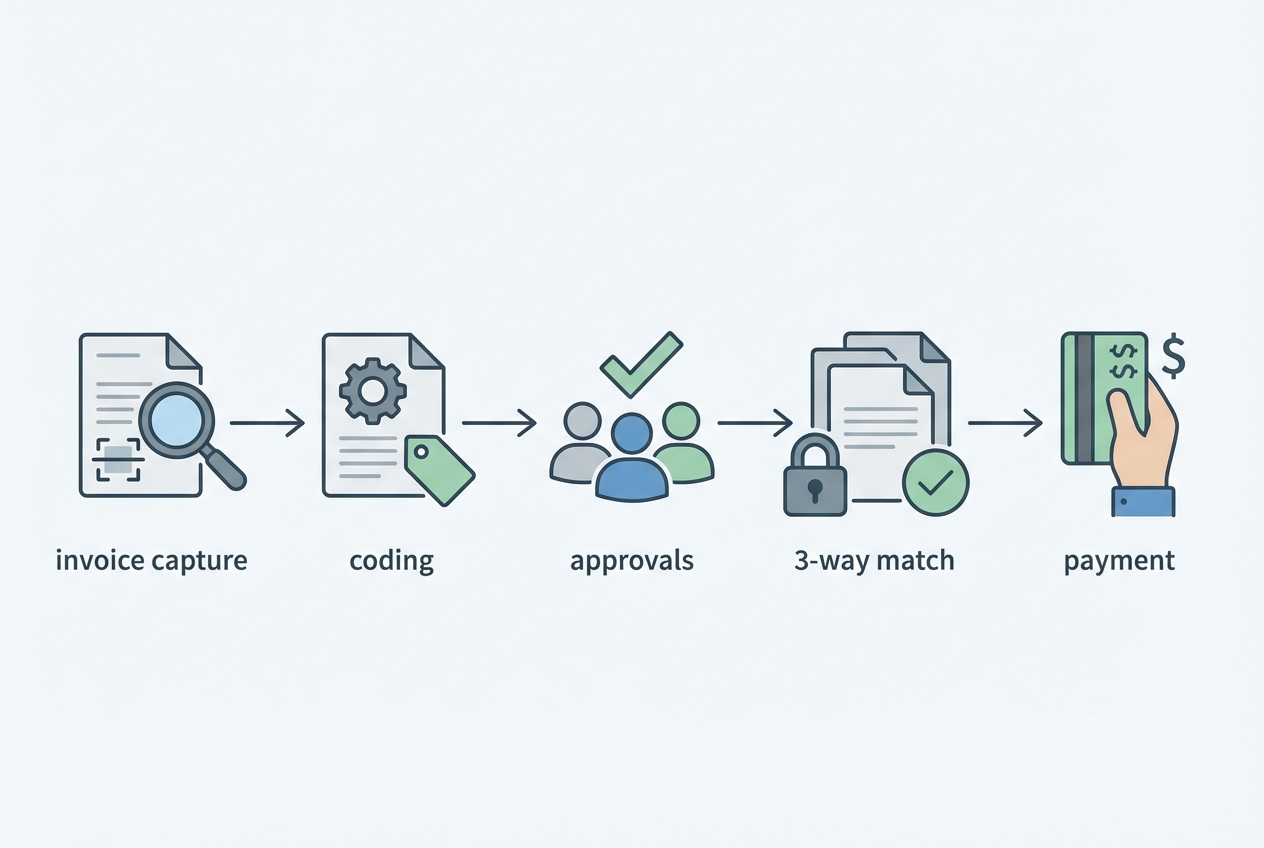
A complete invoice-to-pay lifecycle typically includes:
-
Invoice intake: Capturing invoices from email, PDF, vendor portals, or e-invoicing.
-
Data extraction and validation: Pulling header and line details, then checking for missing fields and duplicates.
-
Coding and routing: Assigning GL accounts and segments (department, class, location, subsidiary).
-
Approvals: Enforcing who can approve what, and when.
-
Matching: Verifying invoices against purchase orders and receipts when applicable.
-
Payment execution: Sending ACH, virtual card, check, or international payments.
-
Audit trail and reporting: Keeping a traceable record for controls and audits.
A major 2025 development is the NetSuite and BILL partnership, which positions payment automation as something many teams can activate quickly instead of treating it like a long integration project.
The real shift is operational. AP moves from disconnected steps into a single source of truth in the cloud, where every approval, edit, and payment status is trackable.
Key Features of NetSuite Accounts Payable Automation
AI-driven invoice capture (OCR)
OCR (optical character recognition) reads invoices and extracts structured fields from PDFs and scans. In practical terms, it removes repetitive rekeying and reduces avoidable errors.
Strong capture typically includes:
-
Header fields: Vendor, invoice number, invoice date, due date, totals.
-
Line details: Items, quantities, unit prices, tax, freight, discounts.
-
Validation rules: Duplicate detection, missing PO flags, mismatch checks.
The payoff is consistency. Your team spends time on exceptions, not transcription.
Three-way matching
Three-way matching verifies the invoice against:
-
Purchase order: What you agreed to buy.
-
Receiving report: What you received.
-
Supplier invoice: What the supplier billed.
This is where AP accuracy connects directly to operational outcomes. Weak matching can drive overpayments, inventory confusion, and vendor disputes that eat hours across finance and operations. If you want to tighten the operational side as well, pair matching with better inventory controls.
Agentic AI workflows
NetSuite is pushing beyond basic routing into agentic AI. Instead of clicking through multiple screens, finance can use natural language prompts to execute complex actions, like building payment proposals based on rules, approvals, and cash position.
Think of it as a workflow co-pilot. It runs the process you designed, with guardrails still in place. NetSuite outlines this direction on its payment automation and AP product pages.
Centralized payment dashboard
AP automation pays off when execution and visibility live in one place. A solid dashboard typically supports:
-
Payment methods: ACH, virtual cards, checks, and select international payment flows.
-
Status tracking: Scheduled, sent, cleared, failed, reissued.
-
Exception handling: Missing bank details, approval holds, duplicate flags.
The hidden benefit is fewer vendor escalations. When your team can answer “when will I be paid?” confidently, the noise drops.
The Business Benefits of Automating AP in NetSuite
Drastic cost reduction
Automation is not just about speed. It changes unit economics. Many teams see processing cost reductions of up to 80% when moving from manual to automated invoice-to-pay flows, depending on volume and exception rates. Resolve Pay summarizes several industry benchmarks.
The savings typically come from fewer touches per invoice, less rework, and fewer payment errors.
Enhanced security and compliance
AP is a common fraud surface. Fake invoices, vendor bank detail changes, and approval workarounds often look like normal work until money leaves the account.
Automation helps by making controls hard to bypass:
-
Clear audit trails: Every approval, edit, and payment step is recorded and searchable.
-
Segregation of duties: Reduced risk that one person can create vendors and push payments through end-to-end.
-
Policy enforcement: Thresholds, required attachments, and mandatory approval sequences run consistently.
You still need smart permissions and training. But an automated workflow gives you a system that behaves the same way every time.
Improved cash flow visibility
When invoices are digitized and routed consistently, liabilities stop hiding in inboxes. Leadership can see what is pending, approved, and scheduled, which unlocks:
-
Real-time reporting: Cleaner views into outstanding payables.
-
Better timing decisions: Capture early-pay discounts or protect runway.
-
Cleaner close: Fewer surprises and fewer last-minute accruals.
This connects to broader scaling wins you can drive across the business.
Scalability without hiring
As invoice volume rises, manual AP forces headcount growth just to keep up. Automation changes the math:
-
Straight-through processing: Low-risk invoices flow automatically when rules are met.
-
Exception-first work: Humans focus where judgment is needed.
-
Repeatable controls: Adding entities or locations does not mean reinventing the process.
Native NetSuite AP vs. Third-Party SuiteApps
NetSuite gives you a strong baseline. For many teams, native capabilities deliver meaningful wins quickly. But some environments benefit from SuiteApps.
NetSuite Intelligent Payment Automation
NetSuite Intelligent Payment Automation is often a practical entry point, especially with the BILL relationship supporting invoice-to-pay execution.
Where native tools usually win:
-
ERP-native execution: Fewer moving parts and fewer sync failures.
-
Faster adoption: Finance teams stay in familiar NetSuite workflows.
-
Lower overhead: Less integration management than standalone tools.
Third-party solutions (Stampli, Tipalti, Medius)
Third-party solutions can make sense when your requirements exceed standard AP flows:
-
Complex global compliance: Withholding, tax rules, country-specific payment rails.
-
High-volume exceptions: Lots of variability in invoice formats, routing, and coding.
-
Advanced multi-subsidiary controls: Cross-entity approvals, specialized reporting, or unique policy enforcement.
Integration depth matters
If you choose a SuiteApp, treat “Built for NetSuite” certification as a baseline. You want deep integration, not shallow sync. Shallow sync creates mismatched data, and mismatched data becomes your new manual work.
Decision matrix (native vs SuiteApp)
| Decision factor | Native NetSuite is a strong fit when… | A third-party SuiteApp is a better fit when… |
|---|---|---|
| Cost | You want fast wins without adding major licensing. | You can justify added spend for specialized capabilities. |
| Complexity | Your routing, coding, and approvals are straightforward. | You need advanced exception workflows and tighter policy enforcement. |
| Global reach | Most vendors are domestic with standard payment methods. | You operate across many countries with local compliance needs. |
| Industry specificity | Your workflow maps cleanly to general AP best practices. | Your industry has unique documentation and controls requirements. |
How to Implement NetSuite Accounts Payable Automation
Step 1: Process audit
Map your current invoice-to-pay flow end-to-end. Your goal is to find where invoices stall and why.
Look for:
-
Entry points: AP inboxes, shared drives, vendor portals.
-
Coding variability: Inconsistent GL coding or segment usage.
-
Approval bottlenecks: Missing approvers, unclear thresholds, “approval by email.”
-
Payment blockers: Missing bank details, PO and receipt gaps, vendor disputes.
Step 2: Solution selection
Decide whether native NetSuite capabilities cover your needs, or whether you require a SuiteApp or custom components.
If you have specific requirements, a tailored build can be the most direct path. Examples include a vendor onboarding portal, an exception triage queue, or mobile approvals for leaders who live outside NetSuite. AI App builders such as QuantumByte can aid in producing customized solutions within minutes.
If you want a lightweight “companion app” around NetSuite (intake, exception handling, simple approvals), QuantumByte can prototype it in days using its AI app builder, then have an in-house team harden it for production.
Step 3: Data cleansing
Automation amplifies data quality, good or bad. Clean data drives straight-through processing.
Prioritize:
-
Vendor master data: Terms, tax IDs, addresses, payment details.
-
Duplicates: Duplicate vendors and repeat invoice patterns.
-
GL and segments: Standard departments, classes, locations, subsidiaries.
-
PO and receiving discipline: Matching only works if your inputs are reliable.
Step 4: Workflow configuration
Build guardrails so automation feels safe on day one:
-
Approval hierarchies: Align to spend categories and thresholds.
-
Straight-through rules: Auto-approve clean matches, route exceptions.
-
Controls: Block payments when required fields or policies are violated.
Start strict. Loosen rules once you understand exception patterns and your team trusts the flow.
Step 5: Training and optimization
Adoption is the multiplier. Without it, you moved the mess into a new tool.
-
Train by role: Approvers need speed, AP needs exception clarity, leaders need dashboards.
-
Review exceptions weekly: Fix root causes, not symptoms.
-
Track ROI: Cycle time, exception rate, early-pay discounts captured, cost per invoice.
Future Trends: The Move Toward Agentic ERP
Finance automation is shifting from rules-based workflows to reasoning agents. In AP, that means the system can move from routing invoices to recommending actions.
Expect more of:
-
Payment timing guidance: Suggested timing based on cash forecasts and discount windows.
-
Proactive exception detection: Likely duplicates, unusual vendors, unexpected term changes.
-
Natural-language control: Prompts like “show invoices over $10k pending approval for Subsidiary X” become normal.
AP will also connect tighter to operations. When receiving data is timely and accurate, matching improves and disputes drop. This is where AP automation links with physical workflows, including warehouse management systems.
Wrap-up: From Back Office to Cash Flow Control
NetSuite accounts payable automation removes the friction that drains your team: manual entry, unclear approvals, and payments that require too many handoffs. It also creates a clean foundation for more advanced AI initiatives because invoice data becomes structured, consistent, and traceable.
Solutions such as QuantumByte are well suited to building enterprise automations.
Frequently Asked Questions
Does NetSuite have built-in AP automation?
Yes. NetSuite includes native AP capabilities and supports Intelligent Payment Automation. NetSuite’s 2025 partnership with BILL enables faster activation of payment automation for many invoice-to-pay workflows.
How much does NetSuite AP automation cost?
Costs depend on what you enable. Intelligent Payment Automation is often positioned as a no-charge add-on for subscribers, but transaction fees and payment-related costs can still apply. SuiteApp licensing varies by vendor and invoice volume.
What is the best AP automation for NetSuite?
The best option depends on your complexity. Native NetSuite tools are a strong fit for many teams, especially when you want tight ERP integration and fast time-to-value. Third-party tools like Tipalti, Stampli, or Medius can be worth it for complex global requirements or highly specialized workflows.
Can NetSuite automate invoice scanning?
Yes. NetSuite supports AI-powered capture and OCR-style extraction for digital invoices (PDF and other formats). This reduces manual entry by shifting humans toward exception review instead of full rekeying.
How long does it take to implement AP automation in NetSuite?
Using native capabilities and the BILL-linked approach, some businesses can activate payment automation quickly for basic setups. Full workflow customization, controls, and data cleanup typically takes several weeks, depending on subsidiaries, approval paths, and exception scenarios.