
Expense reports are universally despised. Employees hate creating them. Managers hate reviewing them. Finance teams hate processing them. And everyone hates waiting for reimbursement.
The irony? This miserable process is also expensive. Tipalti found that processing a single expense report costs $58 on average. For many businesses, the process costs more than the expenses themselves.
Expense management automation eliminates this friction. Mobile receipt capture, AI-powered data extraction, automated approvals, and instant reimbursement transform expense management from a painful chore to a seamless process.
The Expense Report Problem
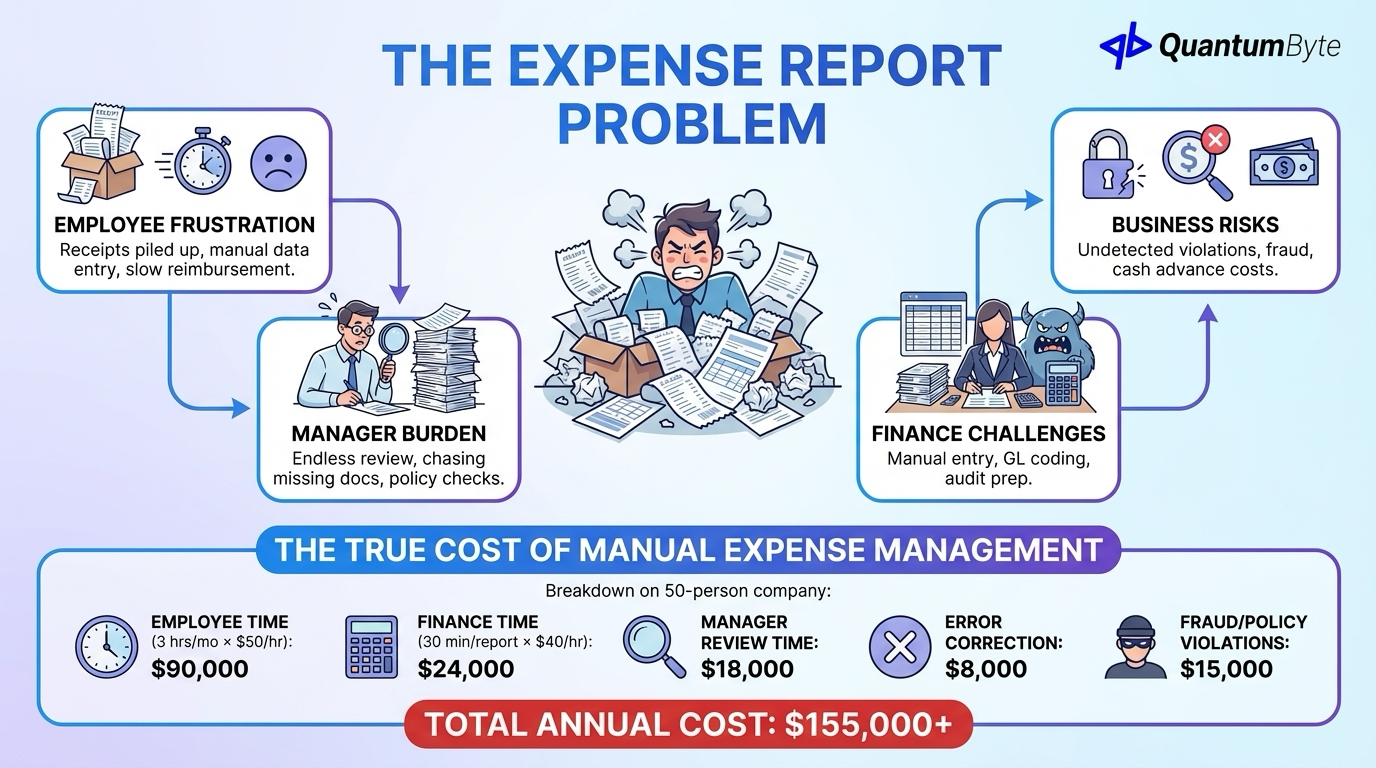
Expense management sits at the intersection of several problems:
Employee frustration: Saving receipts for weeks, manual data entry, confusing policies, slow reimbursement.
Manager burden: Reviewing stacks of reports, checking policy compliance, chasing missing documentation.
Finance challenges: Manual data entry, validation, GL coding, processing reimbursements, audit preparation.
Business risks: Policy violations going undetected, fraud vulnerability (20% of reports contain errors or fraud), cash advance costs.
The True Cost of Manual Expense Management
| Cost Component | Annual Cost (50 employees) |
|---|---|
| Employee time (3 hrs/mo × $50/hr) | $90,000 |
| Finance time (30 min/report × $40/hr) | $24,000 |
| Manager review time | $18,000 |
| Error correction | $8,000 |
| Fraud/policy violations | $15,000 |
| Total Annual Cost | $155,000+ |
For a 50-person company, manual expense management costs $155,000+ annually, mostly in hidden labor costs that never appear on any budget.
9 Expense Management Automation Opportunities
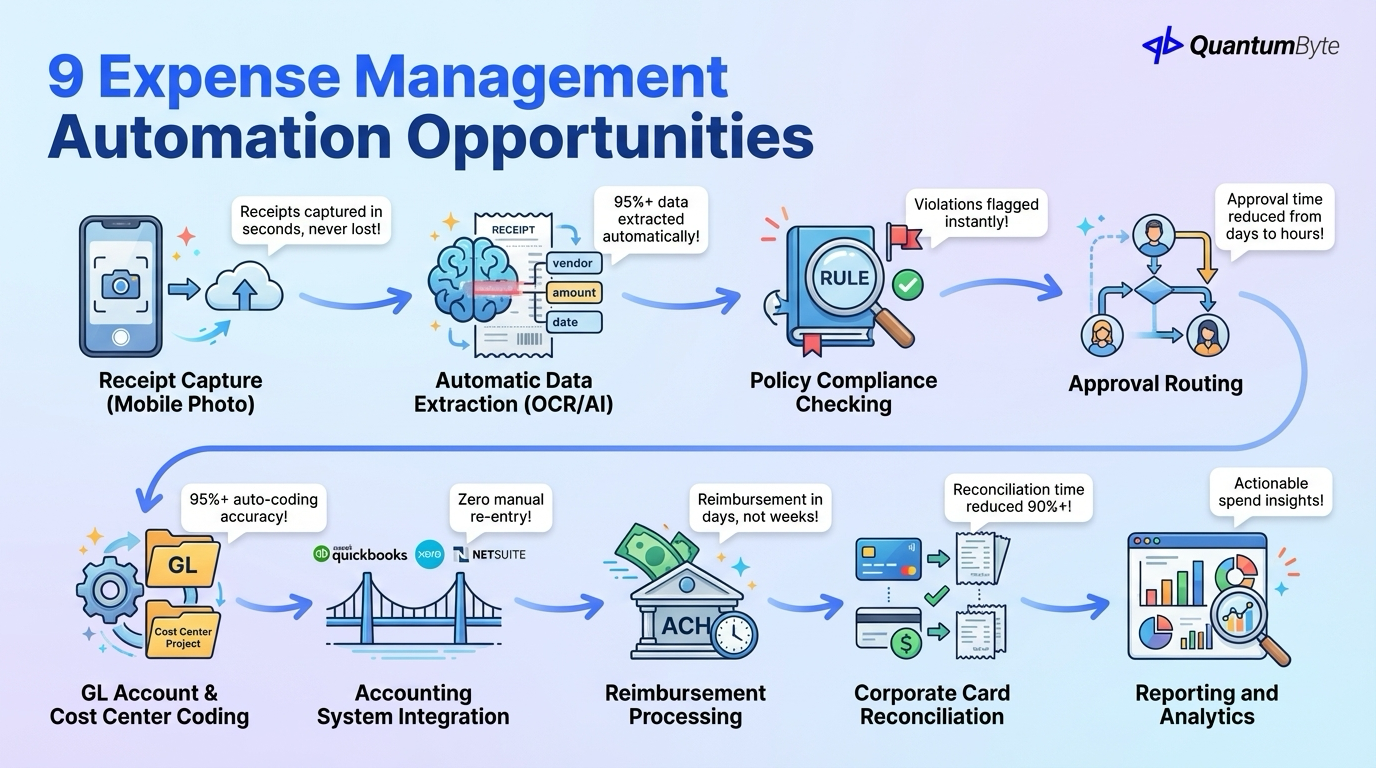
These automations deliver the highest impact:
1. Receipt Capture (Photo Upload from Mobile)
What to automate: Photo capture from smartphone, cloud storage, receipt-to-expense linking, multi-receipt batch upload.
Impact: Receipts captured in seconds, never lost.
2. Automatic Data Extraction (OCR/AI)
What to automate: Vendor name recognition, amount extraction, date parsing, category suggestion, tax calculation.
Impact: 95%+ of receipt data extracted automatically.
3. Policy Compliance Checking
What to automate: Per diem limit enforcement, approved category validation, receipt requirement verification, duplicate detection.
Impact: Policy violations flagged instantly, not after submission.
4. Approval Routing
What to automate: Amount-based routing rules, department/project routing, multi-level approval chains, delegation for absent managers.
Impact: Approval time reduced from days to hours.
5. GL Account and Cost Center Coding
What to automate: Automatic GL account assignment, cost center allocation, project coding, tax code application.
Impact: 95%+ auto-coding accuracy.
6. Accounting System Integration
What to automate: Approved expense export to QuickBooks, Xero, or NetSuite, journal entry creation, reconciliation.
Impact: Zero manual re-entry.
7. Reimbursement Processing
What to automate: Payment file generation, direct deposit processing via ACH, payment notification, expense report closure.
Impact: Reimbursement in days, not weeks.
8. Corporate Card Reconciliation
What to automate: Transaction import, match to submitted receipts, gap identification, missing receipt follow-up.
Impact: Card reconciliation time reduced 90%+.
9. Reporting and Analytics
What to automate: Spend by category/vendor/employee, budget vs. actual tracking, policy violation reporting, benchmark comparisons.
Impact: Actionable spend insights without manual report building.
Benefits of Expense Management Automation
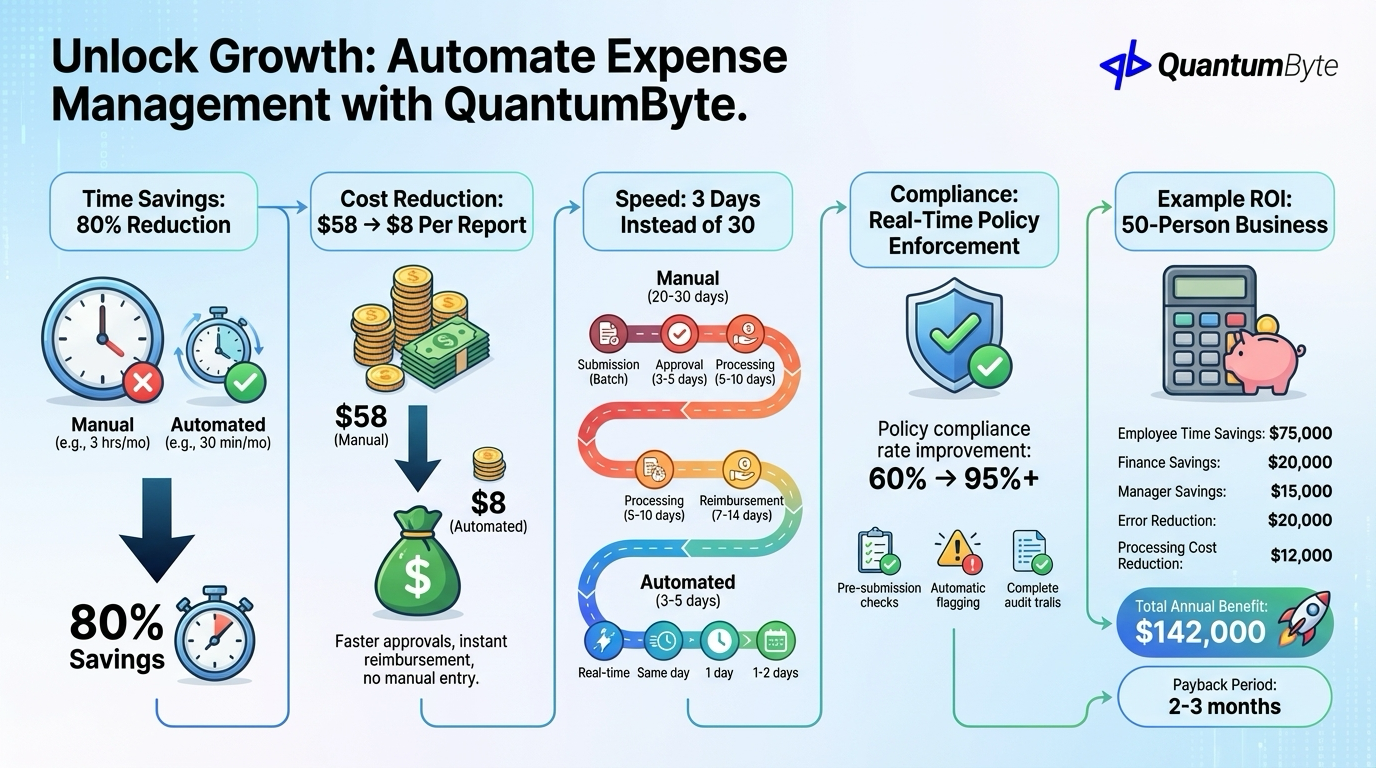
Time Savings: 80% Reduction
| Activity | Manual Time | Automated Time | Savings |
|---|---|---|---|
| Employee expense entry | 3 hrs/mo | 30 min/mo | 83% |
| Manager review | 30 min/report | 5 min/report | 83% |
| Finance processing | 20 min/report | 2 min/report | 90% |
| Reconciliation | 10 hrs/mo | 1 hr/mo | 90% |
Cost Reduction: $58 → $8 Per Report
Processing cost drops dramatically with no manual data entry, faster approvals, automated coding, and instant reimbursement processing.
Speed: 3 Days Instead of 30
| Stage | Manual | Automated |
|---|---|---|
| Employee submission | Batch monthly | Real-time |
| Manager approval | 3-5 days | Same day |
| Finance processing | 5-10 days | 1 day |
| Reimbursement | 7-14 days | 1-2 days |
| Total | 20-30 days | 3-5 days |
Compliance: Real-Time Policy Enforcement
Policy compliance rate improvement: 60% → 95%+ with pre-submission policy checking, automatic flagging, and complete audit trails.
Example ROI: 50-Person Business
| Benefit Category | Annual Value |
|---|---|
| Employee time savings | $75,000 |
| Finance time savings | $20,000 |
| Manager time savings | $15,000 |
| Error/fraud reduction | $20,000 |
| Processing cost reduction | $12,000 |
| Total Annual Benefit | $142,000 |
| Implementation Cost | $15,000-25,000 |
| Payback Period | 2-3 months |
Technology Options
Understanding your choices:
Cloud Expense Platforms
Examples: Expensify, Concur, Ramp, Divvy, Brex
Cost: $5-15/user/month
Pros: Quick implementation, mobile apps, corporate card integration.
Cons: Monthly fees accumulate, limited customization, per-user pricing scales expensively.
Custom Solution
Cost: $15,000-30,000 (one-time development)
Pros: Your exact policies, your approval chains, no per-user fees, complete customization.
Best for: Complex policies, unique approval workflows, high employee counts, specific integration needs.
| Approach | Year 1 Cost (50 users) | Year 5 Cost | Customization |
|---|---|---|---|
| Cloud Platform | $3,000-9,000 | $15,000-45,000 | Medium |
| Custom Built | $20,000 + $2,000 maint | $28,000 | High |
Advanced Features to Consider
Beyond basic expense management automation:
AI-Powered Receipt Reading
Multi-language support, handwritten receipt handling, partial/damaged receipt processing, continuous accuracy improvement.
Mileage Tracking with GPS
Automatic distance logging with IRS standard mileage rate application, audit-ready documentation.
Per Diem Automation by Location
Automatic rate lookup using GSA per diem rates, meal breakdown tracking, international location support.
Multi-Currency Handling
Automatic conversion, historical rate application, base currency reporting for international teams.
Budget Alerts and Spending Limits
Category budget tracking, real-time limit enforcement, manager notifications, forecast vs. actual analysis.
Building Your Expense Management App with QuantumByte
QuantumByte develops custom expense management apps that streamline your workflows:
- Mobile-first employee submission: Native iOS and Android apps, one-tap receipt capture, offline capability
- AI-powered receipt extraction: OCR for any format, vendor recognition, category suggestion
- Custom approval workflows: Department-based routing, amount thresholds, delegation and escalation
- Accounting integration: QuickBooks, Xero, NetSuite, custom systems
- Real-time dashboards: Employee status, manager overview, finance queue, budget tracking
- Flexible rules engine: Your policies enforced automatically
Conclusion: Transform Expense Management
Expense management automation transforms the experience for everyone:
For employees: Submit expenses in seconds, get reimbursed in days, no more lost receipts.
For managers: Quick mobile approvals, pre-validated compliance, spend visibility.
For finance: Minimal manual processing, accurate coding, complete documentation.
For the business: Policy compliance, cost control, fraud prevention, audit readiness.
The ROI is clear. Typically 200-400% first-year return. The technology is proven.
Ready to transform expense management? Schedule a consultation to explore your automation opportunities.
Other Guides to Explore
- Invoice Automation: How to Get Paid Faster and Reduce Costs
- Accounting Automation Software: Reduce Manual Work and Improve Accuracy
- Financial Reporting Automation: Real-Time Insights for Better Decisions
- How to Automate Business Processes to Increase Revenue in 2025
Frequently Asked Questions (FAQ)
How long does expense management automation implementation take?
Cloud platforms: 2-4 weeks including training. Custom solutions: 4-6 weeks from requirements to production. The key is thorough policy documentation upfront.
Will employees actually use a new expense system?
Adoption is typically high when the new system is genuinely easier. Mobile receipt capture beats saving paper receipts. Faster reimbursement motivates usage.
How do I handle expense fraud with automation?
Expense management automation improves fraud detection through duplicate detection, policy violation flagging, unusual pattern identification, and complete audit trails. ACFE research shows 20% of manual reports contain errors or fraud. Automation catches most of these.
What ROI should I expect from expense automation?
Most implementations achieve 150-300% first-year ROI. Primary savings: employee time (largest), finance processing time, faster reimbursement, and fraud/error reduction.