
Simple apps making millions in 2026 are real. But it is rarely about a “tiny idea” that magically blows up. It is usually one small workflow that removes an expensive problem for a specific group. Then it becomes a product with clear pricing, fast onboarding, and a repeatable growth channel.
This guide shows you how to build that kind of app step by step. You will use the same mindset strong founders use. Validate early. Ship fast. Turn chaos into a scalable system.
The real pattern behind simple apps making millions
A “simple app” that reaches meaningful revenue is typically simple in scope. The business side is rarely simple. It does a few things extremely well:
-
Targets one customer type: It is built for a narrow role (for example, “independent bookkeepers”) instead of “anyone who needs invoicing.” This keeps marketing and features focused.
-
Solves one repeating job: It handles a task users must do weekly or daily, not a once-a-year edge case. Repetition drives retention.
-
Creates a measurable outcome: It saves time. It prevents errors. It improves conversion. It reduces risk. Outcomes support pricing.
-
Onboards fast: Users get their first win quickly, before they churn.
-
Improves through feedback loops: The app gets better because you measure, learn, and ship small improvements consistently.
If you want a mental model for shipping early, Y Combinator’s guidance on building a minimum viable product (MVP) emphasizes launching quickly and learning from real users rather than waiting for perfection.
Step 1: Choose a narrow problem with money attached
Your fastest route to “simple apps making millions” is to pick a problem that already has budget.
Look for problems with at least one of these signals:
-
A direct cost: People pay contractors, agencies, or staff to handle it.
-
A revenue impact: Fixing it increases leads, conversions, renewals, or deal size.
-
A compliance or risk angle: Mistakes cause penalties, refunds, or legal exposure.
-
A painful bottleneck: Work piles up, deadlines slip, customers complain.
Good “simple app” starting points are often unsexy:
-
Client onboarding and document collection: Turn messy email threads into a single intake flow with required fields and clear status.
-
Quote-to-invoice workflows: Reduce delays between approval and payment by automating the handoff.
-
Scheduling and capacity planning: Help teams stop double-booking and remove the spreadsheet juggling.
-
Approval flows (expenses, content, hiring): Remove slow back-and-forth with a single source of truth and a clear audit trail.
-
Client status updates: Cut down “just checking in” messages by giving clients a live progress view.
When in doubt, aim for a workflow that currently lives in spreadsheets, email threads, and scattered tools.
Step 2: Validate demand before you build
Validation is where most solopreneurs either win early or waste months.
Start with a small set of conversations (not surveys). Your goal is to confirm three things:
-
The problem is real: People can describe it clearly without you prompting them.
-
The problem is frequent: They face it repeatedly, not once in a while.
-
They already pay to solve it: Money is already leaving their business.
A clean way to run validation is to ask for examples:
-
Last-time walkthrough: Ask, “Walk me through the last time this happened.” You want a real story with real steps.
-
Cost framing: Ask, “What did it cost you in time or lost revenue?” You are looking for painful tradeoffs.
-
Tool breakdown: Ask, “What tools are you using now, and what breaks?” The gaps become your feature boundaries.
If you get vague answers, you do not have a sharp problem yet.
Also validate distribution early. Ask:
-
Discovery expectation: “Where would you expect to find a tool like this?” Their answer points to a few options. It may be SEO. It may be marketplaces. It may be communities or partners.
-
Trust source: “Who do you trust for recommendations?” This often reveals the fastest credibility path.
That answer often becomes your first growth channel.
Step 3: Design the smallest useful workflow
Minimum viable product (MVP) means the smallest version that delivers a real outcome for a real user. Not a demo. Not a roadmap.
Design your MVP around one “start to finish” loop:
- Input: The user inputs something.
- Transform: The app transforms it.
- Output: The user gets an output that saves time or reduces mistakes.
Keep the MVP tight by defining three boundaries:
-
Who it is for: One role, one type of business.
-
What it does: One workflow, end to end.
-
What it does not do (yet): A clear “not now” list to protect scope.
Helpful MVP framing:
-
Core job: The one thing the user hires the app to do.
-
First win: The first result they should get in the first session.
-
Escape hatch: What happens if the app cannot do something yet (manual fallback, export, or support).
If your MVP cannot be explained in one sentence, it is probably too big.
Step 4: Pick a pricing model that matches the outcome
Pricing is strategy. It is not an afterthought.
For many “simple apps,” recurring revenue is the goal because it compounds. Stripe’s overview of the SaaS (Software as a Service) model is a strong reference for how subscription businesses operate and what metrics matter.
Use this table to choose a model that fits your product and buyer:
| Model | Best for | What you must get right | Common mistake |
|---|---|---|---|
| Subscription (monthly/annual) | Ongoing workflows (ops, reporting, client management) | Onboarding and retention so users keep paying | Pricing too low because the app “looks simple” |
| Usage-based | Workloads that scale with volume (messages, invoices, scans) | Transparent metering and predictable bills | Surprise bills that trigger churn |
| Per-seat | Team tools where access maps to headcount | Permissions and admin controls | Charging per seat for a solo use case |
| One-time fee | Narrow utilities with low ongoing support | Distribution volume, because you get paid once | Underestimating support and maintenance |
| Services + software hybrid | Niche B2B tools with onboarding complexity | A clear boundary between “product” and “service” | Custom work that never becomes reusable |
If you want pragmatic pricing guidance, Stripe Atlas also covers principles like reducing plan complexity and anchoring price to value: SaaS pricing.
Step 5: Build fast without painting yourself into a corner
Speed matters, but so does avoiding a fragile product.
A solid build strategy for a simple app is:
-
Start with a real data model: Even if the interface is minimal, structure your data from day one.
-
Design for iteration: You want to ship improvements weekly without reworking everything.
-
Use proven building blocks: Do not reinvent authentication. Use a trusted provider for payments. Reuse proven components for notifications and analytics.
This is where AI-assisted app building can be a force multiplier. If you want to turn a workflow into an app quickly, QuantumByte’s app builder helps you build from natural language. It is built for rapid prototyping. You also get an in-house development team when you hit edge cases that need custom engineering.
You can start by generating a working prototype from a template. Then refine it into a real product using QuantumByte pricing guide.
If you are still deciding how to monetize, QuantumByte also has a practical guide worth scanning: app monetization strategies (real examples).
Step 6: Launch like a service first
The fastest way to learn is to onboard your first customers manually.
This looks like:
-
You set up accounts for them: You learn exactly where they get stuck.
-
You import their data: You discover the messy formats your app must handle.
-
You tailor the first workflow: You see which features matter and which ones are noise.
That “service-first” launch gives you two advantages:
-
Better product decisions: You stop guessing.
-
Better positioning: You learn the language your customers use, which becomes your landing page copy.
This is also where “simple apps” quietly become valuable. The app is the system. Your early manual work teaches you what the system must automate next.
Step 7: Build a retention loop
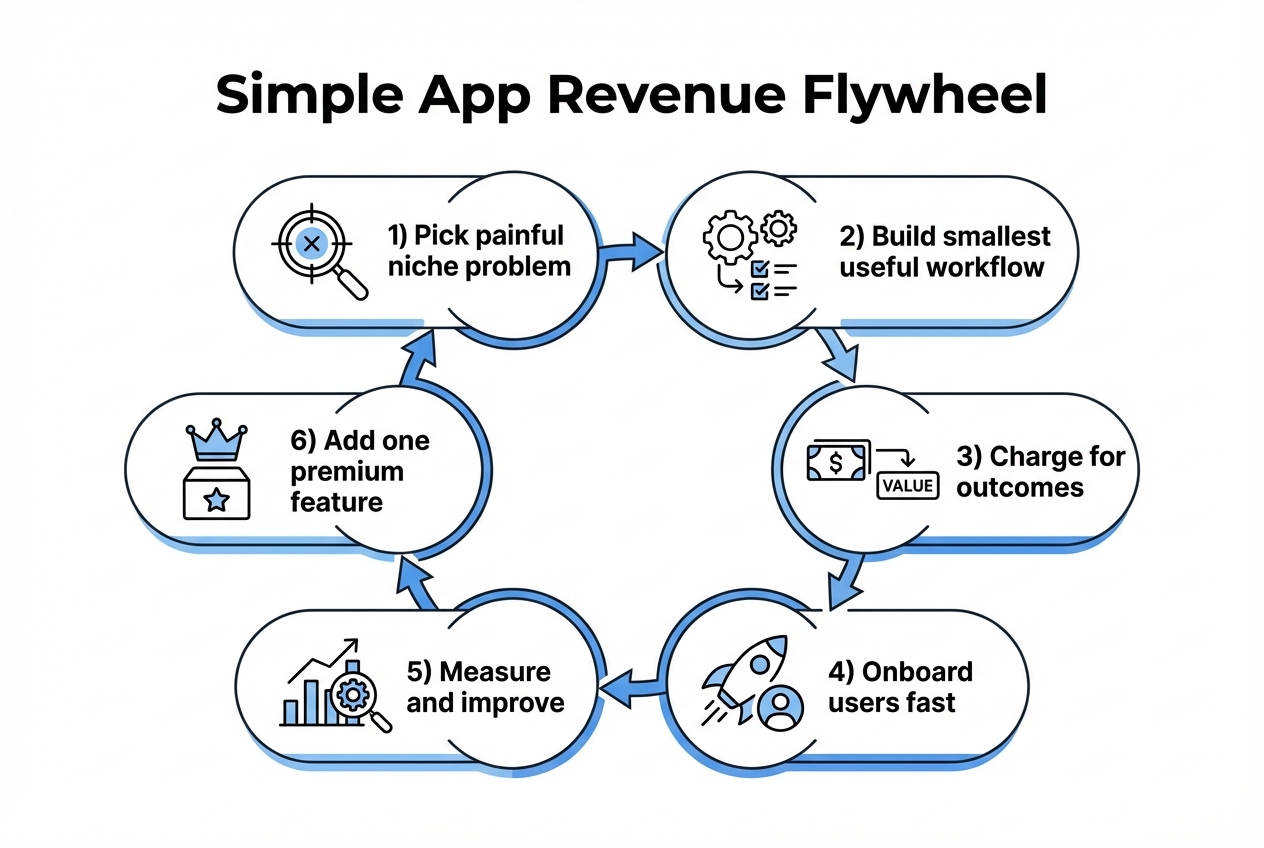
A simple app becomes a serious business when retention is intentional.
Define a small set of key performance indicators (KPIs) that show whether users are getting value:
-
Activation: Did they reach the first win (the outcome) in their first session?
-
Time-to-value: How long until they get a meaningful result?
-
Weekly use: Do they come back as part of their normal routine?
-
Churn reasons: Why do people cancel or stop using it?
Then build your retention loop:
-
Make the next step obvious: After the first win, guide users to the next action.
-
Automate reminders: Notifications should pull users back at the right moment.
-
Add one premium feature only when it strengthens the core job: Avoid feature bloat.
If you plan to publish a mobile app, make sure your monetization approach matches platform rules. Apple’s App Store policies include requirements for minimum functionality. They also cover how digital purchases and subscriptions must be handled.
Step 8: Scale distribution with one channel you can win
Most failed app businesses did not fail because the product was bad. They failed because nobody consistently heard about it.
Pick one primary channel and go deep:
-
SEO content: Best when the problem has clear search intent (templates, calculators, “how to” pain).
-
Communities: Best when your customer hangs out in a few forums, groups, or Slack spaces.
-
Partnerships: Best when adjacent tools serve the same buyer.
-
Outbound: Best when you can describe a clear outcome and target a narrow list.
A simple rule:
-
Search-led buyers: If your buyer searches for the problem, invest in SEO.
-
Peer-trust buyers: If your buyer trusts peers more than Google, invest in community and partnerships.
As you grow, you may want to offer a “white label” path so agencies can resell your tool under their brand. This can turn one app into many distribution surfaces: white label app builder: sell apps under your brand.
Common traps that keep “simple apps” from ever making real money
Avoid these, and you will move faster than most founders.
-
Building for “everyone”: You end up with generic features and weak messaging. A narrow audience provides focus and leverage rather than limitations.
-
Confusing novelty with value: AI features and dashboards do not matter unless they change outcomes.
-
Overbuilding the first version: Shipping late usually means learning late.
-
Pricing based on effort: Customers pay for results, not how hard it was to build.
-
Skipping onboarding: Most churn happens because users never reach the first win.
If you need a reminder of why democratizing software matters (and why small builders can compete), QuantumByte’s perspective is clear in its manifesto.
A practical 30-day build path you can actually execute
This is not a rigid checklist. It is a realistic sequence that keeps momentum.
Days 1 to 7: Lock the problem and the buyer
Spend the first week narrowing the problem until it is specific.
-
Outcome: One sentence problem statement, one customer role, and a shortlist of “must-have” workflow steps.
-
Tip: Write your landing page before you build. If you cannot explain it simply, you are not ready to code.
Days 8 to 14: Prototype the workflow
Build a thin version that completes the core loop.
-
Outcome: A working product that a real user can try.
-
Where QuantumByte fits: Generate the first version quickly, then iterate based on feedback. When you hit a capability gap, you can hand off targeted pieces to a dev team rather than rebuilding everything from scratch.
Days 15 to 21: Onboard your first users manually
Treat onboarding as product research.
-
Outcome: 3 to 10 users who complete the core job and tell you what broke.
-
Focus: Time-to-value and the first win.
Days 22 to 30: Charge, measure, and improve
Do not wait for “perfect pricing.” Start with a clear offer tied to the outcome.
-
Outcome: Paid users, plus the KPI baseline you can improve next month.
-
Next step: Add exactly one premium feature that strengthens the core workflow.
When you are ready to turn your prototype into a more polished product, start with a template.
Wrap-up: build the “boring” workflow that prints value
Simple apps making millions are rarely complicated products. They are focused systems.
You now have a practical path:
-
Choose a narrow problem with money attached: Start where budgets already exist and where the pain shows up weekly.
-
Validate demand and distribution before building: Talk to real users and confirm how they discover tools like yours.
-
Ship an MVP that completes one end-to-end workflow: One loop, one outcome, one clear first win.
-
Price based on outcomes, then improve retention on purpose: Revenue compounds when retention is designed, not hoped for.
-
Scale through one channel you can win: Depth in one channel beats shallow effort across five.
Do this well and you earn a durable advantage. Your product grows because it reliably creates value. It does not depend on being loud.
Frequently Asked Questions
Can a simple app really make millions?
Yes. It usually happens through focus and compounding. The app stays simple because it solves one job extremely well. It keeps users for a long time. It also has a channel that keeps bringing in qualified buyers.
What kinds of “simple apps” tend to work best?
Apps that sit inside a repeating business workflow tend to do better than novelty apps. Think onboarding and approvals. Think reporting, scheduling, document collection, and client communication.
Should I start with a mobile app or a web app?
Start where your users already work. For many B2B (business-to-business) workflows, a web app ships faster and iterates easier. Add mobile when it clearly improves the core job. Field teams and photo capture are common examples.
How do I validate pricing if I do not have users yet?
Sell the outcome, not the feature list. Offer early access pricing to a small set of users. In exchange, give hands-on onboarding and ask for feedback. You are testing willingness to pay and clarity of value. You are not trying to perfect packaging on day one.
When should I hire developers vs using an AI builder?
Use an Artificial Intelligence (AI) builder when you need speed and iteration. It also helps when you want a working product quickly. Bring in developers when you hit constraints. Common constraints include custom integrations, complex permissions, performance needs, and advanced security requirements. A hybrid approach often wins because you keep momentum while still building something solid.