
Transportation spend is often a top-three operating expense. Yet many shippers still rely on manual data entry to bridge the gap between logistics and finance.
That gap is not harmless. Freight invoice error rates are often reported in the 3% to 6% range, which adds up fast when you process hundreds or thousands of invoices a month. When your team is keying charges by hand, those errors become payments, disputes, and messy month-end close cycles. Transportation Insight also notes invoice disputes can consume a meaningful chunk of AP time, pulling your team away from higher-value work.
TMS integration with accounting ERP turns that fragmented process into a single financial workflow. Your shipment events, rate confirmations, accessorials, and carrier invoices flow into your ERP with consistent coding and predictable controls. The result is fewer surprises, faster close, and cleaner reporting you can trust.
Why TMS Integration with Accounting ERP Is Critical for Finance Teams
When your TMS and ERP do not talk, finance is always a step behind operations. You are booking costs after the fact, are chasing context in emails and you are building reports in spreadsheets that no one can audit.
Here's how fundamental TMS integration can benefit companies:
-
Real-time accruals: You can post an estimated freight liability at ship or delivery time, instead of waiting weeks for an invoice to arrive. That improves financial accuracy during the month, not after it.
-
Granular cost allocation: You can allocate freight to the right business dimension (SKU, customer, channel, warehouse, project) without manual rework. That matters when you want to understand true margin.
-
Reduced audit overhead: When invoice lines are automatically matched against shipment facts and contracted rates, you reduce the “he said, she said” loop. Transportation Insight calls out invoice disputes as a real time sink for AP teams. Automation gives everyone the same source of truth.
Mapping the Data Model: From Load to GL Lines
The connector matters. The mapping layer is what determines whether your integration holds up in the real world, month after month.
Think in two languages:
-
The TMS language: Loads, stops, tenders, events, and accessorials.
-
The ERP language: Suppliers, invoices, lines, accounts, departments, and periods.
Your job is to create a translation that never loses meaning.
The transactional flow
-
Load/shipment to carrier invoice: When the carrier invoice arrives (EDI 210, portal upload, or PDF), it must match back to the original shipment ID and carrier identity. This is the foundation of a 3-way match: shipment + rate confirmation + invoice.
If you want the matching logic to be durable, design it as a workflow, not as a one-time import. Start with a clear AP process and then automate it: 3-way matching and invoice processing. -
Mapping to GL lines: Your integration must translate logistics attributes into ERP dimensions.
-
Dimensions include: Cost center/department, GL account (freight-in vs freight-out), mode (LTL, FTL, parcel), lane, customer or project code, and service level.
-
Accessorial codes: Detention, lumper fees, re-delivery, and fuel surcharges should not all land in one bucket. Map them to sub-accounts (or item categories) so you can manage spend instead of guessing. This is a core building block for transportation spend management automation.
-
A useful design rule: if a finance leader might ask “why did this cost happen?”, your mapping should preserve the answer.
Accruals and reversals
Accrual design is where many integrations break.
You want two things to be true:
-
Timing: You can recognize freight expense in the right period.
-
No double counting: You do not double count when the invoice arrives.
That means:
-
Accrual posting: Trigger an accrual at a defined shipment milestone (departed, delivered, or shipped-confirmed), based on the best available expected cost (contract rate, spot quote, or TMS rating engine).
-
Accrual reversal: When the approved carrier invoice posts in the ERP, reverse the accrual automatically and replace it with the actual.
If you do not build reversals, your automation will quietly inflate spend.
Master Data Requirements for a Seamless Connection
Integrations fail when the “language” of the TMS does not match the ERP. Master data alignment is the first real milestone, not an afterthought.
-
Carrier and vendor master: TMS systems often identify carriers by SCAC codes. Your ERP pays vendors using vendor IDs. You need a controlled crosswalk between the two. SCAC is assigned and managed by NMFTA, which is why it shows up everywhere in freight data exchange.
-
Lanes and rate tables: Your rate logic only works if origin and destination definitions are consistent. That includes zip ranges, zones, and service levels. Even small mismatches create “false exceptions” that force manual review.
-
Location master: Ship-from and ship-to locations should carry the financial tags the ERP needs (warehouse ID, cost center, region). Otherwise, your GL coding rules will always be fragile.
-
Currency and tax: If you ship internationally, define a single source of exchange rates and a clear mapping of tax treatments (VAT/GST). Without it, you increase the odds of mismatched totals and downstream issues like duplicate invoice detection.
Master data work rarely feels glamorous, yet it keeps the integration boring. And boring is the goal.
Common Pitfalls in TMS and ERP Integration
Real-world freight is messy. Your integration logic has to be built for that mess, not for the “happy path.”
-
Partial shipments and multi-stop loads: A single purchase order can split across multiple trucks. Or one truck can carry multiple orders. Your rules must support pro-rata allocation (by weight, pallets, cube, value, or a defined policy) so cost lands where it belongs.
-
Multi-leg shipments: One customer move can include drayage, linehaul, and final mile. Treat these as parent-child relationships so invoices can post as separate lines while still rolling up to one shipment for reporting.
-
Accessorial splits: When detention is caused by a customer, you may want to rebill it. Your integration should tag rebill-eligible accessorials and route them for review rather than burying them in freight expense.
-
Timing mismatches: Invoices often arrive in a different fiscal period than the shipment event. Your process needs period rules, accrual reversals, and reconciliation checks. If you are tightening controls across cash and accrual, connect this work to your bank reconciliation process.
Pitfalls are predictable. You can design around them if you name them early.
Integration Patterns: API, EDI, and iPaaS
“How data moves” matters as much as “what data moves.” There is no single best pattern, but there is a best pattern for your systems, volume, and timeline.
Here are the common approaches:
| Pattern | Best for | Strengths | Trade-offs |
|---|---|---|---|
| API (Application Programming Interface) | Cloud ERPs and modern TMS platforms | Near real-time sync, strong validation, better error handling | Requires API maturity on both sides and careful rate limiting |
| EDI (Electronic Data Interchange) | Carrier invoicing and legacy freight networks | Widely adopted by carriers, standardized transaction formats | Often needs an EDI translator and strong monitoring |
| iPaaS (Integration Platform as a Service) | Teams connecting multiple apps with transformations | Faster builds, reusable mappings, governance and monitoring | Ongoing subscription cost; still requires clean data design |
| File-based (SFTP/CSV) | Low complexity, stable batch workflows | Reliable for nightly pushes; easy to audit the file | Not real-time; weak feedback loop and slower exception handling |
A practical note on EDI 210: this is a common transaction set used for motor carrier freight invoice details. If your carriers send EDI 210, design your process to treat it as an input to matching, not as a “final truth” you blindly post. For a field-level view of what typically shows up in a 210, see this EDI 210 overview.
Recommended Minimum Viable Integration (MVI) Scope
Do not try to automate every edge case in phase one. Start with a minimum viable integration that delivers value in weeks, then expand.
A strong MVI scope looks like this:
-
Shipment and invoice headers: Match load ID, carrier identity, invoice date, total amount, and key references. This gets you out of the copy-paste business fast.
-
GL coding rules: Auto-assign cost centers and accounts using simple rules you can explain, like “origin warehouse drives cost center” or “mode drives GL account.”
-
Status updates: Send “invoice approved” and “invoice paid” statuses back to the TMS or analytics layer. This reduces carrier inquiries and keeps operations aligned.
-
Exception queue: Create one place for mismatches beyond a tolerance (for example, 1%). Route those to your accounts payable automation workflow instead of burying them in email threads.
If you want to move faster without hiring a large integration team, QuantumByte’s app builder can prototype the exception queue and matching workflows in days, then your team can extend the integration where your edge cases require deeper custom work.
Visualizing the Automated Freight Workflow
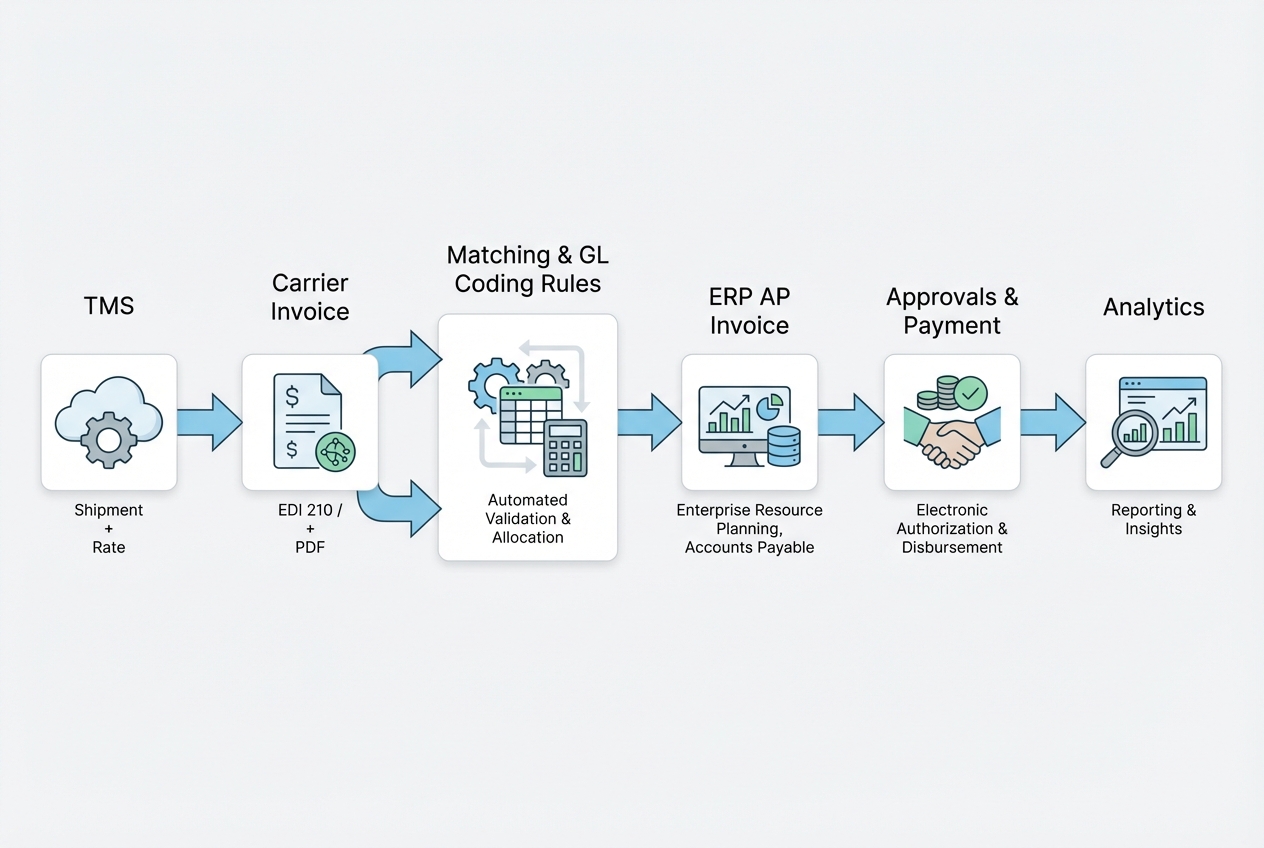
An end-to-end automated flow should look like this:
- TMS shipment: Shipment is tendered, accepted, and rated. The TMS holds the operational facts.
- Invoice intake: Carrier sends EDI 210, portal invoice, or PDF. Data is captured and normalized into a consistent structure.
- Matching and transforms: The system matches invoice-to-load, applies contract and tolerance rules, and generates GL coding.
- ERP AP invoice creation: Validated invoices post into the ERP as “ready for approval” with clean header and line-level detail.
- Approvals and payment: Your ERP controls approvals, payment terms, and disbursement.
- Analytics loop: Payment status and actual cost flow back to your reporting layer, so you can see true cost-per-mile, cost-per-pound, and carrier performance.
This is the point where finance stops reacting and starts steering.
Scaling Your Financial Logistics with QuantumByte
A seamless TMS integration with accounting ERP requires system design across data, process, and controls.
QuantumByte is a fit when you want speed without sacrificing correctness:
-
AI-assisted build speed: You can stand up the core workflows fast: intake, matching, exception queues, and GL rules.
-
Custom hardening when reality hits: When you hit real-world complexity (multi-leg shipments, rebills, lane-specific logic), QuantumByte’s in-house developers can take it across the finish line with custom connectors and hardened validation.
If you want to map your MVI scope and see what you could automate first, try using QuantumByte to build your automation today.
The goal is simple: fewer disputes, cleaner close, and transportation spend you can explain in one screen.
What You Should Walk Away With
TMS integration with accounting ERP is how you turn freight from a monthly fire drill into a repeatable financial workflow.
You covered:
-
Why finance teams need real-time visibility, not lagging spreadsheets
-
How to map a load into GL lines without losing business meaning
-
What master data must be aligned to keep automation stable
-
The pitfalls that create hidden manual work if you ignore them
-
The main integration patterns (API, EDI, iPaaS, file-based) and when each makes sense
-
A minimum viable scope that delivers value quickly, then expands safely
Build the foundation first. Then automate the edge cases. That is how you scale without adding headcount.
Frequently Asked Questions
What is the difference between an ERP and a TMS?
An ERP runs broad business functions like accounting, purchasing, and HR. A TMS is built to plan, execute, and optimize the movement of freight. Integrating them ensures your logistics truth becomes your financial truth, with consistent coding and auditability.
How does TMS integration with accounting ERP improve freight auditing?
It enables automated matching between what was planned (rates and rules), what happened (shipment events), and what was billed (carrier invoice). That reduces overpayments and prevents disputes from becoming your default process.
What is an EDI 210 and why does it matter for integration?
EDI 210 is a common electronic freight invoice format used by carriers (Motor Carrier Freight Details and Invoice). It matters because it provides structured invoice data that can be matched to shipments and translated into ERP AP invoices. For a field-level view of what typically shows up in a 210, start with this EDI 210 overview.
Can small shippers benefit from TMS and ERP integration?
Yes. Manual AP work is expensive even at low volume. Small teams often see fast payback from reducing touch time and disputes.
What are the most common data mapping challenges?
The most common issue is mismatched identifiers. For example, the TMS may use SCAC codes while the ERP pays vendors using internal vendor IDs. A controlled cross-reference table, backed by clean vendor master data, is the usual fix. For SCAC context and governance, NMFTA is the assigning authority.