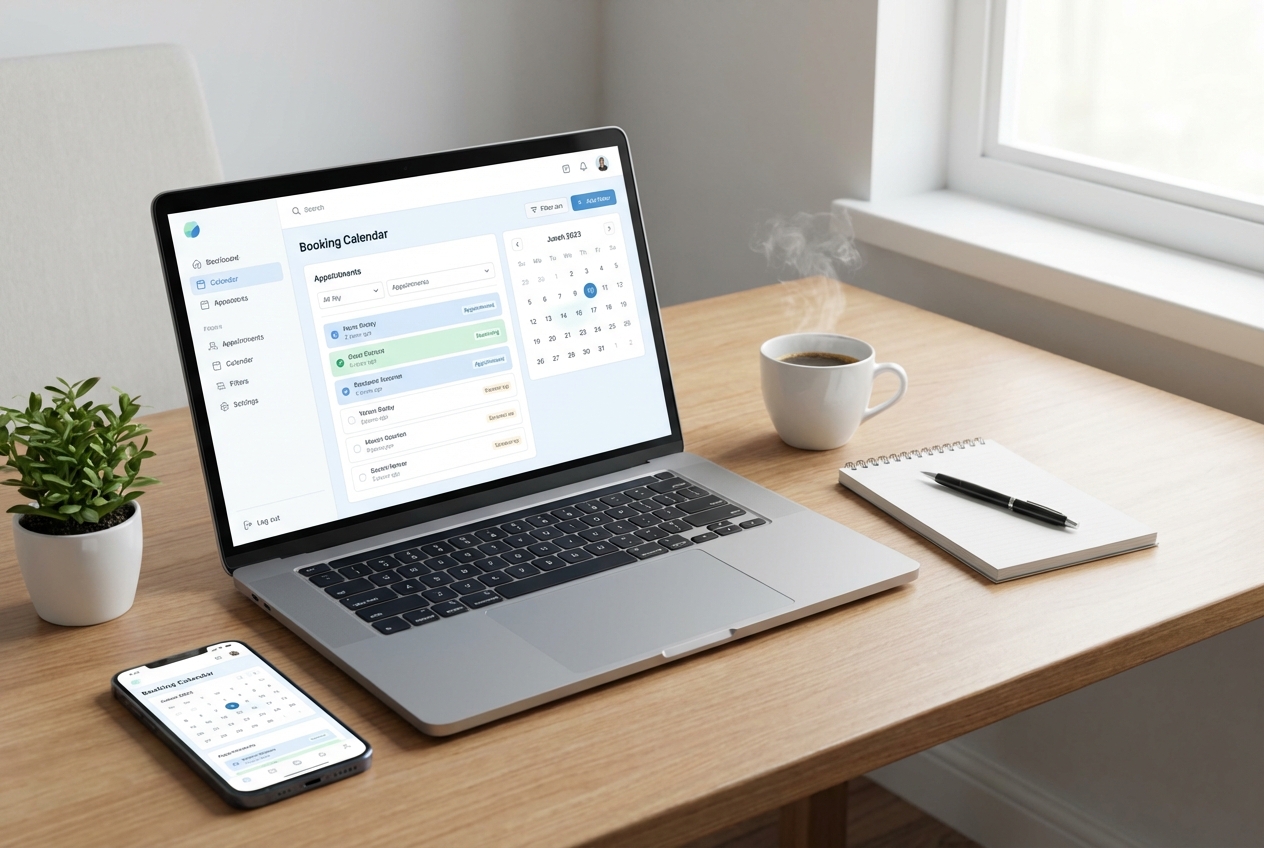
You want customers to book and pay without the back-and-forth, and you want your team to stop living in spreadsheets. A modern booking app builder lets you ship a scheduling experience that looks like your brand, captures the right details, enforces your rules, and ties into calendars, payments, and notifications.
What a booking app builder needs to handle
Before you build anything, get clear on the minimum capabilities your booking app must support. If you miss these fundamentals, you will end up rebuilding core logic later.
- Service catalog: Define what can be booked (services, packages, locations, staff) and which rules apply to each.
- Availability and capacity: Convert your real-world constraints into bookable time slots (working hours, buffers, breaks, lead time, capacity per slot).
- Intake and data capture: Collect the information you need at the moment of booking (reason for visit, address, intake form answers, consent).
- Confirmations and reminders: Send email and Short Message Service (SMS) confirmations, reschedules, cancellations, and reminders.
- Payments and deposits: Take payment upfront, collect a deposit, or store a card on file if your model requires it.
- Admin operations: Give your team a back office to manage bookings, customers, refunds, reschedules, and no-shows.
- Integrations: Sync with calendars, customer relationship management (CRM), accounting, video meeting links, and analytics.
- Security and privacy: Store personal data responsibly and ensure only the right people can access it.
Decide what you are building
Most booking products fall into one of three patterns. Choose one, because it drives the data model, user interface, and integrations.
- Single-provider bookings: One person or one resource is being booked (consultant, photographer, private chef).
- Multi-staff scheduling: A customer chooses a service, then the system selects staff automatically or lets customers pick (salon, clinic).
- Capacity-based bookings: Many customers book the same slot until capacity is reached (classes, tours, workshops).
A quick way to decide is to write one sentence:
- If the customer chooses a person: You need staff profiles, permissions, and staff-specific availability.
- If the customer chooses a time only: You need capacity and a waitlist.
- If the customer chooses a location: You need location hours, time zone handling, and location-based staff assignment.
Plan the booking workflow and rules
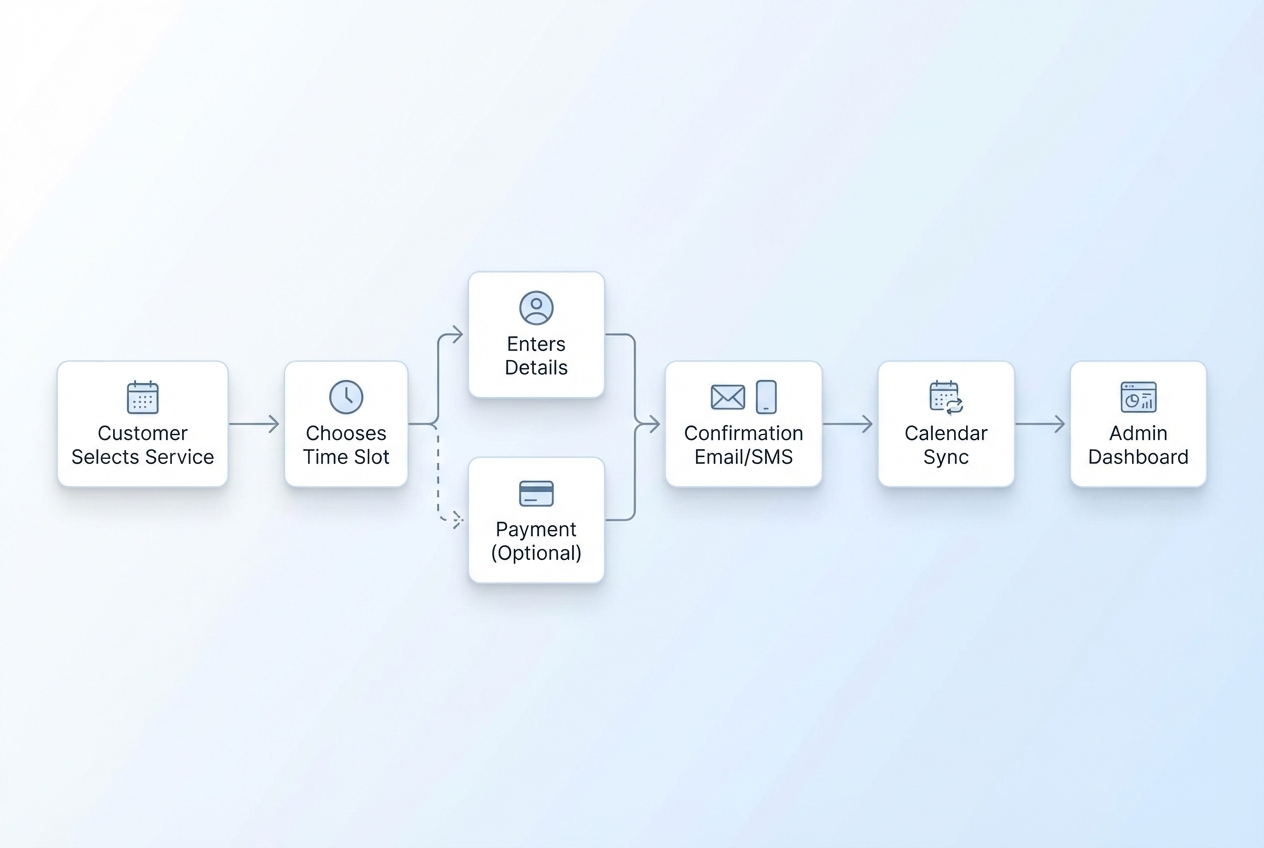
Your booking app succeeds or fails on rules. Get them right on paper first, then build.
The rules you should define up front
- Duration and buffers: How long is each service, and do you need setup and cleanup buffers before and after?
- Lead time: How soon can someone book? Many businesses require same-day cutoffs.
- Booking window: How far into the future can someone book?
- Cancellation and reschedule policy: How late is too late, and what happens then?
- Capacity rules: Is capacity per slot fixed, service-specific, or staff-specific?
- Payments policy: Full payment, deposit, or pay later. Also decide on refund logic.
- No-show handling: Fees, deposits, auto-blacklist, or manual review.
Define the user journeys
Write the journey for two roles. Keep it short.
- Customer journey: Find service → pick slot → enter details → pay (if needed) → receive confirmation → manage booking.
- Admin journey: View calendar → approve or edit booking (if applicable) → contact customer → mark complete → report.
If you are building on QuantumByte, this is the exact kind of structured spec that the platform can turn into an app quickly. The clearer your rules are, the less rework you will do later.
Choose the right booking app builder for your needs
You are usually choosing between a specialized scheduling tool and a more flexible app builder.
Common options and when they fit
| Option | Best for | Where it breaks |
|---|---|---|
| Calendly | Simple one-to-one scheduling with minimal customization | Limited control over complex capacity, custom intake logic, and branded end-to-end flows |
| Acuity Scheduling | Service-based bookings with payments and forms | Custom workflows and deep internal tooling typically require workarounds |
| Square Appointments | Service businesses already using Square payments and point of sale (POS) | Portability and customization can be limiting outside the Square ecosystem |
| Cal.com | Teams that want open-source scheduling and self-hosting options | You still need engineering effort to tailor workflows and operations |
| AI app builders | Founder-led teams that want speed plus customization | Quality depends on how well the system supports data, permissions, and integrations |
If your booking process is a core differentiator, or if you need a real back office (beyond a basic calendar), a flexible builder is usually the safer long-term bet.
If you are evaluating build vs buy, it can also help to sanity-check what you would pay for a packaged tool against a builder tier. The pricing tiers on QuantumByte are a useful reference point for what “ship fast, then refine” tooling typically costs.
How to build a booking app with a booking app builder
The steps below assume you are building a real product rather than a one-page scheduler. Each step includes the why and what “done” looks like.
1) Model your data first
Booking apps become painful when data is improvised. Define a minimal schema.
At a minimum, you will want:
- Customer: Name, email, phone (optional), notes, consent flags.
- Service: Name, duration, price, buffers, required fields, capacity.
- Availability rule: Working hours, exceptions, holidays, time zone.
- Booking: Service, start time, end time, status, assigned staff, payment status.
- Payment record: Amount, method, refund status, processor IDs.
- Message log: Confirmation and reminder delivery status.
What “done” looks like: you can describe each record in one sentence, and each booking can be traced to a customer and a service without ambiguity.
2) Define availability and slot generation
Availability represents the combination of rules rather than just a single calendar.
Build these layers:
- Base schedule: Business hours per day.
- Overrides: Holidays, time off, special events.
- Buffers and lead time: Prevents “impossible” bookings.
- Conflict detection: Ensures you never double-book staff or resources.
If you plan to sync with Google Calendar, you should understand how events impact availability. The Google Calendar API lets you create events with events.insert and mark time as busy or available using the transparency field in the event resource, and it also provides a dedicated Freebusy resource for availability checks in scheduling contexts via the same documentation set.
Use this official reference when you implement calendar sync.
What “done” looks like: the system generates slots that match your real capacity, and you can explain why a slot is not available.
3) Build the customer booking flow
This is the front door. Keep it short and obvious.
A reliable booking flow usually has five screens:
- Choose service: Show duration, price, and key policies.
- Choose time: Make time zone clear. Allow next available.
- Enter details: Collect only what you need for delivery.
- Pay or confirm: Payment optional depending on policy.
- Confirmation: Show a clear summary and a reschedule link.
Design choices that reduce drop-off:
- Progress clarity: People abandon flows when they do not know how many steps remain.
- Mobile-first layout: Most bookings happen on mobile, even for business-to-business (B2B) services.
- Policy visibility: Show cancellation rules before payment, not after.
What “done” looks like: a first-time user can book in under two minutes without contacting you.
4) Add payments the safe way
If you charge upfront, treat payment handling as a security feature, not a monetization feature.
Two practical patterns:
- Deposit model: Collect a smaller amount to reduce no-shows and preserve flexibility.
- Full prepay: Simplifies revenue reporting and reduces admin.
If you use Stripe, implement webhooks correctly. Verify payment completion through backend webhooks instead of relying solely on the customer’s return to the success page.
Stripe’s documentation is explicit about verifying webhook signatures using the Stripe-Signature header and your endpoint’s signing secret, ideally via official libraries: Stripe webhooks documentation
What “done” looks like: your booking status changes only after a verified webhook event, and your system handles retries gracefully.
5) Automate confirmations and reminders
Notifications are where booking apps create operational leverage.
At minimum, send:
- Confirmation: Immediately after booking.
- Reminder: Typically 24 hours before and again 1 to 2 hours before, depending on your business.
- Change notices: Reschedule and cancellation emails and SMS.
Recommended content:
- A clear summary: Service, time, location, and any prep instructions.
- A single action link: Reschedule or cancel without needing to call.
- A support path: A real email address or help form.
What “done” looks like: customers stop asking “Am I booked?” and your team spends less time on manual follow-ups.
6) Build the admin back office
A booking app is only as good as the workflow behind it. Your admin experience should be designed for speed.
Core back office views:
- Calendar view: Day and week views with filters for staff, service, and location.
- Booking detail page: Status, customer info, notes, payment status, message history.
- Customer profile: Booking history, no-show count, preferences.
- Operational controls: Reschedule, cancel, refund, assign staff, add internal notes.
Helpful automation rules:
- Conflict prevention: Block staff changes that create overlaps.
- No-show workflow: A consistent path for fees, warnings, or follow-ups.
- Audit trail: Track who changed what and when.
What “done” looks like: your team can process changes without jumping between tools.
As you scale, you may also want a clearer separation between a lightweight starter build and a more controlled, role-heavy setup. This is where an enterprise option can make sense for larger teams.
7) Secure authentication and sessions
Booking apps hold personal data such as names and emails, which are explicitly considered personal data under the General Data Protection Regulation (GDPR) per the European Commission’s definition: what counts as personal data
That means your security posture matters even if you are “just scheduling.”
Session basics you should implement:
- Secure cookies: Use Secure and HttpOnly cookies and set SameSite appropriately.
- Short-lived sessions: Combine idle timeouts with absolute timeouts.
- Session regeneration: Regenerate session identifiers on login and privilege changes.
OWASP provides a clear baseline for cookie settings, session lifecycle, and renewal requirements in its session management guidance: OWASP Session Management Cheat Sheet
What “done” looks like: admins cannot accidentally expose accounts through weak session handling, and customer data access is properly restricted.
8) Integrate calendars without creating chaos
Calendar sync can be a competitive advantage, but it can also create double-booking if you treat it casually.
Decide your sync direction:
- Booking app is source of truth: You create calendar events and treat external calendars as read-only for availability checks.
- Calendar is source of truth: Bookings reflect calendar state. This is harder and requires more edge-case handling.
Implementation tips:
- Write idempotently: If you receive the same webhook twice, you should not create two calendar events.
- Store external IDs: Keep the calendar event ID on the booking record.
- Handle cancellations: Update or delete the external event when the booking changes.
What “done” looks like: you can reschedule a booking and see the change reflected everywhere within minutes.
9) Test from an operational perspective
A booking app fails in real life because of operational edge cases.
Test scenarios to run:
- Double-click booking: Two fast submissions for the same slot.
- Time zone mismatch: Customer books from a different time zone.
- Payment failure: Card declined after slot selection.
- Late cancellation: Policy enforcement with partial refund or fee.
- Staff reassignment: Move a booking to a new staff member without breaking notifications.
What “done” looks like: your most common “bad day” events are handled cleanly, with clear messaging.
10) Launch and iterate with real feedback
Your first launch should be controlled.
A sensible rollout path:
- Soft launch: Put it in front of repeat customers first.
- Add tracking: Track funnel steps and drop-off.
- Iterate weekly: Improve copy, reduce fields, refine policies.
What “done” looks like: you can measure where bookings are lost and fix the biggest friction point first.
Where QuantumByte fits if you want speed and flexibility
If you are a founder trying to ship a booking flow quickly, you typically want two things at once: a working app now, and the ability to tailor it later.
QuantumByte is a strong fit when:
- You need a branded, end-to-end booking experience: You receive a complete app flow instead of just a scheduling link, plus a back office.
- You want templates without template lock-in: You can start from a common structure and still change the rules.
- You want to move fast without hiring immediately: Especially when the first version is a proof of concept.
If that sounds like you, start with our basic plan.
Common pitfalls that slow booking apps down
These are the mistakes that create months of rework.
- Over-collecting fields: You think you are being thorough, but you are increasing abandonment. Ask for what you need to deliver the service.
- Treating availability as a single calendar: Real scheduling is rules plus exceptions.
- Not separating booking status from payment status: A “confirmed booking” should have a defined meaning in your system.
- Skipping an admin audit trail: When something goes wrong, you need to know who changed what.
- Bolting on integrations too early: Build the core booking loop first, then integrate.
Practical feature roadmap for the first 30 days
If you are building your first version, focus on what drives revenue and reduces admin.
- Week 1: Service catalog, availability rules, slot selection.
- Week 2: Booking details, confirmation emails, admin calendar.
- Week 3: Payments or deposits, reschedule and cancel flows.
- Week 4: Reminders, analytics, calendar sync, operational hardening.
If you want a guiding principle, borrow the mindset behind the product manifesto: ship value quickly, then let the product evolve.
Summary of what you built and why it works
A booking app builder is most valuable when it turns your real-world scheduling constraints into a clean customer experience and an efficient back office. You now have a clear path to:
- Data modeling: Model the core booking data so your app stays coherent.
- Conflict prevention: Implement availability rules that prevent double-booking.
- Customer flow: Build a customer flow that reduces friction and drop-off.
- Payment handling: Add payments using verified webhooks and reliable status handling.
- Operational automation: Automate confirmations and reminders to cut manual admin.
- Session security: Secure sessions and treat personal data responsibly.
- Calendar sync: Sync calendars with a clear source-of-truth decision.
If you want to build quickly without sacrificing control, QuantumByte is designed to help you get a working booking product in days, then refine it as your business grows.
Frequently Asked Questions
What is the difference between a booking app and a scheduling link?
A scheduling link typically handles basic availability selection and confirmation. A booking app includes service-specific rules, intake forms, payments or deposits, customer management, staff assignment, operational reporting, and a back office for your team.
Do I need payments in my booking app from day one?
Not always. If no-shows are expensive or you have limited capacity, deposits can be valuable early. If your service is low-risk and relationship-driven, you can launch with pay-later and add payments after you validate demand.
How do I prevent double-booking?
Use a single source of truth for bookings, apply conflict checks at the database level, and generate slots from rules rather than letting customers select arbitrary times. If you sync calendars, store external calendar event IDs and ensure updates are idempotent.
Should my booking app sync with Google Calendar?
If your business runs on Google Calendar, sync is usually worth it. The key decision is whether your booking app or Google Calendar is the source of truth. Most businesses keep the booking app as the source of truth and push events outward.
What should I build first if I only have a weekend?
Build the core loop: services → available slots → booking creation → confirmation message → basic admin calendar view. Everything else, including payments, advanced reminders, and complex integrations, can follow once you have real users booking.