
If your month end close feels like a mad sprint, you are not alone. Traditional closing processes often take upwards of 10 days, which keeps your team stuck in manual entry, spreadsheet reconciliations, and last-minute fire drills.
And spreadsheets are not just slow. They are risky. Field audits have found that around 90% of real-world spreadsheets reviewed contained errors in some form, especially as they grow in size and complexity. This is a natural result of running a modern business on copy-paste and manual processes.
Month end close automation changes the shape of the work. Instead of waiting until the month ends to find problems, you move toward a continuous close, where transactions get validated as they flow in. This shift is part of modernizing the financial close to support faster, more real-time visibility. Deloitte describes the close evolving into a more continuous, automated cycle, with exception handling replacing manual checking.
In this guide, you will learn:
-
Plain-English definition: What month end close automation is (without jargon)
-
Fast ROI automations: Which processes to automate first to save time quickly
-
5-step implementation plan: A framework you can follow without guesswork
-
Touchless close habits: Best practices to keep automation working month after month
What is Month End Close Automation and Why Does it Matter?
Month end close automation is the use of software (and often AI) to handle repetitive accounting tasks, such as:
-
Transaction ingestion: Pull transactions from banks and apps automatically, instead of manual exports
-
Matching and variance handling: Match transactions and clear variances using rules, then surface only exceptions
-
Recurring journals: Post scheduled journal entries with consistent logic and approvals
-
Approvals with audit trails: Route approvals automatically, with a record of who approved what and when
-
Close-ready reporting: Produce reconciled, close-ready reports faster so decisions happen sooner
The biggest mindset shift is this: automation enables a continuous close. Instead of treating the close as one big end-of-month event, you close throughout the month in smaller, controlled loops.
That matters because you get:
-
Faster decisions: You see issues earlier, while you can still fix them cleanly
-
Fewer month-end surprises: Exceptions show up daily or weekly, not all at once
-
Stronger controls: You gain consistency, clear approvals, and better audit trails
-
Less burnout: Your team stops living in spreadsheet chaos and late-night rework
Key Financial Processes for Month End Close Automation
To see the fastest ROI, focus on high-volume, rule-based tasks first. Save the hard stuff for later, once the foundation is stable.
Automated Transaction Matching and Reconciliation
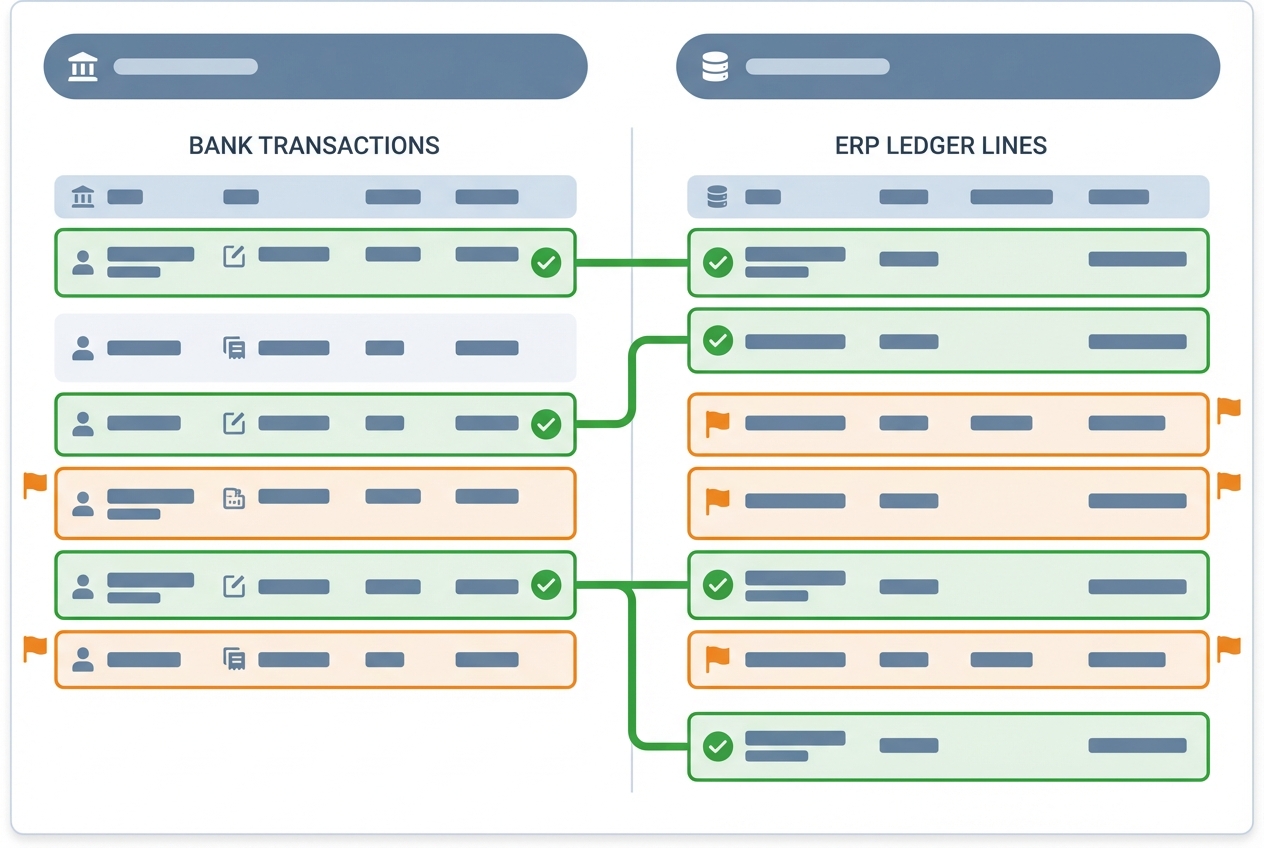
Automation tools can pull data from bank statements, credit card processors, and your ERP, then match thousands of transactions in seconds. Instead of manually ticking and tying line items, your team reviews the exceptions.
What to automate here:
-
High-volume matching: Match deposits, payouts, fees, and clearing accounts using rules like amount, date range, and reference IDs.
-
Exception queues: Route “no match” items into a review list so people stop hunting through tabs.
-
Auto-clearing entries: Post clearing entries automatically when matches meet your criteria, so the ledger stays clean.
Journal Entry Automation
Recurring journal entries for accruals, prepayments, and depreciation can be scheduled and posted automatically based on predefined rules.
This is also where AI can help. For example, if your accrual amounts follow patterns (seasonality, payroll timing, subscription renewals), AI can suggest accrual estimates that your controller approves.
Common wins:
-
Recurring entries: Automate monthly depreciation, amortization, rent, and prepaid schedules.
-
Accrual suggestions: Use trend-based estimates, but require approval for posting.
-
Standard templates: Reduce judgment calls by forcing consistent fields, memos, and supporting links.
Intercompany Eliminations
For organizations with multiple entities, month end close automation can reconcile “to/from” accounts automatically. It should flag discrepancies early, then produce elimination entries with traceable support.
What to automate first:
-
Mirror matching: Match intercompany invoices, charges, and settlements across entities.
-
Discrepancy alerts: Notify owners when balances drift outside tolerance.
-
Elimination entry prep: Generate a proposed elimination packet with supporting detail for approval.
Quick prioritization table: automate these first
| Process | Why it’s a fast win | Typical setup effort | What “good” looks like |
|---|---|---|---|
| Bank and card reconciliations | High volume, repetitive matching | Medium | Most items auto-match; exceptions are reviewed daily |
| Recurring journal entries | Consistent logic and schedules | Low | Journals post on schedule with approval gates |
| AR cash application | Clear rules (invoice number, amount, payer) | Medium | Cash is applied continuously, not at month-end |
| Intercompany matching | Painful manually, big control risk | High | Only true discrepancies require human time |
How to Implement Month End Close Automation in 5 Steps
Step 1: Map and Standardize Your Process
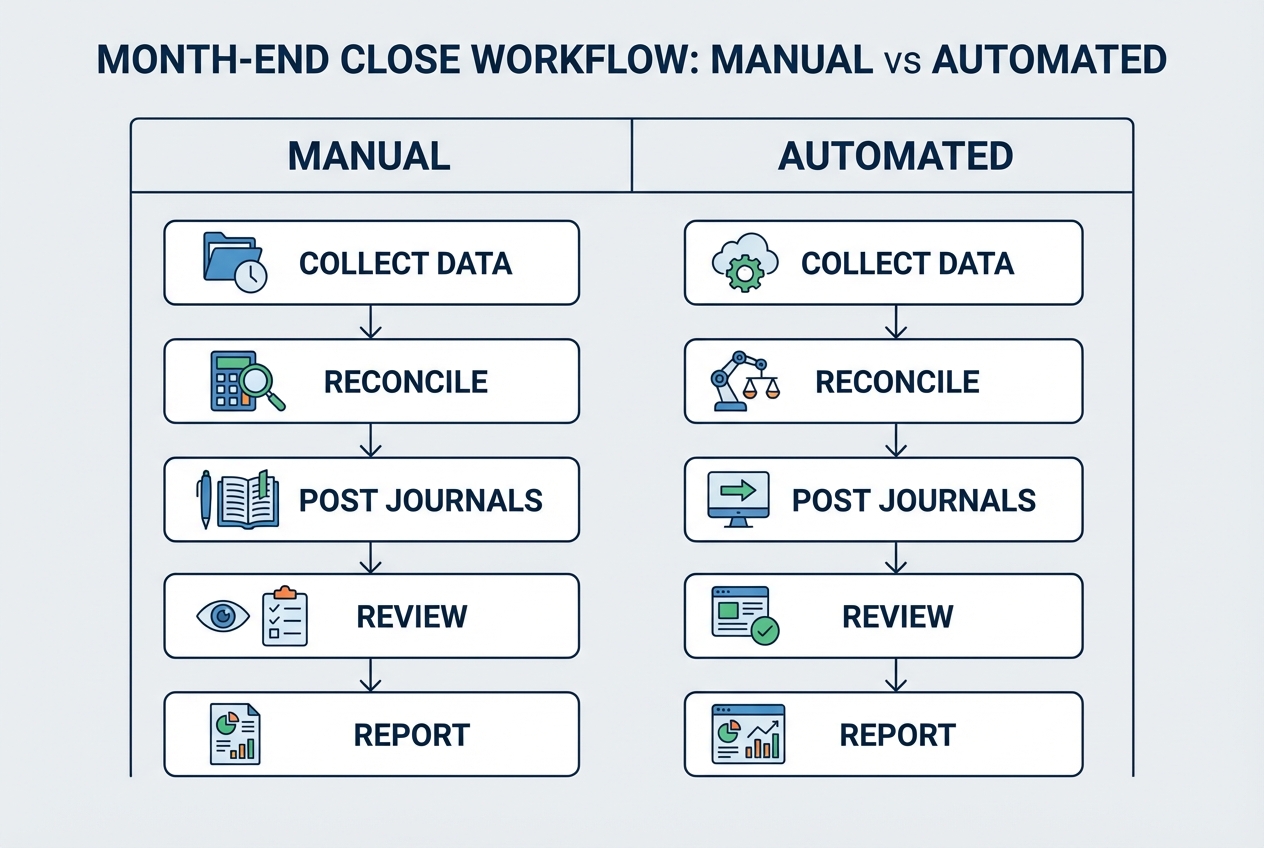
Automation fails if the underlying process is broken. Start by documenting your close from end to end, even if it is messy. You need the truth on paper before you build anything.
Do this in a 90-minute working session:
-
List every close activity: Include who does it, what system they use, and what “done” means.
-
Mark bottlenecks: Highlight steps that depend on one person, one spreadsheet, or one manual export.
-
Standardize inputs: Create consistent naming, account mapping, and transaction fields so automation can read them.
If you plan to add AI on top of standard automation, standardization is non-negotiable, and can easily accessible, via tools like Quantum Byte.
Step 2: Choose the Right Automation Stack
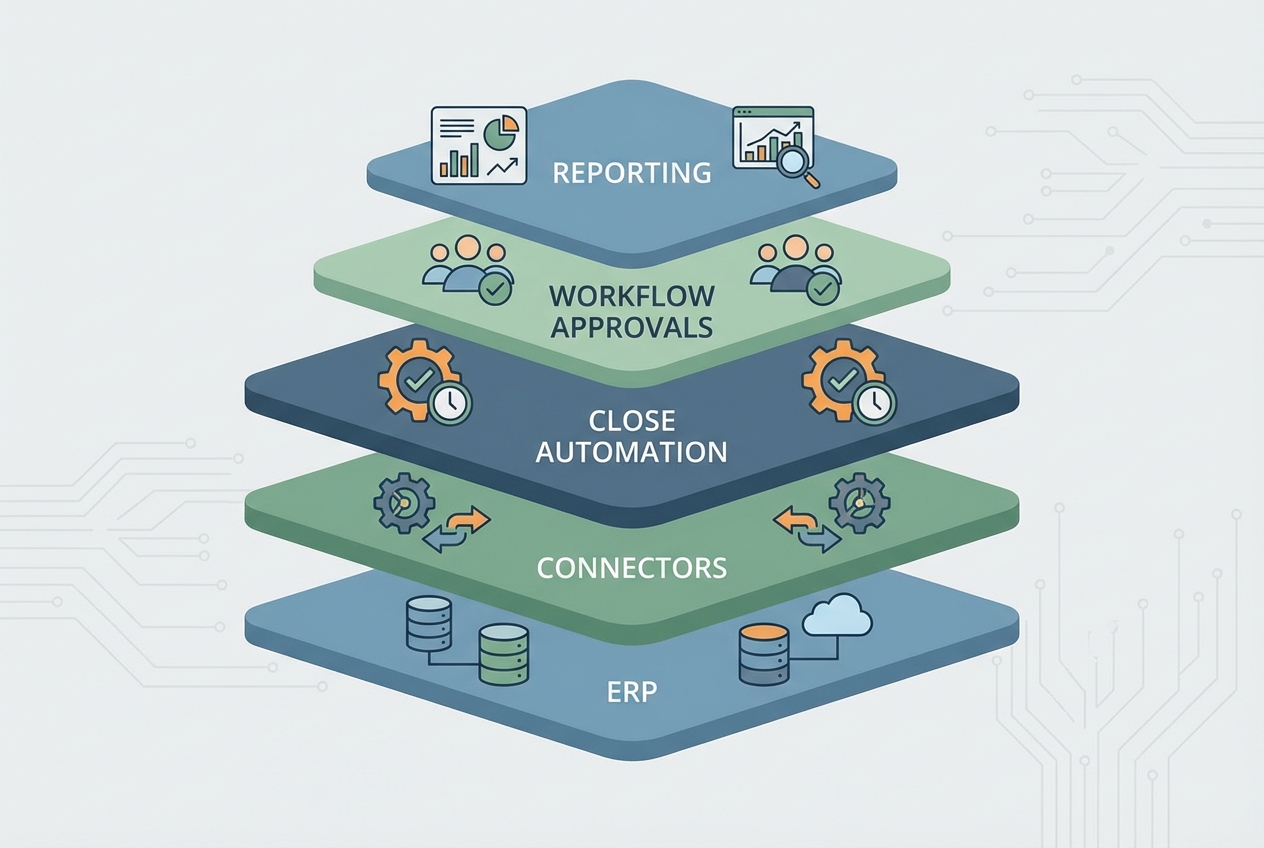
Your "stack" is the set of tools that will power your close. You do not need the most expensive platform. You need the right fit for your ERP and your team’s maturity.
Selection criteria that matter most:
-
ERP integration: Native integration (or proven connectors) for NetSuite, SAP, QuickBooks, Xero, and your billing tools.
-
Exception-based reporting: The system should surface what is wrong, not make you re-check everything.
-
Audit trail: Every match, rule, approval, and override should be logged and exportable.
-
Workflow controls: Approvals should route based on risk, like amount, vendor, account, or entity.
Opinion: If your workflow is unique (and most are), you will eventually need custom automation. Not custom for everything, just for the 10% that creates 80% of your pain.
This is where a build partner can help. Quantum Byte can prototype custom close workflows quickly using its AI app builder, as opposed to bringing in an in-house development team for the complex edges that AI tools cannot finish cleanly.
Step 3: Integrate Your Data Sources
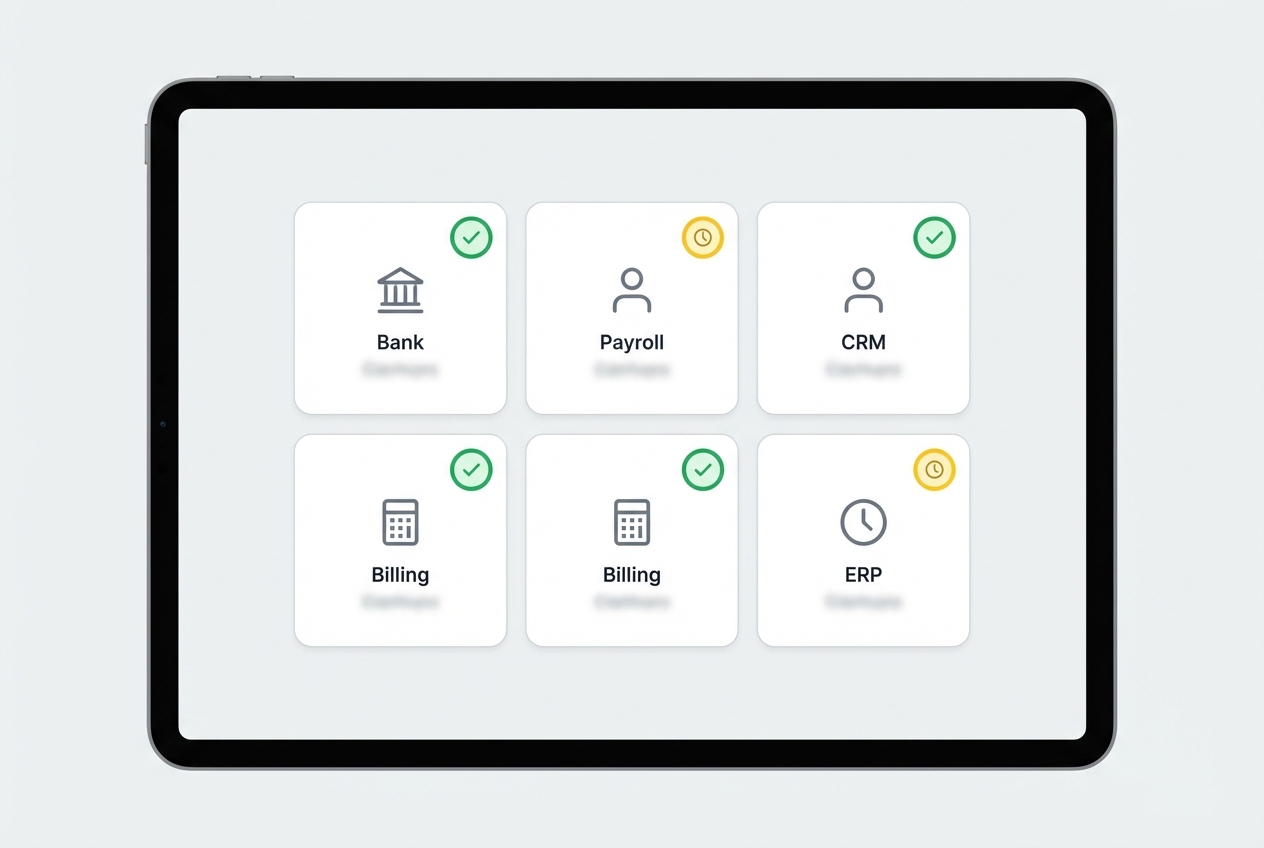
Once you choose your stack, connect your data sources. No clean data flow means no touchless close.
Start with the sources that create the most work:
-
Banking and cards: Bank feeds, payout reports, merchant processor statements.
-
Payroll: Payroll journal detail and benefit liabilities.
-
Billing and subscriptions: Invoices, credits, refunds, and deferred revenue detail.
-
CRM: Closed-won dates, contract terms, and renewal data (if revenue recognition needs it).
This is also where integration projects go sideways if you do not plan them.
Step 4: Configure Business Rules and AI Models
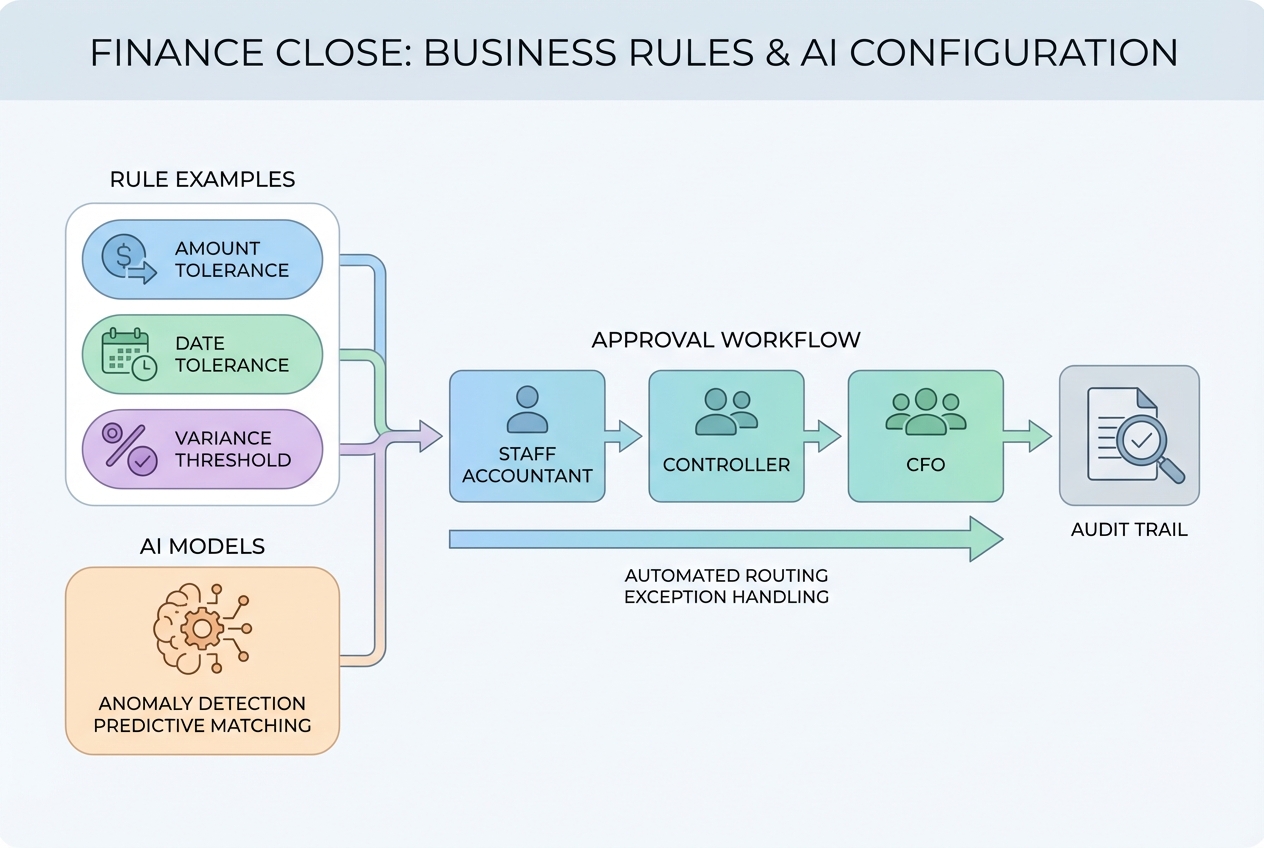
Now you teach the system how to behave.
Rules handle the predictable work. AI helps with pattern recognition and anomaly detection, as long as you keep humans in the loop for risk areas.
A simple ruleset that works for most teams:
-
Matching tolerance: Amount must match exactly or within a small threshold.
-
Date tolerance: Accept matches within a set window (example: plus or minus 3 days).
-
Reference priority: If a transaction has an invoice number, match on that before amount-based matching.
-
Risk routing: Larger amounts, certain GL accounts, and manual overrides require higher approvals.
To implement approvals cleanly, use workflow tools designed for it. Quantum Byte’s workflow automation explainer can help you think in “routes and rules,” not “email chains and screenshots.”
Step 5: Test, Validate, and Scale
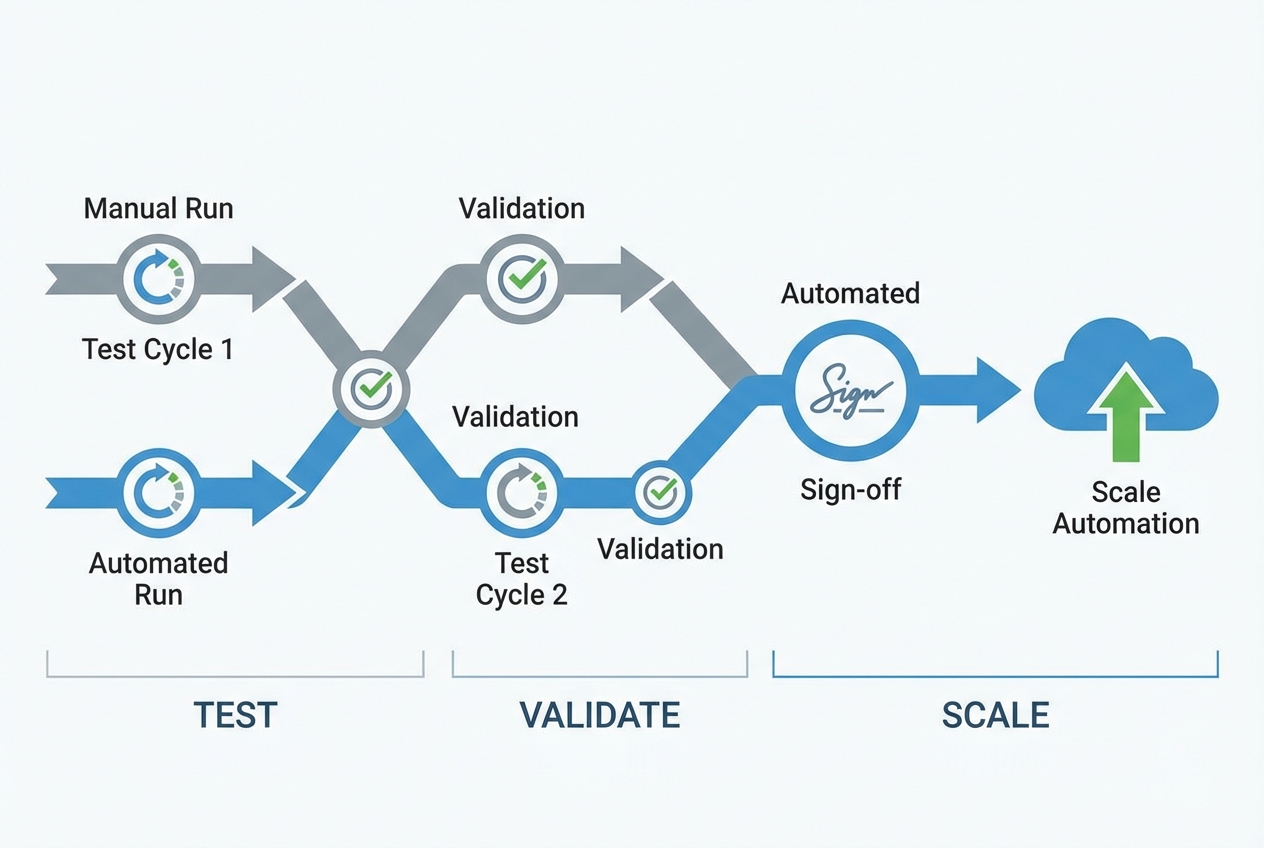
Do not flip the switch and hope. Run your automated close in parallel with your manual close for at least two cycles. That gives you enough data to find edge cases without wrecking reporting.
Validation checklist:
-
Reconcile outputs: Confirm automated matches and journals reproduce the same ending balances.
-
Review exceptions: Make sure exceptions are true issues, not noisy false positives.
-
Lock down controls: Document who can change rules, who can approve, and how overrides are logged.
-
Expand scope slowly: Once core reconciliations and recurring entries are stable, add harder areas like revenue timing, tax provisioning, or inventory adjustments.
When you are ready to scale, you can also productize your close workflow into a custom internal tool. If that's your direction, you can prototype it quickly in Quantum Byte's app builder and iterate from real usage, not guesses.
The Strategic Benefits of Month End Close Automation
Speed is great, but it is not the real prize. The real prize is freedom. You stop spending your best finance hours doing clerical cleanup.
-
Enhanced accuracy: Automated systems apply rules consistently, and they do not get tired at 11:30 p.m. That matters when spreadsheet error rates are a known risk in complex models (AIS Educator Journal summary).
-
Stronger internal controls: Automation creates a consistent digital audit trail for matches, approvals, and overrides. That makes audits smoother and reduces “who changed this?” confusion.
-
Employee retention: Close week stress burns people out. When you move to continuous close, the pressure drops because problems get handled earlier and in smaller chunks.
Best Practices for Sustaining an Automated Close
Automation works best as an operating system you maintain and improve over time. The good news is that maintenance gets easier as your data gets cleaner.
-
Adopt a continuous close mindset: Reconcile daily or weekly, not just on the 30th. You catch issues while context still exists.
-
Prioritize data cleanliness: If your vendor names, account mappings, and transaction IDs are messy, your rules will be messy too. Clean inputs power better systems, including quantum-ready systems that rely on structured data.
-
Invest in training: Your team’s job shifts from doing reconciliations to managing the automation. Train them on exception review, rule tuning, and control ownership.

