
If you run a small business, your finances can quietly steal your best hours. Invoices. Receipts. "Quick" reconciliations that turn into late nights.
Small business owners typically spend approximately 10 hours per week on bookkeeping and accounting tasks. That is a full workday gone, every week.
And the payoff for fixing it is real. Gartner reported that 59% of finance teams planned to increase AI spending and are seeing returns from it.
The good news: you do not need an enterprise IT budget anymore. Modern tools (and AI) make finance process automation for small business practical, affordable, and fast to roll out.
This guide shows you exactly what to automate first, and how to implement it step by step, without breaking your current process.
Core Areas for Finance Process Automation for Small Business
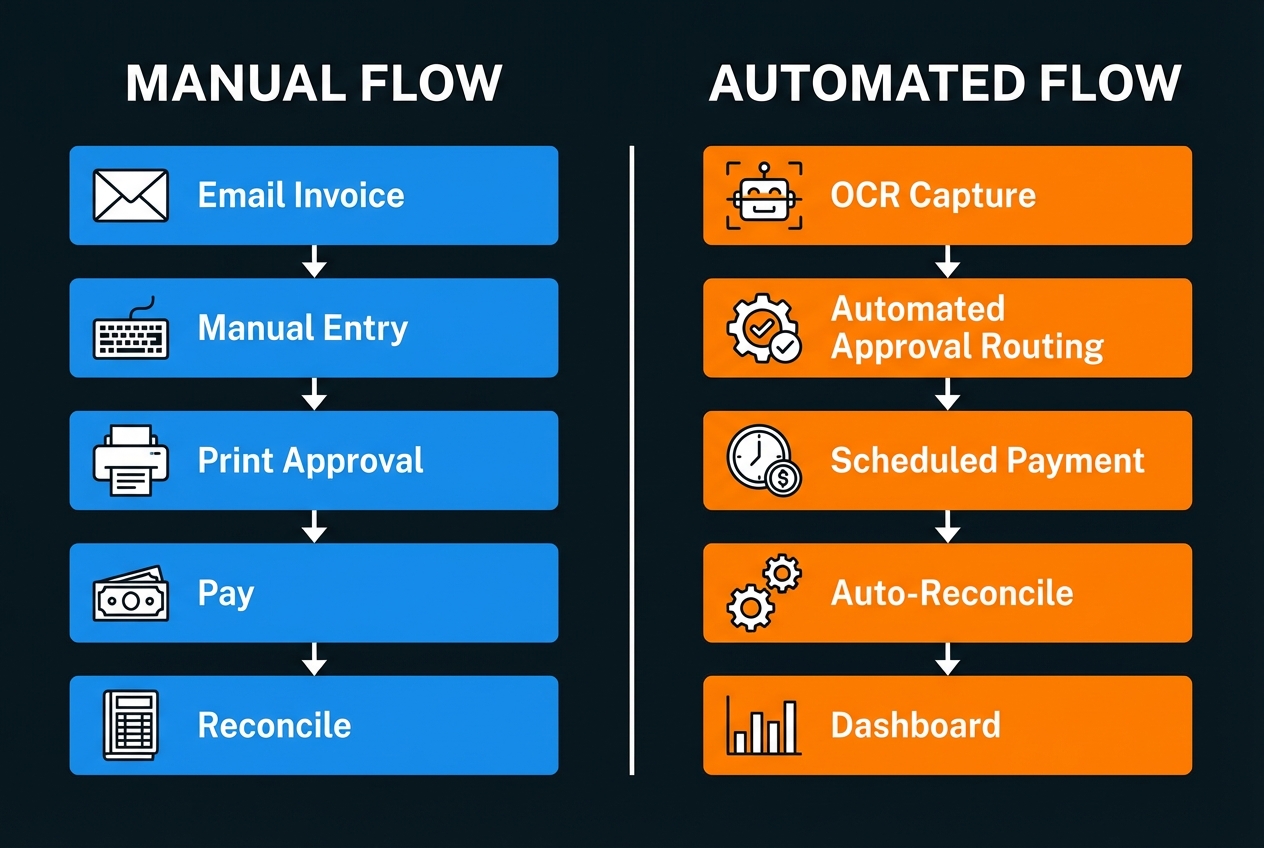
Automated Accounts Payable (AP) and Bill Pay
AP is where small businesses leak time and focus. A bill arrives, someone keys it in, someone approves it, and someone schedules the payment. Then you do it again. And again. This is where invoice automation makes a significant impact.
Manual invoice processing can cost$15 to $20 per invoice when you account for labor, mistakes, and rework.
Automation typically includes:
- OCR capture: The system reads invoice PDFs or photos and pulls vendor, amount, due date, and line items into your books.
- Approval routing: Bills get sent to the right person automatically (for example, the project owner or department lead).
- Scheduled payments: You pay on time without babysitting due dates, which helps you avoid late fees and vendor stress.
If you want a clean first win, AP is a great place to start because the workflow is repetitive and easy to standardize.
Accounts Receivable (AR) and Invoice Collections
Cash flow is oxygen. AR automation helps you get paid faster, with less awkward follow-up.
Common AR automations include:
- Recurring invoices: Automatic invoices for retainers, subscriptions, or monthly service packages.
- Payment links and auto-receipts: Customers click to pay. You stop chasing checks.
- Dunning sequences: Friendly reminder emails go out on a schedule when invoices are overdue.
The key is reducing the gap between "work delivered" and "cash received."
Real-Time Expense Management
Receipts are the silent chaos agent in most small businesses. They hide in cars. They fade. They show up months later. Proper expense management automation solves this.
With modern process automation, your team can snap a photo of a receipt, and the system can:
- Categorize automatically: It guesses the category based on vendor and history.
- Match to card transactions: Receipts connect to transactions so you are not guessing later.
- Keep audit-friendly records: This matters because the IRS expects you to maintain supporting documents like receipts and invoices to substantiate income and deductions.
Expense automation keeps your books cleaner and cuts tax-season panic.
How to Implement Finance Process Automation for Small Business
You do not need a giant finance overhaul project. You need a simple rollout plan that protects your books and builds momentum.
Step 1: Audit Your Current Financial Workflows
Before you install anything, get clear on what is happening today.
Do this in 45 to 90 minutes:
- List every finance workflow you run weekly or monthly (bills, invoicing, payroll, reimbursements, reconciliations).
- For each workflow, write:
- Who starts it
- What tool they use
- Where data gets copied (email to spreadsheet, spreadsheet to accounting, etc.)
- Where approvals happen
- Highlight tasks that are:
- Repetitive: The same steps happen every time, so rules and templates can replace memory.
- High volume: You do it often enough that small time savings turn into big weekly wins.
- Error-prone: A small typo can create mismatched books, duplicate vendors, or missed payments.
- Dependent on one person's memory: The process works only because one person remembers the steps, which creates risk when they are busy or away.
Your goal is to find the first 1 to 2 workflows that will save you the most time with the least disruption.
Step 2: Select Your Automation Tech Stack
Think of your stack like a hub-and-spoke system.
- Your accounting tool should hold the official numbers.
- Everything else should feed it clean data, with as little manual work as possible.
A practical small business finance automation stack often looks like this:
- Accounting core: QuickBooks Online or Xero (see our guide on accounting automation software)
- Invoicing and payments: Your invoicing tool and payment processor
- Expenses: Receipt capture + corporate card feeds
- Integration layer: Something that connects tools when native integrations are not enough
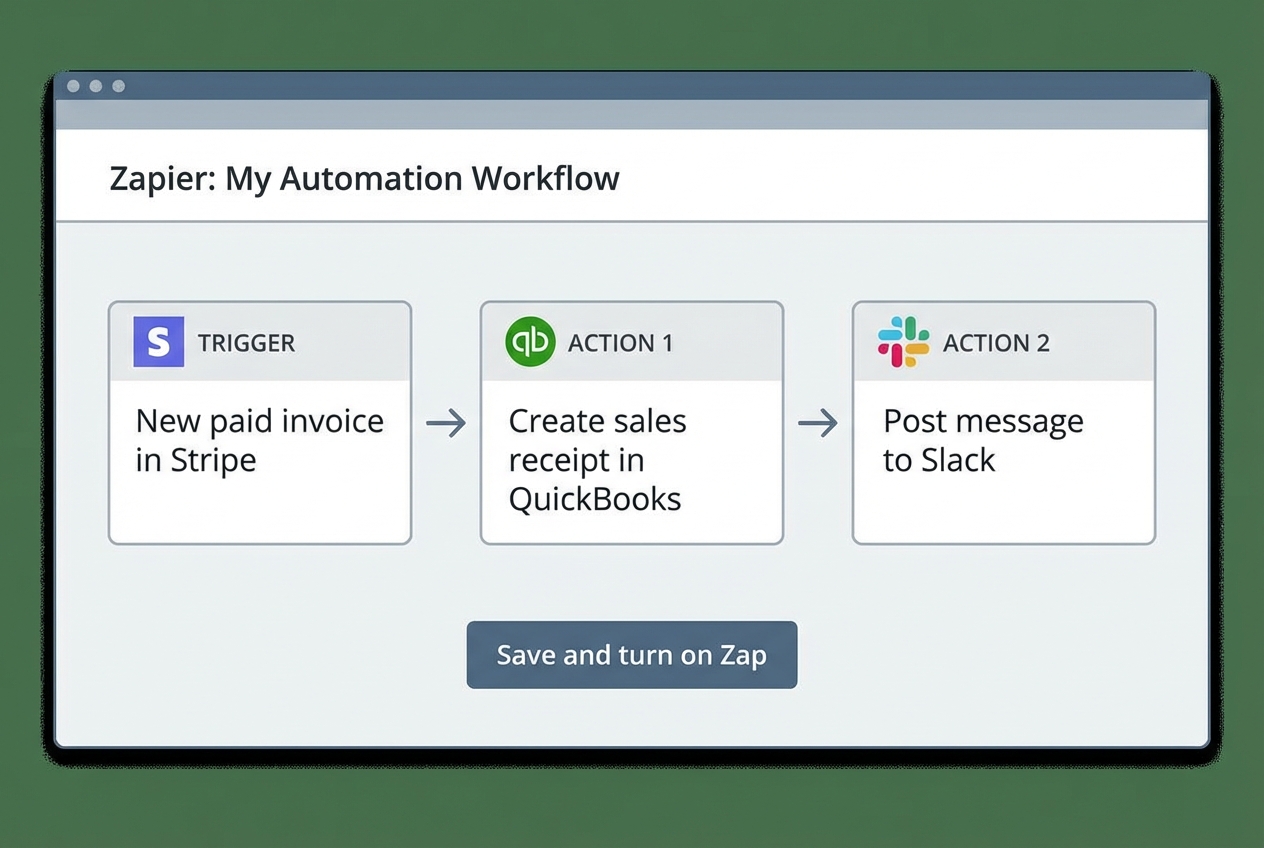
For integrations, you can use tools like Zapier (or similar platforms) to connect events across systems. If your needs get more custom, we can help figure out exactly what you need.
For example, Quantum Byte can help you prototype a lightweight finance operations app from natural language, then connect it to your existing tools. That is useful when you have a specific process (like multi-step approvals) that off-the-shelf tools cannot match.
Step 3: Configure Approval Workflows and User Permissions
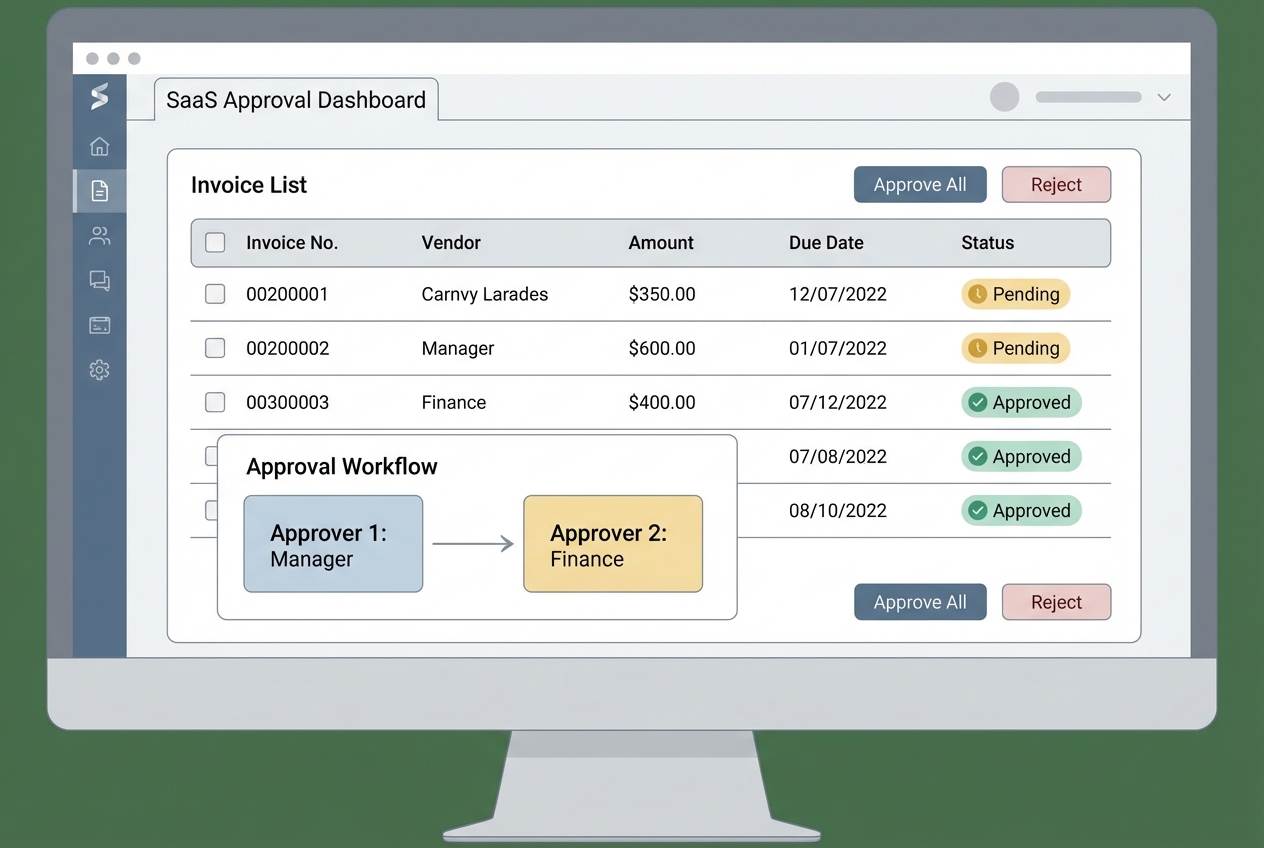
Automation should give you speed and guardrails. You set rules once, and the workflow follows them every time.
Set up your approvals with clear thresholds, like:
- Bills under $500: Auto-approved, paid on schedule
- Bills $500 to $2,500: Needs project owner approval
- Bills over $2,500: Needs owner or CFO approval
Then lock down permissions:
- Who can add vendors
- Who can edit bank details
- Who can approve payments
- Who can export or delete records
This reduces fraud risk and prevents "helpful" changes that break your books.
Step 4: Sync Bank Feeds and Enable Auto-Reconciliation
This is where your books start closing themselves daily.
What to do:
- Connect your business bank and credit card accounts to your accounting software.
- Turn on bank feeds.
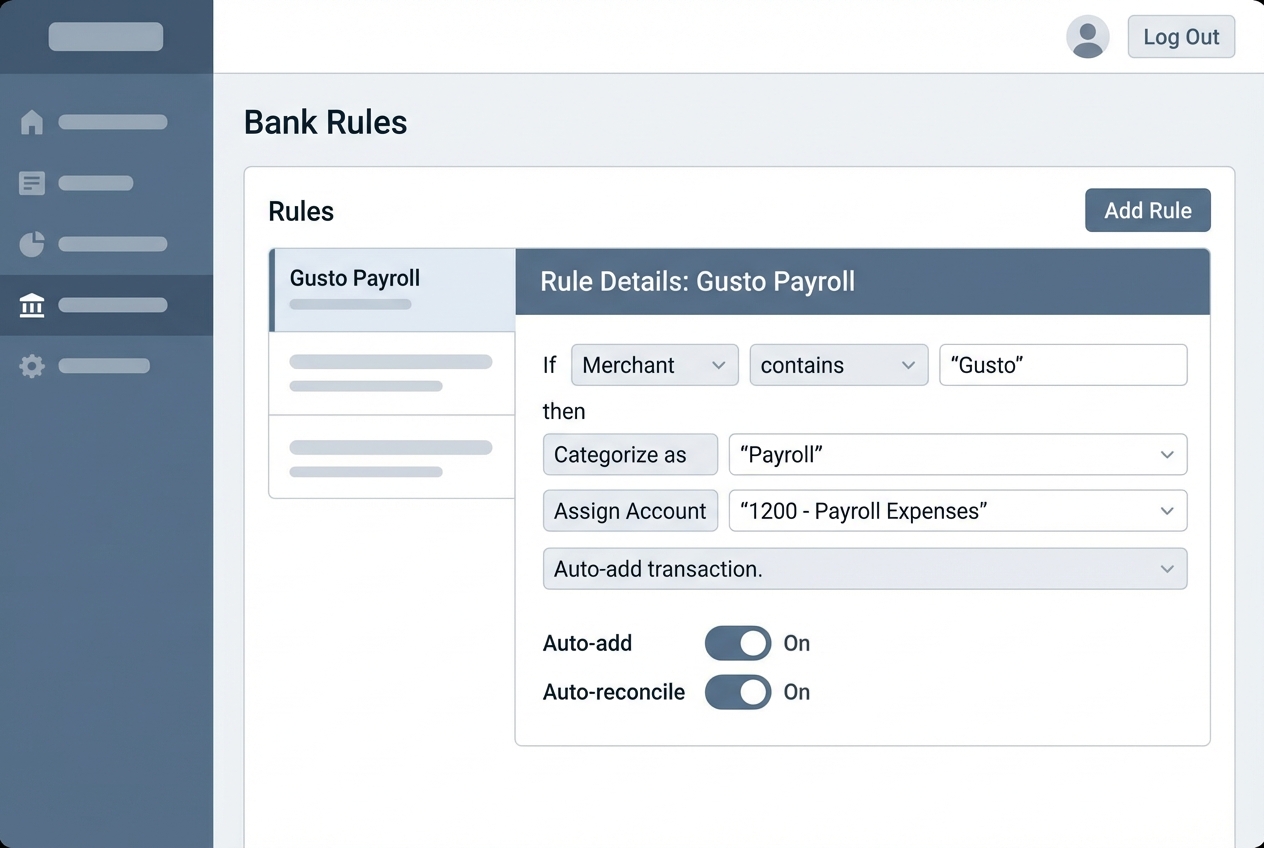
- Create bank rules for repeat transactions:
- Software subscriptions
- Rent
- Payroll provider
- Common vendors
- For each rule, set:
- Category: The account you want the transaction to land in (so reports stay accurate).
- Vendor name mapping: A consistent vendor name so you do not end up with duplicates like "Google" and "GOOGLE*ADS."
- Auto-add or auto-match behavior: Whether the transaction should be posted automatically or just suggested for review.
Start with 5 to 10 rules. Let them run for a week. Then expand.
Step 5: Monitor and Optimize with AI Insights
Once data flows automatically, you can finally use your numbers for decisions, not just compliance.
Track a few metrics weekly:
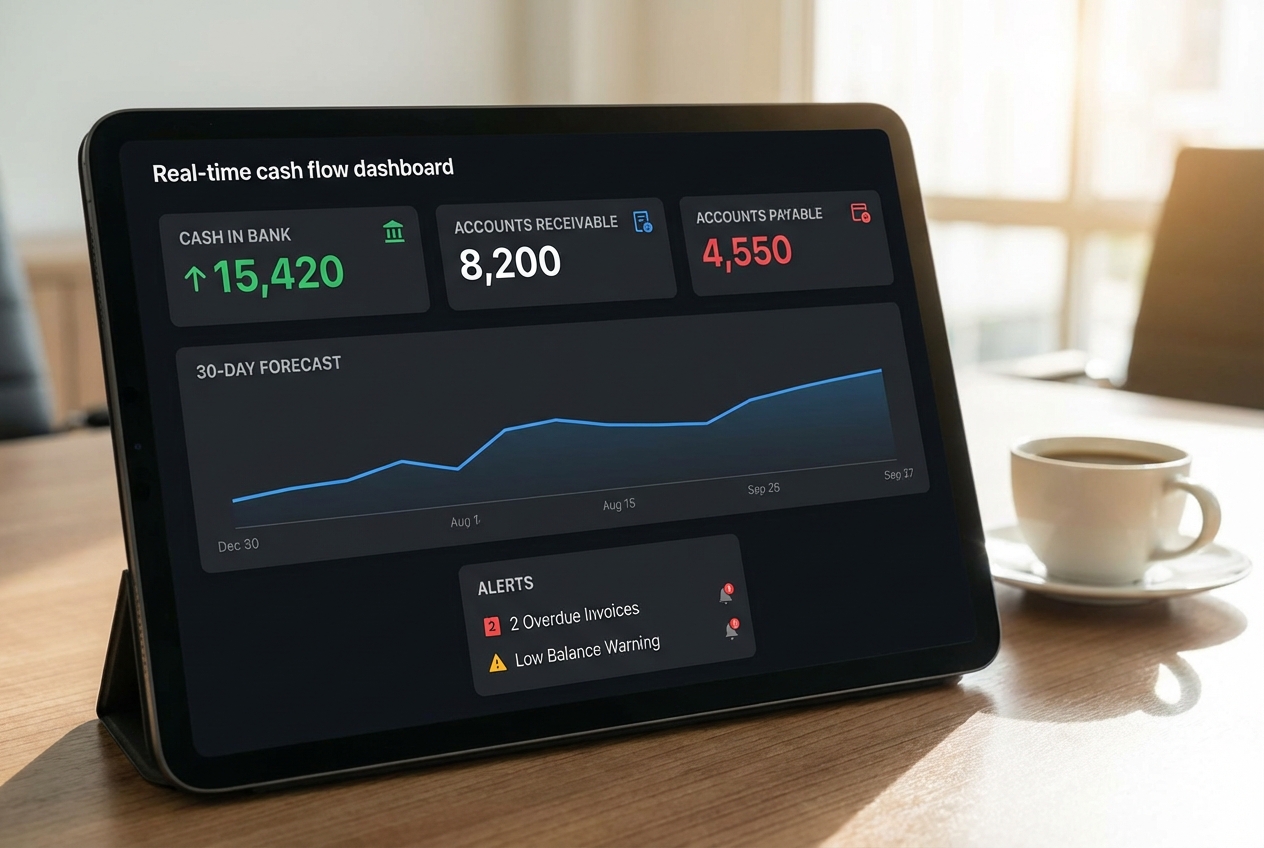
- Cash position: Cash in bank, so you know what is real and available today.
- Collections health: Accounts receivable aging, so you can spot late payers before cash gets tight.
- Upcoming obligations: Accounts payable aging, so you do not get surprised by due dates.
- Profit trend: Net income trend, so you can tell if growth is healthy or just busy.
- Near-term runway: 30-day cash flow forecast, so you can make hiring and spending calls with fewer guesses.
Then look for patterns:
- Are certain clients always late?
- Are expenses spiking in one category?
- Are you overpaying for software?
Top Tools for Small Business Finance Automation
Accounting Engines: QuickBooks vs. Xero
Both can anchor a business process automation strategy. The best choice is the one your team will actually use daily.
| Feature | QuickBooks Online | Xero |
|---|---|---|
| Best for | Service businesses that want strong built-in reporting | Owners who want a clean UI and strong add-on ecosystem |
| Strength | Deep reporting, common with US accountants | Smooth bank reconciliation experience, strong integrations |
| Watch-outs | Can get complex as you add features | Some advanced reporting may require add-ons |
| Automation fit | Great bank rules + integrations | Great bank feeds + app ecosystem |
If your accountant already lives in one of these, choose that one. Accountant alignment saves you more time than any feature list.
Specialized Automation: Bill.com and Expensify
These tools shine when volume increases.
- Bill.com: Great for AP and bill pay workflows. Strong when you need approvals, vendor management, and predictable payment runs.
- Expensify: Great for employee expenses, receipt capture, and fast reimbursements.
If you are aiming for a cleaner automated workflow, these are common bolt-ons to your accounting core.
Integration Platforms: Zapier and Make
These tools help when two systems do not talk natively.
A simple example:
- When a deal is marked "Closed Won" in your CRM, create a draft invoice in your accounting system.
- When an invoice is paid, post a message in your team chat and update a client status field.
This is often the bridge between "we have tools" and "we have a system."
Strategic Benefits of Automating Your Finances
Enhanced Data Accuracy and Compliance
Most finance errors are not bad math. They are copy-paste mistakes, missed receipts, and mismatched categories.
Automation helps by:
- Capturing data from the source: OCR and bank feeds reduce manual entry.
- Applying consistent rules: Categories and approvals follow the same logic every time.
- Improving audit readiness: You keep cleaner supporting documents, which matters for substantiating deductions
Improved Cash Flow Visibility
When your workflows are automated, your books are closer to real time.
That changes how you lead:
- You hire with confidence: You see your runway clearly.
- You invest earlier: You can spot surplus cash before it disappears into surprise bills.
- You avoid panic decisions: You catch cash gaps weeks earlier, not days.
Best Practices for Scaling Finance Process Automation for Small Business
- Prioritize Security: Ensure all tools use multi-factor authentication (MFA) and aim for vendors with strong security practices (SOC 2 is a common benchmark). This protects money movement and sensitive financial data.
- Start Small: Don't automate everything at once. Pick one workflow (AP or expenses) and get a clean win. Then expand.
- Maintain Human Oversight: Always have a human review high-value transactions and new vendor setups. Automation reduces errors, but it should not remove judgment.
- Standardize Data: Clean up your chart of accounts and naming conventions before you automate more. A messy foundation creates messy dashboards.
A simple next step
If you want to turn this guide into a real system fast, start by building one small internal tool: a finance operations hub that tracks approvals, due dates, and cash priorities in one place.
Quantum Byte is built for that. You can prototype an app from natural language and connect it to your tools, starting at $39/month. If you need custom logic later, our in-house developers can take it across the finish line.

