
Manual invoice processing is a real bottleneck. It drains time, creates errors, and forces your team into constant follow-ups.
J.P. Morgan notes that automating accounts payable can significantly improve cost-effectiveness and payment accuracy by shifting from paper-heavy workflows to digital processing systems. See their overview here:
https://www.jpmorgan.com/insights/treasury/payables-disbursements/ap-automation-benefits-to-the-accounts-payable-process
And with recent advances in AI-driven accounts payable automation, “touchless” processing is now realistic for many teams. In plain English: most invoices can flow from receipt to payment with little to no human typing.
This guide gives you a clear, step-by-step roadmap to implement AP automation without guesswork. You will audit your current workflow, choose the right software, integrate with your accounting stack, and roll out a supplier-friendly process. The goal is simple: turn AP from daily chaos into a scalable system you can trust.
Accounts Payable Automation Implementation Checklist
-
Workflow map: Document your current manual invoice workflow from arrival to payment.
-
Bottleneck list: Identify the slow spots, like approvals, missing POs, and “lost” invoices in inboxes.
-
Requirements doc: Define technical needs like OCR, ERP integration, and 3-way matching.
-
Implementation partner: Select an intelligent automation partner that can support your full workflow.
-
Vendor data cleanup: Fix duplicates, outdated payment info, and missing tax fields before migration.
-
Approval rules: Set up approval hierarchies, thresholds, delegations, and exception handling.
-
Pilot plan: Run a pilot with your highest-volume suppliers before rolling out company-wide.
What is Accounts Payable Automation and How Does it Solve Manual Inefficiency?
Accounts payable automation is the use of software (often with AI, OCR, and machine learning) to manage invoices from the moment they arrive to the moment they are paid and recorded.
If you are doing AP manually, you already know the pain points:
-
Too much retyping: Someone has to key in invoice numbers, dates, line items, tax, and totals.
-
Approval chasing: Invoices stall in inboxes, Slack threads, or on desks.
-
No clean visibility: You cannot easily answer “what do we owe this week?” without exporting, sorting, and guessing.
-
Higher fraud risk: Duplicate invoices and vendor detail changes slip through when the process is fragmented.
NetSuite also highlights AP automation as a lever for improving cash flow and working-capital management because you can process faster, predict liabilities better, and avoid late fees.
The unique angle: it is a “digital nervous system” for spend
AP automation goes beyond scanning paper into PDFs. It turns spend into structured data that moves through rules, approvals, and payments the same way every time.
Once invoices become data, you can:
-
Automated routing: Route approvals automatically based on rules like vendor, department, and amount.
-
Policy enforcement: Apply spend policy consistently so exceptions do not get “handled differently” each time.
-
Instant exception visibility: Surface mismatches and missing info early so invoices do not silently age.
-
Clean accounting sync: Sync coding and payment status back to your accounting system without retyping.
This starts with capture. OCR (optical character recognition) is the tech that reads invoice text and turns it into usable data. When you see “AI data capture,” it usually builds on OCR plus smarter classification and learning.
How Accounts Payable Automation Works: The 5-Step Digital Workflow
Below is the modern AP flow from invoice receipt to ERP sync.
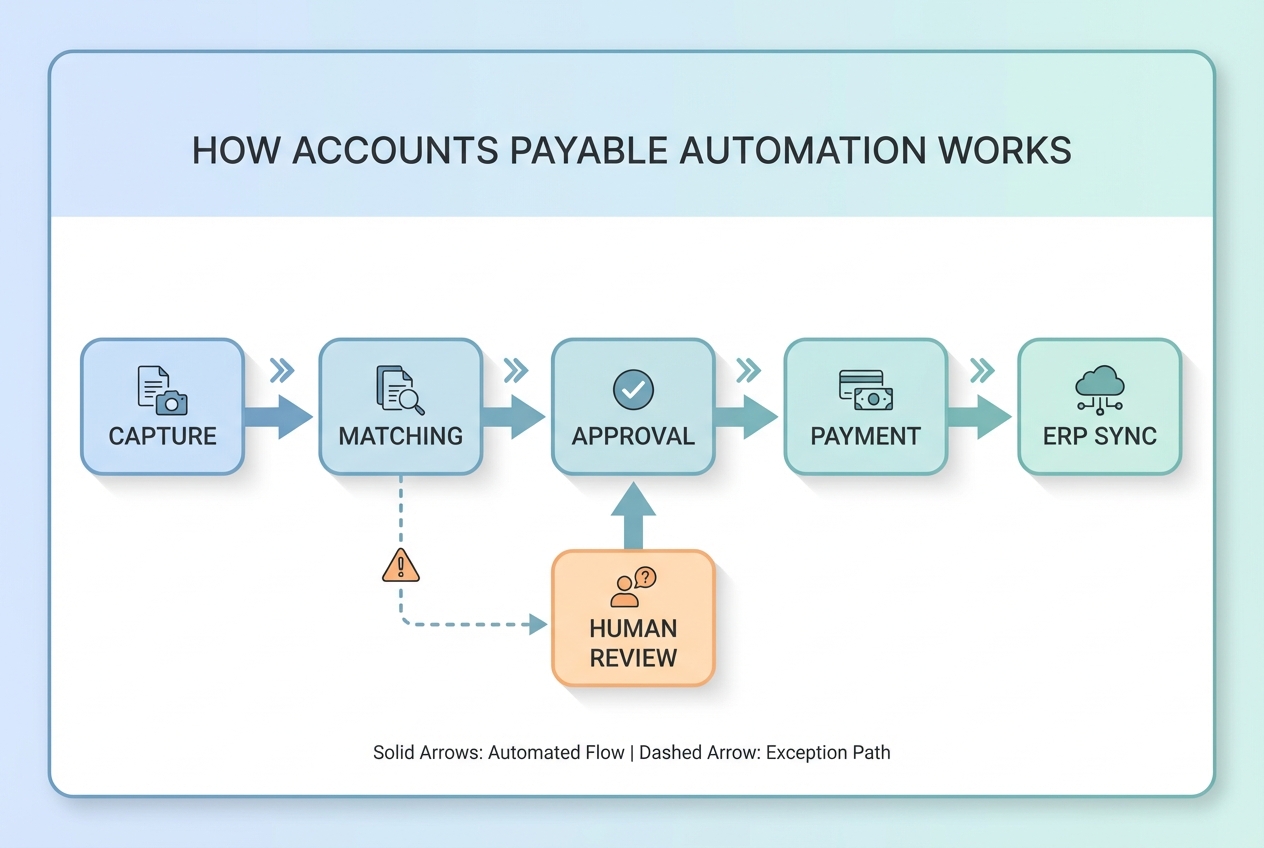
The 5 steps (what each one really means)
- Invoice Capture: Invoices come in through email, upload, e-invoicing, or scans. OCR extracts header and line-item data.
- Validation & Matching: The system checks totals, duplicates, vendor identity, and matches invoices to purchase orders (2-way) or to purchase orders plus goods received (3-way).
- Approval Routing: Invoices go to the right people automatically based on amount, department, vendor, cost center, and policy.
- Payment Execution: Approved invoices are paid through the chosen method (ACH, virtual card, wire). Payment status is tracked.
- ERP Synchronization: Everything syncs back to the ERP or accounting system so your books stay accurate without manual reconciliation.
Step-by-Step Guide to Implementing Accounts Payable Automation
Step 1: Audit Your Current Manual Process
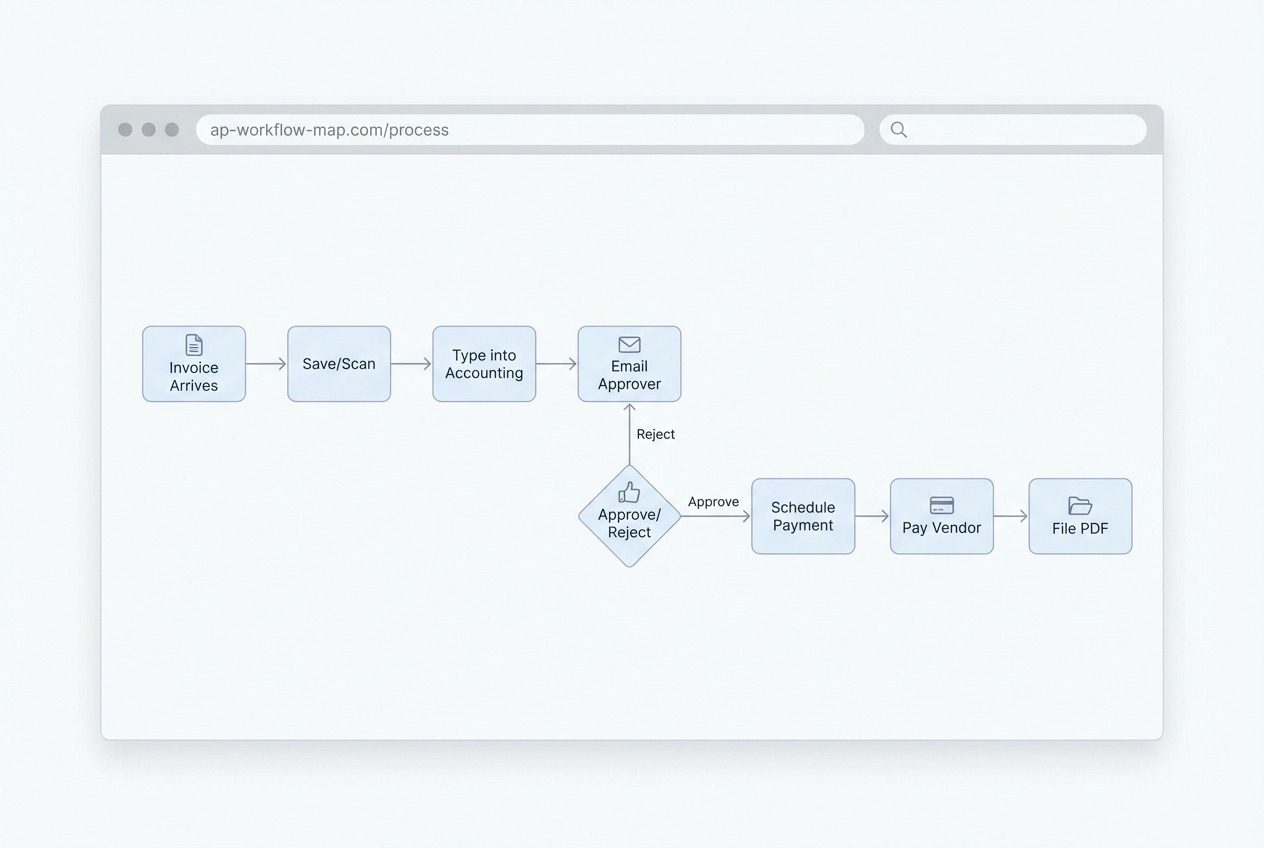
Before you buy tools, you need truth. Not opinions. Truth.
Your audit should answer:
-
Entry points: Where do invoices enter the business (email, mail, vendor portal, shared inbox)?
-
Handoffs: How many times does an invoice change hands before it gets approved?
-
Approval latency: How long do approvals sit before someone clicks approve or asks a question?
-
Exception frequency: How many invoices per 100 hit mismatches, missing PO, missing coding, or price disputes?
-
Cycle time: What is the real time from receipt to payment, not the “best case” time?
What to do in this step
-
Collect 30 to 60 days of invoices: Pull them from email folders, shared drives, and accounting exports so you can spot patterns.
-
Time-stamp the journey: Track receipt date, entry date, approval date, and payment date. Even rough data is useful.
-
Find the real bottleneck: For most teams, it is approval chasing and exceptions, not the typing.
Step 2: Select the Right Accounts Payable Automation Software
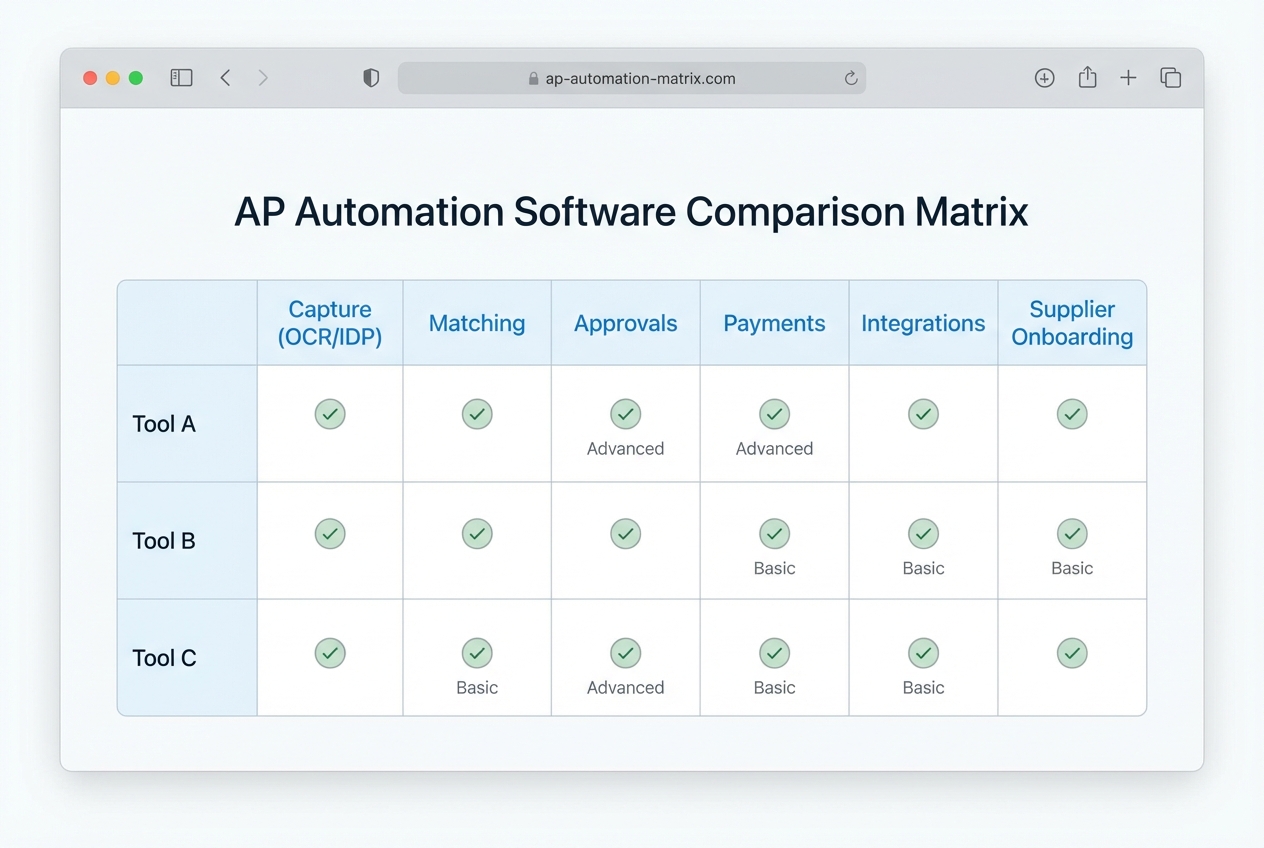
This is where many teams accidentally “automate” the wrong thing. They buy a tool that scans invoices, but approvals are still chaotic. Or it matches POs, but supplier onboarding is painful.
You want software that supports end-to-end workflow, not a single feature.
Below is a table comparing the common AP automation options:
| Option | Strengths | Trade-offs | Best for |
|---|---|---|---|
| Bill.com | Strong SMB workflows, approvals, payments | Can get rigid if you have complex routing or custom fields | Service businesses with standard approval paths |
| Tipalti | Global payouts, tax/compliance workflows, strong payments | Can be more tool than you need if invoice volume is low | Companies paying many suppliers across countries |
| Coupa | Full spend management suite, strong controls | Heavier implementation and cost | Larger orgs with procurement maturity |
| AvidXchange | AP focus, invoice workflows for mid-market | Integration depth varies by ERP | Mid-market teams with steady invoice volume |
| NetSuite AP tools | Native if you already live in NetSuite | You may still need best-of-breed capture/matching | NetSuite-first finance teams |
| Custom build (Quantum Byte) | Tailored workflows, custom portals, unique rules, fast iteration | Requires clear requirements and a build partner | Teams that want automation shaped around their business |
What matters most when you decide
-
AI-driven capture quality: If data capture is weak, your team spends time correcting instead of approving.
-
Matching depth: If you do PO-based buying, 3-way match is a must.
-
Rule flexibility: Approvals should match how you run the business, not force a new org chart.
-
Integration reality: “Has an integration” is different from “syncs cleanly with your setup.”
If you need automation beyond invoice scanning, prioritize platforms that support business process automation so you can automate exceptions, escalations, and policy checks too.
If your AP process is a competitive advantage (or a constant pain), custom workflows often beat generic workflows. Quantum Byte specializes in building custom workflows for businesses in a quick, easy and accessible manner.
Step 3: Integrate with Your Existing ERP or Accounting Software
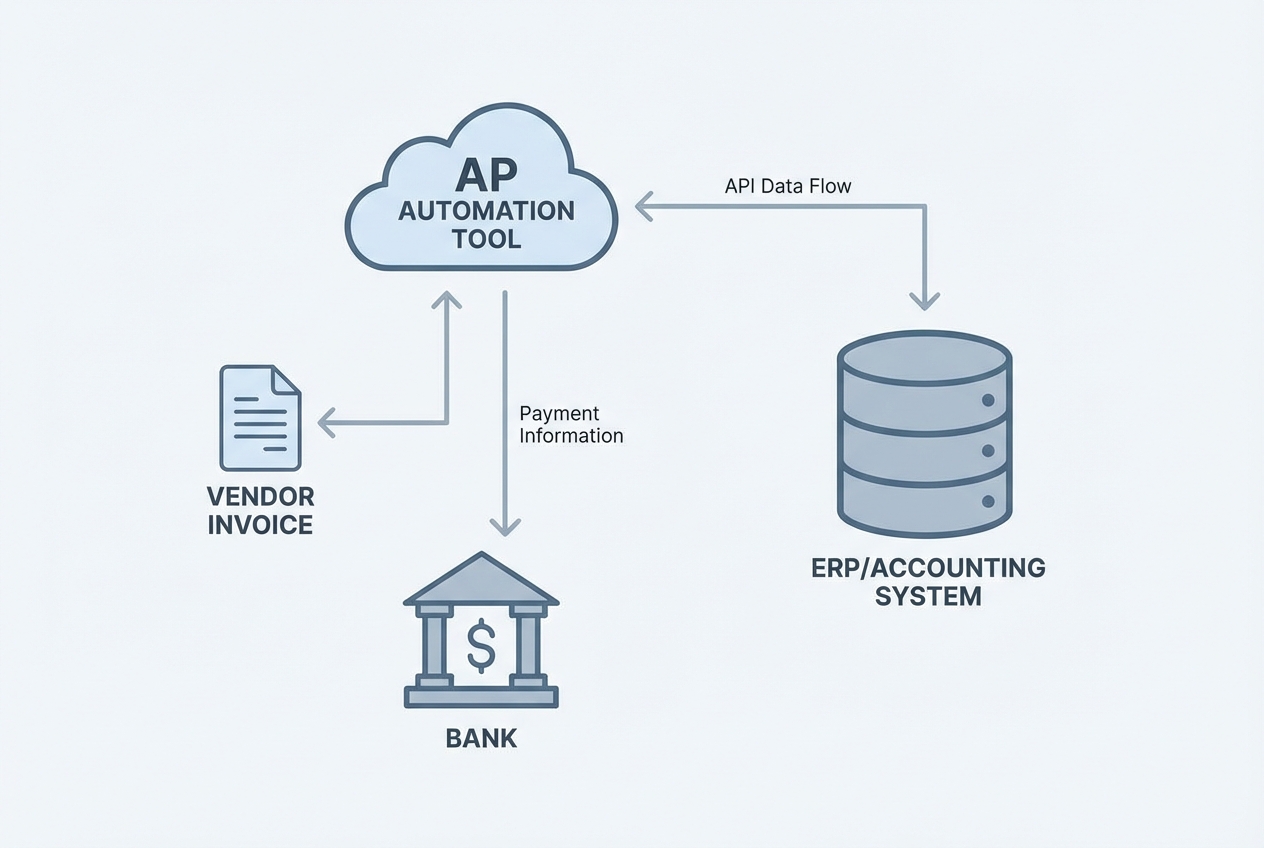
Automation fails when data stops flowing.
If invoices get approved in one tool but posted manually into your ERP, you still have:
-
Reconciliation work: Your team is stuck matching records and fixing coding after the fact.
-
Month-end surprises: Liabilities and cash needs drift because data is stale.
-
A shadow spreadsheet: People keep an “offline truth” because they do not trust the systems.
Integration must-haves
-
Vendor master sync: Names, addresses, payment methods, and tax IDs stay aligned across systems.
-
Chart of accounts and dimensions: Cost centers, classes, projects, and locations map correctly so reporting stays clean.
-
Status and audit trail: You can prove who approved what and when, without digging through email threads.
-
Error handling: You get a clear exception log plus safe retries, not silent failures.
If your systems are older, or your workflow needs custom glue, this is where implementation expertise matters. Quantum Byte’s team can help bridge legacy accounting setups with modern AI workflows through its integration work. See services.
Step 4: Define Approval Hierarchies and Business Rules
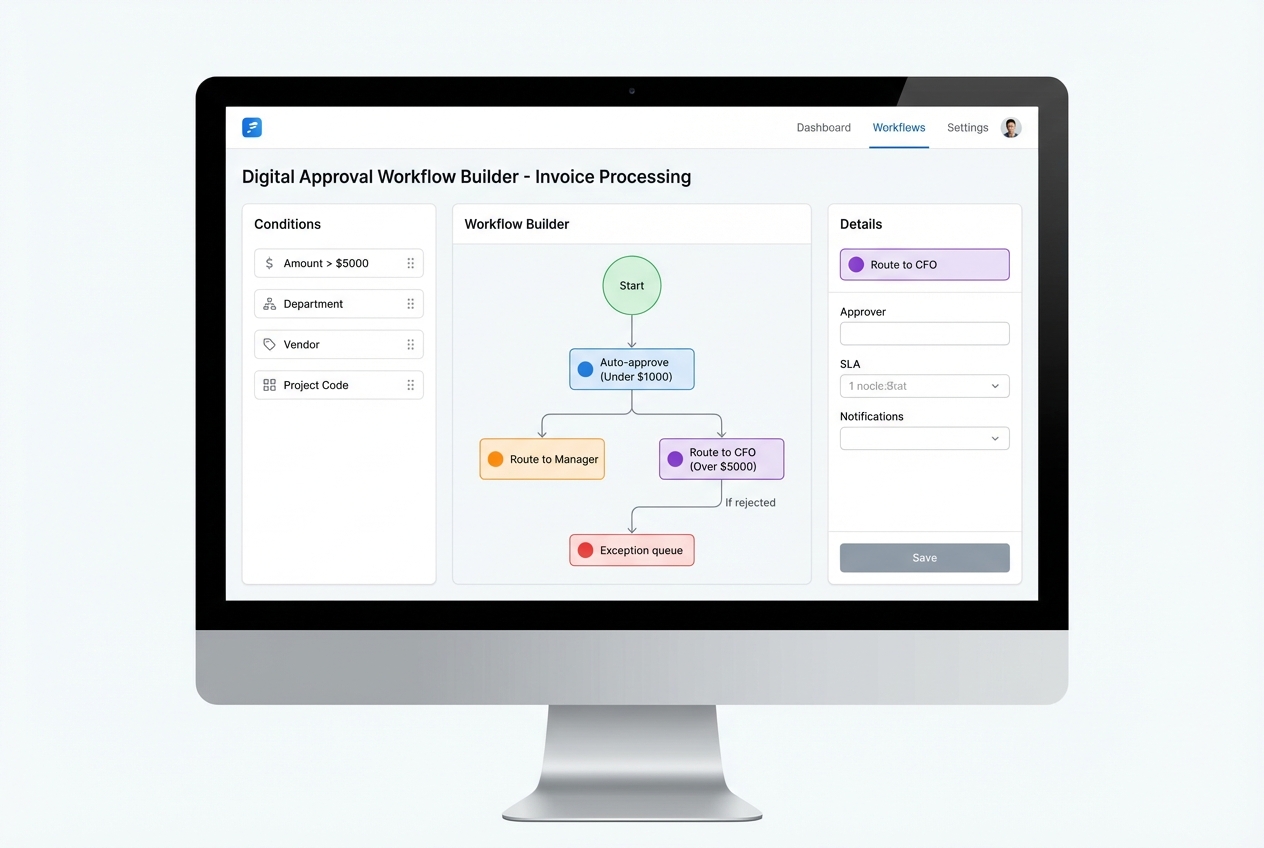
This step is where you get leverage. Rules eliminate the constant “who should approve this?” loop.
Your rules should cover:
-
Threshold routing: Amount-based approvals, like anything over $5,000 going to the CFO.
-
Ownership logic: Routing by department, cost center, project, or vendor.
-
Policy flags: Handling missing PO, missing tax, mismatched totals, or non-standard terms.
-
Exception escalation: Defining what happens after 24 hours, 72 hours, or a rejection.
Basware points out that AP automation helps reduce risk by improving controls and detection around issues like duplicates and suspicious changes.
Rules that usually create fast wins
-
Out-of-office delegation: Approvals should never stall because someone is traveling.
-
Threshold-based routing: For example, anything over $5,000 goes to the CFO.
-
Mandatory fields: Block posting if tax, PO, or cost center is missing.
-
Duplicate detection: Flag same vendor plus same invoice number plus same amount.
Step 5: Onboard Your Suppliers to the New Portal
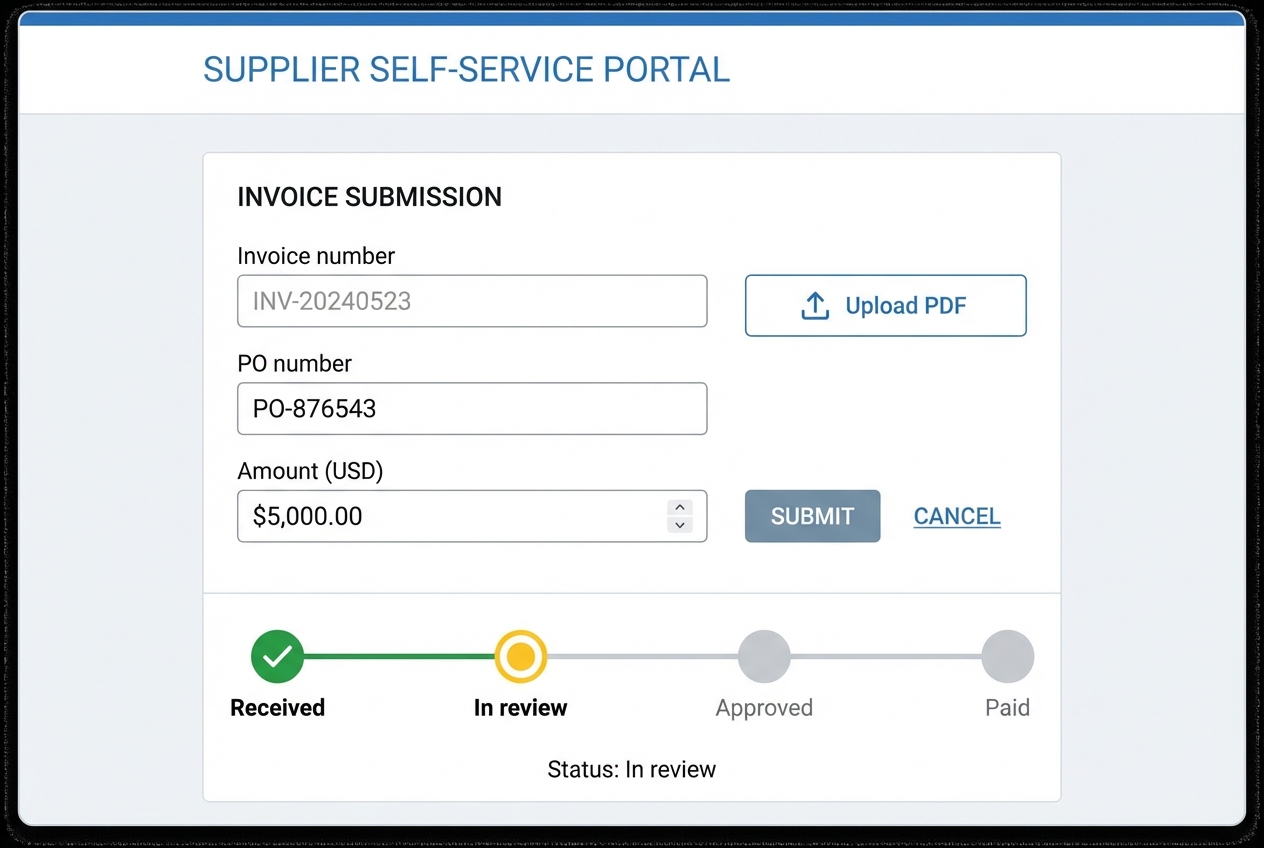
Supplier onboarding is essential because it reduces invoice chaos at the source.
Your goal is to standardize how invoices arrive so capture and matching works consistently.
How to make suppliers actually adopt it
-
Clear benefit: Promise something real, like faster payment, fewer emails, and live payment status.
-
Top-vendor first rollout: Start with the 10 to 20 suppliers that generate most invoices so you see impact quickly.
-
Two submission options: Offer portal upload plus email-to-invoice so suppliers can transition without friction.
-
Cutover date: Set a firm date where invoices must arrive through approved channels.
Step 6: Monitor, Report, and Optimize
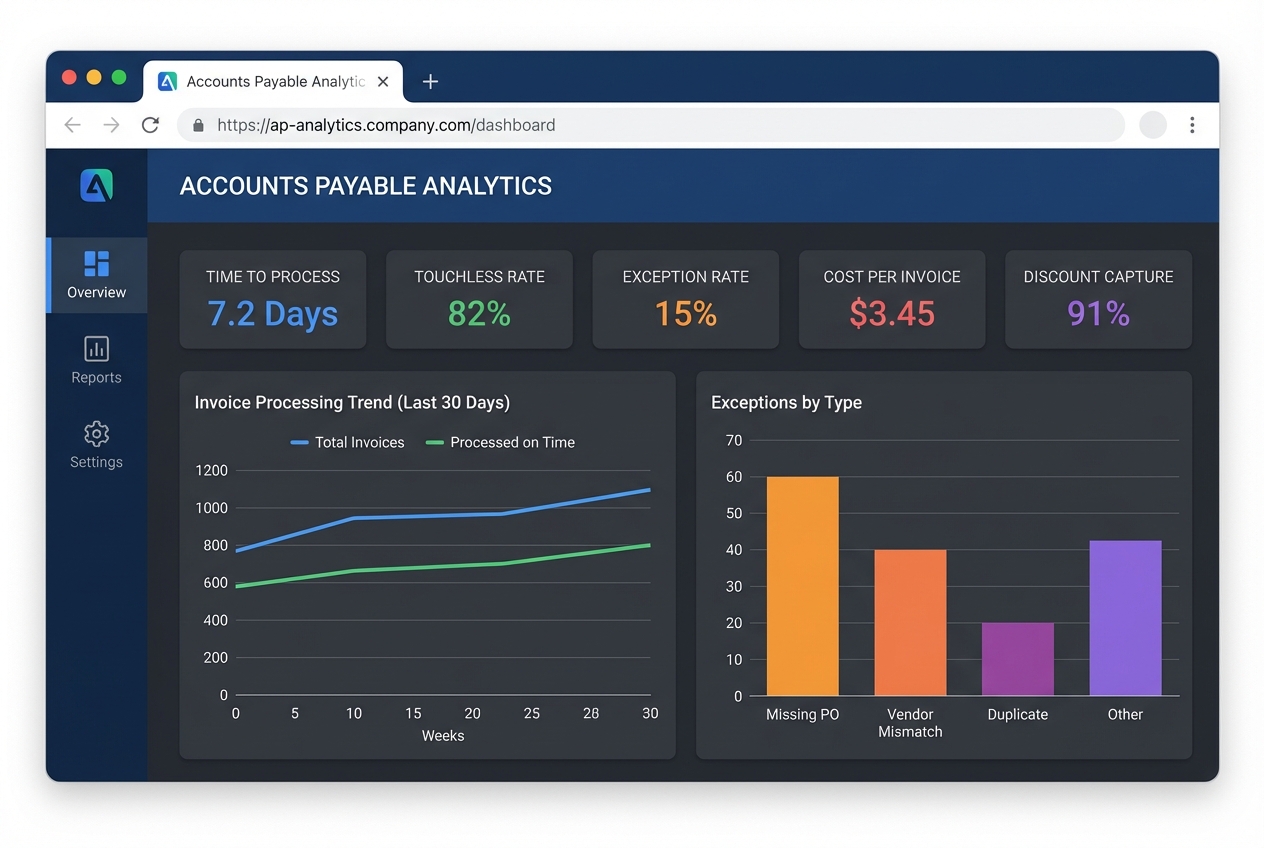
Automation continues after go-live. You tune the system over time.
Once live, track the numbers that prove whether AP is getting easier or just “different.”
What to do every month
-
Exception review: Break exceptions down by root cause, like vendor format issues, receiving gaps, or policy mistakes.
-
Careful rule tuning: Tighten controls without creating a new backlog of blocked invoices.
-
Department coaching: If one team creates most exceptions, fix the upstream behavior and buying habits.
-
Touchless goal: Treat touchless rate as your north star KPI and push it up quarter by quarter.
Key Features to Look for in an AP Solution
Use this as your quick buying checklist.
-
AI & Machine Learning: Continuous learning of invoice layouts so capture improves over time.
-
Fraud Detection: Duplicate invoice detection and alerts for suspicious vendor changes, which reduces preventable losses.
-
Mobile Access: Fast approvals from a phone so invoices do not sit untouched for days.
-
Audit trail and controls: Clear logs of who approved, edited, or paid each invoice.
-
Intelligent document processing: Strong extraction plus validation, especially for messy PDF invoices. If you are comparing vendors, prioritize platforms that clearly support intelligent document processing.
-
Forward-looking AI support: Generative AI is starting to help teams query financial data in plain English (for example, “show me vendors with repeated mismatches last month”).
The Real-World Benefits of Automating Accounts Payable
These outcomes compound fast. You feel them within weeks if implementation is solid.
-
Cost Savings: Cutting manual effort can reduce processing costs dramatically, often cited as up to 80% depending on invoice volume and exception rate. Savings come from fewer touches, fewer errors, and fewer follow-ups.
-
Accuracy: Automation reduces human rekeying and can catch duplicates before payment, which lowers write-offs and rework.
-
Early Payment Discounts: Faster cycle time helps you capture discounts that used to be missed because approvals were slow.
-
Strategic Insights: Your CFO gets near real-time visibility into liabilities, cash needs, and spend trends without waiting for month end.
Overcoming Common Implementation Challenges
Most AP automation failures come from adoption and process gaps, not the software. Here is how to handle the big three.
-
Resistance to Change: Position automation as a promotion for the team. Less typing. More oversight, vendor negotiation, and analysis. Give people ownership of the new process and celebrate faster close cycles.
-
Data Quality: Vendor master data is often messy. Clean names, payment details, duplicate vendors, and tax fields before you migrate. If you skip this, exceptions will spike.
-
IT Bottlenecks: Choose cloud tools and integrations that do not require weeks of internal infrastructure work. If you need custom connections, plan them early so finance is not blocked by backlog. If you are modernizing other workflows too, cloud-based solutions can reduce the ongoing IT burden.
Conclusion
Accounts payable automation is no longer a luxury. It is how growing businesses keep control while scaling volume. When you follow a structured rollout, you reduce errors, speed approvals, and gain real visibility into cash flow.
Start with the audit. Then pick software that fits your workflow, integrate it cleanly, and build approval rules that match how decisions happen in your business. Finally, onboard suppliers and keep optimizing until touchless processing becomes normal.
If you want AP automation that fits your exact process (not the other way around), Quantum Byte can help you prototype and ship a tailored workflow quickly, then extend it with engineering where AI tooling stops.

