
If vendor onboarding in your business still looks like "email me a W-9," “please resend the COI,” and “who approved this vendor,” you are not alone. But it is no longer sustainable.
Traditional, manual vendor management often creates fragmented data and rework, driving a sizable increase in operational friction. Modern vendor onboarding automation can reduce the back-and-forth significantly, with some teams reporting up to 80% fewer email exchanges once a structured workflow is in place.
In 2026, AI has pushed onboarding beyond simple “form collection.” Done well, it becomes a proactive risk and compliance engine that helps you prevent fraud, keep documents current, and push clean vendor records into your accounting system without manual re-typing.
This guide walks you through the essential steps to digitize supplier intake, the key technologies you need, and how to keep your data reliable from intake to ERP sync.
Quick Checklist: Is Your Organization Ready for Automation?
-
Documentation: Do you have a standardized list of required vendor documents (W-9, COI, etc.)?
-
Approvals: Are your current internal approval workflows documented?
-
Systems: Do you have a centralized ERP or accounting system to sync data?
-
Bottlenecks: Can your team identify the specific bottlenecks in the current manual process?
-
Cycle time: Are you losing more than 5 days on average per vendor intake?
If you can answer “yes” to at least three of these, you should start looking into automation.
What is Vendor Onboarding Automation?
Vendor onboarding automation is the use of digital workflows to collect, verify, approve, and store vendor information with minimal manual intervention.
Instead of your team chasing people across email threads, you give vendors a secure, guided path to submit everything you require, and you route the data through checks and approvals automatically.
Here is what “end-to-end” typically includes:
-
Data capture: Vendors enter their details through a form or portal (not a PDF that someone has to retype later).
-
Validation: The system checks fields for completeness and correctness (like tax ID formats, bank account formats, required attachments).
-
Risk screening: Automated checks can flag sanction matches, politically exposed persons (PEP) risk, mismatched bank ownership, or other red flags depending on your industry.
-
System integration: Approved vendors sync into your ERP/accounting and payment tools so your finance team does not “copy and paste” critical data.
The big shift is moving from “email-tag” to a self-service model. Vendors own their profile, and your team owns the rules.
Why Modern Businesses Prioritize Vendor Onboarding Automation
Speed is a big win. But the deeper value is predictable, auditable onboarding that your team can trust.
-
Fraud Prevention: Automated onboarding makes it harder for attackers to slip in vendor impersonation or Business Email Compromise (BEC) tactics. Solutions that verify identities, banking details, and approval trails reduce the chance that one convincing email changes where payments go.
-
Efficiency Gains: Faster onboarding improves “time-to-transaction.” That can unlock early-payment discounts and reduce project delays caused by “vendor not set up yet.”
-
Regulatory Compliance: If you operate in regulated markets or serve larger enterprises, you will feel pressure for repeatable checks like sanctions screening and KYB/KYC-style verification. For sanctions specifically, the U.S. Treasury’s OFAC provides official search tools and datasets that many screening providers build on.
-
Cleaner audits: Every approval, document version, and validation event can be logged, which makes audits and vendor reviews much less painful.
Internal workflows matter too. When optimizing your business process automation, vendor management is often the highest-ROI starting point.
Step 1: Deploying a Self-Service Supplier Portal
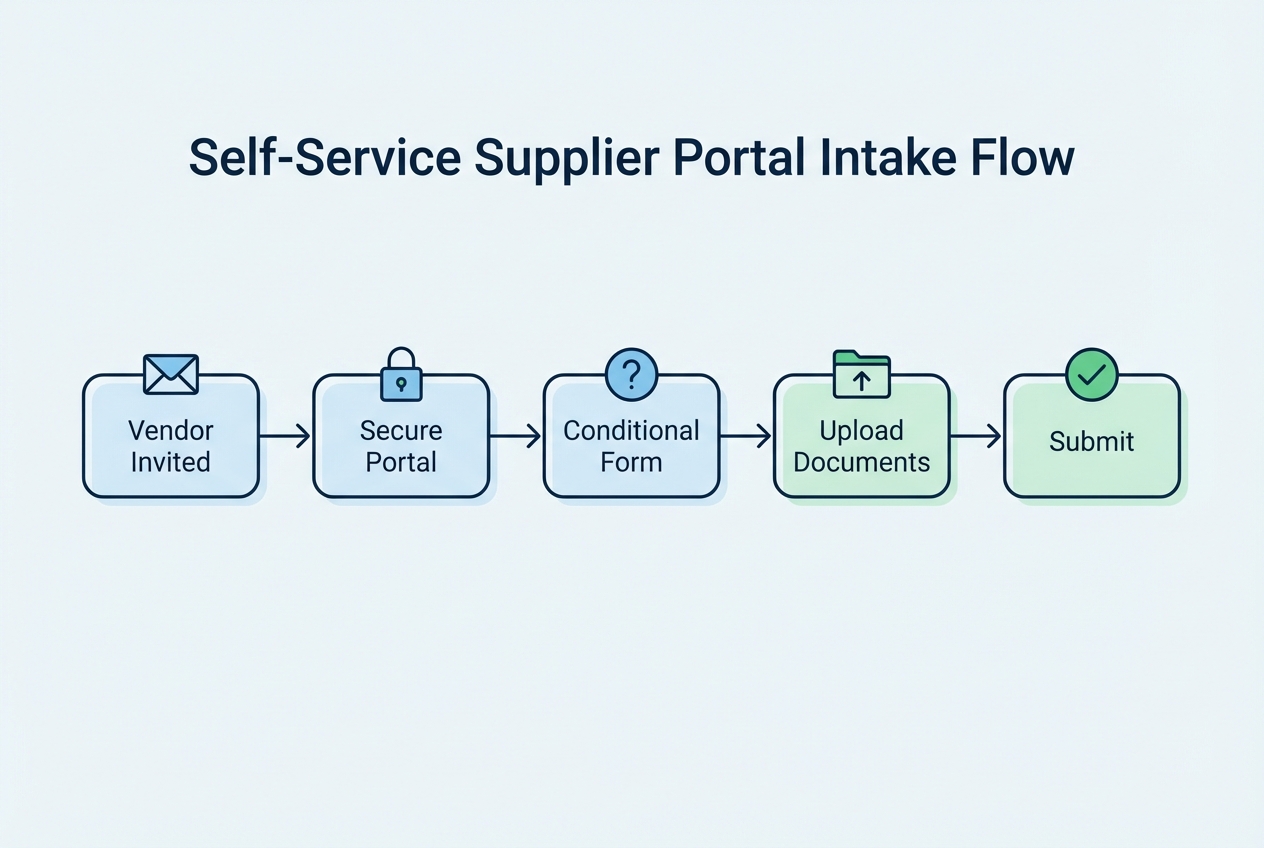
Your portal is the front door. If it is confusing, vendors stall. If it is clear, onboarding accelerates.
A solid portal should do three things:
-
Collect the right data once: No duplicate forms. No “send it in an email too.”
-
Guide the vendor: Make it obvious what is required and what is optional.
-
Protect the data: Use secure links, role-based access, and proper encryption.
Actionable step: Use conditional logic in forms
Conditional logic means vendors only see questions relevant to them. This keeps forms shorter and reduces errors.
-
Vendor type branching: Service providers might need a signed MSA and COI. Goods suppliers might need shipping terms and product compliance docs.
-
Country branching: International vendors may need different tax documentation than U.S.-based vendors.
-
Payment method branching: ACH vendors need bank details. Card-only vendors might not.
Practical tip: Start with 2–3 categories. Do not over-segment on day one.
Step 2: Automating Document Collection and AI Verification
Documents are where onboarding slows down. Not because vendors refuse, but because your team becomes the human “scanner, checker, and reminder system.”
Automation fixes this in three layers: capture, verification, and renewal tracking.
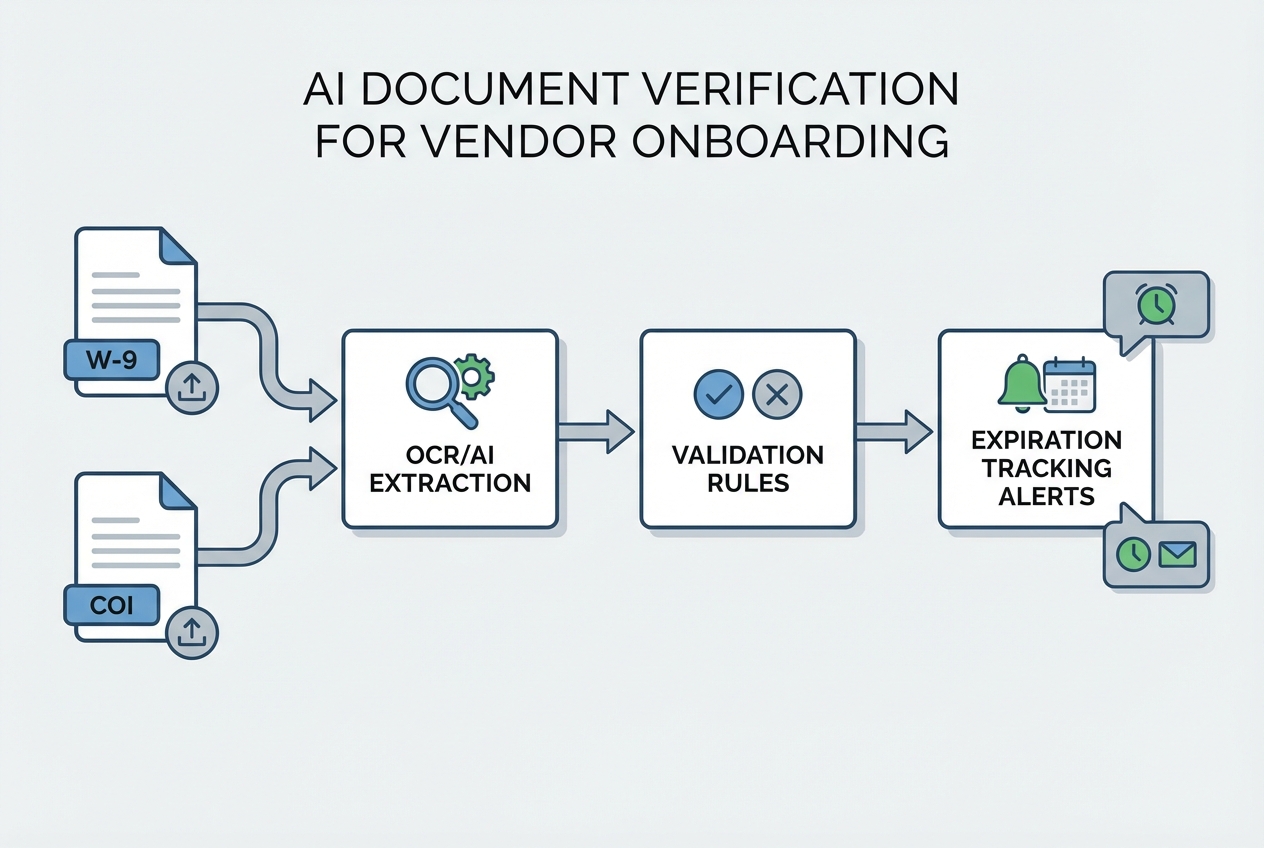
What “AI verification” actually does
-
OCR extraction: Optical Character Recognition reads documents like W-9s and insurance certificates and pulls key fields (business name, tax classification, policy expiry date).
-
Validation rules: The system checks that required fields exist and that names match what the vendor typed in the portal.
-
Exception routing: If something looks off, it flags the record and routes it to a human review instead of blocking every vendor.
For tax forms, point vendors to the official IRS reference so they know you are not making requirements up:
- IRS “About Form W-9”
Automated expiration tracking (the hidden win)
COIs expire. Licenses lapse. Certifications need renewal.
Build these defaults:
-
30/15/7 day reminders: Notify the vendor before an insurance policy expires.
-
Auto-freeze rules (optional): If a critical document expires, automatically pause payments until a new version is uploaded (use this carefully and communicate it clearly).
Leveraging AI document processing ensures that human error is removed from the verification stage.
Step 3: Integrating Real-Time Risk and Compliance Screening
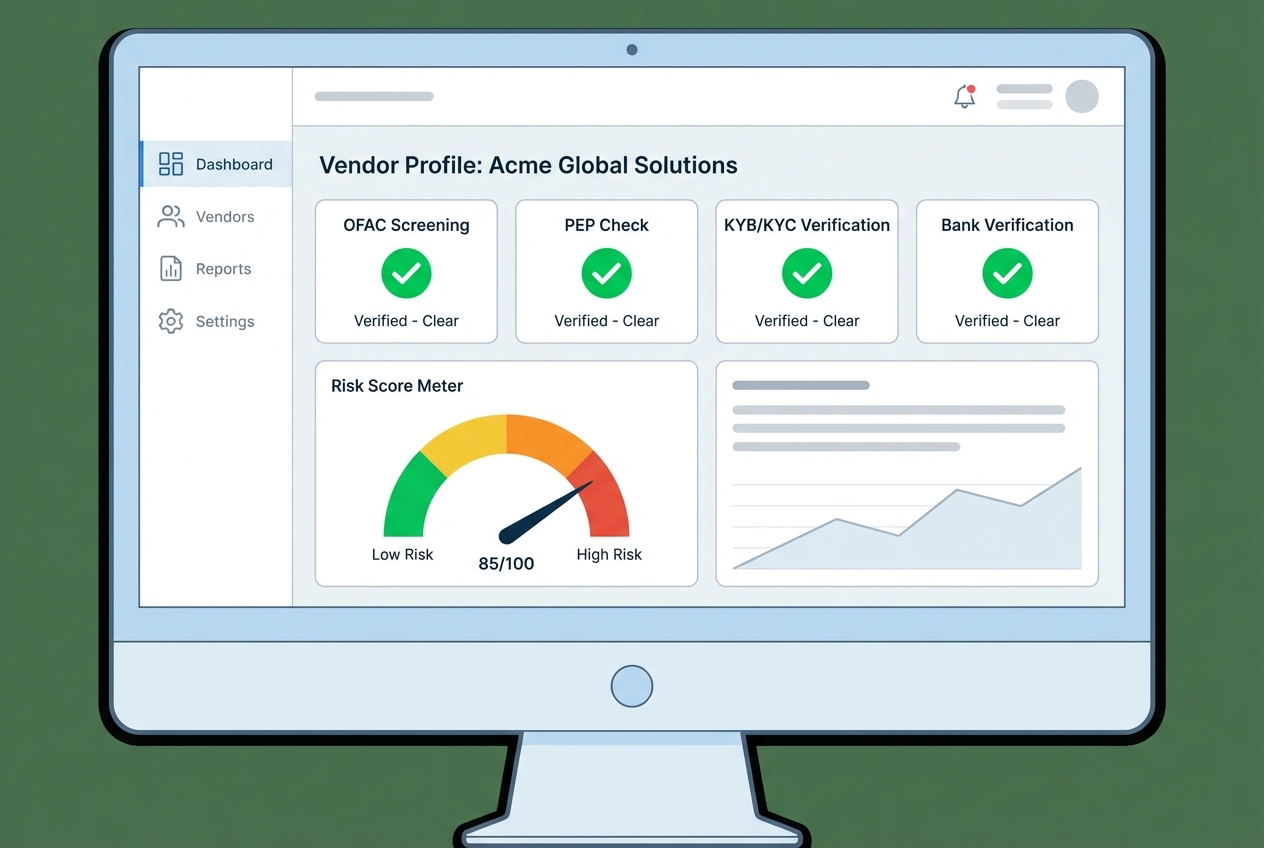
In 2026, the threat is bigger than “bad vendors.” It also includes “good vendors with compromised inboxes,” fake banking updates, and identity mismatches.
Automated screening helps you catch issues early, before a vendor is approved and paid.
What to screen (and when)
-
Sanctions checks (OFAC and global lists): Run at onboarding, and re-run periodically because lists change. OFAC provides the official Sanctions List Search tool that many screening workflows rely on.
-
PEP checks: Helps you flag higher-risk relationships that may require extra review.
-
KYB/KYC-style verification: For some businesses, verifying the entity behind a vendor reduces shell-company risk.
-
Bank account verification: Confirm the vendor is the rightful owner of the routing and account details, and add controls around bank changes.
If you want a deeper framework for supplier risk beyond onboarding, NIST’s supply chain risk guidance is a strong reference point:
- NIST SP 800-161 (Cybersecurity Supply Chain Risk Management)
Step 4: Configuring Multi-Level Approval Workflows
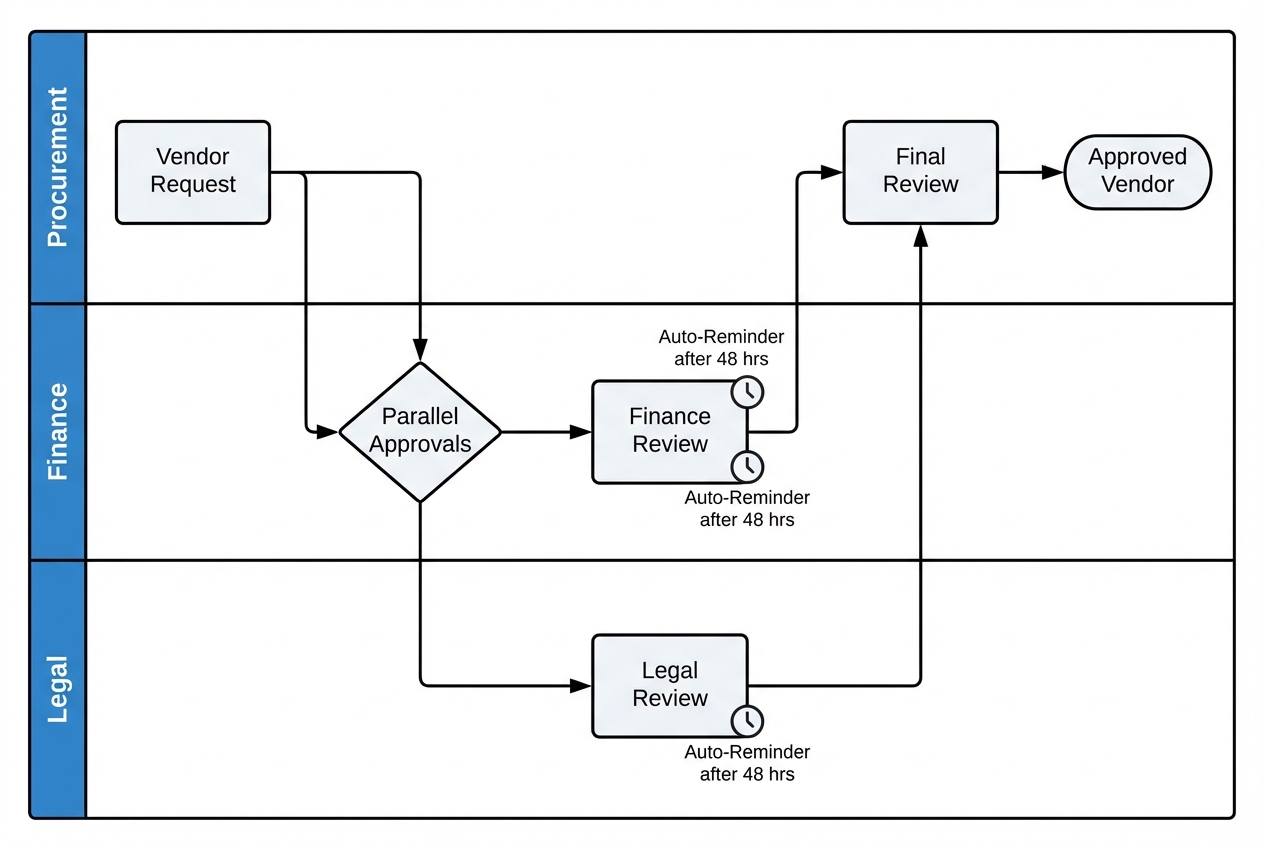
Automation is not helpful if approvals still happen in random Slack messages. You need a clear, auditable path through procurement, finance, and legal.
You want fewer bottlenecks while still keeping the right controls in place.
Set up parallel approvals (not sequential)
Sequential approvals create bottlenecks. Parallel approvals let legal and finance review at the same time.
-
Procurement: Confirms vendor category, scope, and pricing alignment.
-
Legal: Confirms contract terms, liability clauses, and required docs.
-
Finance/AP: Confirms payment method, tax form completion, and banking controls.
Actionable step: Add automated reminders after 48 hours
Regular reminders protect momentum without feeling like nagging.
-
48-hour nudge: Remind the approver with a direct link to the approval screen.
-
Escalation path: If still pending after another 48 hours, route to a manager or fallback approver.
Effective workflow orchestration is the backbone of any automated onboarding system.
Tip: Keep “approval conditions” simple at first. You can always add advanced routing after you have clean baseline data.
Step 5: Finalizing ERP and Payment System Integration
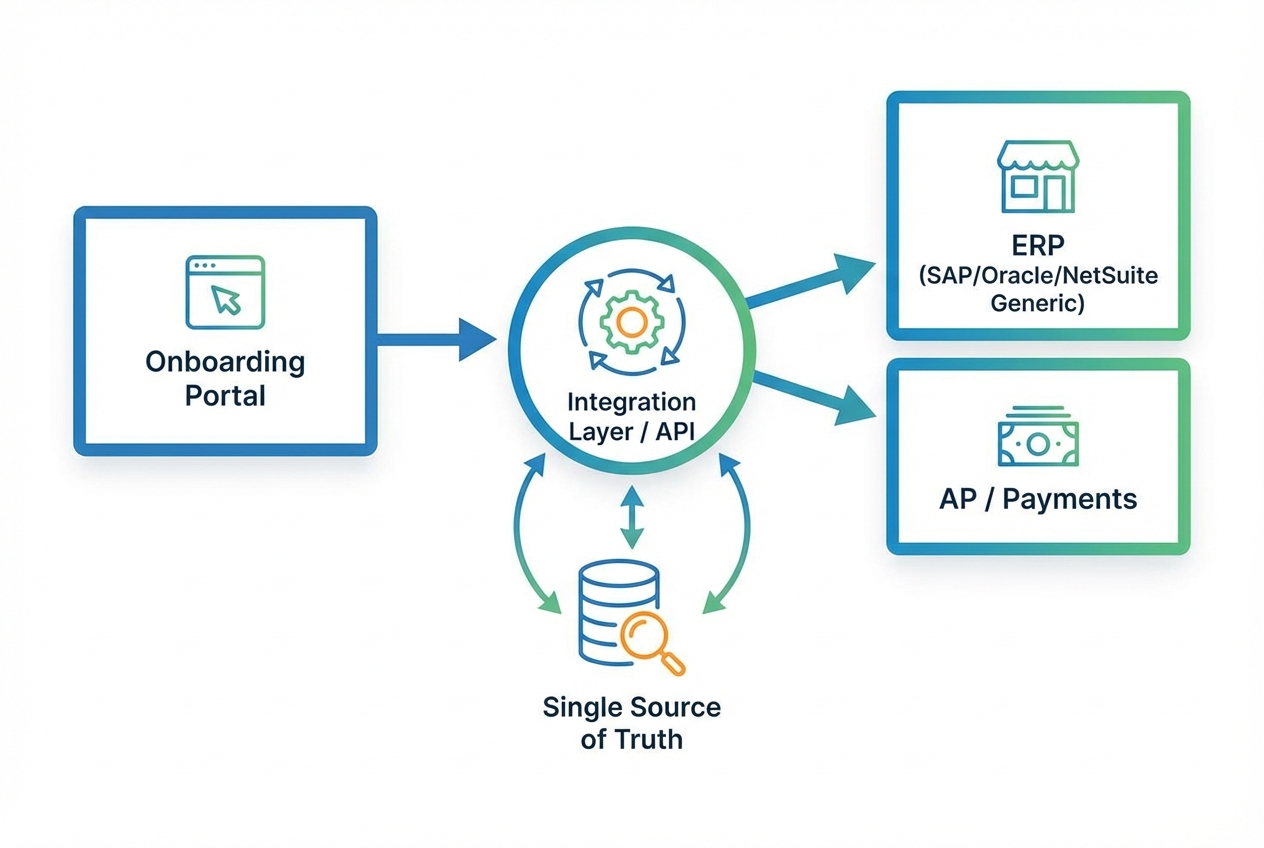
This is the last mile, and it is where many teams quietly reintroduce risk by manually typing vendor data into the “system of record.”
If the onboarding system is not your source of truth, it must sync cleanly into the source of truth.
What “Single Source of Truth” means in practice
-
One vendor record: The vendor exists once, with one vendor ID.
-
One set of banking details: Stored and changed through controlled workflows, not email.
-
One audit trail: Every change has a who/what/when.
Why manual entry here is a security vulnerability
Manual entry introduces:
-
Typos: A single digit error can misroute funds.
-
Silent changes: Someone updates a bank account without a clear approval trail.
-
Data drift: The portal says one thing, the ERP says another, and your team spends time reconciling.
Most companies push data into systems like SAP, Oracle, or NetSuite. Your “integration layer” can be an iPaaS (integration platform) or a custom API connection, depending on your stack.
If you are a smaller team that wants to move fast, this is also where a lightweight custom app can shine. Quantum Byte, for example, can help you prototype an onboarding portal and approvals workflow quickly, then extend it with a dev team when you hit the tricky edge cases. That “days, not months” speed matters when vendor delays are already blocking revenue.
Key Benefits of a Digital Vendor Onboarding Strategy
Here is what the C-suite cares about, in plain terms:
-
Scalability: You can onboard 100 vendors with the same operational load you used to spend on 10, because reminders, routing, and validation are automated.
-
Data Accuracy: Fewer typos in bank accounts, addresses, and legal names because data is captured once and validated automatically.
-
Improved Vendor Experience: Vendors get clarity, transparency, and faster approvals. That makes you easier to work with, and it reduces drop-off.
Quick summary table (what improves after automation)
| Area | Before (manual) | After (automated) |
|---|---|---|
| Cycle time | Days lost to chasing emails | Faster, with reminders and parallel approvals |
| Data quality | Re-typing errors and version confusion | Validated fields and one record |
| Risk control | Hard to prove who approved what | Clear audit trail and automated screening triggers |
| Vendor experience | Friction and uncertainty | Self-serve, transparent status, fewer touchpoints |
Best Practices for Vendor Onboarding Automation Success
Automation is leverage, but only if the foundation is solid.
-
Standardize Your Framework: Do not automate a broken process. Decide your required fields, required documents, and your vendor categories first. Then automate.
-
Prioritize Security: Look for encryption, role-based access, and vendor isolation. If you are evaluating platforms, SOC 2 reporting is a common signal for security maturity. The underlying criteria come from the AICPA Trust Services Criteria.
-
Monitor KPIs: Track average onboarding time, approval SLA, exception rates (how many vendors fail checks), and vendor drop-off (who starts but never finishes).
-
Keep the human-in-the-loop for exceptions: Low-risk vendors should glide through. High-risk or incomplete ones should route to review with clear reason codes.
Conclusion
In 2026, vendor onboarding automation has transitioned from a luxury to a baseline requirement for secure, scalable operations.
Avoid boiling the ocean when starting; instead, pick the most painful part of your process to automate first. For most teams, that is document collection or approvals. Then expand to risk screening and ERP sync once the intake data is clean.
If you want a fast way to turn this into a working system without hiring a full team, you can map your workflow and prototype a vendor onboarding app in Quantum Byte’s AI app builder, then bring in expert developers for integrations and security hardening when you are ready. You can explore that workflow starting point here:
Build your onboarding workflow packet
When you eliminate the chasing, you unlock time, reduce risk, and create a vendor experience that feels as professional as the service you deliver.

