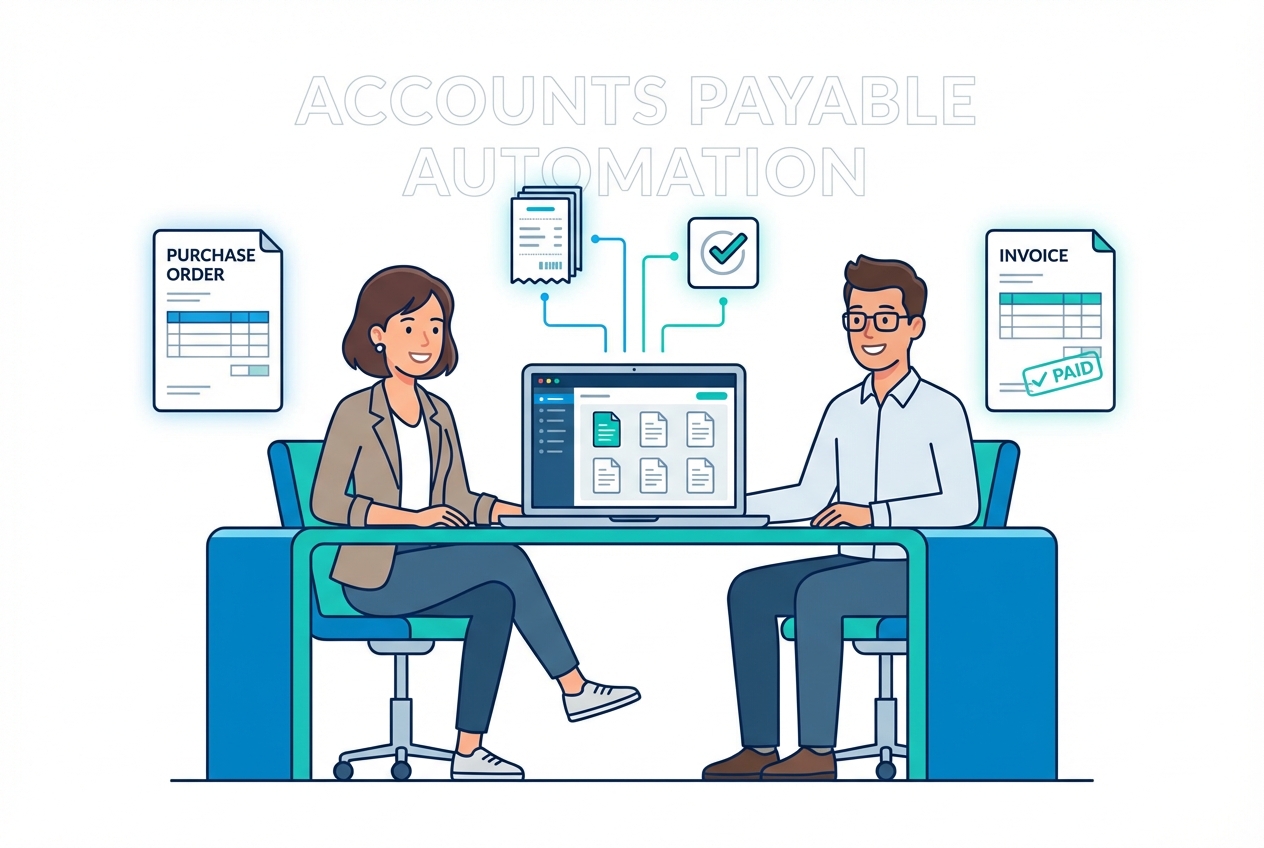
Manual invoice processing is a costly bottleneck. It slows down payments, creates friction with vendors, and leaves room for human error and fraud.
According to BirchStreet Systems, implementing three way match automation can lead to a 90% decrease in manual processes and over a 50% reduction in labor costs. That is the kind of operational leverage growing teams need, especially when finance is asked to scale without adding headcount.
This guide walks you through how automated matching works, why it matters for modern compliance, and the exact steps to implement it in your organization.
What is Three Way Match Automation in Accounts Payable?
Three way match automation is an internal control process that uses software to automatically compare three critical documents:
-
Purchase Order (PO): The approved request that defines what you agreed to buy, at what price, and in what quantities.
-
Goods Receipt Note (GRN) / receiving report: The confirmation that goods (or sometimes services) were received and recorded.
-
Supplier invoice: The bill that asks you to pay, including quantities, pricing, tax, and totals.
Unlike manual matching, which forces a person to verify line items one-by-one, automation uses OCR (optical character recognition) plus matching rules to extract fields, line items, quantities, and prices. Then it flags mismatches in seconds.
At its core, the system ensures:
-
Ordered: What you ordered on the PO is the approved source of truth.
-
Received: What you received on the GRN matches the delivery reality.
-
Billed: What you are billed for on the invoice aligns with the order and receipt.
If you want a quick primer from a mainstream accounting vendor, Sage’s overview is a solid companion read.
For a deeper, system-level view, three-way matching is one of the most common building blocks inside an automated financial workflow. It protects you against duplicate payments, incorrect billing, and “ghost invoices” that slip through when teams are busy.
Manual vs automated: what actually changes?
| Area | Manual matching | Automated three way match |
|---|---|---|
| Speed | Hours or days, depending on backlog | Seconds for clean matches |
| Accuracy | Depends on focus and data entry quality | Consistent rules, fewer keystrokes |
| Team workload | High effort on every invoice | Effort focused mainly on exceptions |
| Audit trail | Often scattered across email and spreadsheets | Centralized logs and status history |
Why Your Business Needs Three Way Match Automation Now
Relying on manual verification is no longer sustainable for growing businesses, often leading to delayed payments and strained vendor relationships.
Here is what automation unlocks when you put it in place.
- Eliminate human error: Automation reduces “fat-finger” mistakes because it pulls data directly from documents and systems instead of relying on manual re-keying.
- Prevent fraud and overpayment: By requiring a verified GRN (or approved receiving confirmation), you only pay for what you actually received.
- Scale AP operations: You can process more invoices with the same team because staff focus on the small percentage that need attention.
- Improve audit readiness: Automated controls leave a clearer trail. If you operate in a regulated environment, it helps to align with the spirit of ICFR expectations described in standards like PCAOB AS 2201.
How the Three Way Match Automation Process Works (Step-by-Step)
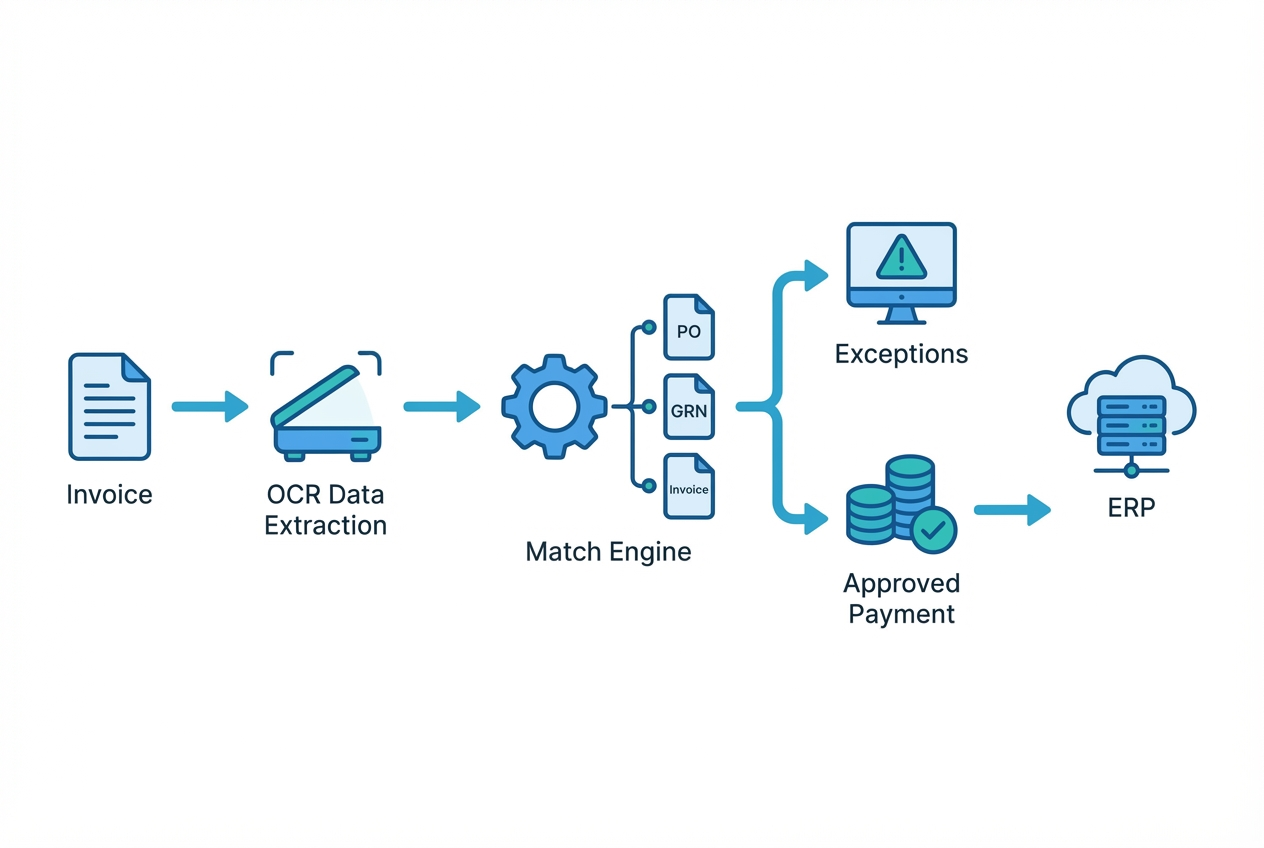
Step 1: Digital Data Extraction with OCR
The process starts when an invoice arrives (email, portal upload, EDI, or scan). The system uses OCR plus AI to pull out:
-
Vendor details: Vendor name plus remit-to information, so invoices map to the right supplier record.
-
Invoice identifiers: Invoice number and invoice date, which helps prevent duplicates and improves tracking.
-
PO reference: PO number (when present), which is the fastest path to a clean match.
-
Line items: SKU or description, which enables line-level matching instead of relying on totals.
-
Quantities and pricing: Qty, unit price, tax, shipping, discounts, and totals for rule-based comparisons.
If your invoices vary a lot by supplier, AI-powered extraction matters. It helps you avoid “template hell” where every vendor needs manual setup.
For teams building modern pipelines, this is creating a custom AI tool using applications like Quantum Byte that fits your workflow come into play, turning messy invoices into structured data you can trust.
Step 2: Automated Comparison Logic
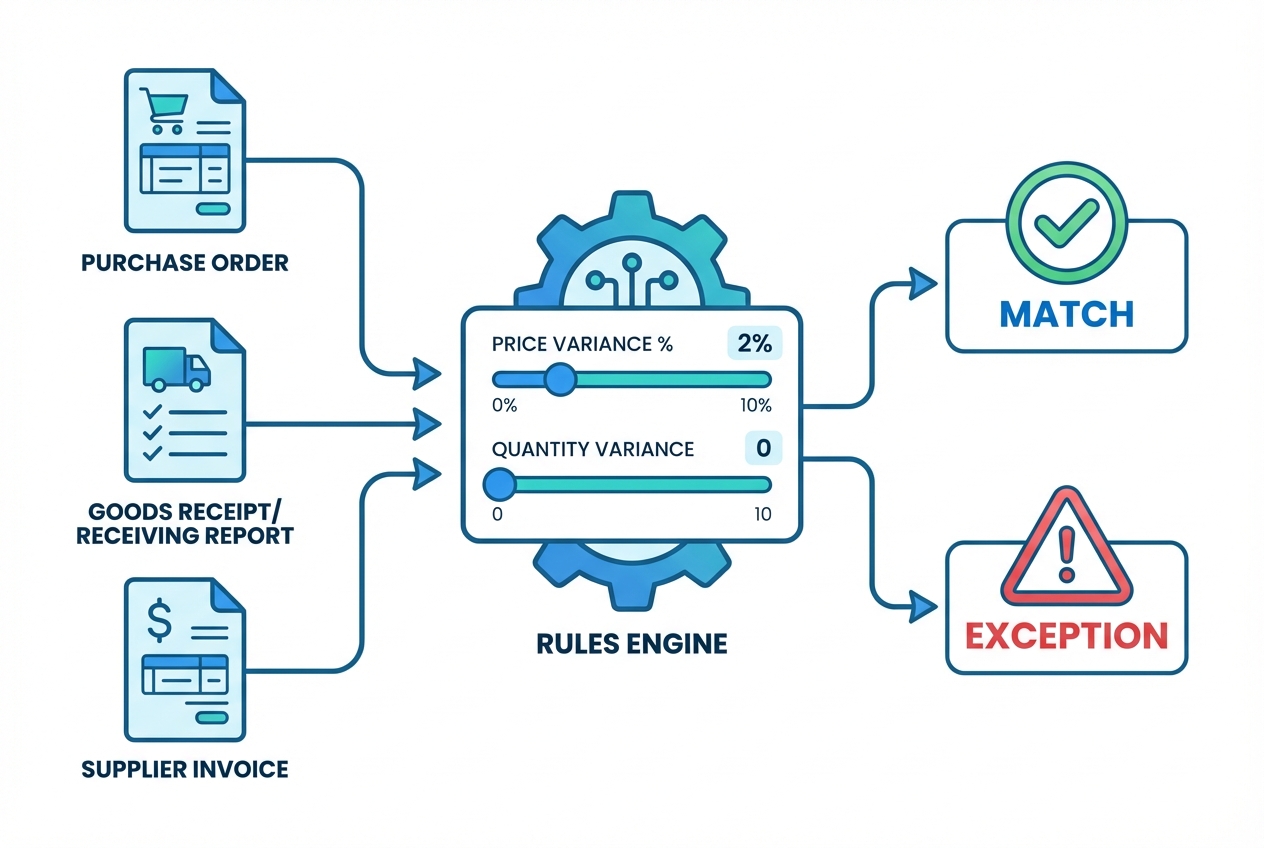
Next, the system pulls the corresponding PO and GRN from your ERP or procurement system, then compares key fields based on rules you define.
Typical matching checks include:
-
Quantity check: Ordered vs received vs billed quantities, including partial receipts if you allow them.
-
Unit price check: Invoice unit price compared to PO price, with rules for discounts or contract pricing.
-
Total amount check: Invoice totals compared to expected totals, including tax and shipping logic.
You also set tolerance levels. For example:
-
Price variance tolerance: Allow up to 2% variance to reduce noise on tiny differences.
-
Partial receipt handling: Allow backorders to match only the received portion, so you do not block payment.
-
Strict categories: Require exact matches for high-risk spend (regulated goods, controlled items, or specific vendors).
This is the “brain” of the match. It is also where bad data gets exposed fast, which is a good thing.
Step 3: Real-Time Exception Handling
If everything matches, the invoice is marked as matched.
Then it is routed for approval or payment (depending on your workflow).
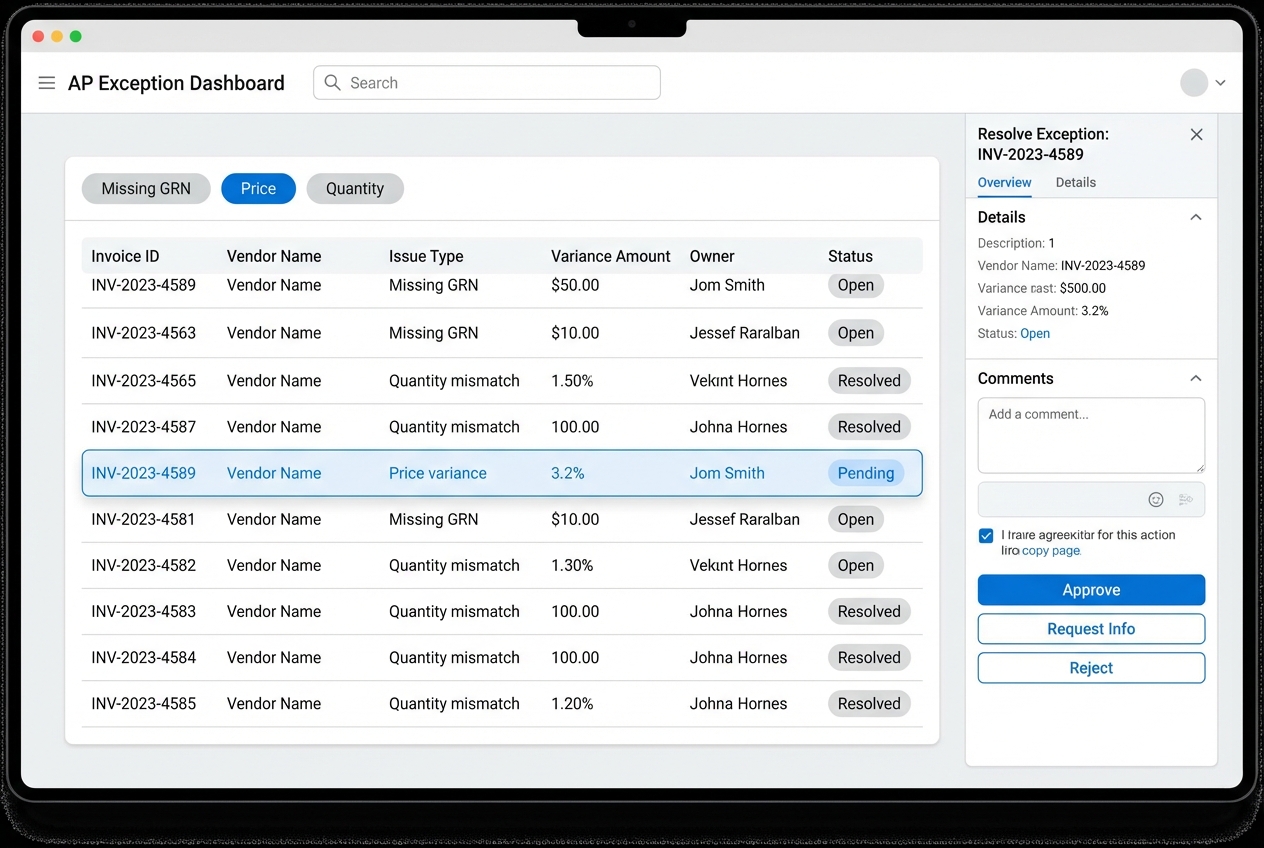
If something does not match, the invoice becomes an exception. The system flags the exact issue and routes it to the right person (receiving, procurement, AP lead, or the requester).
Common exceptions include:
-
Missing GRN: Items were not received yet, or receiving was not recorded.
-
Price variance: Vendor pricing differs from the PO or contracted price.
-
Quantity variance: Vendor billed more units than you received or approved.
-
PO problems: PO number is missing, invalid, or does not map cleanly to the invoice.
Below is an example of what a simple exception dashboard can look like:
Step 4: Seamless ERP Integration
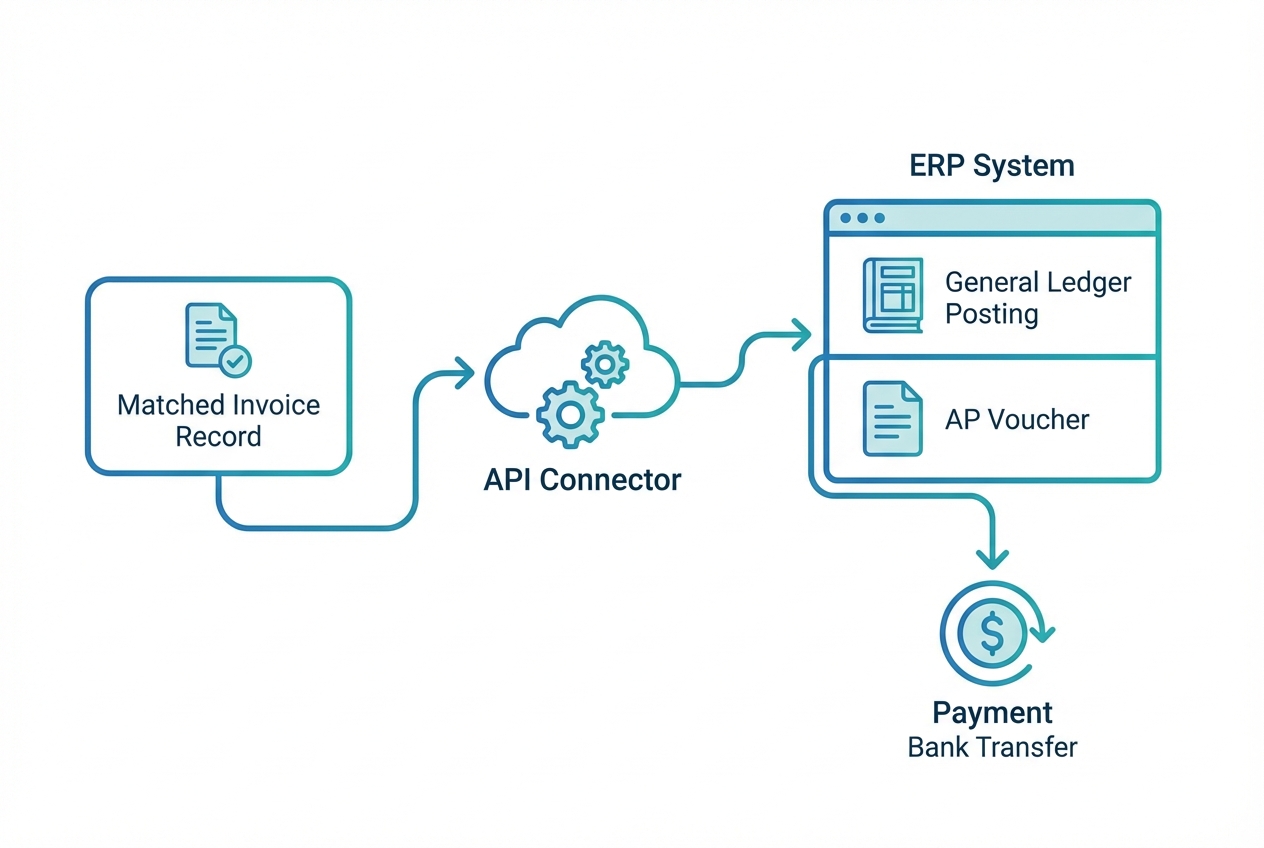
Once matched (and approved if your workflow requires it), the system pushes clean data into your accounting software.
This is the point where you stop paying the “manual entry tax” on every invoice.
If your goal is true end-to-end automation, integration matters as much as OCR. This is where ERP integration and a tightly managed accounts payable automation flow make the biggest impact.
5 Steps to Implementing Three Way Match Automation
1. Map your current workflow: Document what really happens today
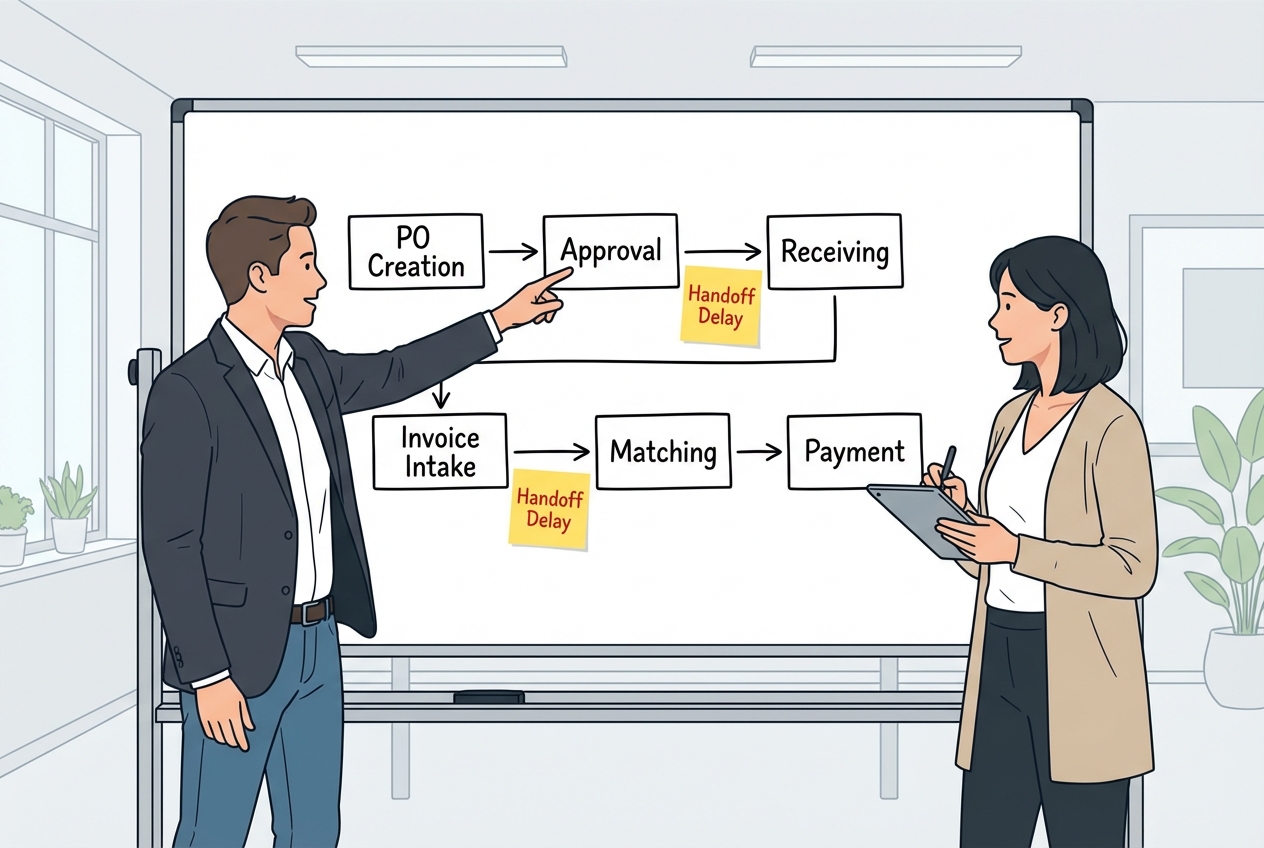
Start with reality, not what the SOP says.
Capture:
-
PO creation and approval: Who creates POs, who approves them, and what rules block approvals.
-
Receiving process: Who records receipts, how partial receipts are handled, and how often GRNs are missing.
-
Invoice intake: Where invoices arrive (email, portal, EDI), and who triages them.
-
Mismatch resolution: Who gets pulled in when something breaks, and what the average fix time looks like.
Your output should be a simple flowchart plus a list of “handoffs” (handoffs are where work usually stalls).
2. Define matching rules and tolerances: Decide what “clean” looks like
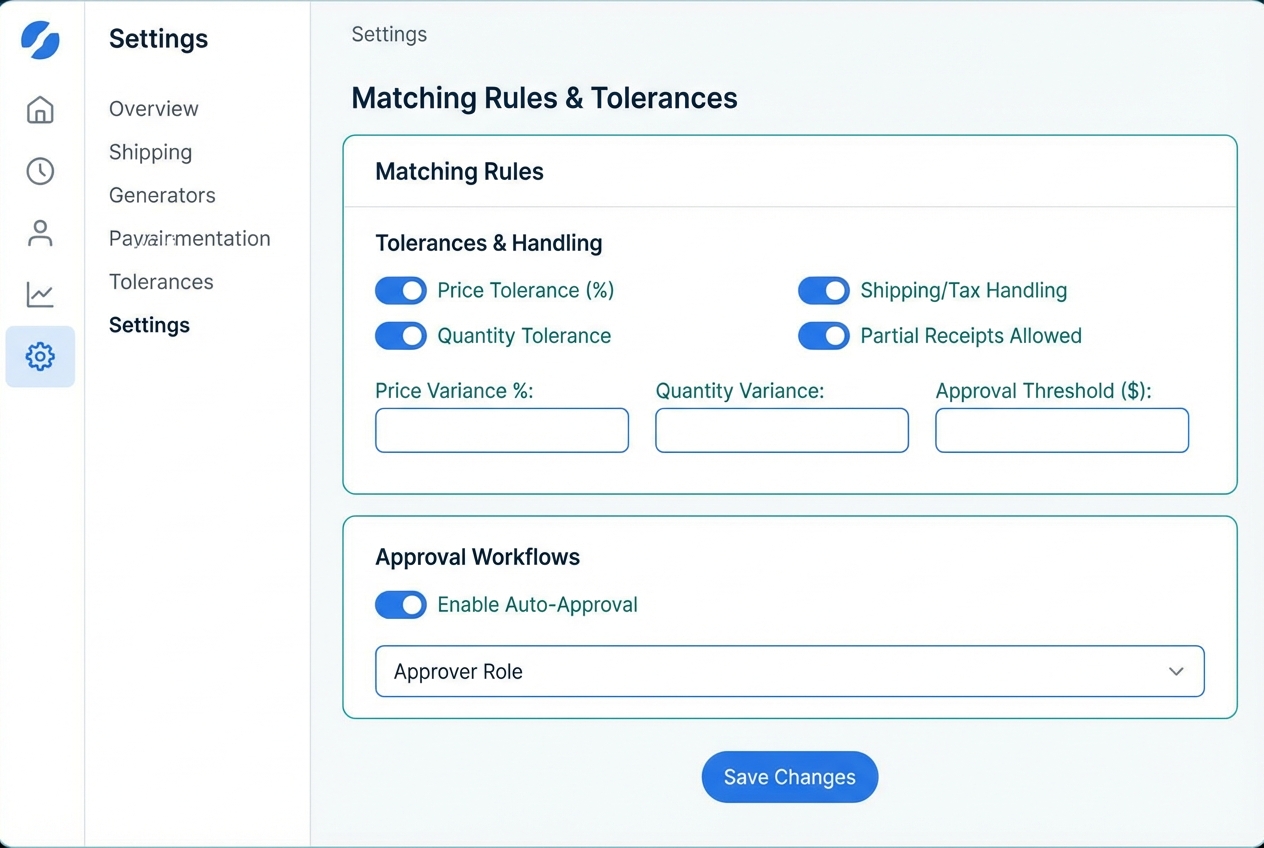
This is where you choose what can auto-approve and what must be reviewed.
A few useful rules to consider:
-
Price tolerance: Allow a small variance (example: up to 2%) so low-value noise does not trigger exceptions.
-
Quantity tolerance: Decide whether partial receipts can match or whether invoices must wait for full receiving.
-
Shipping and tax handling: Decide if shipping is allowed to differ from PO or must match exactly.
Write these rules down. They become your automation playbook.
3. Cleanse your vendor data: Fix the foundation before you automate
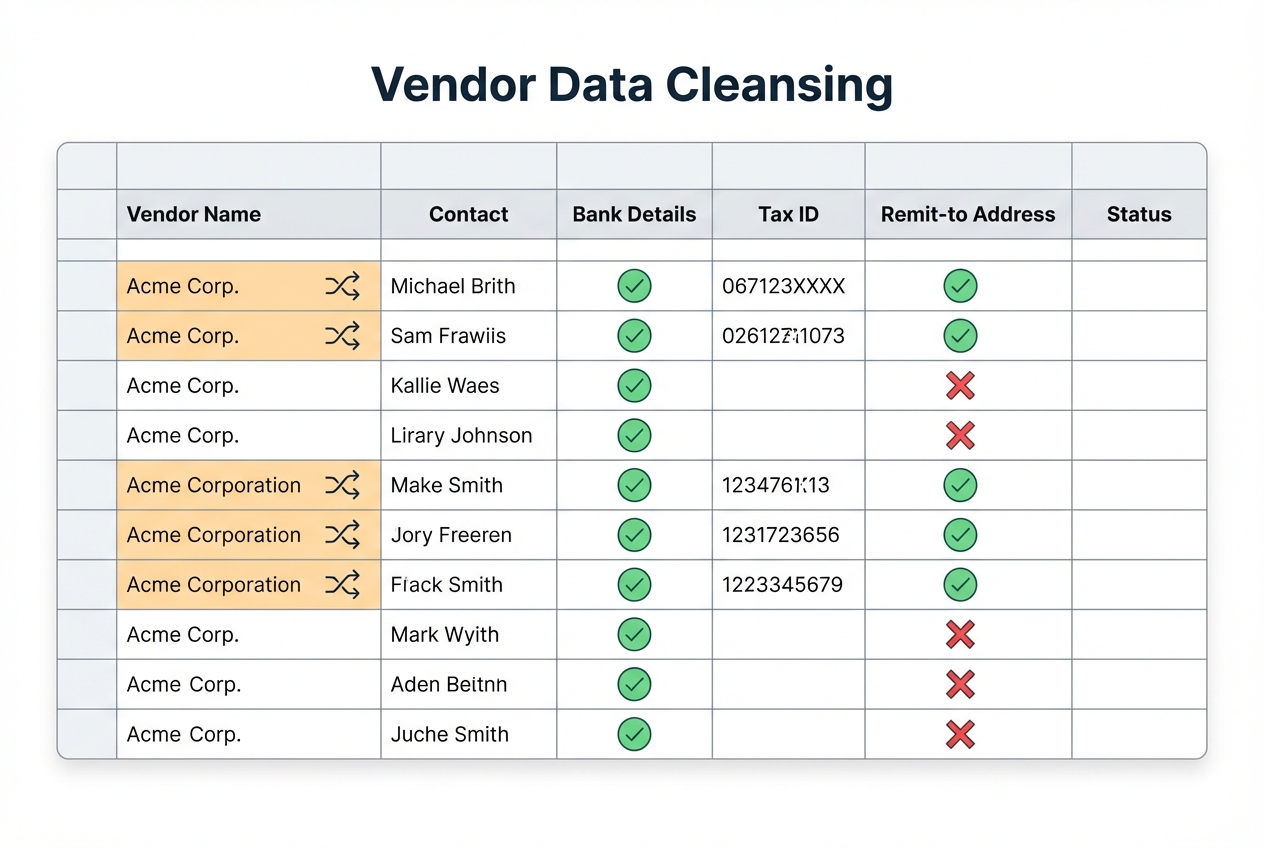
Automation amplifies what is already true. If vendor records are messy, your exceptions will explode.
Do a quick cleanup sprint:
-
De-duplicate vendors: Standardize vendor names so one supplier does not appear as three records.
-
Confirm remit-to details: Validate addresses and payment routing so invoices post to the right vendor profile.
-
Validate compliance fields: Check tax IDs and required fields for your region and audit needs.
-
Set vendor expectations: Communicate that PO numbers must appear on invoices, every time.
This step is usually fast, and we believe this delivers one of the highest ROI improvements for match rates.
4. Deploy AI-powered software: Choose tools that can handle your edge cases
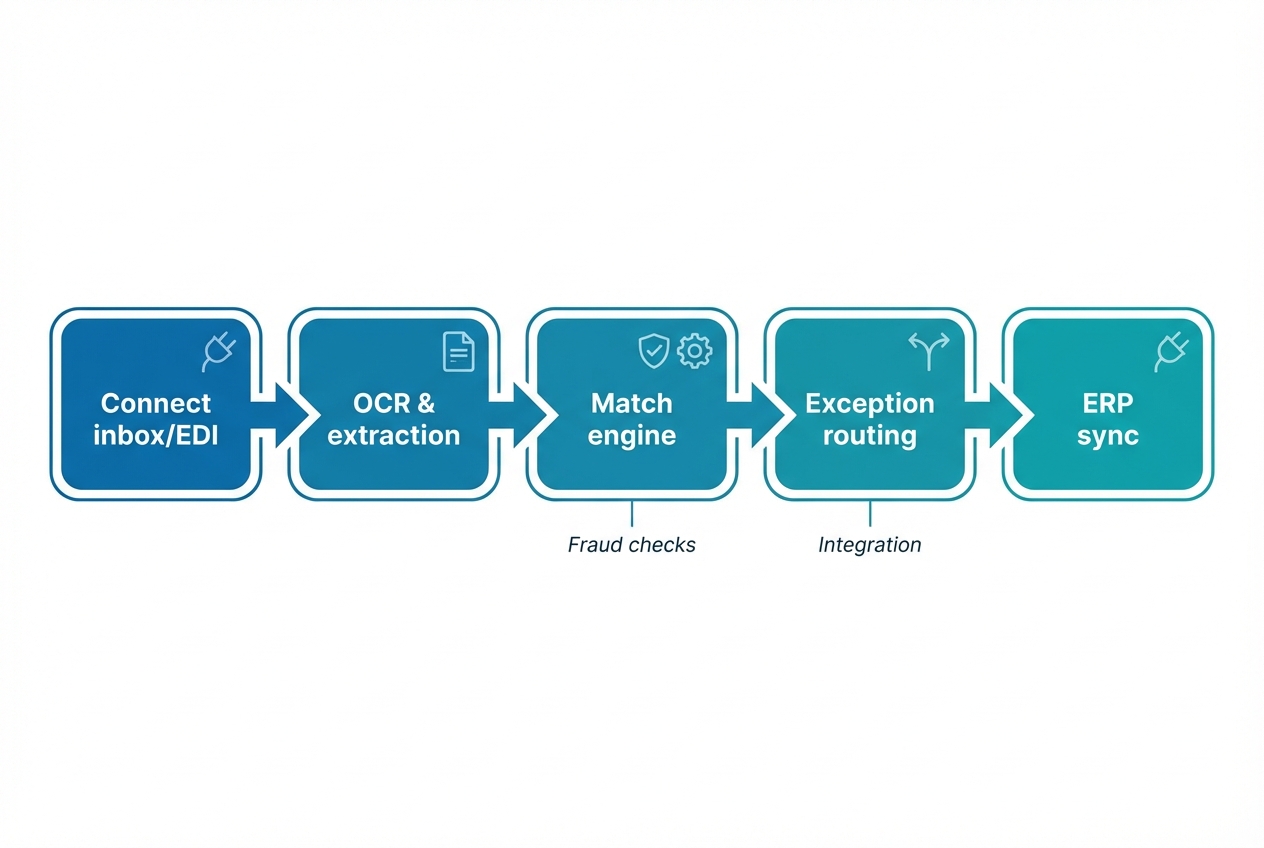
Look for a solution that can do all three:
-
Extract line items reliably: Handle unstructured invoices without heavy template setup.
-
Match at the line level: Compare quantities and prices by line, not just totals.
-
Route exceptions fast: Assign the right owner automatically so issues do not bounce around.
Also, consider fraud controls. Even basic detection of duplicates and suspicious patterns can pay for itself quickly. This is where capabilities like AI fraud detection can add real protection.
If you are a founder or operator who wants a custom workflow without a long build cycle, Quantum Byte’s approach can be a fit: you can prototype the matching workflow with AI, then bring in engineering help for the tricky parts, like ERP-specific integrations or complex approval logic. The goal is simple: get to a working system within days instead of months.
5. Monitor and optimize: Use exceptions to improve the system
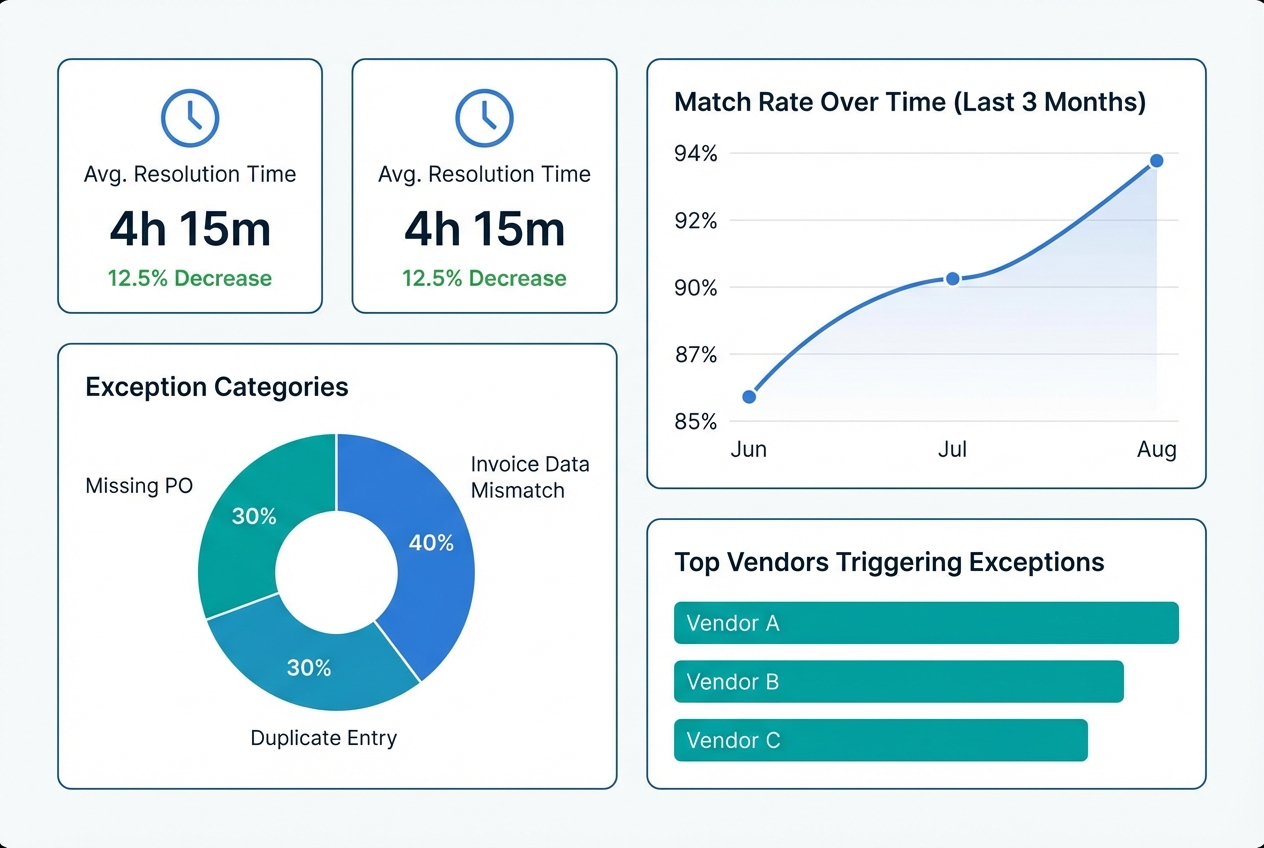
After go-live, measure what matters:
-
Match rate: Track what percent of invoices auto-match without human touch.
-
Exception mix: See which categories dominate (price, qty, missing receipt, missing PO).
-
Resolution time: Monitor how long exceptions take to clear so backlogs do not form.
-
Vendor repeat offenders: Identify vendors that trigger issues so procurement can fix the root cause.
Then act on the data.
In our opinion, a practical pattern is a monthly exception review where AP, procurement, and receiving agree on the top fixes. Over time, exception volume drops and the automation value climbs.
Common Challenges and How to Overcome Them
-
Low quality data: Require suppliers to include PO numbers on all invoices. Also standardize how receipts are recorded so the GRN is reliable.
-
Resistance to change: Show your AP team the win. Automation removes repetitive work and gives them time to focus on vendor relationships, cash planning, and process improvements.
-
Complex line items: Use tools that handle unstructured invoices and long, multi-line POs. If your process includes service hours, milestone billing, or mixed shipments, make sure your solution can match at the line level, not just totals.
Frequently Asked Questions
What is 3-way matching in accounts payable?
It is a process that verifies the accuracy of a transaction by comparing the purchase order, receiving report (GRN), and supplier invoice.
What is the difference between 2-way and 3-way matching?
2-way matching compares the invoice to the PO. 3-way matching adds the goods receipt to confirm items were actually delivered.
| Match type | Compares | Best for | Main risk |
|---|---|---|---|
| 2-way match | PO + Invoice | Services, subscriptions, non-receipted spend | Paying for items not received |
| 3-way match | PO + GRN + Invoice | Physical goods and receipted spend | More process steps if receiving is inconsistent |
Which documents are required for 3-way matching?
The three essential documents are the Purchase Order (PO), the Goods Receipt Note (GRN) or receiving report, and the Supplier Invoice.
How does 3-way matching prevent fraud?
It ensures that payments are only made for authorized orders that have been received and verified. This makes it much harder for fake vendors, duplicate invoices, or inflated bills to slip through.
What is the best software for three way match automation?
In our view, the best software fits your invoice volume, your ERP, and your real-world exceptions. In practice, that means strong OCR, line-level matching, and fast exception routing.
If you need a workflow that matches how your business actually runs, in our opinion Quantum Byte can be a strong option because you can prototype the automation quickly, then extend it with custom logic where off-the-shelf tools fall short.

