
Manual payroll is annoying and it carries high stakes. One wrong tax setting, one stale spreadsheet, or one missed approval can lead to angry employees and costly penalties.
Automation changes the game. According to research by the American Payroll Association (APA), companies can reduce payroll processing costs by up to 80+% by automating core workflows. That result matters because it gives you time back and lowers risk at the same time.
In this guide, you will learn what payroll workflow automation is, why it matters right now, and a practical seven-step roadmap to implement it. You will move from scattered spreadsheets to a workflow that is clear, trackable, and built to scale.
What is Payroll Workflow Automation?
Payroll workflow automation is the use of software and pre-defined rules to run the end-to-end process of paying people with minimal manual data entry.
That typically includes:
- Time and change collection: Collect approved time, pay changes, reimbursements, and deductions so payroll starts with trusted inputs.
- Gross-to-net calculations: Convert hours and rates into accurate pay, including overtime rules, bonuses, and retro pay when needed.
- Tax and deduction application: Apply tax withholding and benefit rules consistently every run, without re-keying values.
- Payments and distribution: Trigger direct deposits (or other payment methods) and generate pay stubs automatically.
- Reporting and year-end forms: Generate payroll registers, store audit-friendly reports, and prepare year-end forms without scrambling.
Payroll workflow automation is bigger than "a payroll tool." It is the workflow around payroll: who approves what, when data syncs, what happens when something is missing, and how exceptions get handled.
If you want the broader concept, payroll automation is a slice of process automation. The same thinking applies across your business: remove repeated steps, create reliable handoffs, and get clean reporting. For a deeper dive into existing payroll automation fundamentals, that guide covers the basics before you tackle workflow-level changes.
Why You Need Payroll Workflow Automation Now
Payroll complexity does not scale nicely. Every new hire, contractor, state, benefit plan, and pay type adds another chance for errors and rework.
Research consistently shows that high-performing payroll organizations are far more likely to use cloud-based automation than low performers. Cloud tooling also helps you keep workflows consistent as your team grows.
Here is what payroll workflow automation delivers in plain terms:
- Elimination of human error: Automated systems apply the same tax and deduction logic every run, so you stop copying formulas, re-keying numbers, and guessing which spreadsheet is "the latest."
- Enhanced data security: Strong platforms use encryption, role-based access, and audit logs so fewer people can view or change sensitive pay data. That reduces fraud risk and "who touched this?" confusion.
- Real-time reporting: Instead of waiting until month-end, you can see labor costs, overtime trends, and cash requirements as payroll moves through approvals.
- Improved employee experience: Employee self-service means fewer "Can you resend my pay stub?" messages, and fewer HR interruptions.
If you are already streamlining other ops work, payroll is one of the highest leverage places to start. The same principles apply across workflows: reduce steps, reduce mistakes, and make work visible.
How to Implement Payroll Workflow Automation in 7 Steps
You are building a system and doing more than just swapping a software tool. Treat this like a focused implementation project and you will avoid the most common traps.
Step 1: Audit Your Current Manual Processes
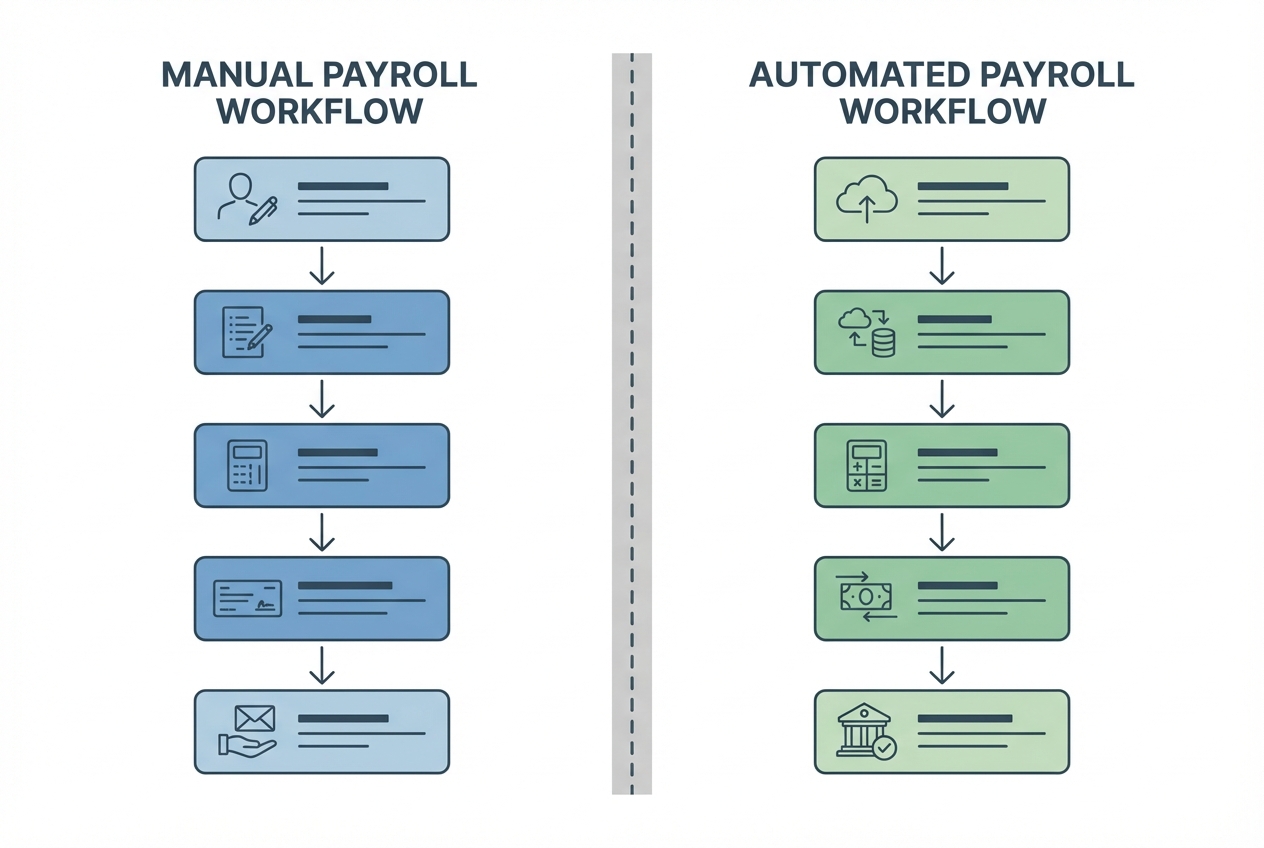
Before you automate anything, get clear on what "payroll" means in your company.
Document the current cycle, start to finish:
- Time source: Where time comes from (timesheets, a time clock app, project tools).
- Approvals: Who approves time, bonuses, commissions, and reimbursements.
- Data entry point: Where payroll data gets entered.
- Deductions check: How deductions are calculated and checked.
- Final approval and funding: How payroll is approved, funded, and submitted.
- Storage and reporting: How reports are stored and shared.
Then flag every manual touchpoint. Every copy/paste. Every spreadsheet formula. Every "email me the updated hours."
Use this simple output as your deliverable:
- Inputs: Time, pay changes, benefits changes, and new hires or terminations. This defines what must be "ready" before payroll can run.
- Approvals: Who signs off, what they review, and the deadline. This is where delays often happen, so make ownership visible.
- Outputs: Payroll register, tax filings, pay stubs, and journal entries. These outputs also define what you must store for audits.
- Exceptions: Missing time, negative balances, off-cycle payments, and reversals. Exceptions deserve their own lane so they do not derail the whole run.
Step 2: Define Your Integration Requirements
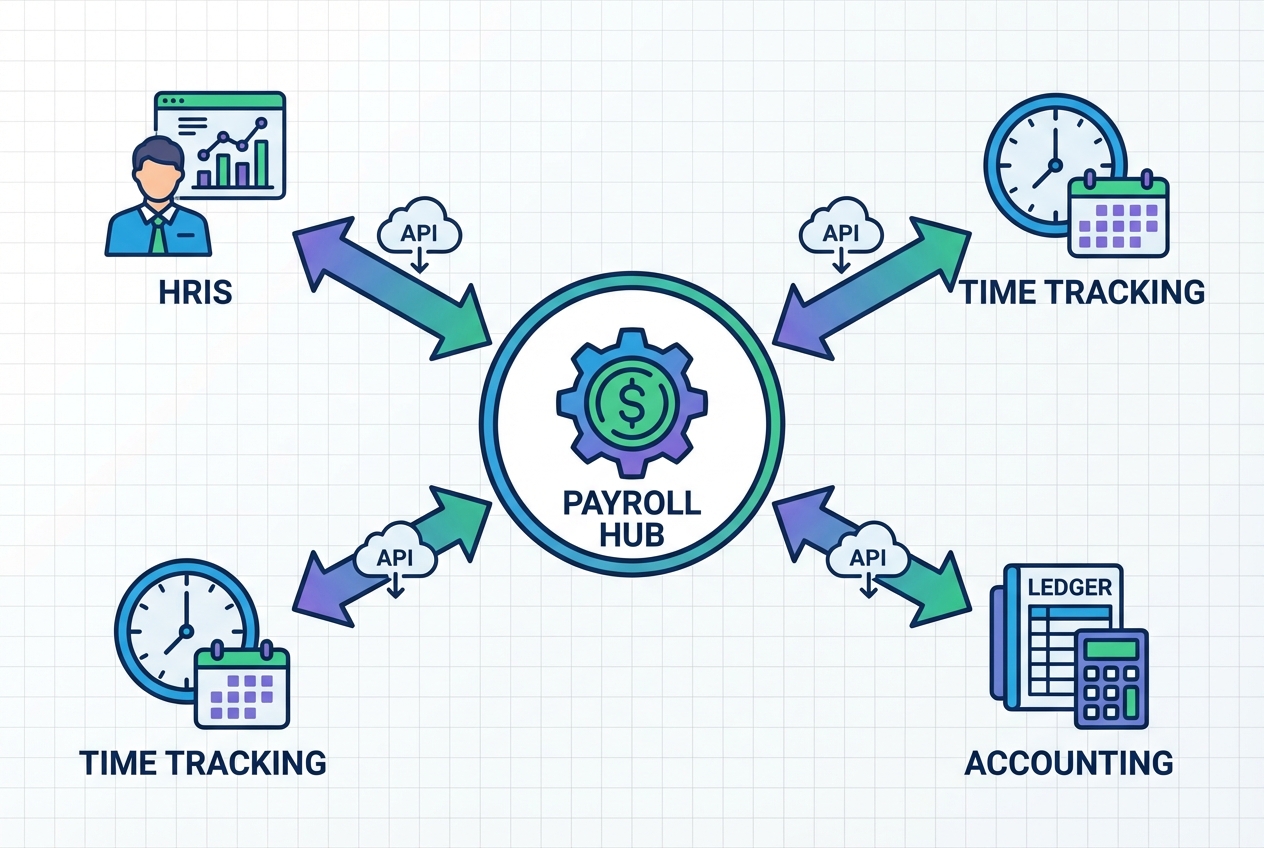
Payroll should not live in a vacuum. A "new system" still feels manual if you keep exporting CSV files between apps.
List the systems that must sync with payroll:
- HRIS (employee master data): Name, address, tax info, job changes, manager, and department. This is usually your source of truth for who a person is.
- Time tracking: Hours, overtime, PTO, job codes, and approvals. If time is wrong, payroll will be wrong.
- Accounting or ERP: Payroll journals, department allocations, class or project tracking, and month-end reporting. This keeps your books clean without extra work.
- Benefits: Deductions, employer contributions, eligibility changes, and carrier updates. This prevents "surprise" benefit errors after payroll is finalized.
Now define what direction the data needs to flow:
- One-way sync: Good for simple setups (time to payroll, payroll to accounting). Fewer moving parts, fewer places to debug.
- Two-way sync: Needed when changes can happen in multiple systems. This is common in growing teams where HR, finance, and ops all touch data.
Practical tip: write integration requirements as "events," not tools:
- New hire created: HRIS sends the new employee record so payroll is ready before the first pay period.
- Timesheet approved: Time tracking sends approved hours so payroll does not ingest drafts or unapproved edits.
- Payroll finalized: Payroll sends the journal entry so accounting closes faster and with fewer manual adjustments.
If you are building a custom workflow layer (for approvals, special pay rules, or contractor billing), you will also want API access. An API is how apps exchange data directly, without manual exports.
Step 3: Select the Right Payroll Workflow Automation Software

This is where most teams rush. Slow down and choose based on your real workflow.
You are not only buying payroll. You are buying:
- Compliance coverage: Whether the platform can keep you aligned with tax and labor rules where you operate.
- Integration depth: How cleanly data flows in and out without spreadsheets.
- Exception handling: How the system flags issues and routes fixes before money moves.
- Reporting clarity: Whether you can explain payroll outcomes to leaders and auditors fast.
- Scalability: How easy it is to add pay types, locations, and entities without rebuilding everything.
Here is an example comparison table to narrow down options quickly.
| Option | Best for | Strengths | Watch-outs |
|---|---|---|---|
| Gusto | US-based SMBs | Clean UI, strong core payroll, solid self-service | Complex multi-entity needs can outgrow it |
| QuickBooks Payroll | Teams already in QuickBooks | Tight accounting fit, familiar workflow | Integrations outside QuickBooks can be limited |
| ADP | Larger or more complex payrolls | Broad compliance coverage, mature features | Can feel heavy; costs can climb |
| Rippling | Payroll + IT + HR in one | Strong automation across HR/IT, flexible workflows | Best value when you adopt the suite |
| Deel / Remote | Global payroll + EOR/contractors | International hiring support, global compliance options | Pricing varies; depends on country setup |
To make this decision feel less fuzzy, score vendors on the same set of criteria. Here is a simple framework you can use in one afternoon:
- Compliance fit: Does it cover the states and countries you operate in now, and the ones you plan to expand into next? Ask how updates are handled when laws change.
- Integration coverage: Do they integrate with your HRIS, time tracking, and accounting tools today? Confirm whether integrations are native or built through third parties, and whether they support two-way sync.
- Exception workflow: When something is wrong, what happens? Look for clear alerts, ownership, and resolution steps. A system that hides exceptions creates chaos.
- Reporting and audit trail: Can you pull a payroll register, show approvals, and export journals without workarounds? Auditors and banks will ask for proof. You want it in one click.
- Support and implementation model: Do you get onboarding help, and how fast do they respond when payroll is on the clock? Ask about SLAs and escalation paths.
- Total cost: Include per-employee pricing, tax filing fees, multi-state fees, contractor fees, and add-ons. Cheap upfront can become expensive at scale.
Questions worth asking in vendor demos:
- Retro pay handling: How does the system calculate retroactive changes without manual math?
- Off-cycle pay: Can you run a bonus payroll or correction payroll cleanly, with correct taxes and reporting?
- Multi-entity needs: If you have multiple legal entities, can the platform handle them without messy workarounds?
- Approvals: Can you enforce "two-step approval" before funds move? If not, can you add that outside the platform?
If your payroll is straightforward, a strong payroll platform may be enough.
If your payroll workflow is messy because your business is unique (commissions, multi-step approvals, client bill-backs, blended contractor + employee rules), you may need a thin custom layer around payroll.
This is a spot where Quantum Byte can be genuinely helpful. You can prototype a lightweight internal "payroll ops" app in days, not months, to manage approvals, exceptions, and audit trails, while your payroll provider handles filing and payments. If you want to explore that approach, we're happy to be in touch
Step 4: Map and Cleanse Employee Data
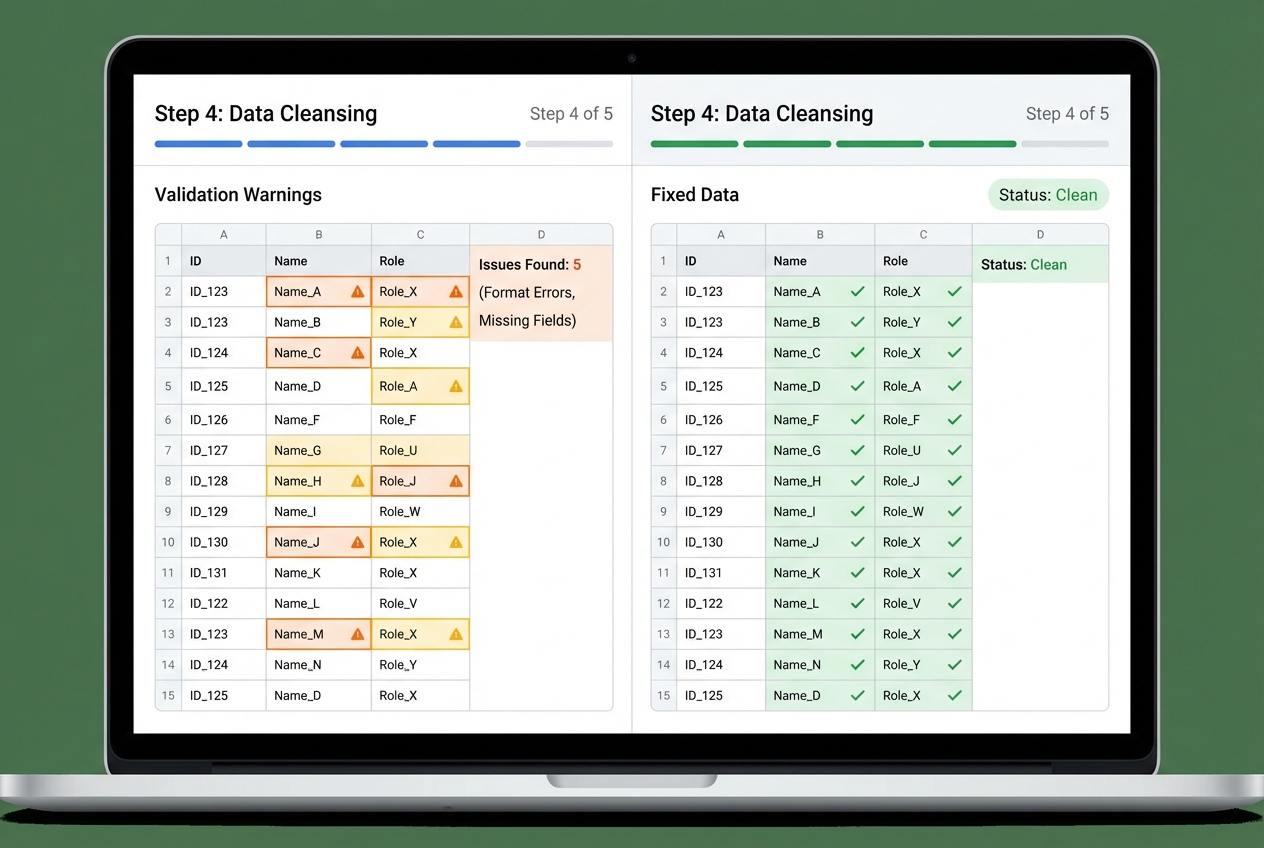
Payroll automation runs on clean data. If your employee records are inconsistent, automation will surface errors fast.
Before you migrate, validate these fields for every worker:
- Identity: Legal name, address, date of birth (if required), and employee ID so records match tax and banking requirements.
- Tax: Filing status, work location, tax IDs, and local tax fields so withholding is correct in each jurisdiction.
- Pay: Hourly vs salary, pay rate, pay schedule, and overtime rules so calculations match your policies.
- Bank: Routing and account details for direct deposit so funds go to the right place on the first live run.
- Deductions: Benefits, retirement contributions, and garnishments so net pay matches expectations.
A simple, high-impact approach is to create a payroll master checklist and require a second-person review before go-live. Getting employee data right before migration is also critical for employee onboarding workflows to function smoothly.
- Two-person verification: Have one person enter bank details and another person verify them before the first automated payroll run. This one control prevents the most painful "live payroll" mistakes.
Step 5: Configure Rules for Taxes and Deductions
This is the heart of payroll automation. Once the rules are set, payroll becomes repeatable.
You will configure:
- Tax setup: Federal, state, and local tax settings, plus tax jurisdictions tied to work locations.
- Unemployment and employer taxes: SUI settings, rates, and employer-only tax rules that still impact reporting and liabilities.
- Benefits deductions: Health, dental, vision, and HSA/FSA deductions, including pre-tax vs post-tax treatment.
- Retirement plans: Employee contributions, employer match rules, and eligibility start dates.
- Special pay types: Bonus, commission, severance, PTO payouts, reimbursements, and taxable fringe benefits.
Also align with official guidance for your jurisdiction. For US employers, the baseline reference is the IRS Publication 15 (Circular E).
To keep this step controlled, define rules in plain English first. Then configure them.
Examples:
- 401(k) match rule: Match 50% of employee contribution up to 4% of base pay. This tells you what to configure and how to test it.
- Health premium rule: Deduct a fixed amount per pay period, pre-tax, starting on the first payroll after eligibility. This avoids back-and-forth surprises and retro headaches.
Step 6: Conduct Parallel Testing
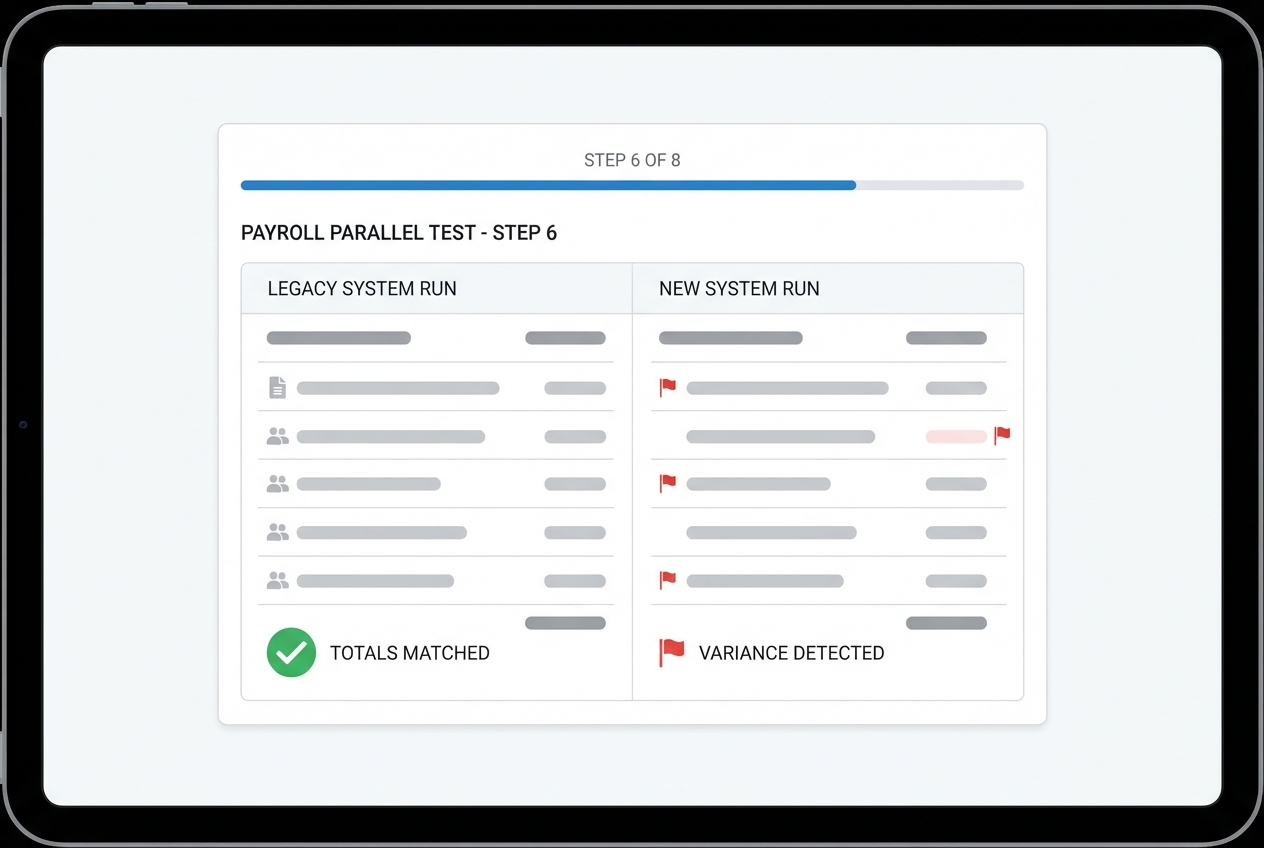
Parallel testing means running the new automated payroll process alongside your existing process for at least two pay cycles.
Do not skip this. This is where you catch:
- Mapping gaps: Missing deductions, missing earnings types, or incorrect GL mapping.
- Jurisdiction errors: A tax jurisdiction set to the wrong location or missing a local tax rule.
- Sync issues: Time-tracking data arriving late, arriving twice, or arriving with the wrong approvals.
- Calculation differences: Rounding, overtime rules, or retro pay logic mismatches.
Your goal is simple: match the results down to the penny.
How to run a clean parallel test:
-
Freeze change windows: Avoid mid-cycle quick edits unless they are logged and approved, so you can compare like-for-like.
-
Run payroll without submitting payments: Process payroll in the new system, but do not send money yet.
-
Compare at the employee level: Check per-employee net pay, taxes, and deductions, not just totals.
-
Investigate every variance: Track down every difference, even if it looks tiny, and document the reason.
-
Fix and rerun when needed: Apply configuration or mapping fixes, then rerun the test to confirm the variance is gone.
-
Variance threshold: Decide upfront what "acceptable" means. Many teams set $0.00 variance as the standard for employees and only allow minimal rounding differences when they are clearly explained.
Step 7: Launch and Continuous Monitoring
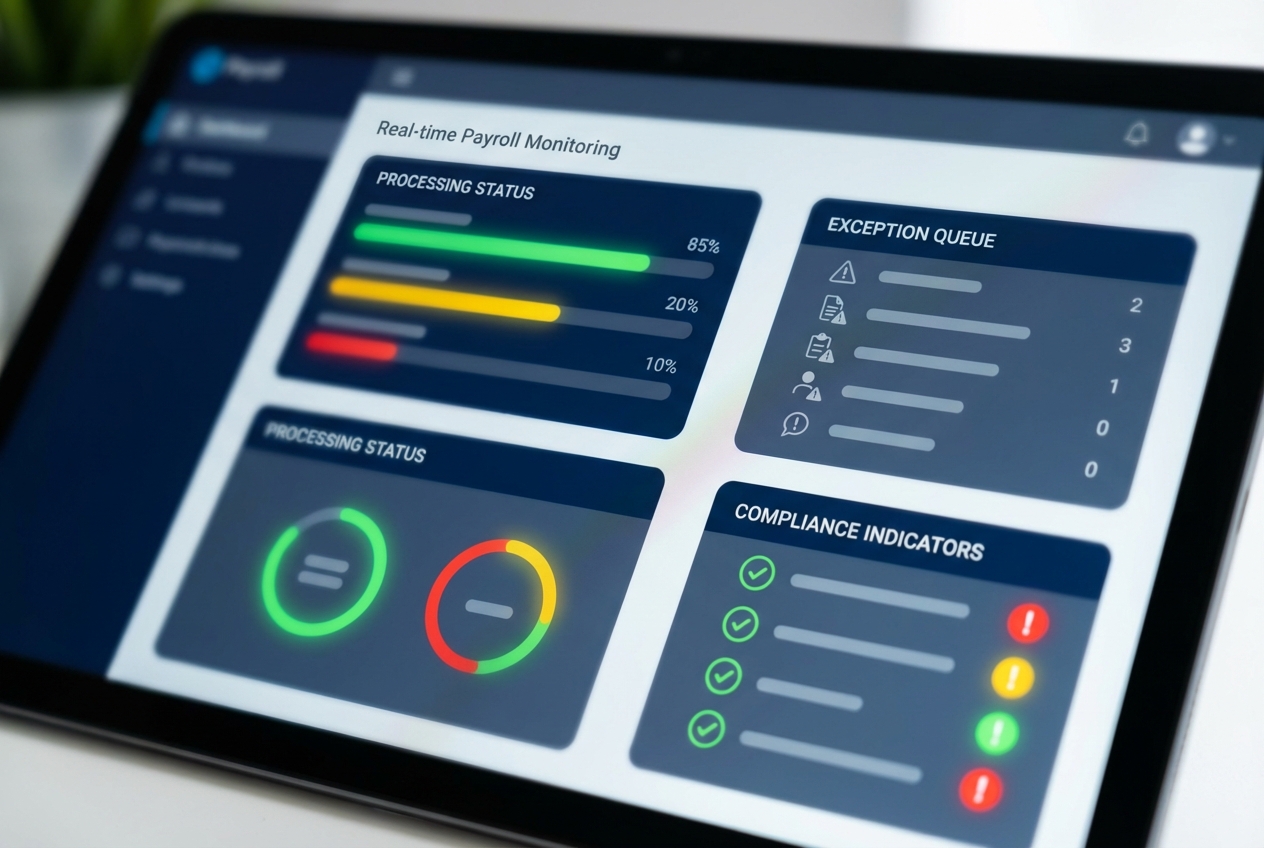
Once your parallel tests match, go live.
Then run a tight monitoring loop for the first 60 to 90 days:
- Exception review: Check the exception queue every cycle and track root causes so the same problems stop repeating.
- Approval timing: Track how often approvals are late and which step causes delays, then adjust your cutoffs or reminders.
- Filing confirmations: Confirm tax filings and receipts are being stored automatically so you have proof when you need it.
- Edge-case tracking: Watch for repeated issues around new hire timing, PTO payouts, terminations, and off-cycle checks.
This is also where lightweight automation scripts or rules can make a big difference. Even simple triggers like missing time-entry alerts or approval reminders reduce chaos.
Essential Features of a Payroll Workflow Automation System
To get real ROI, look for these capabilities:
- Automated tax filing: The platform should calculate, withhold, and file required payroll taxes. It should also store confirmation receipts so you are not hunting later.
- Time and attendance sync: Direct integrations that pull approved time automatically. This is where many payroll errors start, so eliminate manual entry early.
- Employee self-service (ESS): A portal where employees can update personal info, view pay stubs, and download tax forms. That cuts HR tickets fast.
- Global compliance engines: If you pay people in multiple countries, you need local labor law coverage, multi-currency support, and compliant documentation flows.
If you want to understand the return on investment from automation projects like this, see process automation benefits.
Prioritize exception handling over flashy dashboards. A payroll system feels automated when it tells you what is wrong, who owns the fix, and what happens next.
Common Challenges in Payroll Workflow Automation
Automation projects fail when teams automate confusion instead of fixing it first.
Industry research consistently shows that a significant portion of automation projects fail due to poor process definition. Payroll is unforgiving because mistakes hit real people.
Common pitfalls and how to handle them:
- Data silos: If systems do not talk, you still end up exporting files. Fix this early by making integrations a requirement, not a nice-to-have.
- Resistance to change: Some staff fear automation means job loss. Reframe it as protection. It removes repetitive work, reduces stress, and frees time for higher-value tasks like forecasting and improving controls.
- Complex compliance: Rules change. Locations expand. Contractors become employees. Your system must keep pace, and your workflow needs periodic reviews.
- Unclear ownership: Payroll touches HR, finance, and managers. If nobody owns each step, tasks slip. Write owners into the workflow (time approval owner, payroll reviewer, final approver).
- Messy exception handling: Off-cycle checks, reversals, retro pay, and garnishments are where "automation" breaks down. Make sure your process has an exception lane with clear steps and a place to document decisions.
- Security gaps: Payroll data is sensitive. Confirm least-privilege access, audit logs, and offboarding steps (remove access the same day someone leaves).
- Go-live timing mistakes: A rushed launch during a busy month invites errors. Choose a calmer payroll cycle, freeze changes during testing, and keep a rollback plan.
If your payroll workflow requires custom logic (like multi-step approvals, commission schedules, client billing allocations, or one-off pay runs), consider a hybrid model: keep a trusted payroll provider for payments and filings, and build a small internal layer to manage workflow and edge cases.
Conclusion
Payroll workflow automation is a foundation for a business that wants to scale without chaos. When you automate payroll the right way, you reduce errors, protect sensitive data, and give your team predictable operations.
Use the seven steps in this guide to move confidently:
- Audit what is happening now: Document inputs, approvals, outputs, and exceptions so you stop automating guesswork.
- Define integrations: Decide what systems must sync, in what direction, and on what trigger.
- Pick the right tool for your reality: Choose based on compliance, integrations, exceptions, reporting, and total cost.
- Clean your data: Validate identity, tax, pay, banking, and deductions before you migrate.
- Configure rules carefully: Write your pay, tax, and deduction logic in plain English, then configure and test it.
- Prove accuracy with parallel tests: Run side-by-side pay cycles until results match and variances are explained.
- Launch and monitor like a system owner: Track exceptions, approvals, filings, and edge cases until the workflow is stable.
If you want a fast path to building the supporting workflow layer around your payroll system, Quantum Byte can help you prototype internal tooling quickly using natural language, then bring in engineers when you need deeper integrations.
Start building your payroll ops workflow today!:

