
Manual accounts payable tasks are a quiet bottleneck in most businesses. Invoices arrive from everywhere. People retype the same fields. Approvals get stuck in inboxes. Then payments go out late, or worse, twice.
That pain has a real price tag. According to Centime, the average cost to process a single invoice manually can exceed $15. Multiply that by a few hundred invoices a month and you are burning time and cash that should be going into growth.
The good news: invoice processing automation is no longer “enterprise-only.” With modern AI-driven document processing and machine learning, you can move from data entry to oversight. That is the shift that unlocks scale.
This guide breaks down how automated invoice processing works, what to implement first, and how to avoid the common traps that stall rollouts.
What is Invoice Processing Automation?
Invoice processing automation is the use of software to manage the end-to-end lifecycle of an invoice, from the moment it arrives to the moment it is paid, with little to no human intervention.
Many teams first picture something simple, like scanning a PDF and filing it away. That is only the starting point.
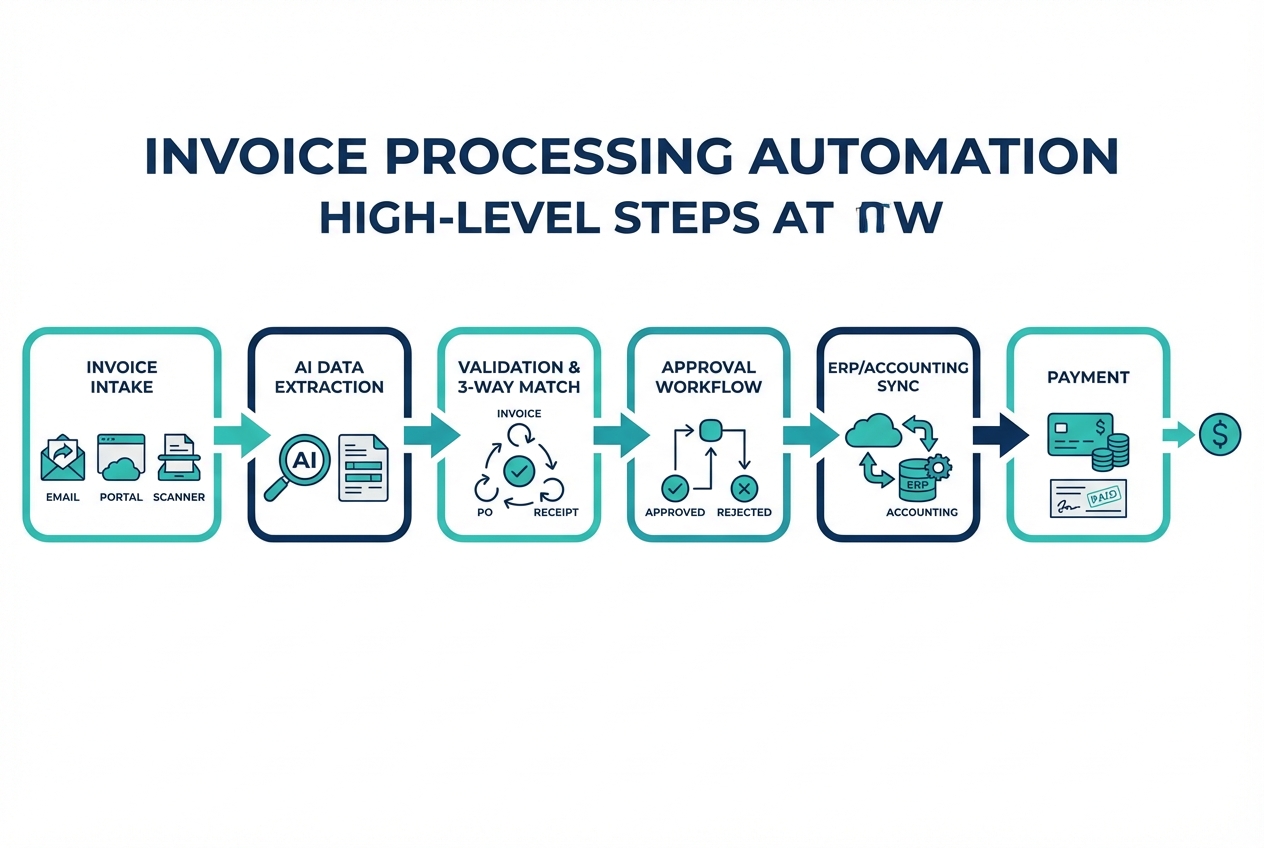
A real automated workflow typically includes:
-
Capture: Pull invoices from email, uploads, vendor portals, or scanners.
-
Extraction: Read invoice fields (vendor, date, totals, tax, line items).
-
Validation: Check the data against your records and business rules.
-
Matching: Match invoices to purchase orders and receipts when applicable.
-
Approvals: Route to the right people automatically.
-
Posting and payment: Sync to your ERP/accounting system, then pay.
The automation gets powerful when the system can understand context, not just characters. That is where machine learning for finance matters. It learns from corrections, patterns, and vendor-specific quirks so accuracy improves over time.
Automation moves finance teams from manual entry to strategic oversight, where humans focus on exceptions and decisions, not copying numbers.
How Invoice Processing Automation Works: Step-by-Step
Below is the high-level flow you are building. Think of it as a conveyor belt. A practical target is touchless processing for clean invoices, with fast human review only when something looks off.
Step 1: Intelligent Data Capture and Extraction
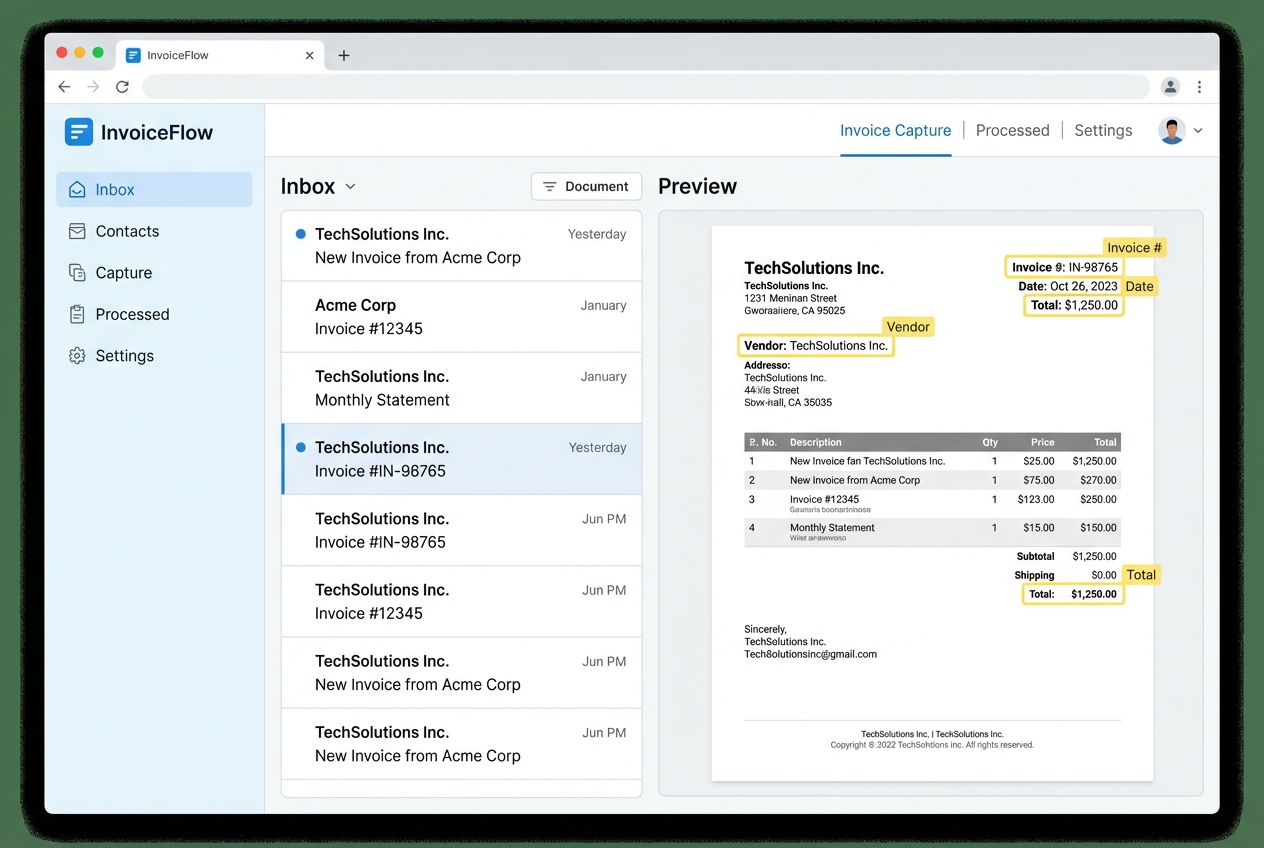
Invoices come in through multiple channels. Your automation system should ingest all of them:
-
Email attachments: Pull invoices from shared AP inboxes so nothing gets lost in personal email threads.
-
Vendor portals: Import invoices from supplier sites via downloads or APIs, reducing manual chasing.
-
Paper invoices: Scan and convert paper into digital invoices so they follow the same automated path.
-
Shared drives or upload forms: Let teams upload invoices in one place when email is not the source of truth.
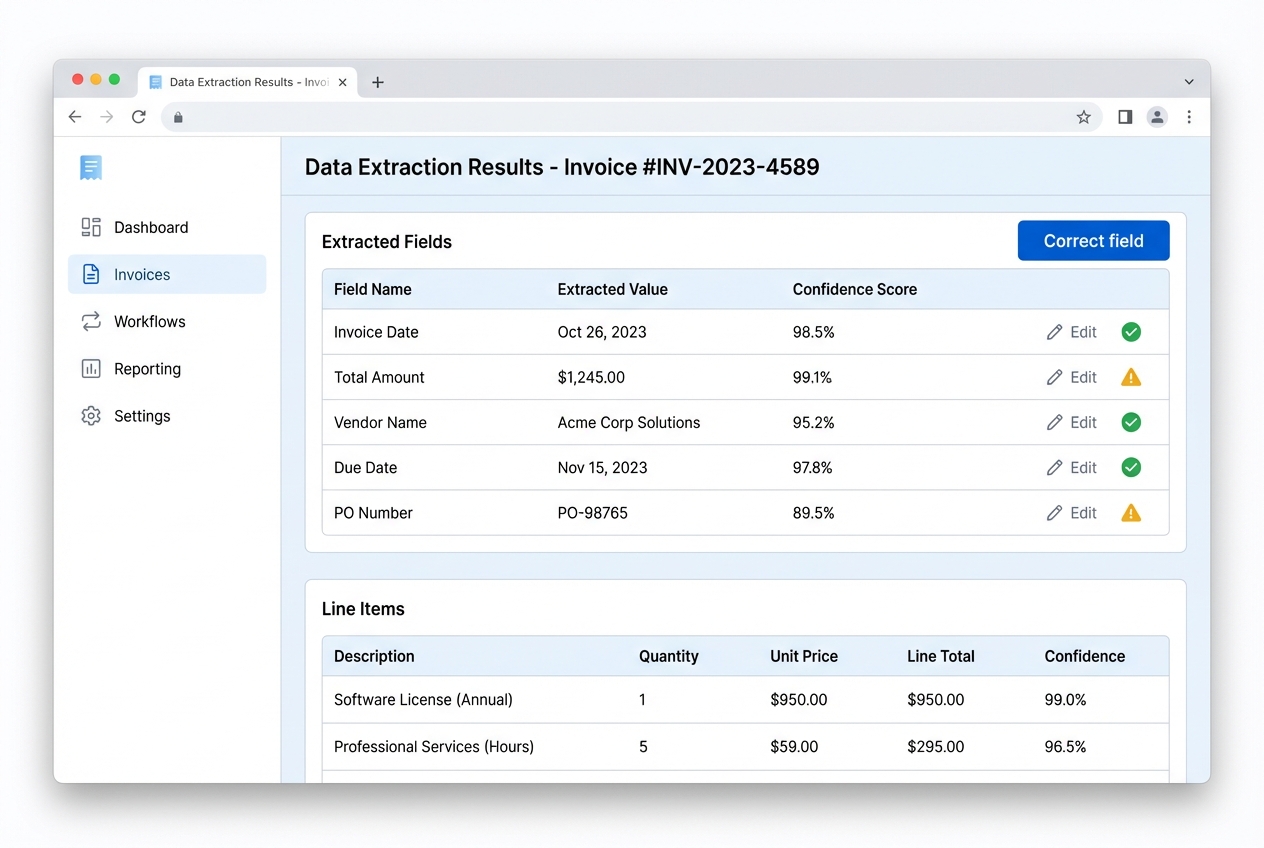
Once ingested, the system extracts key fields. This is where many teams confuse OCR with modern AI extraction:
-
Traditional OCR: Reads text from an image. It often needs templates and struggles with messy layouts.
-
AI-powered extraction: Reads meaning. It can identify vendor names, tax IDs, invoice numbers, and line items even when the layout changes.
Practical tip: aim for “fast corrections” more than “perfect extraction.” If your team can fix a field in 5 seconds, the model can learn and your accuracy climbs quickly.
Step 2: Automated Validation and Two/Three-Way Matching
After extraction, the system validates the invoice before it ever hits an approver.
Validation typically checks:
-
Vendor existence: Confirm the supplier exists in your master vendor file so you do not route payments to unknown entities.
-
Duplicate invoice numbers: Block repeat submissions that can trigger duplicate payments.
-
Math accuracy: Verify totals add up (subtotal + tax + shipping) so you catch errors immediately.
-
Tax and currency sanity: Ensure tax IDs, rates, and currencies make sense for the vendor and region.
-
Payment terms alignment: Flag mismatches between the invoice terms and the terms you have on file.
Then comes matching:
-
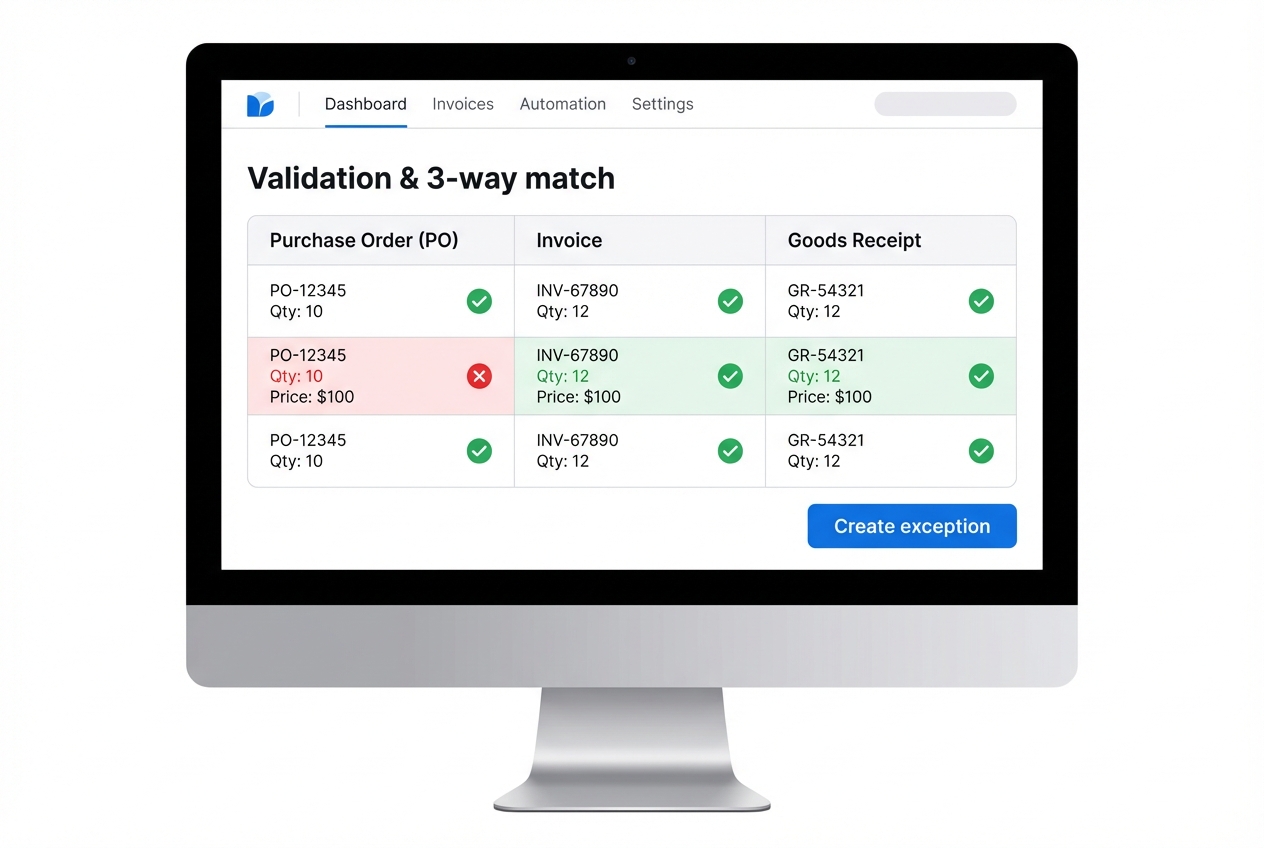
Two-way match: Compare invoice vs. Purchase Order (PO) to confirm what was ordered matches what is billed.
-
Three-way match: Compare invoice vs. PO vs. Goods Received Note (GRN) or receiving record to confirm what was billed also matches what was received.
This is how you prevent duplicate payments and reduce fraud. NetSuite explains how invoice automation and matching reduce errors and surface discrepancies early.
What happens if it does not match? You do not want chaos. You want an exception queue with clear reasons like “missing PO,” “price variance,” or “quantity variance.”
Step 3: Dynamic Approval Routing Workflows
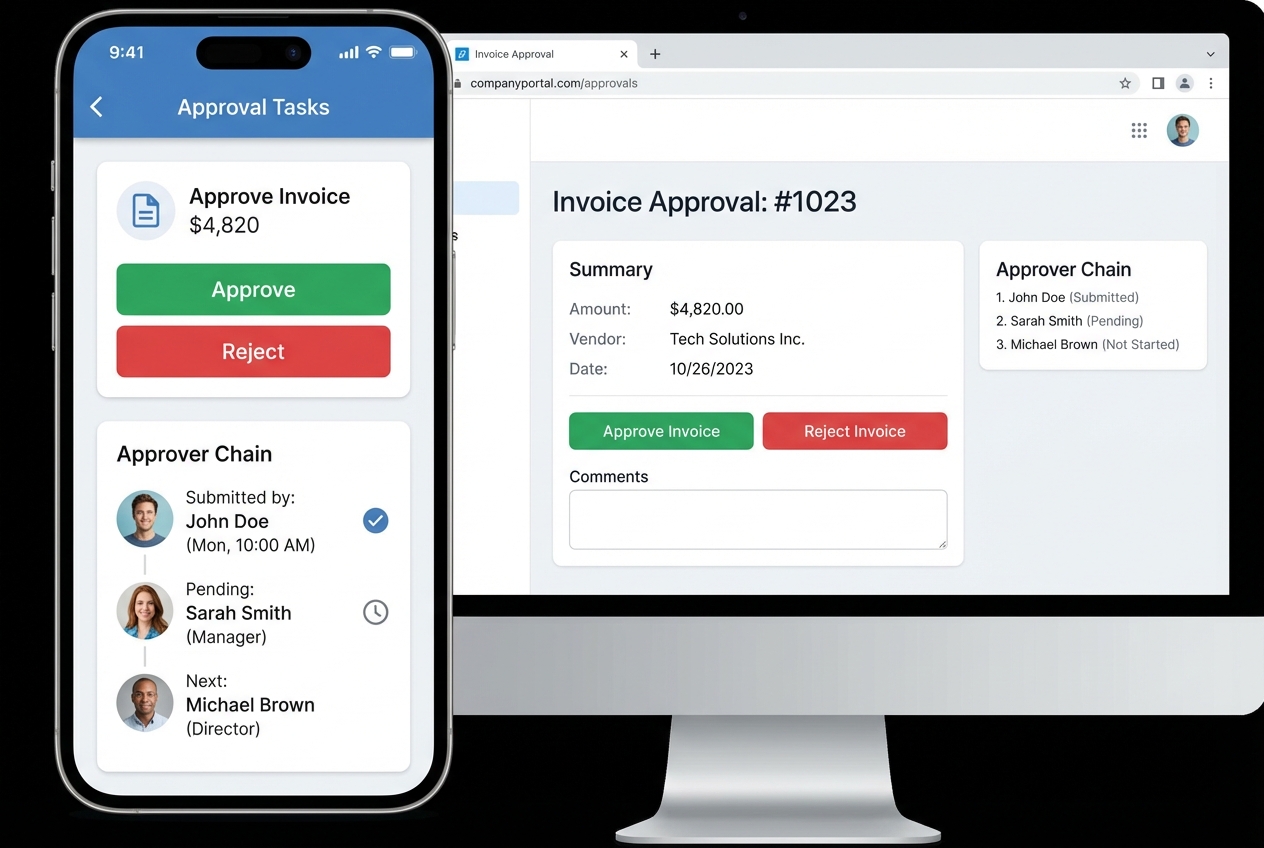
Once an invoice passes validation (or lands in an exception path), it needs approvals. This is where cycle time usually dies in manual AP.
Modern routing uses rules like:
-
Amount thresholds: Route based on spend limits (example: over $5,000 requires Controller approval).
-
Department or cost center: Send invoices to the correct leader (example: marketing invoices go to the marketing head).
-
Project codes: Route spend tied to projects or clients to the right owner for context and sign-off.
-
Vendor risk tier: Add extra scrutiny for new vendors, vendor changes, or vendors with higher fraud risk.
Mobile approvals are a big lever here. When the right person can approve in 20 seconds from their phone, your entire cash cycle tightens.
A simple mindset helps: approvals should be predictable. If your approvers need to “think about where this goes,” the system is not finished.
Step 4: Final Payment and ERP Integration
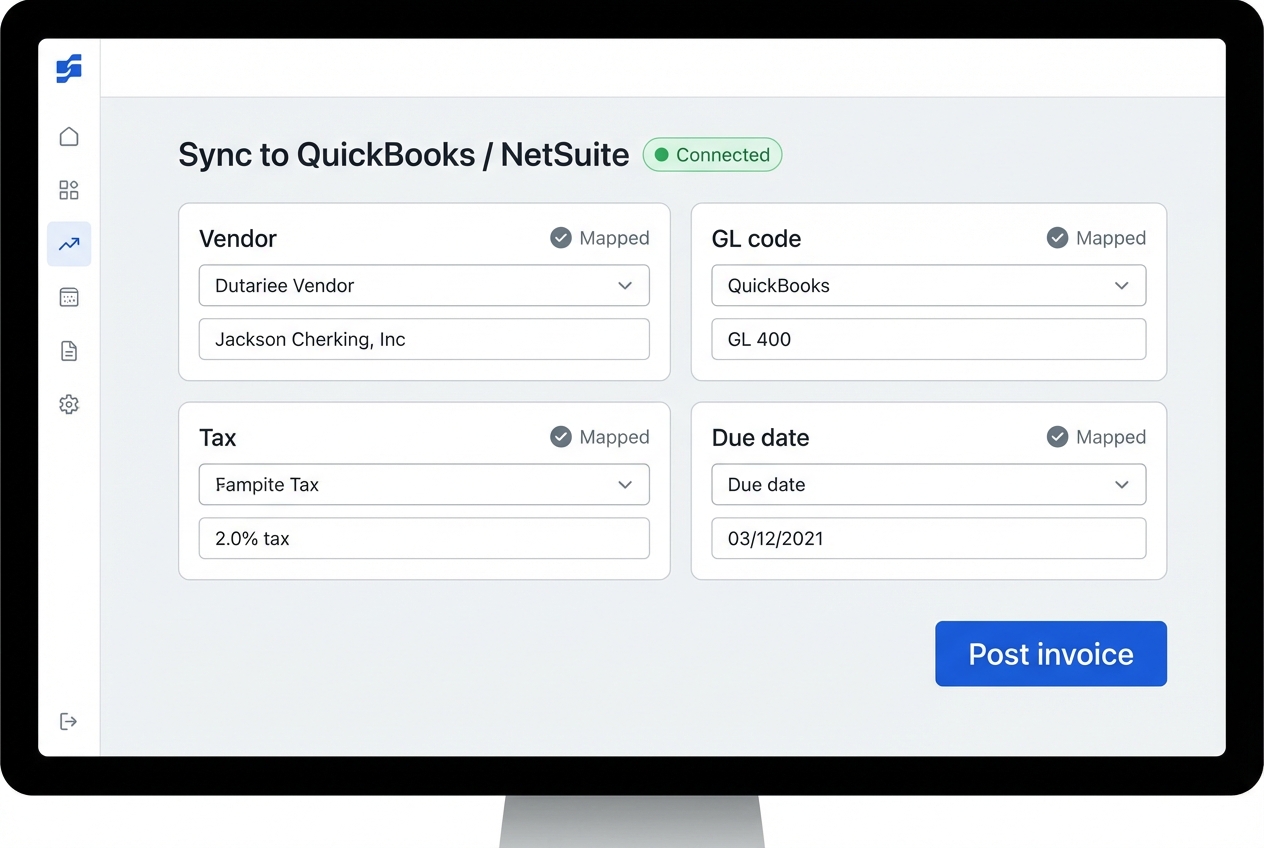
After approvals, the system posts the invoice into your accounting software or ERP. This is where automation becomes real, because your books update without retyping.
Typical integration tasks:
-
Field mapping: Map invoice fields to ERP fields (vendor, GL codes, tax, due date) so posting is consistent.
-
Two-way status sync: Keep invoice states aligned across systems (approved, posted, paid) to avoid duplicate work.
-
Audit trail creation: Store who approved, when they approved, and what changed for compliance and accountability.
-
Payment handoff: Trigger payment runs or hand off clean data to your payment tool so payment execution is predictable.
Integrating these systems is a core part of business process optimization. If the integration is brittle, your team will quietly fall back to spreadsheets. So treat this step as foundational, not “nice to have.”
Essential Features of Invoice Processing Automation Software
Not every tool is built for scale. Here are the features that matter most when you want touchless processing (and not just digitized paperwork):
-
AI and Machine Learning: Learn from past corrections and improve extraction accuracy over time so exceptions shrink month over month.
-
Vendor Portals: Let suppliers check invoice and payment status on their own, which cuts “did you get my invoice?” emails.
-
Scalability: Handle thousands of invoices without slowing down at month-end, when you can least afford it.
-
Audit Trails: Maintain a digital history for compliance and tax purposes, including who touched what and what changed.
If you need help selecting the right stack (and making sure it matches how your business actually runs), AI consulting services can help you avoid expensive dead ends.
Strategic Benefits of Invoice Processing Automation
Automation is not just about speed. It is about control.
Here are the big wins you can expect:
-
Cost reduction: Lower labor cost per invoice, fewer late fees, and less time chasing approvals. This is where the $15-per-invoice problem starts to disappear.
-
Early payment discounts: Process invoices fast enough to consistently capture 2/10 Net 30 discounts, especially with high-volume vendors.
-
Enhanced data integrity: Reduce transcription errors so your financial reporting is cleaner and more trustworthy. Pair this with data automation strategies for stronger dashboards.
-
Improved cash flow visibility: Track liabilities in near real time so you can make decisions with confidence, not guesses.
The biggest benefit is mental clarity. When AP is calm, you make better decisions everywhere else.
How to Deploy Invoice Processing Automation in 5 Steps
These steps are the shortest path to a rollout that sticks. Each step is designed to reduce risk and get your team to real value quickly.
1. Assess Your Current State
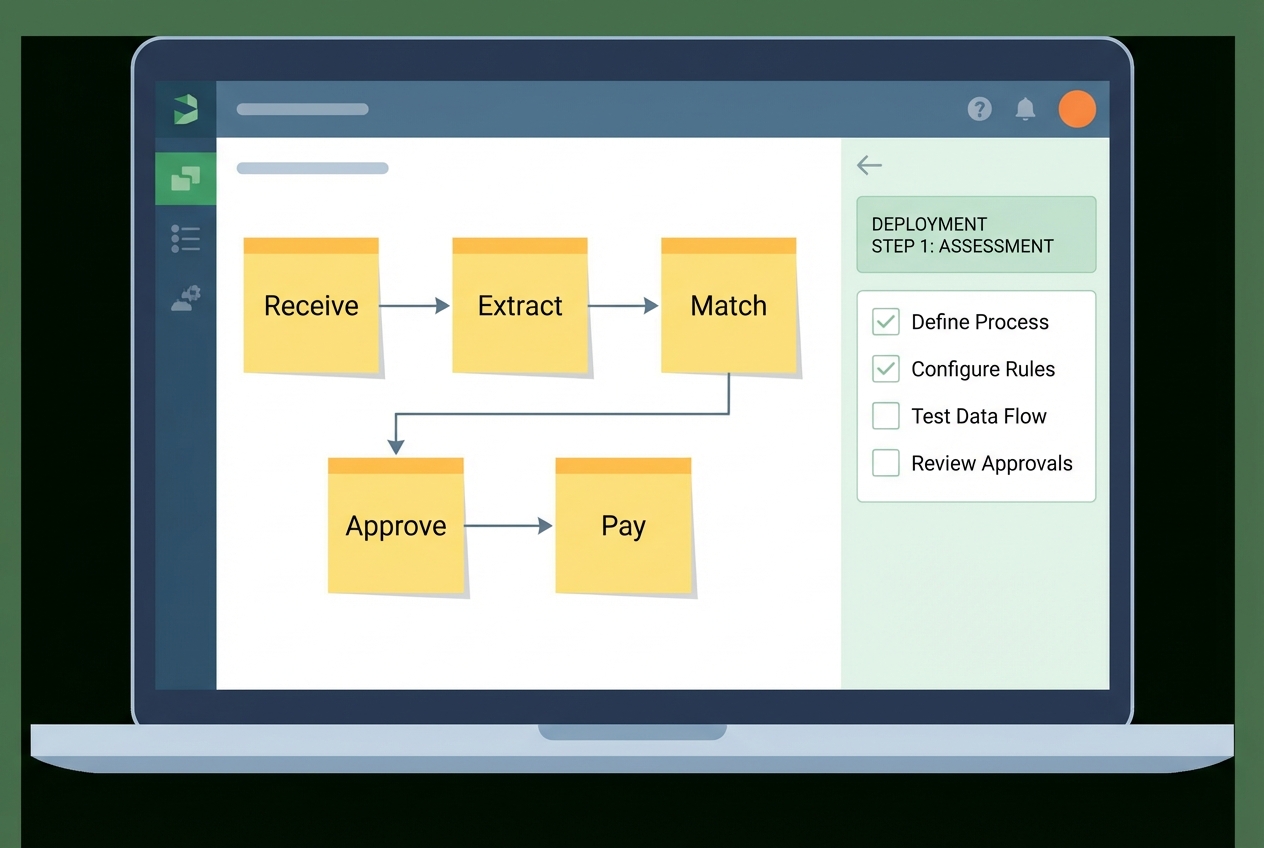
Document every touchpoint an invoice currently goes through. Do not guess. Watch it happen.
Capture details like:
-
Invoice entry points: Note where invoices arrive (email, mail, portal) so intake is complete.
-
Data entry locations: Track who enters data and where it gets typed (ERP, spreadsheets, inbox notes).
-
Approval logic: Record what approvals happen and why, including unwritten rules people follow.
-
Exception handling: Document what happens when things do not match, and who resolves it.
-
Time-in-step: Measure how long each stage takes so you know where the real bottleneck lives.
Deliverable to aim for: a one-page map that shows “invoice in” to “payment out,” plus the top 10 reasons invoices get stuck.
2. Clean Your Master Vendor File
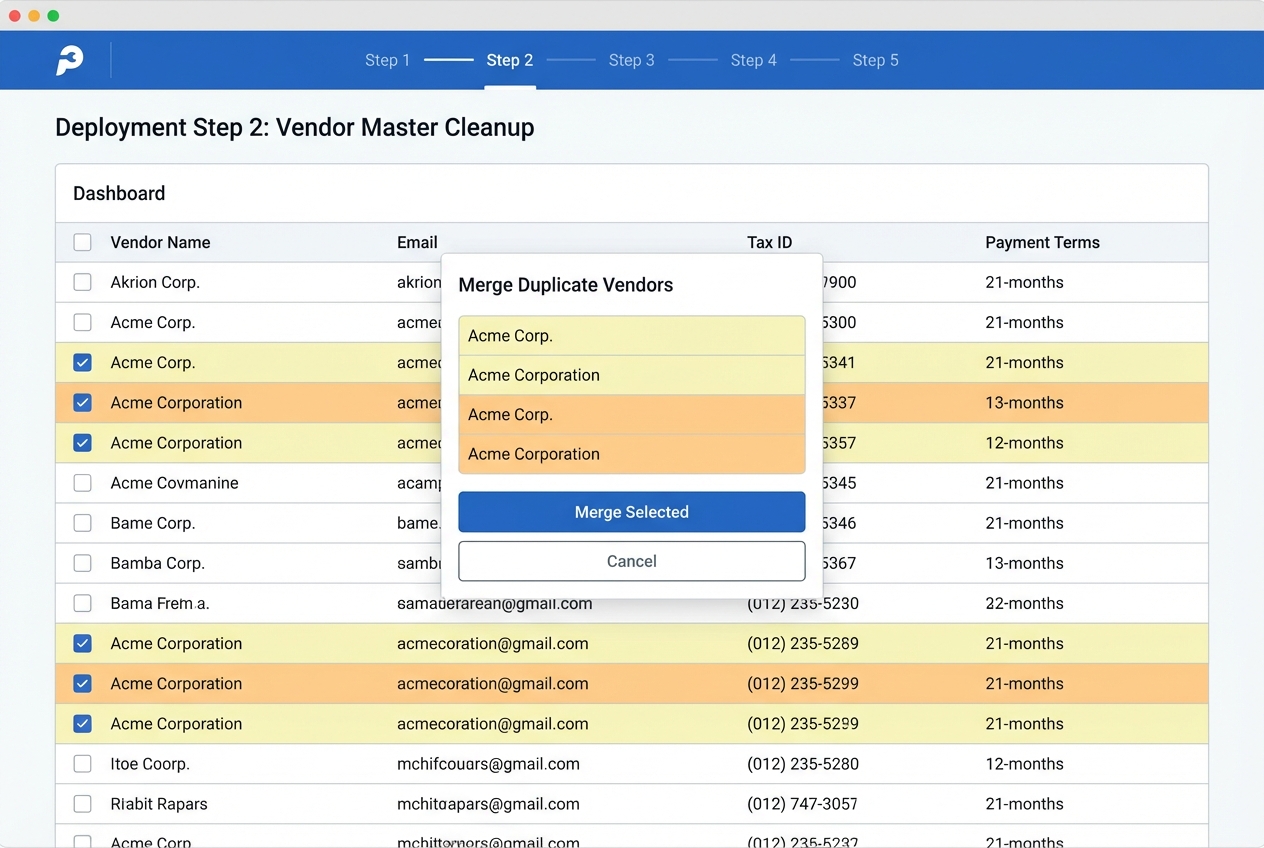
Automation magnifies whatever is already in your data. If your vendor list is messy, your exceptions will explode.
Before you migrate to enterprise AI solutions, clean your vendor master:
-
Duplicate removal: Merge vendors that are the same company but spelled differently.
-
Contact fixes: Update missing emails, remittance info, and payment contacts so routing works.
-
Data standardization: Standardize tax IDs and addresses to reduce false mismatches.
-
Coding defaults: Confirm default GL codes (if you use them) to reduce manual coding work.
3. Define User Roles
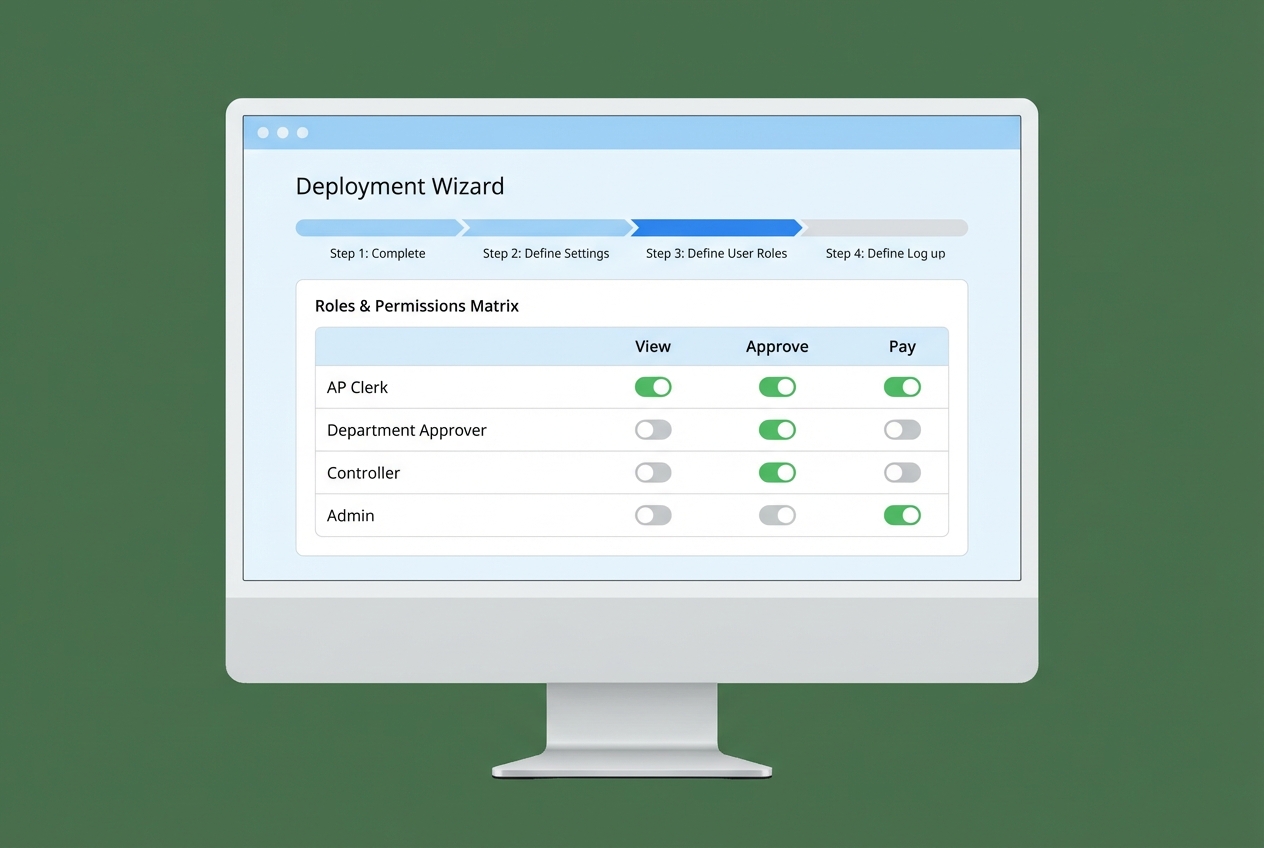
Be explicit about who can do what. This is both a security issue and a speed issue.
At a minimum, define:
-
View-only users: People who need visibility but should not be able to change or approve anything.
-
AP processors: Team members who can correct fields and manage exceptions, but cannot authorize payments.
-
Approvers: Department leads who approve spend for their budgets and projects.
-
Payment authorizers: Controller/CFO roles that authorize releases of funds.
-
Admins: People who manage workflows, rules, integrations, and security settings.
4. Set Up Exception Rules
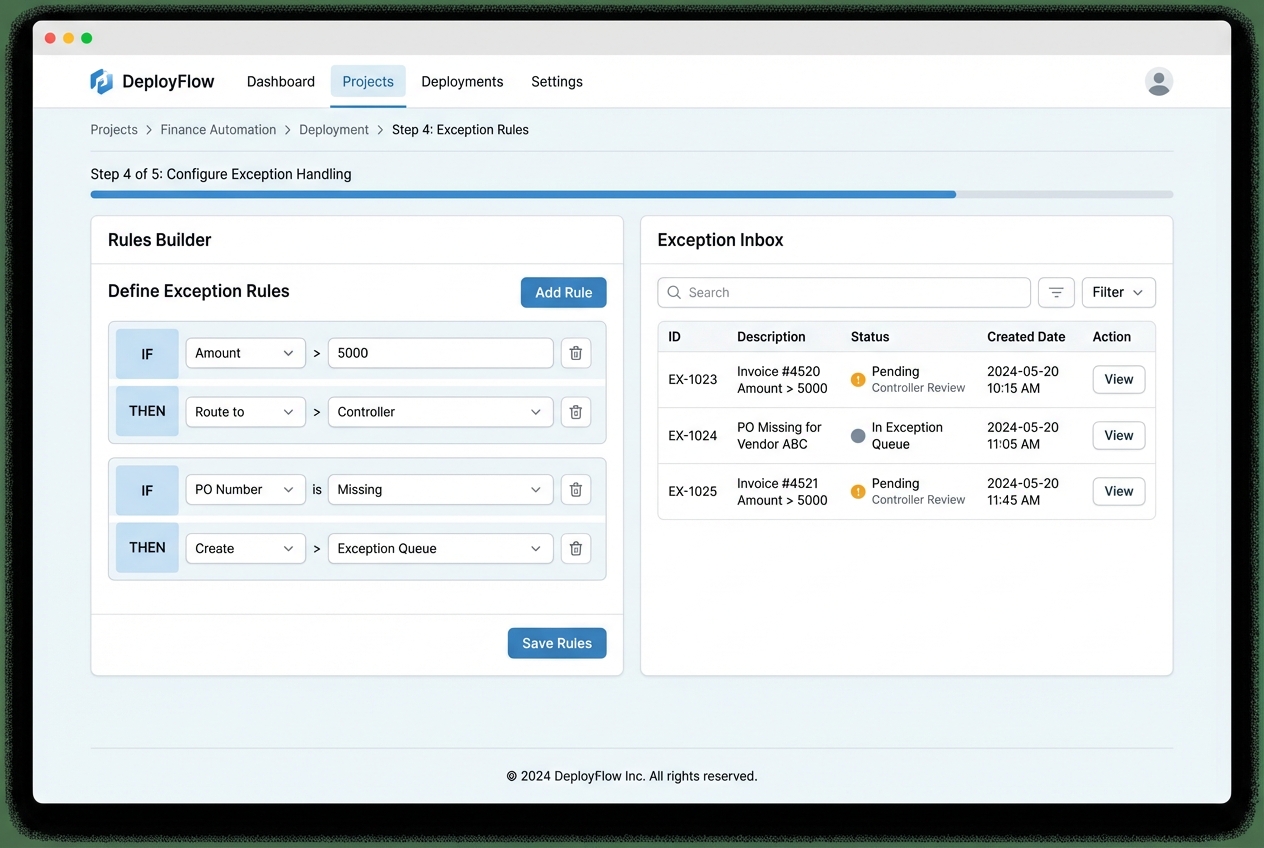
Exceptions are normal. The mistake is treating them as surprises.
Define what happens when:
-
Missing PO: Decide whether it routes to a requester, a manager, or procurement for cleanup.
-
Price variance: Set thresholds (percent or dollar) that trigger reviews so you do not overpay.
-
Quantity mismatch: Route to receiving or operations so the “what actually arrived” question gets answered.
-
New or flagged vendor: Add extra checks for bank changes, first-time vendors, or high-risk categories.
-
Duplicate invoice: Quarantine duplicates automatically and require confirmation before any payment can proceed.
Build a clear exception inbox and make ownership obvious.
This is also where a custom workflow can be a competitive advantage. If your approval logic is unique (client billing, project-based spend, or complex subcontractor flows), Quantum Byte can help you build a tailored process quickly, then harden it with a dev team when needed.
5. Employee Training
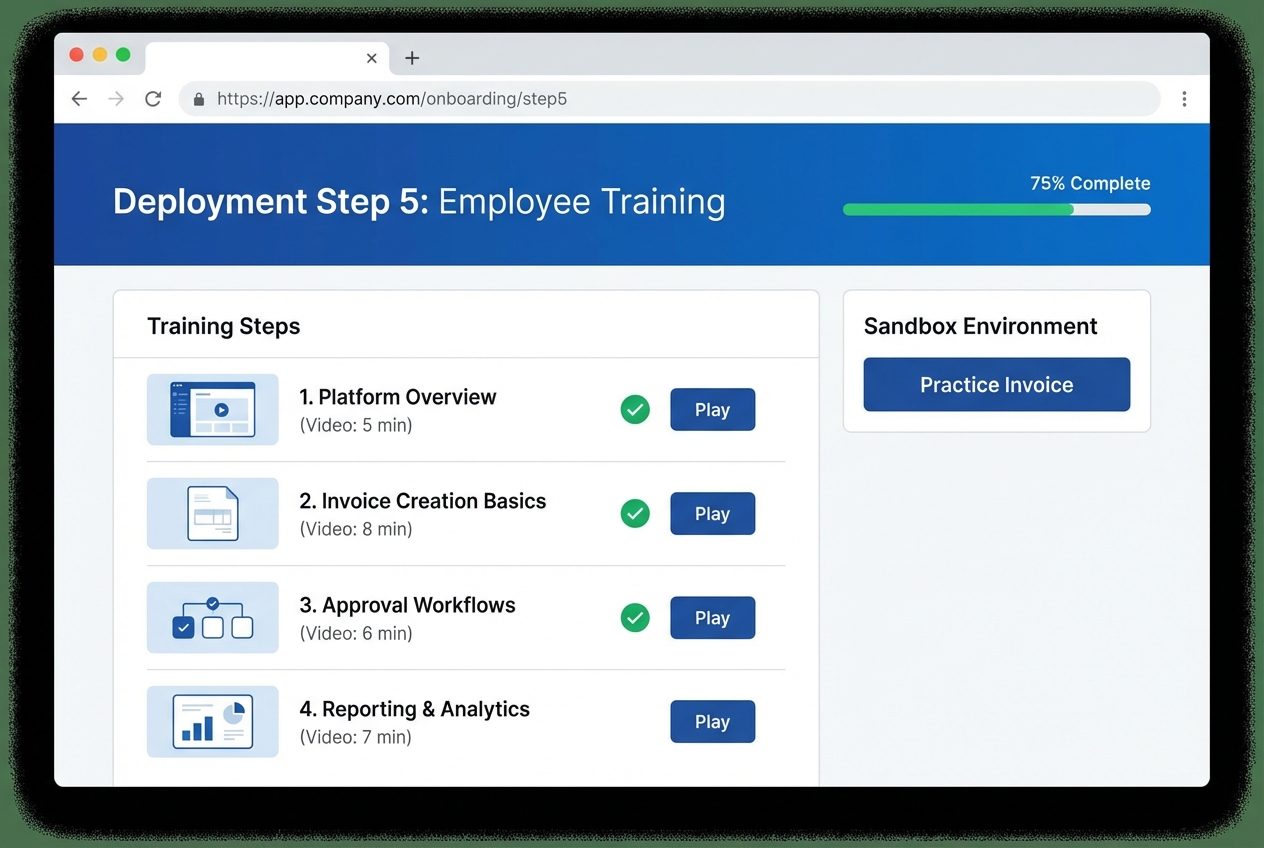
Effective training focuses on reframing the process rather than just explaining where to click.
Your goal is to show your team:
-
Daily workflow changes: What steps disappear, what steps remain, and where exceptions live.
-
Controls and accountability: What approvals still matter and how audits work in the new system.
-
Time-saving habits: How to correct fields quickly and teach the system (so accuracy improves).
-
Red-flag responses: What to do when something looks wrong, including escalation paths.
Overcoming Challenges in Automated Invoice Management
Every automation project hits friction. The difference between success and shelf ware is planning for it early.
-
Handling edge cases: Handwritten invoices, low-quality scans, and complex multi-page invoices will happen. Build an exception workflow that makes these easy to route and resolve. Also track them by reason, so you can reduce them over time.
-
Change management: Some employees will worry automation means replacement. Lead with the real outcome: fewer boring tasks and fewer end-of-month emergencies. Tie the rollout to a broader digital transformation goal like faster closes or better cash forecasting.
-
Data security: Invoices contain sensitive information. Require encryption in transit and at rest, strong access controls, and SOC 2 compliant hosting. Also ask about audit logs and how long data is retained.
Final note
Invoice processing automation is one of the cleanest “buy back your time” moves you can make in operations. When AP becomes a system, not a scramble, you free up focus for product, sales, and customer experience.
Start small. Pick one high-volume vendor group. Get the workflow tight. Then scale it across the business.

