
Manual invoicing is a silent killer of business growth. Late payments don’t just feel annoying, they shrink your options. You delay hiring. You pause marketing. You spend nights chasing money you already earned.
Accounts receivable automation changes that. Done well, it turns your invoice-to-cash cycle into a predictable engine. Finance teams often reclaim a big chunk of their week and bring down Days Sales Outstanding (DSO), which is the average number of days it takes to get paid after you invoice.
Recent shifts toward digital-first payments have also raised the bar. Customers expect fast invoices, simple payment links, and clear reminders. Manual collections can’t keep up once you start scaling.
This guide walks you through what AR automation is, the financial impact, how to implement it in 5 steps, and how AI is changing the AR game.
What is Accounts Receivable Automation?
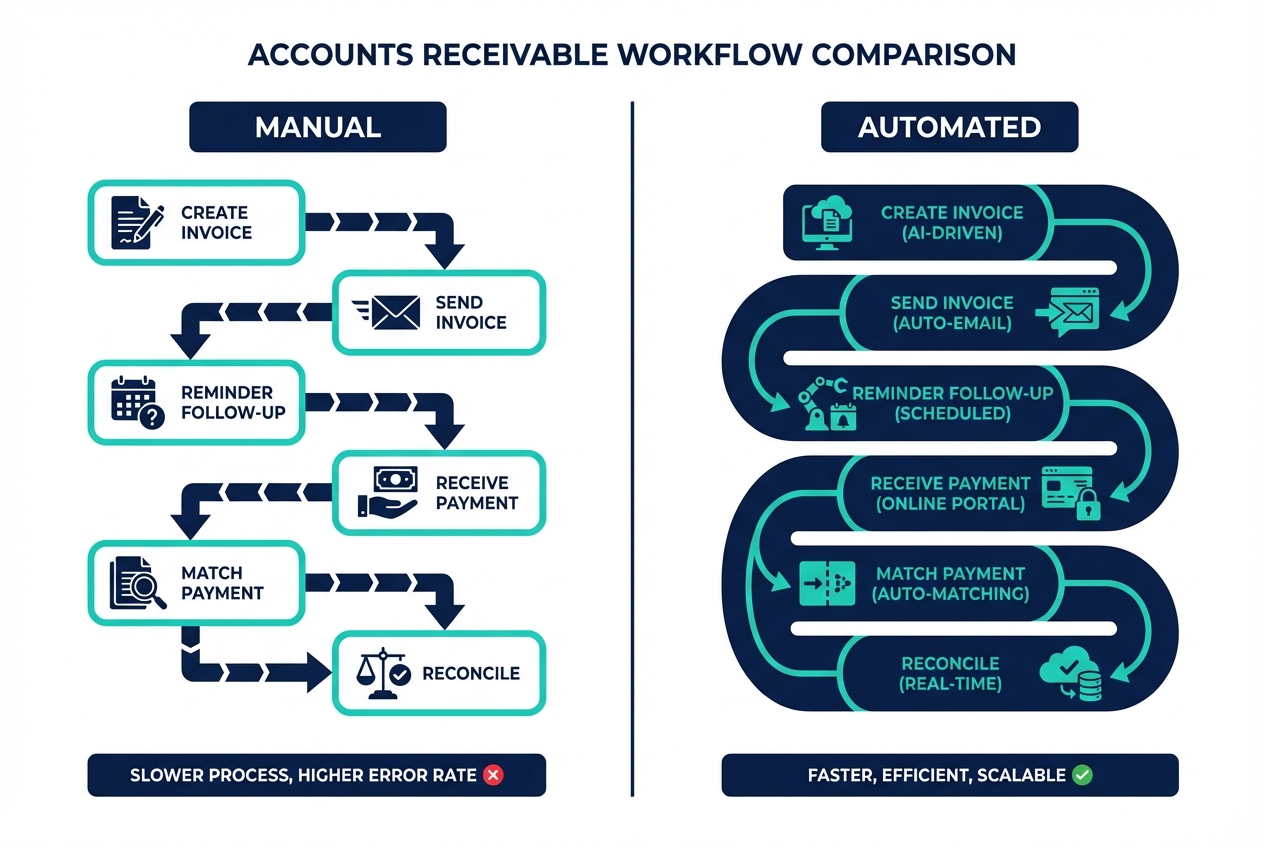
Accounts receivable automation is the use of software to digitize and streamline the end-to-end collections process. It typically covers:
-
Invoice generation and delivery: Create invoices from your accounting system and send them automatically by email or portal.
-
Automated reminders and follow-ups: Trigger nudges before and after due dates so customers pay without you chasing.
-
Online payments: Let customers pay via ACH, card, or wallets directly from the invoice link.
-
Cash application: Match payments to open invoices automatically so your books stay current.
-
Reconciliation and reporting: Keep your ledger clean and track performance without manual spreadsheets.
The goal is simple: remove manual touchpoints so you get fewer errors, fewer “I didn’t see the invoice” excuses, and faster cash in the bank.
For growing teams, this is a core part of operational maturity. It’s also a practical way to make financial workflow optimization a standard operating system, not a hero effort from you or your bookkeeper.
The Financial Impact of Accounts Receivable Automation
AR automation directly improves cash flow and reduces admin time.
A few real-world impacts you can expect:
-
Lower processing costs: Less manual entry, fewer corrections, and fewer hours spent reconciling.
-
Faster payments: Invoices go out immediately, reminders go out consistently, and payment is easier.
-
Better visibility: You stop guessing which customers are late and why.
-
Less risk: Cleaner records reduce disputes and missed follow-ups.
If you are a founder or solopreneur, here’s the hidden win: you buy back focus. You stop context-switching between delivery, sales, and collections. That alone can change your growth trajectory.
How to Implement Accounts Receivable Automation in 5 Steps
Before you jump into tools, anchor on one truth: automation only works when it matches your real workflow. Not the workflow you wish you had.
Here’s the high-level picture you’re aiming for:
Step 1: Map Your Current AR Workflow
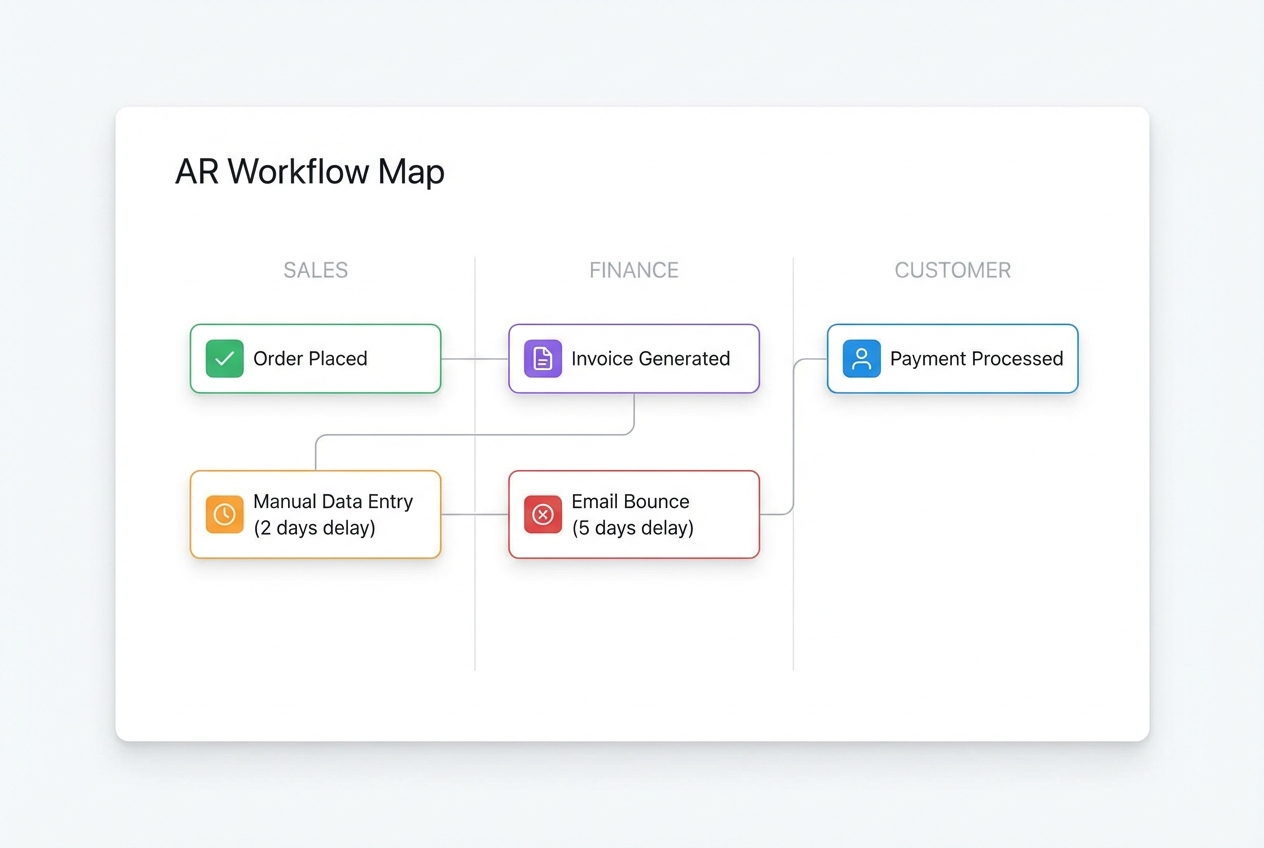
Start by documenting what happens today, from “service delivered” to “money received.”
Include:
-
Responsibility: Identify who creates invoices and who approves them.
-
Customer data source: Note where billing details live (CRM, spreadsheet, email threads) and who maintains them.
-
Invoice delivery: Capture how invoices are sent (email, portal, EDI) and how you confirm delivery.
-
Reminder process: Record when reminders go out, who sends them, and what gets said.
-
Payment matching: Write down how payments are recorded and matched to invoices.
-
Exceptions handling: Document how disputes, partial payments, and credits are handled.
Your goal is to identify delays, not to blame people.
Common bottlenecks you’ll usually find:
-
Data entry mistakes: Wrong PO number, wrong contact, wrong terms, or missing reference fields.
-
Draft pile-ups: Invoices created but stuck in drafts because nobody owns the last step.
-
Inconsistent reminders: Follow-ups are awkward to send, so they get delayed or skipped.
-
Slow cash application: Payments arrive but sit unmatched for days, which hides the truth in your reports.
-
No clear past-due owner: Overdue invoices drift because nobody is accountable for escalation.
Step 2: Choose Your Software Solution
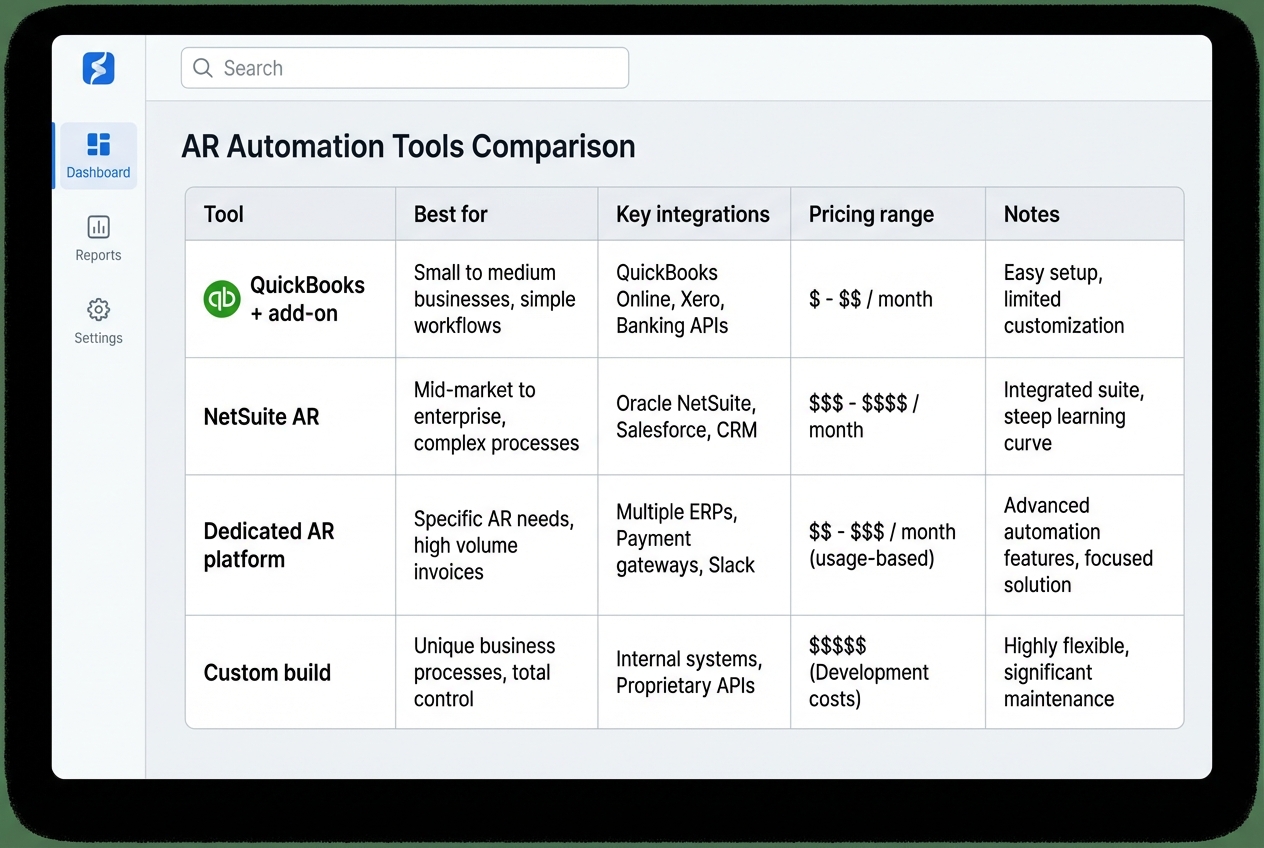
Pick a platform that fits your current accounting stack and your next stage of growth.
At a minimum, you want:
-
Accounting integration: Sync invoices, customers, and payments so you are not double-entering data.
-
Automated reminders: Build a cadence once and let it run consistently.
-
Online payment options: Add pay links so customers can settle invoices fast.
-
Clear reporting: See DSO and aging at a glance, without spreadsheet gymnastics.
If you want to move fast with minimal friction, prioritize tools that align with broader business process automation. That means automating the handoffs too, not just the invoice email.
A practical way to shortlist options is to use a simple comparison table so you avoid analysis paralysis:
| Option | Best for | Key integrations | Typical effort | Trade-offs |
|---|---|---|---|---|
| Accounting add-on | Basic AR needs | QuickBooks/Xero | Low | Limited workflows and customization |
| ERP-native AR | Complex finance ops | NetSuite/SAP | Medium | Powerful, but setup can be heavy |
| Dedicated AR platform | Strong collections focus | ERPs + CRMs | Medium | Another system to manage |
| Custom build | Unique workflows | API-based | Medium to High | Best fit, but needs a build partner |
If your business has a unique AR flow (subscriptions plus usage billing, multi-entity invoicing, complex approvals, or customer-specific rules), a standard AR tool may force you into workarounds.
In those cases, it can be faster to prototype a custom AR layer. Quantum Byte’s AI app builder can help you turn a plain-English workflow into a working internal tool in days, then their dev team can handle the tricky edges like integrations and permissions when needed.
Step 3: Integrate with Accounting and ERP Systems
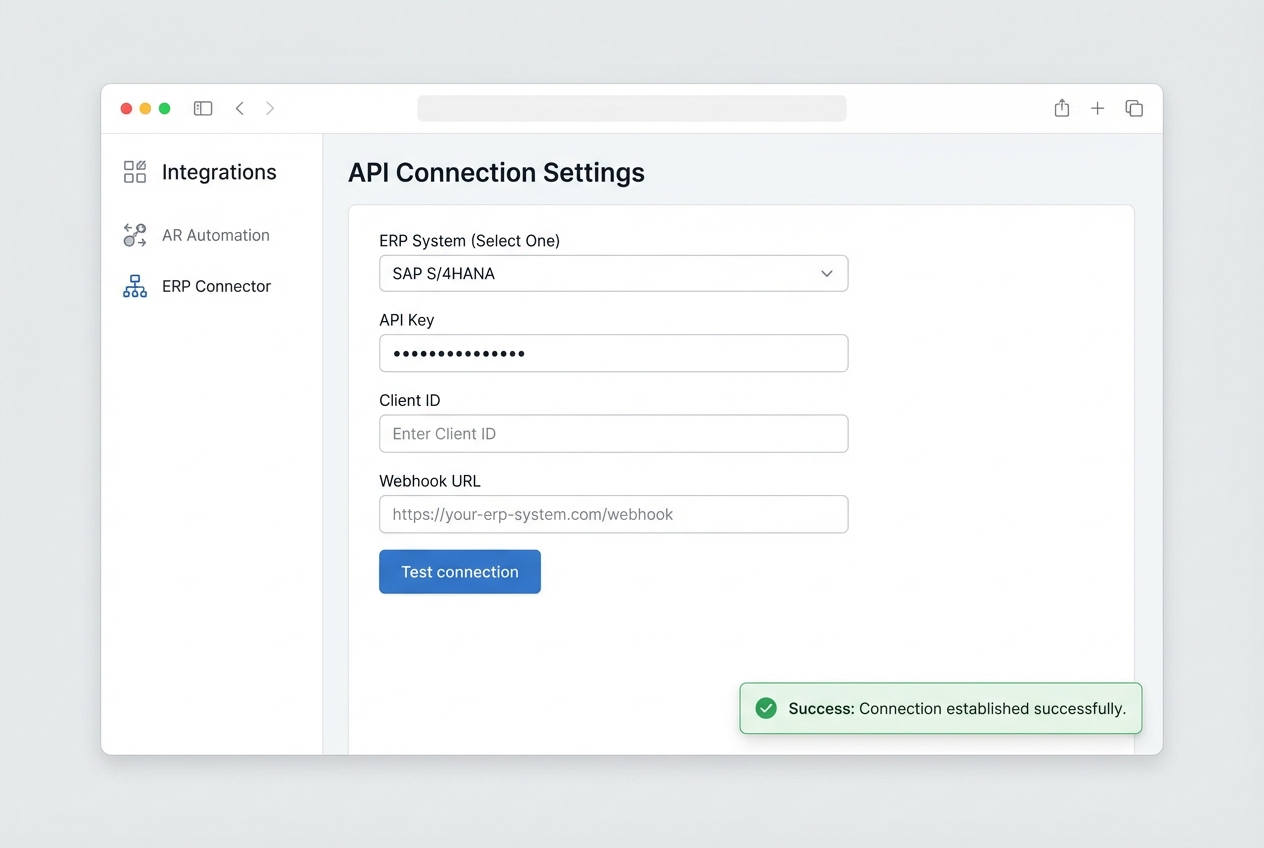
Automation breaks if your data is split across systems.
Your goal is a single source of truth for:
-
Customer records: Customers and billing contacts, including who should receive invoices and reminders.
-
Invoice status: Draft, sent, viewed, paid, partial, overdue, and written off.
-
Payment details: Amount, method, date, and reference.
-
Credits and adjustments: Credit memos, discounts, and corrections.
Most modern tools connect via API, which is a secure way for systems to exchange data automatically.
Implementation tips that prevent headaches later:
-
Start with a sandbox: Test with fake data first so you don’t corrupt your books.
-
Define field ownership: Decide which system is “master” for billing emails and payment terms.
-
Plan for exceptions: Partial payments and credits need explicit rules, or you’ll create manual clean-up work.
Step 4: Configure Automated Reminders and Workflows
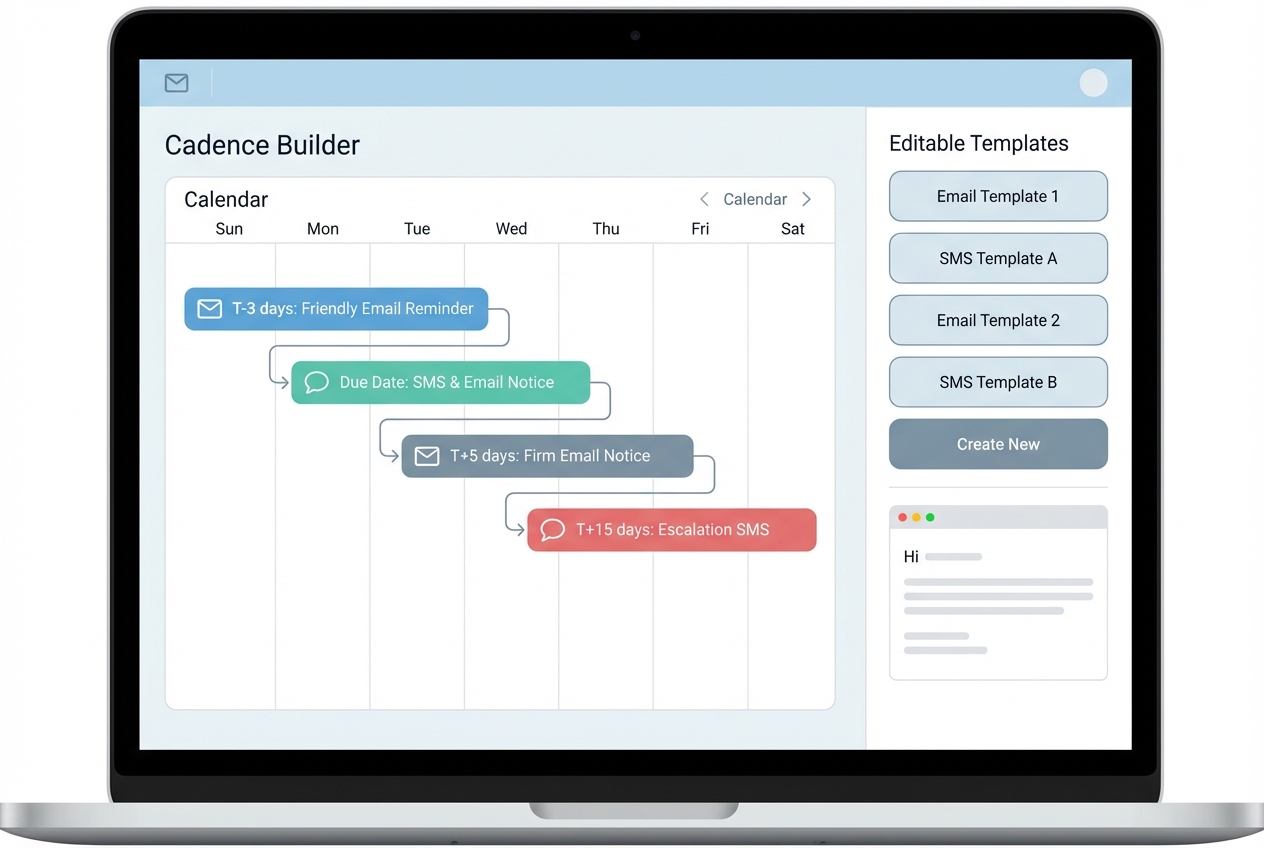
This is where DSO usually drops.
A reminder cadence removes awkwardness and inconsistency. It also creates a paper trail that helps with disputes.
A solid starting cadence:
-
3 days before due: Friendly heads-up with invoice link.
-
On due date: Clear “due today” reminder with payment options.
-
5 days past due: Firm reminder plus next-step language (late fees, service pause, escalation policy).
-
15 days past due: Escalation step (call, pause service, or route to finance lead).
Keep your templates short. Make payment easy. Remove friction.
A few tactical ideas:
-
Direct links: Include a one-click pay link so customers don’t hunt for details.
-
Lower-fee methods: Offer ACH where possible because it’s often cheaper than cards for B2B payments.
-
Clear subject lines: Use subjects like “Invoice #1234 due Friday” so the customer instantly knows what the email is about.
Step 5: Monitor Performance and Optimize
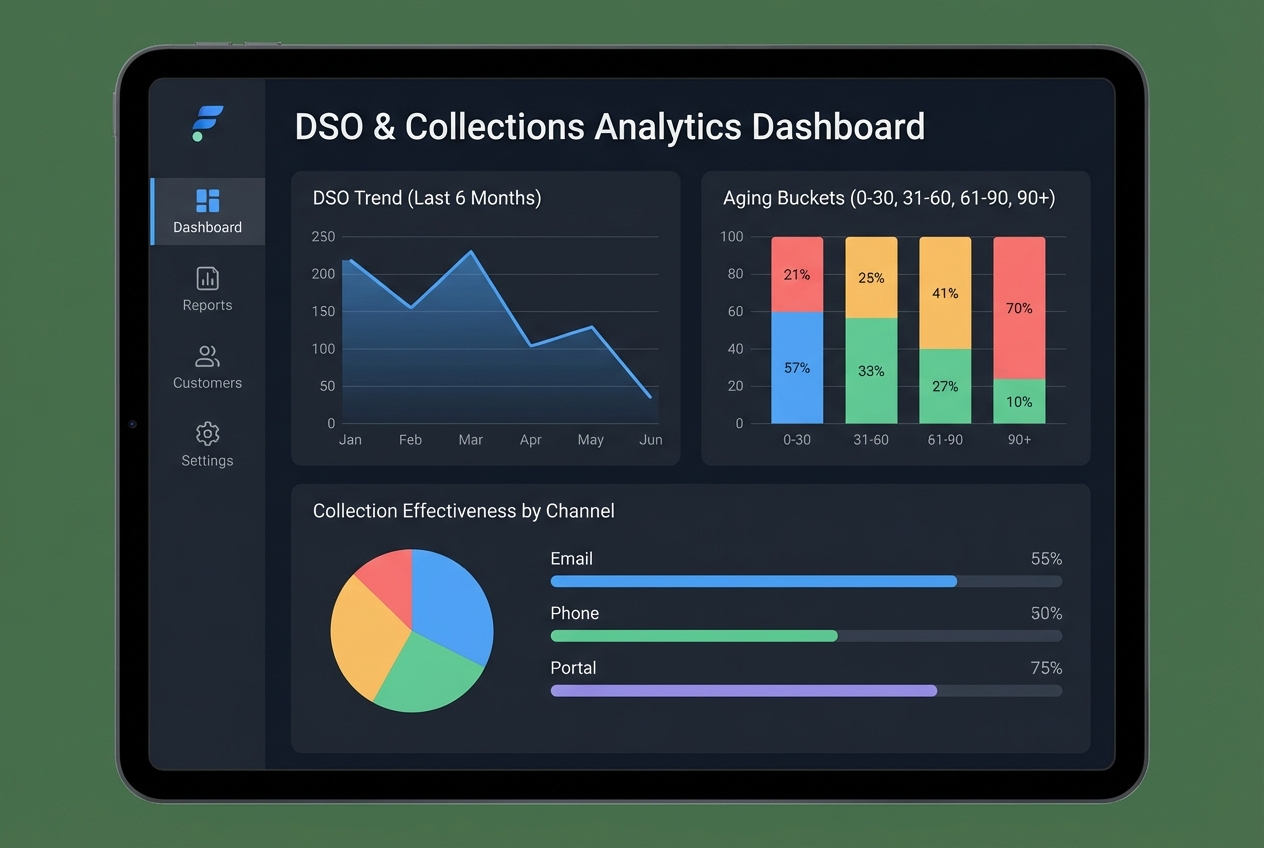
Once your system is running, you shift from chasing payments to managing a process.
Track a small set of metrics weekly:
-
DSO trend: Watch whether your average days-to-pay is moving in the right direction.
-
Aging buckets: Monitor 0–30, 31–60, 61–90, and 90+ so you can act before invoices become uncollectable.
-
Channel performance: Compare collections by email vs SMS vs calls to double down on what works.
-
Dispute rate and speed: Track how often disputes happen and how long they take to resolve.
Then improve one lever at a time. This is where AI-driven data analysis becomes useful: you can spot patterns faster, like which payment terms create friction or which customer segment always pays late.
Essential Features of Accounts Receivable Automation Software
To maximize your investment, look for these critical components:
-
Automated invoicing: Sends invoices instantly (email, portal, or EDI if needed), which reduces “we never received it” delays and keeps billing consistent.
-
Multiple payment options: Supports ACH, credit cards, and digital wallets so customers can pay the way they prefer, which removes friction at the moment that matters.
-
Cash application: Matches incoming payments to open invoices automatically using intelligent document processing, reducing manual reconciliation and speeding up month-end close.
-
Real-time reporting: Shows aging, DSO trends, and forecasts so you can prioritize follow-up and protect cash flow before a crunch hits.
If you’re choosing between tools, a simple scoring approach can help. Rate each feature 1 to 5 based on how critical it is to your business today.
| Feature | Why it matters | What “good” looks like |
|---|---|---|
| Invoicing + delivery | Faster sending means faster paying | Automatic send rules, delivery tracking |
| Reminders + workflows | Consistent follow-up reduces DSO | Cadences, escalation paths, templates |
| Payments | Less friction at checkout | Pay links, ACH support, saved methods |
| Matching + reconciliation | Less manual clean-up | Auto-match, exception queue, audit trail |
| Reporting | Better decisions, less guesswork | DSO trends, aging, segmentation |
The Role of AI in Accounts Receivable Automation
AI is the next frontier for AR because it helps you act before the problem shows up in your bank balance.
Practical AI uses in AR include:
-
Payment behavior prediction: Forecast which invoices are likely to go late based on history, invoice size, customer type, and timing.
-
Smarter prioritization: Recommend which accounts to contact first for maximum cash impact.
-
Exception handling: Flag mismatches (short pays, duplicate payments, wrong invoice reference) and route them to the right person.
-
Cash forecasting: Improve your cash forecast so you can plan hiring, inventory, and marketing with fewer surprises.
Combining AI with enterprise digital transformation helps your finance team predict outcomes and respond faster.
AI matters most once you have enough invoice volume that humans can’t keep it all in their heads. If you are still low volume, the biggest win is usually clean automation and better payment options.
Frequently Asked Questions
How does accounts receivable automation reduce DSO?
It reduces DSO by sending invoices instantly and running follow-ups automatically. That keeps payments top-of-mind and removes delays caused by manual sending, missed reminders, or slow payment matching.
If your process needs custom triggers (like different cadences per customer tier), QuantumByte-style automation can also use predictive signals to nudge the right customers at the right time.
Can accounts receivable automation integrate with my ERP?
Yes. Modern AR tools are designed to sync natively with ERPs like NetSuite, SAP, and QuickBooks, often through API connections, so you keep one source of truth for balances and invoice status.
Is accounts receivable automation secure?
Leading platforms use encryption and follow strong compliance practices.
Two useful reference points:
-
SOC 2 Trust Services Criteria (AICPA).
-
Nacha ACH data security requirements (rules context).
Does automation replace the finance team?
No. It removes repetitive tasks so your finance team can focus on higher-value work like resolving disputes, improving terms, and monitoring customer risk.
What is the typical ROI for AR automation?
Many businesses see ROI within 6 to 12 months through reduced labor costs, fewer errors, and faster cash availability. The exact timeline depends on invoice volume, average payment delays, and how many manual steps you remove.

